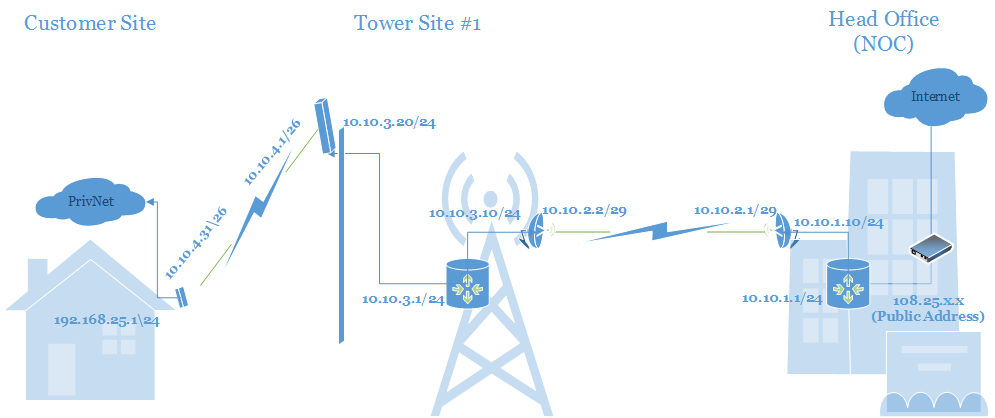
So I’m in the research phase of a WISP start-up and I just drew up a very basic network diagram. I did my CCNA way back in 2008 and I’m just now having a real opportunity to put my knowledge of IP networks to the test.
See attached and let me know what you guys think. I have built this network already using virtual PCs in vmware with RouserOS 6.21.1. I have applied static routes and was able to ping from the CPE (10.10.4.31) all the way out to the core network at the NOC (10.10.1.1).
Is this a simple enough foundation for the ip/network design?
It’s simple enough. Static routes are always simple. If you are going to add more sites, you will eventually want to add a dynamic routing protocol to the mix.
I’m not sure if you made a typographical error putting 10.10.3.0/24 on two interfaces on the tower router or if that device is a switch.
Are you modeling your wireless devices as routers or bridges? I would set them as a bridge to have less to configure on them. With the ..*.1/29 on one router .2/29 on that wireless bridge .3/29 on the remote bridge and .4/29 on the remote router. For the AP, put .1/26 on the tower router .2-5/26 on the APs and give the CPE’s the rest of the /26. You could overlay another subnet for customer public addresses if you have any to hand out.
Then you only have two routers on the network and it is much less work to put in the static routes.
Still in the process of digesting what you’re recommending.
My knee-jerk response is… I’ve been doing a lot of research and I seem to keep seeing “Do not use bridges” and “Make sure put your APs in router mode”.
“Don’t bridge networks” which means don’t build a network of 100’s of clients across several towers all in the same broadcast domain. Bridging your backhauls makes the configuration of the radios simpler. It makes them more like a long ethernet cable between towers. It is not wrong to do it the way you modeled. It just gets tedious finding all those small subnets.
On the AP network, I don’t let clients talk to other clients. I have very few problems from having less than 150 clients on one tower all in the same subnet/broadcast domain. We turn off “default forward” on MikroTIk APs and enable “client isolation” on Ubiquiti APs. All APs are plugged into the same bridge with each port having the same horizon value so that traffic from one port cannot exit another port on the same bridge. We hand out public IPs to clients. Having a /29 for ap1’s 3 clients, a /29 for ap2’s 4 clients, and a /27 for ap3’s 18 clients burns too many public IPs when one /27 can cover all three APs clients with room to spare.
Even better would be PPPoE aggregated on a few big routers near your upstream provider with MPLS back-hauling the tunnels. That would offer even better IP density. I will get around to converting to that model (or something similar) at some point.
You sent me to the books with your first post and I created a new diagram with your theory. Take a look at the attached and let me know your thoughts. Note the model devices I’m using for NOC and branch routers; RB1100AHx2 and RB2011UiAS-2HnD-IN respectively.
Now for me to read up on this PPPoE/MPLS stuff you mentioned
Yeah, that diagram is generally how I would do it.
Make sure the AP 10.1.2.2 is configured with default forward turned off. If you have more than one AP, keep them in separate networks or use bridge filters or port horizon settings to keep traffic from coming in on one IP and going back out to a client on another AP.
There are a lot of ways to get public IPs to the customer. A lot of the options depend on how much public IP space you have. If you only have a /29 or /27 of public IPs, you may need to do a 1:1 NAT on the CCR which would do the translation between the static which lives on the CCR and the 10.1.2.x/26 which lives on the subscriber’s device. If you have a /22 or even only a /24 you could divide it into smaller subnets and put the subnets on the tower routers on the same interface with the 10.1.2.x/26 type subnet. You would just return a different “Framed-Pool” or “Framed-IP-Address” from RADIUS which would assign the appropriate public IP address to the subscriber’s device, via DHCP or PPPoE.