I didn’t give an explanation, I provided a solution,
which is very different from complaining without providing one.
I quote myself:
“monitor 0” must be replaced with something like
monitor ([find]->0)
or
monitor [find where name=“upsname”]
but I do not have any UPS to test it.
monitor ([find]->0)
is the same of “first you find”, the array is on base 0.
“0” in “monitor 0” is not any ID.
for see the correct id you must write something like :put ([find]->0)
The first item usually have ID *1 but configuration changes can change the ID.
the use of “monitor 0” & Co. are just helpers when is used nteractive terminal for manual commands,
but not are for scripts.
Yes, of course. If you have many routes, it won’t choose the right one, but they just wrote “script will fail”, and later they wrote it “will throw an error”, so it’s strange and confusing. It won’t fail and won’t throw an error (if only there will be no any routes at all). It just won’t give you any good and reliable result.
Trying to experiment and learn, and (as always), it’s not going smoothly.
The following do not work (error in log: “Script Error: missing value(s) of argument(s) in”):
:local voltage (([/system ups monitor ([find] -> 1) once as-value]->"line-voltage")/100)

:local voltage (([/system ups monitor ([find] -> 0) once as-value]->"line-voltage")/100)

:local voltage (([/system ups monitor ([find -> 1]) once as-value]->"line-voltage")/100)

:local voltage (([/system ups monitor ([find -> 0]) once as-value]->"line-voltage")/100)
When I issue the following from a terminal prompt it does not work:
:local voltage (([/system ups monitor ([find] -> 1) once as-value]->"line-voltage")/100)

:local voltage (([/system ups monitor ([find] -> 0) once as-value]->"line-voltage")/100)

:local voltage (([/system ups monitor ([find] -> 1) once as-value]->"line-voltage")/100)
When I issue the following from a terminal prompt, with or without the { } (which I learned here basically means execute the command as if it were in a script) it works:
:local voltage (([/system ups monitor ([find -> 1]) once as-value]->"line-voltage")/100)
Not really-really, from what I have understood, the curly brackets should mean more “put the contents inside a self-contained environment” which is what is needed to have the :local variable definitions be valid.
The local variables are local to either the script in which they are defined or to the environment they are in, on “normal” command line they are valid only until you end the line with [ENTER].
[find -> x] is pointless by itself. [find] -> 1 is also pointless, if you have only one ups. [find]->0 should be valid.
I don’t know, why :local voltage (([/system ups monitor ([find] -> 0) once as-value]->"line-voltage")/100) doesn’t work. May be because of spaces, they cause problems in some cases. UPD: Though, no, it doesn’t matter.
I don’t have ups, but for lte interface the same approach works fine.
:put ([/interface/lte/monitor ([find] -> 0) once as-value]->"session-uptime")
11:12:20
Thank you so much for the clear explanation. Curly Brackets “{}” means create “a self-contained environment” which means, I assume among other things, that all locally defined variables are retained within this new environment.
Is it correct to say that this retention of the local variables is the reason why a script (which often has local variables) bounded the {} in a terminal works? Is there anything else this self-contained environment ‘brings to the table’?
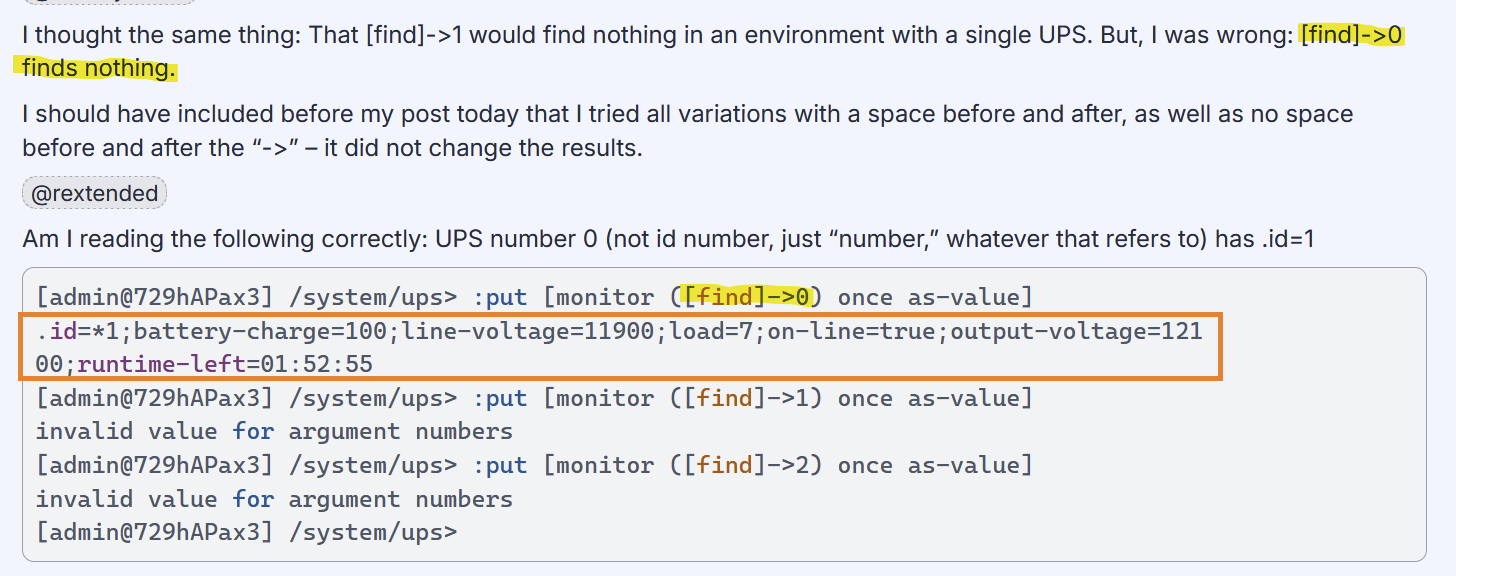
I thought the same thing: That [find]->1 would find nothing in an environment with a single UPS. But, I was wrong: [find]->0 finds nothing.
I should have included before my post today that I tried all variations with a space before and after, as well as no space before and after the “->” – it did not change the results.
Am I reading the following correctly: UPS number 0 (not id number, just “number,” whatever that refers to) has .id=1
[admin@729hAPax3] /system/ups> :put [monitor ([find]->0) once as-value]
.id=*1;battery-charge=100;line-voltage=11900;load=7;on-line=true;output-voltage=121
00;runtime-left=01:52:55
[admin@729hAPax3] /system/ups> :put [monitor ([find]->1) once as-value]
invalid value for argument numbers
[admin@729hAPax3] /system/ups> :put [monitor ([find]->2) once as-value]
invalid value for argument numbers
[admin@729hAPax3] /system/ups>
@Josephny
Yep, It seemed to me you were mixing cause and effect.
Curly brackets make a script runnable on command line because they create a “local” environment in which local variables are valid, just like a script creates its own environment and local variables are valid in It.
Cannot say what other feature this environment has.
[admin@729hAPax3] /system/ups> :put [monitor ([find]->0) once as-value]
.id=*1;battery-charge=100;line-voltage=12100;load=7;on-line=true;output-voltage=122
00;runtime-left=01:52:55

[admin@729hAPax3] /system/ups> :put [monitor ([find]->1) once as-value]
invalid value for argument numbers
This shows that the first UPS (the one found using “([find]->0)”) has .id=*1 (not “1”) – is that correct?
And, the following script runs correctly (log entry: “[UPS]: UPS input voltage is 121”):
:local upsPrefix "[UPS]:"
:local voltage (([/system ups monitor ([find]->0) once as-value]->"line-voltage")/100)
:if ($voltage < 125) do={
  :log info "$upsPrefix UPS input voltage is $voltage"
}
On a different device:
[admin@125hAPax3] /system/ups> :put [monitor ([find]->0) once as-value]
.id=*2;battery-charge=100;line-voltage=11700;load=3;on-line=true;output-voltage=117
00;runtime-left=07:30:00
This shows that the first UPS has .id=*2
Do I understand that “([find]->0)” finds the first UPS? And that the first UPS tells us nothing about the .id number? And that *1 or *2 is the id number – not 1 or 2?
Normally that [find] (you can also include additional filter conditions of course; and also this is not the :find command that is used for substring) returns an array of internal IDs. It’s a list of items, and you can access the value of any items in the list by specifying the index (the position) of the item. Arrays in RouterOS scripts use zero-based indexing, which means the first item of the list has the index 0.
Which means [find]->0 gets the list of internal IDs of all available UPS (because find has no additional filter options) as array and then picks the first item of that array.
Please note that I wrote above about arrays as returned by [find] which are similar to traditional indexed arrays in other programming languages. But arrays in RouterOS are actually similar to those in PHP and can also have elements with named keys (associative arrays).
Let’s go back to the problem. Cut-and-paste CLI fragments while talking about a /system/script blocks any meaning help.
Basic questions:
Do you have 1 or 2 UPS on one single router and logging? Need help figuring out logging in this case.
Or, you need a generic script that deals with logging one, or more, UPS generically on with any UPS, on any router.
If it’s closer to 1, then you don’t need find. You just need to use the .id from /system/ups/print show-ids and then use that .id in your script. No [find] thing needed. This is covered by #1 in MikroTik’s “Scripting Tips and Tricks”
If it’s closer to 2, then you need a :foreach someplace, something structured like this (just for example, so that works in CLI or script)
/system/ups {
   :foreach ups in=[find] do={
       :log info [:put [monitor $ups once as-value]]
    }
}
If you want to learn about how lists/array’s work – which is what [find] gives you (specifically always a array/list of.id string values — which is why you need the ->0 even if there is only one, [find] returns a list of 1 item).
But you wrote two things that shouldn’t be done unnecessarily:
unnecessarily opening { } after a path,
you used ups as the variable name, which is already the path name.
This remove all problems logging all UPS in the system:
/system ups
:foreach item in=[find] do={
    :local iupsname [get $item name]
    :local rawvolt  ([monitor $item once as-value]->"line-voltage")
    :local theshold 11500
    :local voltage  ($rawvolt / 100)
    :local cdate    [/system clock get date]
    :local ctime    [/system clock get time]
    :local filename "upsvoltagehistory.txt"

# NAND flash or XOR flash ?
    :if ([:len [/file find where name="flash" and type="disk"]] = 1) do={:set filename "/flash/$filename"}

    :if ($rawvolt < $theshold) do={
        :log info "UPS $iupsname input voltage is $voltage"
        :local logline "$cdate $ctime $iupsname $voltage"
        :local fileid  [/file find where name=$filename]
        :local howmany [:len $fileid]
        :if ($howmany > 0) do={
# if file exist
           :local previouscontent [/file get $fileid contents]
           /file set $fileid contents="$previouscontent\r\n$logline"
        } else={
# if file do not exist
           /file add name=$filename contents=$logline
        }
    }
}
I had no idea what the “->” meant, so I couldn’t have possibly understood that the [find] command (with or without any additional filters) returns the Nth item in an array as specified by the number after “->”.
And, that the returned item will be entire (is that correct) associative array, and that elements in that array element can also be accessed indvidually.