I know that. This is normal since there is no support for zerotier in winbox yet. If you check firewall rules in terminal they should be correct. In Winbox you see “unknown”.
This is what I see after a few minutes.
The Zerotier interface is gone and repositioned with ether1 or unknow.
After a reboot the zerotier interface returns but not always.
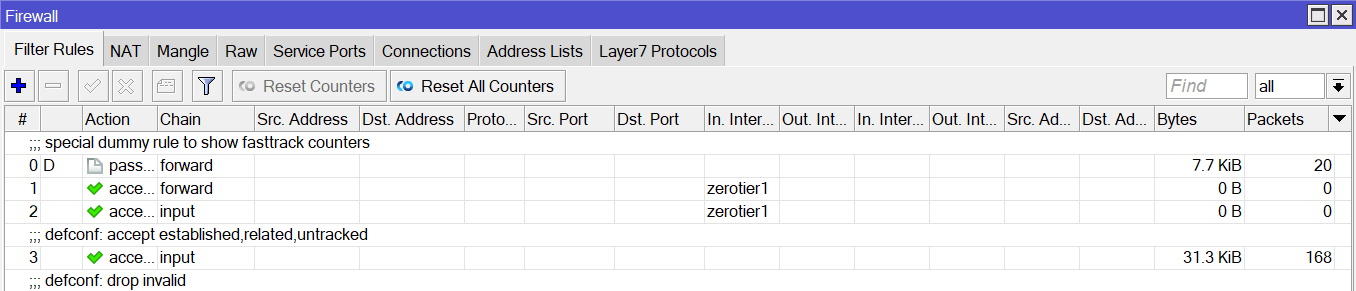
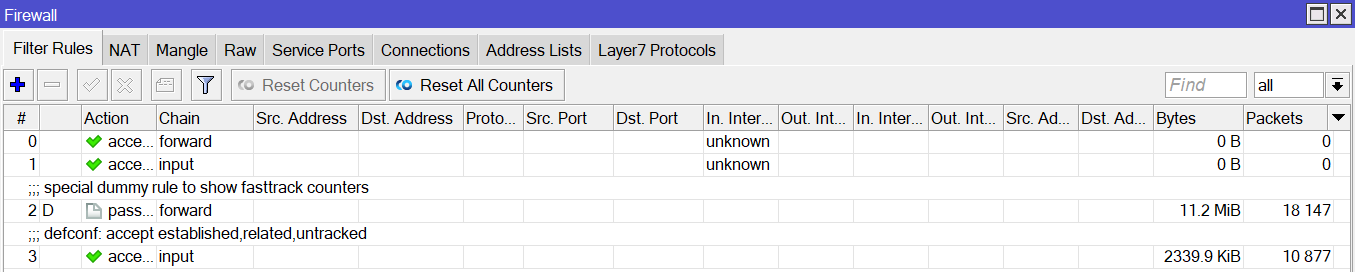
As skylark told you, this is considered as normal for now. What problems to you have with traffic?
Sometimes I can login via Zerotier and sometimes not.
This is definitely a bug in Mikrotik ZeroTier. I consider this not reliable.
There is still work to be done.
I have not had one problem with zerotier. If your on the firewall rule in winbox then you are going to mess the rule up, as zerotier is not supporteds on anything but CLI. To work around this problem for noww add zerotier1 to a interface list and use the interface list in the firewall rules, that way you can mess with the firewall rules all you want in winbox. just don’t touch the list now!
I had issues on the last beta and now again with 7.1 in that Zerotier on my RB3011 becomes unresponsive. Other devices on the same Zerotier network are still contactable.
About every 5 days I need to disable the Zerotier interface on my RB3011 and re-enable it again. However my RB3011 is bridged to my ISP supplied VDSL router and connects using PPPoE. I’m fairly certain now that when DSL drops and resyncs and the RB3011 re-establishes its PPPoE connection the Zerotier interface doesn’t automatically reconnect.
That sounds like something you could temporarly fix with a script when pppoe comes up
Everyone who uses Zerotier on Mikrotik, can you acces devices in ZT network from your LAN devices on 7.1? Somehow i can’t seem to manage to get this to work.
I can ping ZT network from Mikrotik but only in i don’t select interface. If i select bridge as interface, ping stops working. What am i missing?
I have 2 RB3011s running Zerotier.
One 7.1rc4 the other it 7.1.
The RC unit passes ARP discovery to external clients.
The Upgrade 7.1 (Stable) does not.
I can manually enter the mac address into my client and reach the 7.1 unit. But it never shows up as a neighbor in winbox and I can’t discover devices on the LAN.
Maybe its the RB3011 and Zerotier 1.6.6?
I have several hAP AC2s with 7.1 and ZT1.6.6 and they discover just fine.
Anyone else see this or have any ideas?
I just added Zerotier to a running hAP AC2 with a very similar config to the 3011s firewall.
ARP and discovery work just fine.
And, yes, I recall difference in discovery & MAC winbox connection from ~rc4 to 7.1 – what I exactly was going on when, harder to say. I do want to saw L2 winbox connection worked more consistently in the early betas. But in V7.1 discovery has worked well, and L3 connection always has worked in V7… on Audience, wAP ac, hAP ac2 at some point, but no RB3001 to try.
But has not always worked in V7 is L2 MAC-based – I haven’t narrowed it down, but do know the pathes the ZT uses (fiber, LTEw/CGNAT, LTEw/staticIP, ZT through IPSec) effect connecting effect this & perhaps the client-side path to ZT might also be involved. Since I also use a Mac with winbox on top of this… Has worried me about calling L2 discovery a ZT bug BUT I suspect there are issues.
Which why I started to think I’m not sure exactly how much is ZeroTier allow to do to figure out it’s tunnels out. This post has a very bizarre issue with ARP running afoul with ZT: http://forum.mikrotik.com/t/zerotier-bug-arping-for-public-ip-on-lan/153832/1
Since MT neighbor discovery also uses L2 broadcasts, might be related.
Haven’t tried bridging with ZeroTier yet. Already super useful for on V7 devices for only remote access as a plain interface to a specific “Mikrotik Management” ZeroTier network - didn’t want to push my luck. But also I’m not clear what should be happening if bridged – while obviously the traffic inside the tunnel should land on the bridge the ZT port is assigned – that’s part is easy to understand. BUT, the tunnels ZT establish have a lot of way to tunnel OUT from their spec – some kinda strange & prehaps useful, but also non-standard. Basically seem to use various techniques and probing that go well beyond what a “bridge port” can normally do.
Amm0
I have years and years of per site managed networks.
My switches and WAPs are all locally managed. Which I can reach via VPNs.
However there are other devices on my networks that rely completely on broadcasts. For instance… The lighting vendor we use. Not only discovery but programming requires L2 broadcasts.
Going into the Tiks and setting up EoIP tunnels was my only chance at being able to handle things like that. Short of leaving computers onsite and remote controlling them over TeamViewer… Then we were into a whole nother level of maintenance.
Using a hAP AC2 as a “VPN Concentrator” was likely to become a standard for us.
But since this was a new deployment… Figured… Well maybe it could run on the router. After all it runs just fine on 10 other test sites. But they are 8 hAP AC2s, 1 audience, and the other 3011 with RC4 on it.
So I am pretty sure this might be specific to the 7.1 stable release + RB3011 (maybe others). Short of updating the one 3011 to confirm it, I was hoping to see if anyone else saw this. Before I break something that will require driving a few hours.
Hi,
What is you thorough via zerotier? I can get max 25 Mbit…
I have the same observation as plisken.
Do you mean create a new interface list called zerotier1 OR
do you mean add as a list member zerotier1 to an existing interface list?
If the latter this can only be done in CLI, what are the commands??
and did anybody else check what effect this command has when in the zerotier CL structure “disable-running-check=yes”
Hi, at the moment there are two devices connected to ZT - Mikrotik router and Android phone. Everything works, devices can see each other, ping, etc. But … is there any chance that in this configuration my phone will come out with WAN IP from MT in this configuration? I would like to add that there are private WAN IPs on both sides.
If you just added a ZeroTeir interface to the Mikrotik, and installed the ZT client on Android - both joined to same ZT network. The ZT network traffic shouldn’t “come out with WAN IP from MT”.
Now the tunnels ZT will establish to create the ZT network, will go out the WAN at least on the Mikrotik side. But those may or may not be used depending on what network the Android uses… e.g. same LAN as MT ZT, firewall configs, IPv6 config/availablity/paths, etc. could all effect how the Android and Mikrotik are connected by ZT.
But if your wanted your android ZT client to use the Mikrotik as WAN, not the phone. You’d need to add the ZT interface to a bridge, or in some way enabled DHCP on the Mikrotik ZT interface so ZT clients would get DHCP from the MT, thus routed by it. So possible, but it won’t happen by accident – or shouldn’t.
Are you seeing something odd? Otherwise, the MT WAN shouldn’t be involved if you just have a ZT interface on MT and Android ZT client – that should be a private network by default.
I added ZT interface to bridge and unfortunately I still have on my mobile phone WAN IP from sim card provider. Maybe I must to add some rules in ZT admin console? Generally I’d like to looks it the same like in connection via L2TP or Wiregourad .
Fair question. Bridging the ZT interface be fine, to get you the LAN on your phone from anywhere. But the phone using ZT as its default route, that take CLIENT settings in the app. Dunno the specific android client settings for ZT, but you’d want to look at the “Send All Traffic” and/or “Allow Default Route Override” (names be different, help in ZT app may explain) are set right.
The ZT web console is kinda like “Bridge” in the ROS - you add “ports” (e.g. ZT device connections), but once connected to ZT network, how the routing works depends on what the ports connected do on IP/Layer-3. The ZT console does have essentially the equivalent of “DHCP Server” that hands out IPs, but the “Auto IP” does NOT hand out default routes. Since ZT operates at Layer-2, the Mikrotik can certainly bridge any of it’s interfaces to a ZeroTier network.
The ZT client will control what happens with the default route on a device like android (and after it’s bridged to the MT). But, unlike L2TP or Wiregaurd, just having multiple ZeroTier mobile phone clients will bridge them all together without any router – so the default I’m sure isn’t to use the ZT network for all phone device traffic, since a ZT network has no route out to the internet by default too. ZT support doing that it and useful sometimes, but philophosicallly that’s not in line with ZT’s “disaggregated” approach.
Hi,
I added screenshot from ZT Android Client. There is one option - Route via ZT, but if I marked it was the same. Generally I am not such good in Mikrotik ROS, and generally in networks, so I think it will be “to high mountain” for me. But thx a lot for Your full answer.
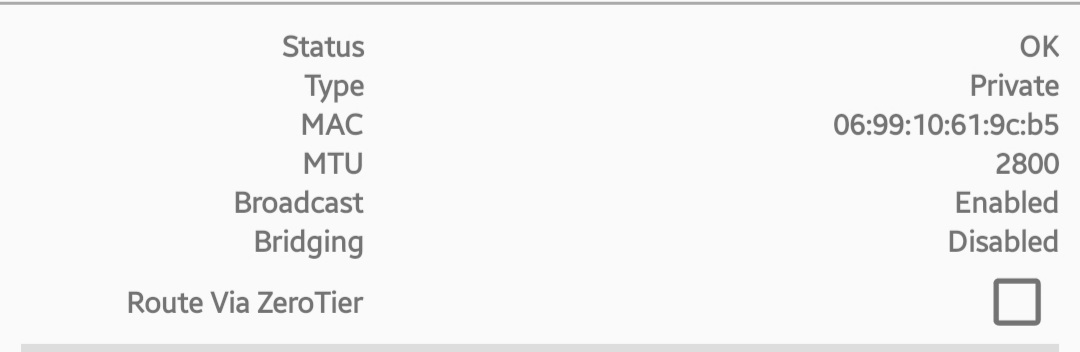
Try adding route to 0.0.0.0/0 gateway “your Mikrotik IP in zerotier network” in Zerotier dasboard and then enable Route Via Zerotier. Not realy sure if this will work, but you can try.
BINGO! It is working! Thx a lot!