Zerotier Struggles on v7.17

I am attempting to troubleshoot a couple issues I am seeing in using Zerotier with rOS v7.17 where only some connections are passing as expected.

A little background on my network configuration. I utilize multiple Zerotier networks for different purposes including remotely accessing my home network. One of these is provisioned through Zerotier’s online service while I run a self hosted network controller for the remainder. The specific network I am seeing this problem with is a standalone network for the purpose of interconnecting deployable assets no matter their geographical or physical network location. This network ID is provisioned through my self hosted network controller and has multiple peers including the network controller server on my home network. There is no configured routing or forwarding for access to my home network.

I provisioned a recently purchased hAP ax2 for use on this Zerotier network last weekend. During the setup I ended up upgrading to rOS v7.17.1. The router is now currently at v7.17.2 with no improvement. The router is correctly provisioned in the network controller and is reachable via the Zerotier network from the network controller machine and other peer devices. This includes icmp ping test, ssh, and access to the web GUI. However, I am unable to reach any devices via the Zerotier network from the LAN side of the hAP ax2. But, from the LAN I am able to reach the web GUI using the Zerotier assigned address.

As I am working on this at home, the hAP ax2 is physically connected to my home network, and from a device on the LAN side of the router I found I am able to connect through to home network devices.

In the hAP ax2 configuration, the Zerotier interface is configured as LAN in the Interfaces>Interface List table, identical to the bridge interface. In the firewall settings I have added two filter rules to accept traffic from the Zerotier interface for both the input and forward chains and moved them toward the top of the list. Under IP>Routes the list correctly shows the expected routes for the bridge interface, the WiFi client interface, the Zerotier interface, and the default gateway route.

On a computer connected to the LAN side of the hAP ax2, the IP and route as assigned by DHCP is correctly shown as only the router’s LAN subnet and default gateway of the router.

If needed, I can provide more specific configuration info. Given that routing works as expected with the exception of Zerotier I am led to believe it may be firewall related but don’t see what would be needed. Appreciate any advice in troubleshooting further.
That was a lot to take in and maybe a bit tricky to get a clear picture of. Here are a few things that might help clarify things:

What exactly isn’t working?

  • Are all Zerotier peers unreachable from the LAN, or just some?
  • Can LAN devices ping any Zerotier IPs, or is all Zerotier traffic failing from the LAN side?
  • Have you checked the firewall settings to ensure Zerotier traffic is allowed for both inbound and outbound connections?
  • Should the hAP ax2 act as a gateway, or is it only meant to forward traffic?

Could you also provide a simple diagram of the network topology (ASCII, hand-drawn, or whatever’s easiest) and list the key devices’ IP addresses (both LAN and Zerotier)? Please mark where the issue occurs. That would make troubleshooting much easier.

In the process of better documenting the network configuration(s) and successful or failed connections, I discovered the source of my difficulties. I needed to configure NAT for connections going to the Zerotier network from the hAP LAN, which I had failed to do. There is a default NAT entry for LAN connections going to the WAN interface list, but since Zerotier is configured as part of the LAN list it is not automatically included. Creating a secondary NAT entry defining the Zerotier network as the Out Interface allows connections to take place as expected.

Below is what I had for my post prior to discovering the error. Leaving it for historical purposes in the event someone may run into this in the future.


Apologize for the wall of text in my initial post. I was trying to thoroughly explain a lot of the details in a way that made sense, but obviously that didn’t happen. Here is a second try.

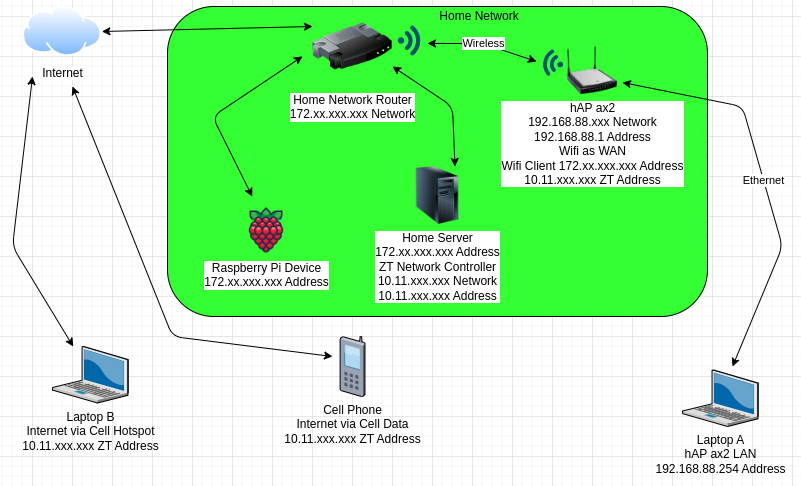
I have attached a basic network diagram to help clarify. Below are some notes on the network(s) and devices.
My home network is rather extensive, but the green box is representative of the basic configuration.
Home network is on a 172.xx.xxx.xxx subnet served via DHCP. The Zerotier network is on a 10.11.xxx.xxx subnet.
I have included the displayed Raspberry Pi as it is one of the devices I have used during my troubleshooting and is representative of devices on my home network that are not involved in Zerotier or any network routing.
My home server hosts the Zerotier network controller for this specific network, and is also a peer on that network.
The hAP ax2 is connected to my home network using one of the WIFI radios as a client device. Laptop A is connected to the hAP ax2 via Ethernet and the only configuration is as a client on the hAP’s LAN.
Separately, I have a Laptop B connected to the internet via a cellular hotspot and a cell phone using it’s own cell data connection. Both are peers on the Zerotier network.

Here is a run down of connections and their success/failure:
hAP > Laptop A: Yes
hAP > Home Router: Yes
hAP > Internet: Yes
hAP > Home Server via home network: Yes
hAP > Home Server via ZT: Yes
hAP > Raspberry Pi: Yes
hAP > Laptop B via ZT: Yes
hAP > Cell Phone via: Yes

Laptop A > hAP via LAN: Yes
Laptop A > hAP via ZT address: Yes
Laptop A > Home Server via home network: Yes
Laptop A > Home Server via ZT: No
Laptop A > Raspberry Pi: Yes
Laptop A > Internet: Yes
Laptop A > Laptop B via ZT: No
Laptop A > Cell Phone via: No

Laptop B > Cell Phone (ZT): Yes
Laptop B > Home Server (ZT): Yes
Laptop B > hAP (ZT): Yes

Cell Phone > Laptop B (ZT): Yes
Cell Phone > Home Server (ZT): Yes
Cell Phone > hAP (ZT): Yes

Home Network devices > hAP via home network: Yes
As expected, no devices other than the hAP can reach Laptop A.
Mikrotik-Zerotier.png

I have much simpler zerotier configuration that works on 7.16.2 but fails on 7.17.2, on both a RB1100AHx4 and a hAP-AX3. The Zerotier interface comes up, the router shows as connected on my.zerotier.com, but ping, ARP, etc. all fail for other hosts in the same subnet. When I upgrade a router from 7.16.2 to 7.17.2 the problem starts, and when I downgrade back to 7.16.2 the problem goes away again.

I’ve set up a test router with the barest minimal configuration for this purpose and it still happens (identical config works on 7.16.2 and not on 7.17.2):

[admin@Test-Router-hAP-AX3] > /export
# 2025-02-15 22:00:47 by RouterOS 7.17.2
# software id = {REDACT}
#
# model = C53UiG+5HPaxD2HPaxD
# serial number = {REDACT}
/interface wifi
set [ find default-name=wifi1 ] configuration.country="United States" .mode=station .ssid={REDACT} disabled=no
/zerotier
set zt1 disabled=no disabled=no
/zerotier interface
add allow-default=no allow-global=no allow-managed=no disabled=no instance=zt1 name=zerotier1 network={REDACT}
/ip address
add address=172.23.3.10/16 interface=zerotier1 network=172.23.0.0
/ip dhcp-client
add interface=wifi1
/system clock
set time-zone-name=America/New_York
/system identity
set name=Test-Router-hAP-AX3
/system routerboard settings
set auto-upgrade=yes
[admin@Test-Router-hAP-AX3] > /ip address/ print
Flags: D - DYNAMIC
Columns: ADDRESS, NETWORK, INTERFACE
#   ADDRESS            NETWORK       INTERFACE
0   172.23.3.10/16     172.23.0.0    zerotier1
1 D 192.168.52.110/24  192.168.52.0  wifi1    
[admin@Test-Router-hAP-AX3] > /ip route print
Flags: D - DYNAMIC; A - ACTIVE; c - CONNECT, d - DHCP
Columns: DST-ADDRESS, GATEWAY, DISTANCE
    DST-ADDRESS      GATEWAY       DISTANCE
DAd 0.0.0.0/0        192.168.52.1         1
DAc 172.23.0.0/16    zerotier1            0
DAc 192.168.52.0/24  wifi1                0
[admin@Test-Router-hAP-AX3] > /zerotier print
Flags: R - ONLINE
Columns: NAME, PORT, IDENTITY.PUBLIC
#   NAME  PORT  IDENTITY.PUBLIC                                                                                                                              
;;; ZeroTier Central controller - https://my.zerotier.com/
0 R zt1   9993  0c2812d231:0:a37fbcbba8ec4a8036cbf09000f5ad77382366607ce75a7904c33ad5b8aea720e213b88dc383f43663a4e537a3ed1bb620cb7c735c21e38d990562c5af8933ad
[admin@Test-Router-hAP-AX3] > /zerotier interface/ print
Flags: R - RUNNING
Columns: NAME, MAC-ADDRESS, NETWORK, NETWORK-NAME, STATUS
#   NAME       MAC-ADDRESS        NETWORK           NETWORK-NAME         STATUS
0 R zerotier1  2E:4E:8C:7D:9A:6F  {REDACT}  {REDACT}  OK    
[admin@Test-Router-hAP-AX3] > /zerotier peer print      
Columns: INSTANCE, ZT-ADDRESS, LATENCY, ROLE, PATH
# INSTANCE  ZT-ADDRESS  LATENCY  ROLE    PATH                                                             
0 zt1       778cde7190  37ms     PLANET  active,preferred,103.195.103.66/9993,recvd:40s34ms,sent:601ms    
1 zt1       cafe04eba9  111ms    PLANET  active,preferred,84.17.53.155/9993,recvd:40s495ms,sent:30s604ms  
2 zt1       cafe80ed74  73ms     PLANET  active,preferred,185.152.67.145/9993,recvd:40s533ms,sent:30s604ms
3 zt1       cafefd6717  175ms    PLANET  active,preferred,79.127.159.187/9993,recvd:39s934ms,sent:30s604ms
4 zt1       {REDACT}  38ms     LEAF    active,35.208.167.241/21029,recvd:39s973ms,sent:30s604ms         
                                         active,preferred,35.208.167.241/21029,recvd:1s561ms,sent:1s561ms 
                                         active,35.208.167.241/21029,recvd:39s934ms        
[admin@Test-Router-hAP-AX3] > ping 172.23.0.1
  SEQ HOST                                     SIZE TTL TIME       STATUS                                                                                                                                           
    0 172.23.0.1                                                   timeout                                                                                                                                          
    1 172.23.0.1                                                   timeout                                                                                                                                          
    2 172.23.0.1                                                   timeout                                                                                                                                          
    3 172.23.3.10                                84  64 153ms498us host unreachable                                                                                                                                 
    4 172.23.0.1                                                   timeout                                                                                                                                          
    5 172.23.0.1                                                   timeout                                                                                                                                          
    6 172.23.0.1                                                   timeout                                                                                                                                          
    7 172.23.3.10                                84  64 141ms377us host unreachable                                                                                                                                 
    8 172.23.0.1                                                   timeout                                                                                                                                          
    9 172.23.0.1                                                   timeout                                                                                                                                          
    sent=10 received=0 packet-loss=100% 

[admin@Test-Router-hAP-AX3] > /ip arp print
Flags: D - DYNAMIC; C - COMPLETE
Columns: ADDRESS, MAC-ADDRESS, INTERFACE, STATUS
#    ADDRESS       MAC-ADDRESS        INTERFACE  STATUS
0 DC 192.168.52.1  {REDACT}  wifi1      stale 
1 D  172.23.0.1                       zerotier1  failed
[admin@Test-Router-hAP-AX3] >

EDIT: The issue for me specifically appears to be related to this part of my Flow Rules, which was from a default example provided by Zerotier:

tag server
  id 2
  enum 0 No
  enum 1 Yes
  default No;

# if both members are not servers, break
break not tor server 1;

If I comment out the break then things work as expected. 172.23.0.1 is a non-Mikrotik Zerotier node running 1.14.2, and it has the server tag set to 1. This means that the traffic should be allowed to/from that IP by the rest of the Zerotier network.