Zerotier very slow speeds

I am thinking I need to go to ZT advanced settings and put in a route.

Destination is 0.0.0.0/0 via ZT IP address of the Server ROUTER.

However that will send any traffic on the ZT virtual LAN from any other node/device NOT JUST the ServerClient device and its specific subnet traffic to the Server Router.

I want ONLY to route ALL the traffic from the Client Router Node to the Server Router Node. If you see what I am saying…

on the device’s where you don’t want to push routes you can add “allow-managed=0” but note then you need to set ip and any routes manually which would be the preferred way on a router anyway.

on mikrotik

/zerotier interface set 0 allow-managed=no

I just noticed you could also set this to just not accept default routes, if you don’t want the hassle of having it unamanaged:

/zerotier interface set 0 allow-default=no

I have no idea what those settings are doing on the MT.
Remember I have not pushed any traffic yet from any other devices onto the virtual LAN.
So its not a concern at the moment.
I fully expect that the missing gap MUST be done at the zerotier network level not on my MT devices.

For instance lets say I have FIVE MT DEVICES A B C D E
I want subnet X of device A, to go out internet of device E
I want subnet Y of device B, to go out internet of device C
I want subnet Z of device D, to also go out internet of device C.

Where is the zerotier help to make this happen???
There community help is a joke and their FAQ is a joke.
Im starting to lean to tailscale if its simpler… this is frustrating.

The routing would be done on the tik’s not on zerotier.

so any suggestions on my case? :smiley:

@normis
One reason that TailScale performs much better than ZT is because the USERS TailScale Network is a TRUE MESH — True Peer to Peer communication

Tailscale’s server is really only needed to help the client devices find each other and get connected. None of the USER’S network traffic passes through the TailScale servers regardless of geography. So Lets say the users is based in Berlin Germany and the TailScale coordination Server is based in Toronto Ontario Canada … the network path is pre-determined for the user’s – all the Traffic for that German User is local in Germany.

And which is why bandwidth performance is vastly superior IMO based on all my tests so far especially for people who have symmetric bandwidth plans like most fiber networks do.

If you’re looking for raw performance, ZT would be a poor VPN choose. But if you need a Layer-2 bridging, it’s one of your only choices. So ZT vs Tailscale is saying TCP is better/worse than UDP – they are just different. Or MLPS vs OSPF would be another apt analogy to ZeroTier vs TailScale. e.g. ZT prefer the reliability of connection like TCP, but similar to MLPS, while Tailscale is more similar to UDP and OSPF. If you want a Mikrotik to show up in Winbox via discovery, you’ll need ZT & that’s not possible with TailScale. By the same token, if I want to have a more sophisticated auth scheme or simply cloud L3 routing/policy, ZT be poorly suited to those needs.

Anyway. On ZT, the issue is there is no way to know it may be using a root server (or moon or whatnot), or if “directly connected” via the Mikrotik. When I’ve tried bridging ZT over the internet, it does seem speed is a lot more inconsistent in speeds – sometime get closer to non-VPN speed, other times much slower.

In my case, we don’t have stable fiber connections – We typically LTE & Wi-Fi available – plus those connected networks change regularly, plus asymmetric with very variable speed. In my use case, just need enough speed to run low bandwidth stuff like SSH, MQTT, winbox, etc - but as close to 100% uptime regardless of network/path/speed. So we config the remote Mikrotiks to try everything under the sun to make sure some connection out, which now includes ZT. ZeroTier seems quite aggressive at maintaining a link – so far if I can ping sometime from the Mikrotik, ZT has been able to find some pathway out.

That being said, I’m pretty sure it uses the roots/moons/whatnot unnecessarily - or, it reacts slowly to a change possible paths. So it would be nice if MT give a little more guidance on troubleshooting ZeroTier… What I’ve seen is continue to use a slower LTE route, even though a newer default route to much fast fiber line was added – it did seem “sticky” to way less optimal route, I actually wasn’t sure how to troubleshoot thing…

@normis, are there some ZeroTier troubleshooting stats or help page coming? ZT seem to always find SOME link out, but not sure it’s always picking an optimal one – that may be the OP’s issue. In another posting someone saw ARP going out a weird interface, that I still don’t understand and seems unresolved.

Anyway be good to know how does one find the interface a ZT connection should be using? And/or if its “directly connected”. That might clarify if it is using a root part here. Connection tracking seems to show quite a few different ZT connections, while you can guess based on traffic, its not quite clear what’s going on. ZT’s routing table and selection doesn’t seem to neatly follow the Packet Flow Diagram so hard to know if what ZeroTier is doing is “right”…

@Amm0
Your post was very interesting and I 4 1 very much appreciate the effort you put in to describe the ZT tribulations you’ve so far experienced.

Please TRY TailScale out and truly find out how a very efficient MESH actually works on a peer to peer basis from a VPN/WireGuard perspective … I would state its very much like mimicking a MASSIVE Switch … so no its not layer 2 but very close to it :laughing: I bet if you actually tried it out you would be objectively impressed. :smiley: BTW, did you know that TailScale is based out of Toronto Canada while ZeroTier is based out of Irvine, California – not that it matters much… BTW if you do take my suggestion and try TailScale out …there is absolutely nothing to configure on your Tik unless you want to implement TailScale Subnet routers and traffic relay nodes … start small and after you get acclimatized – grow as big as you need to…
I dont mind giving tailscale a shot. Does it run on mikrotiks?


Your Tik is your router. When you install the TailScale client on your Phone, on your NAS, on your windows PC … whatever traffic is behind your Tik goes through your Tik …. There is absolutely nothing that you have to configure on your Tik ….. when you are remote and want to connect to your NAS for example the traffic will go through your Tik via your TailScale Network. TailScale manages everything for you. Give it a try and see for yourself.

I had good performance when i used ZT without it running on the router itself, that is between 2 windows machines. The poor performance was introduced when i moved the peer from the windows machine to the router, since i am out of home and it doesnt make sense to keep the pc on. So i wanted ZT on the router in order to access all the devices behind the router. Also my ds218j nas doesnt support docker and thus no ZT. Same for tailscale. aka i cant deploy it on either the router or nas.

Edit: actually ds218j supports tailscale. I was under the impression i did a search in the past, apparently remember wrong.

You do not need docker. TailScale has a client for your Synology NAS … check the package center near the bottom. I’ve installed it on my Synology NAS .
My TailScale network has 2 windows 10 PC’s, my iPhone, my Synology NAS. Remotely I access my NAS via my phone and winows laptop … and when I want to manage my Tik router remotely I use my windows laptop to connect to my windows desktop via windows Remote Desktop. So in my case … my NAS, my desktop PC are behind my Tik router. Everything via TailScale vpn works really well.

BTW, I am only playing with TailScale to learn how stuff works. Normally I just use WireGuard to do everything I need to do and it’s all I need … but if you do not like to configure things especially for non-technical people TailScale is remarkable because it does everything for you under normal circumstances. When more complex issues arise then TailScale Subnet Routers come into play and that requires some effort.

I am trying tailscale atm. So far it seems ok. Any idea why the speeds are inconsistend? Download speed reaches my maximum bandwidth but then drops, then goes up all the time. I even set the metric of the tailscale tunnel in windows as the lowest of all adapters, same happens on my phone. It’s definitely not my connection, since I tried mobile data as well.. Could it be a bottleneck on my router? I know it does not run a tailscale tunnel, but isnt it supposed to max out on the bandwidth?
I know for a fact that my synology operates properly, and the e WD Red 4TB drive also is good (110MB/s on LAN), so it could be an issue with my TIK. i will play around, disable the other interface tunnels on the TIK and report..

When testing on your Phone are you in remote or at home ? if testing from home make sure to turn off your phone wireless and use only your cell connection – if testing from remote location its ok to leave either connection methods on.
When testing on your Windows PC from home are you wired or wireless?

What you describe as >>>> Download speed reaches my maximum bandwidth but then drops, then goes up all the time <<<< is coming from your Tik Router and your ISP gateway … when testing its best to keep it as simple as possible. Your Tik + your ISP device is providing the Bandwidth … your Tailscale vpn client is exploiting that bandwidth and it can only use what it receives from the Router + ISP device. If the TailScale Client is an issue there are some troubleshooting steps you can follow: https://tailscale.com/kb/1023/troubleshooting/
Also check out the TailScale support forum at https://forum.tailscale.com/
They are very helpful … for example https://forum.tailscale.com/t/dramatic-decline-in-performance-in-direct-connect/327

I turn on my mobile data with >100mbps 4G Lte, then connect to tailscale and download a file from my remote NAS behind the Mikrotik. the download speed is around 2MB/s (~16mbps), but my ISP speed is 50mbps upload. so i should be getting at least 6MB/s download with my mobile data.. at the same time, zerotier does not run on the Tik. its just the tailscale on the NAS. and wifi on my phone is also turned off. ONLY 4g active. In fact, i checked the TX rate inside the Tik wireguard peer and it reaches no more than 20mbit/s out of the 50 that my ISP provides

same performance is achieved if I connect with my phone the Tik wireguard tunnel and try to download a file from my NAS via this tunnel, but in that case the NAS does not run tailscale or wireguard.
so where is the bottleneck? why is my speed capped at <3MB/s via wireguard/tailscale ? my Coax ISP upload is stable at 50mbps.. docsis 3.1

Maybe my firewall rules? do i have to disable fasttrack or move it higher up? idk it bothers me so much that i cant achieve maximum bandwidth..

I checked your Tik config I do not see anything there that is hindering you. The TailScale support foks can inspect your TailScale client logs and give you some good feedback as to why your not getting more … I suspect it’s your Connection and the only way to check that is to have those TailScale client logs inspected.. LTE 4G can be erratic since that bandwidth is shared by many depending on the time of day/night …. The very same can be said for cable (DOCSIS) so those comm logs are invaluable …. Have you run the iPerf tests?

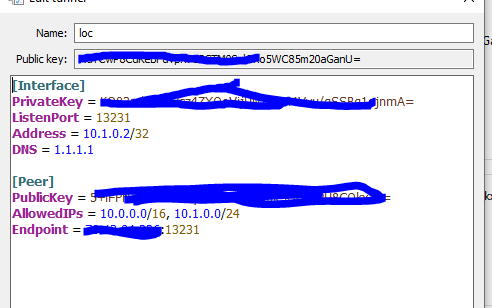
no. im not on site(home), but i have figured out the wireguard speed issue. i was not split tunneling, and my devices had all the traffic go through the WG tunnel, youtube etc and the NAS download speeds were slower for this reason, since the TIK had other stuff to do as well. So now i will just do split tunneling to access my home network only

@pitfermi …. EXCELLENT ……

yea, as soon as i changed the 0.0.0.0/0 to 10.0.0.0/16 (lan subnet) and 10.1.0.0/24 (WG subnet) on my client’s configs, I get the full bandwidth now. see pic:
wg_cfg.PNG