Hi. I have been using Zerotier (ZT) v1.6.6 on RouterOS 7.11 for the past few days and i have a speed problem. I use the Hap ac3 as a ZT peer. I think it’s better to introduce my configuration first, and then ask for suggestions:
-my ZT network is 172.24.0.0/16 and managed on zerotier central
-my home LAN is 10.0.0.0/16
-the hap ac3 has a LAN ip of 10.0.0.1 and a ZT ip which is 172.24.0.1
-i have a synology NAS sitting behind the hap ac3 with an ip of 10.0.0.10
-i have a static route on the ZT central controller in order to access devices behind the hap ac3. for now, i am only accessing the NAS. the static route is: dst 10.0.0.0/24 via 172.24.0.1 (hap ac3 ZT ip)
-i configured the hap ac3 ZT peer according to this tutorial: https://help.mikrotik.com/docs/display/ROS/ZeroTier and made sure to add the firewall rules.
-my home ISP speed is 1000mbit/s down, 50mbit/s up
-remotely, i can properly ping and access the router and the NAS using their LAN IPs (10.0.0.1 and 10.0.0.10), since the static route was configured on zerotier central and the firewall rules added
to the hap ac3 firewall.
-no further configuration has been done on the home lan.
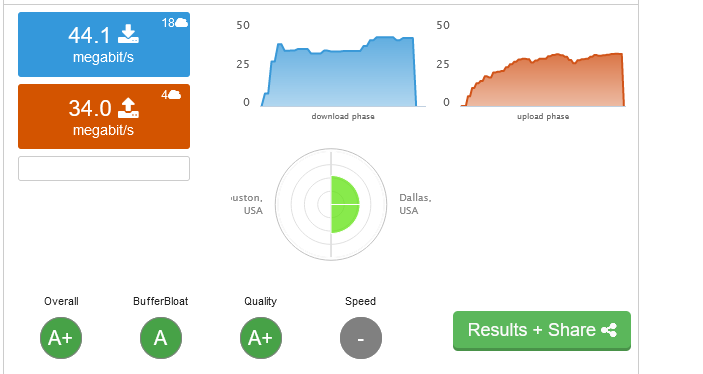
-accessing the home LAN remotely is done using a speed of approx 40mbps down, 5mbps up
remotely, when I try to transfer files, using WebDav or via http/https from or to the NAS, the speed is way low. I get upload speeds of 300kbps and download speeds of 900kbps, which is nowhere near the speeds i get when i do port forward on the hap ac3 and access my NAS without a tunnel like zerotier. for comparison, port forward method delivers a download speed of 3.5-4Mbps.
The cpu load of hap ac3, when transfering files is 20-30%, avg 25%, but i dont think this explains the slow download speed.
i checked the links between peers(pc-hap ac3) on the zerotier central and using the zerotier-cli on windows, they show a direct(non relayed) connection, and the respective public IPs are also showing up properly. ping times also give away a direct link. Any suggestions on improving my speeds would be appreciated.
Zerotier goes through the ZT network, if your physical location is remote, and there are no ZT root servers nearby, it can be slower.
You can read how it works here: https://docs.zerotier.com/zerotier/manual
A wants to send a packet to B, but since it has no direct path it sends it upstream to R (a root).
My peers make a direct connection, not relayed. Isnt this the fastest link possible? From my understanding, the ZT central is just for letting peers know about the configuration and possible changes. But once the link is established, the peers communicate directly (see 4. in your link). The public IP addresses are accurate and i checked the links (which are direct) using the cli. So what am I missing?
They connect directly through more local servers. If there are no local servers it may all go through the slower relay…
Clearly the solution is to move.
I refuse to believe that this is a relay thing. If i move the zerotier peer from the mikrotik router to a windows desktop in the lan of the router, the speed goes up and maxes out.
This is a zerotier issue on the router and i have yet to find out how to address it.
maybe I have to specifically allow traffic for port number 9993 on the hap ac3? i read that on another forum and i was wondering why it was done..
You quoted that out of context, that is only how the initial packet of communication travels. Whole context here:
A wants to send a packet to B, but since it has no direct path it sends it upstream to R (a root).
If R has a direct link to B, it forwards the packet there. Otherwise it sends the packet upstream until planetary roots are reached. Planetary roots know about all nodes, so eventually the packet will reach B if B is online.
R also sends a message called rendezvous to A containing hints about how it might reach B. Meanwhile the root that forwards the packet to B sends rendezvous informing B how it might reach A.
A and B get their rendezvous messages and attempt to send test messages to each other, possibly accomplishing hole punching of any NATs or stateful firewalls that happen to be in the way. If this works a direct link is established and packets no longer need to take the scenic route.
My connection speed hardly is 500kbps now. This cannot be normal. I am aware that wireguard is faster in general, but not by that much. and if zerotier is configured properly, i should be at least getting a decent speed.. okay here is my mikrotik config.
I don’t see anything that would cause a speed problem in your config. Zerotier support is still in the works, so maybe it’s something on mikrotik’s end.
The only thing I have done different is limit the zerotier instance to running on my WAN, and instead of making specific firewall rules for zerotier I just added it to my LAN list
/zerotier set 0 interfaces=WAN
This fixed a bug with zerotier arping for planets on my LAN interface.
/interface list member add list=LAN interface=zerotier1
again I don’t think either one of these changes will help your speed.
smyers, how do I connect a subnet on one MT router (acting as a client node), to go out the WANIP of another MT router (acting as a server node) through zerotier,
That is what I have not been able to figure out? Then I will test that vs a wireguard connection I already have doing the same thing.
This sound similar to what the OP is trying to do ?
That sounds all MT and NO ZT for setup.
It wont be ip addresses it will be a subnet.
No need to mangle, source address is the subnet but will use Table and Route rule.
But how to get this subnet via zerotier (from client router) to server Router and to the server routers internet.
I know how to manipulate the MT side, just need help on the ZT side!!
Sorry I am not understanding then what your trying to do. There’s not really a client server architecture in zerotier. When you connect to zerotier you are essentually plugging a wire into a virtual managed switch.
@smyers119 is there a way to test speed only to my mikrotik and not the NAS ?
wireguard performance is not that better either. i think something’s wrong with the router..
did you test your tunnel?
Okay example.
Subnet 192.168.40.0/24 on RouterClient.
THis router has a zerotier address on my zt network.
On the MT router i put the following IP route
dst-address=0.0.0.0/0 gw=ZTgateway1 table=ThruZT (source address is subnet, action=lookup only in table, table=ThruZT
SO I am assuming that all the subnet traffic is now being shoveled onto my ZT virtual LAN. Great!
Q1: How do I get this traffic to exit from the ZT instance on the RouterServer, the MT whose internet I want that subnet to use!!
The traffic is sitting on the virtual LAN, nothing is telling this traffic hey you need to go out this node…
Q2. Lets say there was a way to force the traffic out the gateway at the Server Router, as desired.
I would have to have an IP Route Rule to ensure any replies from the internet got routed back properly so I would need
dst-address=192.168.40.0/24 dst=ZTgateway2 table=main
But how do I get that incoming traffic out to the internet??? Firewall forward chain rule? in-interface=ZTGateway2 out-interface-list=WAN ???
In SUMMARY.
a. I think I know how to push subnet traffic heading towards the internet ONTO the virtual LAN via the ZTgateway1 (ip route with route rule/table) b. DONT KNOW how to move traffic once on the LAN out a specific NODE??
c. I think I know how to get it to the WAN interface once at the ServerRouter (forward chain firewall rule)
d. I think I know how to the the return traffic from the internet back through the ZT gateway2 (ip route)