We have tested MC7455 locally and it works with RouterOS 6.36 in ppp serial mode. In routeros v7 this card will have mbim support.
We dont have ZTE ZM8620 and we cannot test them.
25mbps is fine. The local T-Mobile tower can’t pump out more than 20mbps on Band 12. I only need it for a VoIP phone that will use under 250MB per month.
I am curious about the ZM8620 now that I see in the 6.36RC40 changelog: “added support for ZTE ZM8620”
I’d love to just buy it and test it out but it’s a $100 card and most places don’t accept returns without a large restocking fee.
We are working with one client from wmocean.com to add ZTE ZM8620 support,
Sorry but we don’t have MC7430 for testing, we have add RouterOS support, but some clients have reported there is some bug in this particular card FW because ppp serial inst stable also on linux with vwdial, (on windows it works correctly )
but MC7455 is nearly identical but it works both in RouterOS and linux with vwdial.
We haven’t any luck with Sierra Wireless MC7455 in the miniPC slots. Is there any initialization commands or something special needed to make them work? Just saw the comment from Mikrotik that the MC7455 works in 6.36… But they’ve never work for us.
We tried the MC7455 miniPCIe card in both RB912, RB922 and RB953 boards, using 6.36 ROS (and previous ROS version in the past), and the MC7455 never shows up under System > Resources > USB (and thus no pop-client interface appears). Same RB912s and RB953s, work in PPP mode with Sierra MC7354 and LTE mode with Huawei ME909s.
MC7455 is flashed with most recent AT&T firmware from Sierra Wireless.
The same MC7455 miniPCI board we tested, works fine in a USB adapter connected to a computer. Now, the PC uses QMI, which isn’t supported until ROS 7 from what I read.
Like to get these MC7455 works under 6.36, and this thread seemed encouraging without waiting for ROS 7…
I would love to replace my current solution with RB912 boards (and cases), if they can reliably support the Sierra MC7455 (regardless of mode - serial PPP is fine with me, as long as the device is supported without the need for me to debug it). Unfortunately, it seems there’s a difference of opinions regarding the MC7455 miniPCIe being supported. Can someone authoritatively tell me if this combination successfully works?
I have a commercial multi-site application, in which I used “business-grade” cellular routers from a Canadian company (with a Franklin U600 USB 3G stick). Unfortunately, the so-called “business grade” solution has wifi issues (every 5 to 12 minutes, the device issues a “deauth” command, causing all streaming and file transfers to fail). The device is based on OpenWrt (for the MediaTek MT7620A wiSoc chip), and the wifi driver is obviously buggy. Support for the devices is non-existent, and I must find a solution for my customers, who are tired of having to restart data transfers.
I simply need a reliable 2.4GHz wifi cellular router, with at least 27dBm output (the 1 Watt of the RB912 is great), that supports an MC7455 without hassles… and that has a mature wifi driver and stack that isn’t experimental.
The MC7455 just isn’t detected on the RB912s I have, even if i force the USB to mini-PCIe. It however works fine in a USB to mini-PCIe adapter that is plugged into the front USB port of the RB912.
Kristaps - Can you please test the MC7455 on an RB912, installed in the miniPCIe slot? I am looking for a self-contained solution (without an external USB cellular stick). It’s obvious from this thread that the MC7455 is not recognized or supported, when plugged into the miniPCIe slot - which is unusual, given that most miniPCIe slots use the USB chipset. Can you find a solution to make this work, hopefully?
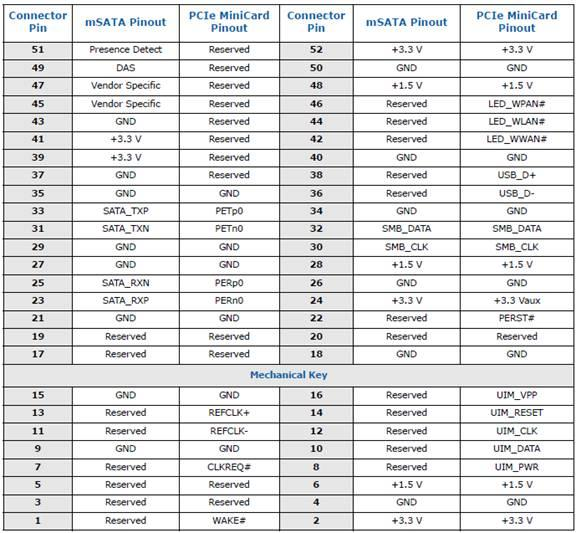
MC7455 use USB3.0 and Mikrotik use USB 2.0. In case you want to force MC7455 work with Mikrotik you will need to use sticky tape and isolate modem contacts pins 23, 25, 31, 33.
You can use one stripe from 23 till 33 (it’s 6 contacts totally). From mechanical key you need start stripe at 4th contact (23) and you may isolate 6 in row. That’s it. I put picture from ixbt forum and it works for me in Mikrotik.
I’ve got ppp only modem and no LTE interface. In case someone knows how to enable it with LTE-interface please drop me a line?
We have tested MC7455 locally and it works with RouterOS 6.36 in ppp serial mode.
Hi, we are currently trying to use a Sierra MC 7455 with Mikrotik RB 2011UiAS-2HnD, using a MiniPCIE to USB converter.
The card is detected and even i can use AT commands connecting on channel 2 trough serial. The card is with the latest Firmware and I’m using the latest stable Mikrotik Router OS (6.36.3)
But when I can not get access to internet using any channels combination. Can you help us with the config that worked?
And I can not see assigned IP or anything, don’t need this modem any call number, init parameters? etc? Sorry to bother with this newbie questions but I can not find good documentation about this specific card or how to put it online.