KB: LTE by SiB

Content this thread/topic is a live documentation. It will be edited with new information becomes available.
@Mikrotik: Please create a M11G with m.2 slot for LTE/5G modules ! We wait for new line of 5G devices like SXTGR 5G, LHGGR 5G, LDFGR 5G - 1Gb and m.2 slot with 4x4 MIMO - we wait.

Table of Contents

  1. How to correctly diagnose & collect LTE logs for support
  2. Additional Scripts for LTE
  3. Antennas
  4. Acessories like m.2 adapters
  5. HowTo configure X LTE module
  6. About LTE, CA and MIMO
  7. Reserved
  8. Reserved

Remember fist do upgrade a RouterOS and separate a lte module upgrade.
List of latest version of firmware per lte module:

  • R11mL-RG502Q-EA (Chateau 5G) RG502QEAAAR11A04M4G ← first m.2 form factor
  • R11e-LTE12 (EG12-EA) EG12EAPAR01A10M4G
  • R11e-LTE6 v028
  • R11e-LTE MikroTik_CP_2.160.000_v020
  • R11e-LTE-4G v9
  • R11e-LTE-US R11eL_v16.02.183961 (R11eL_v05.04.193841 probably show wrong info at ros7)
  • SXT LTE 3-7 |-> chip:2.0 fw:0.1.2.4

Documentation: https://wiki.mikrotik.com/wiki/Manual:Interface/LTE#Modem_firmware_upgrade
Try this:

# Check your and latest firmware version
/interface lte firmware-upgrade lte1
# Do upgrade by:
/interface lte firmware-upgrade lte1 upgrade=yes

1) How to correctly diagnose & collect LTE logs for support

1A) Enable logging of LTE, regular logs.

/system logging action remove [find where name=support]
/system logging action add name=support target=memory memory-lines=16384 
/system logging remove [find where topics~"lte"] 
/system logging add action=support topics=lte

1B) LteLogger2 - optional
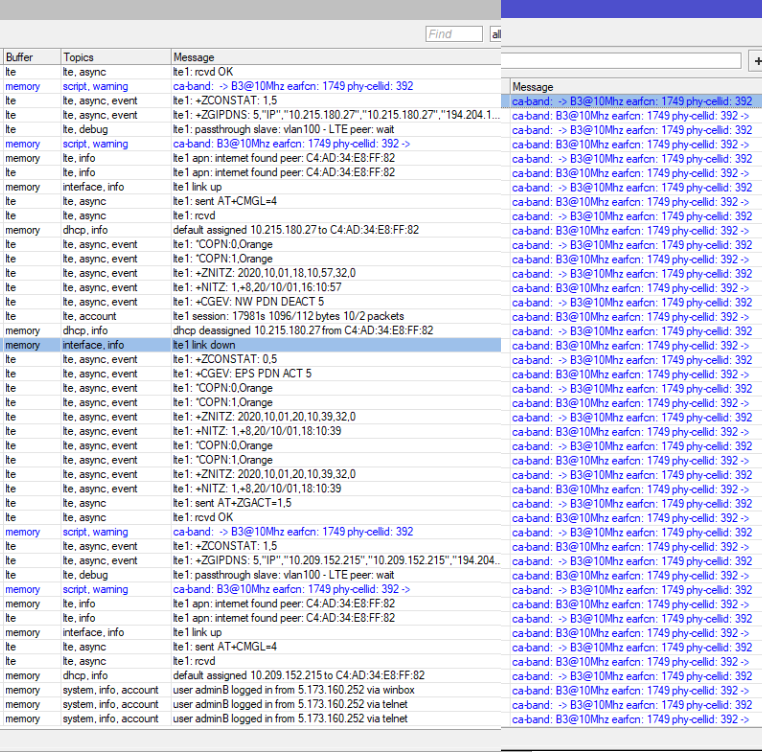
Final script as job in loop will monitor current lte parameters and log them as warning, blue entry. Check picture below.
You will see when BTS/Tower/eBN will change, when ca-band is re-assign etc., very useful in diagnosis.

Download proper script file and drag&drop it to WinBox.
You see new scheduler and script items. Scheduler is a software watchdog who watches over a script job to be still running in loop.

Installation of that file is by /import in terminal, remember that TAB key do complements of syntax :

/import ros6-lteLogger2.rsc

Example:
left - show one lte down
right - filtered ca-band logs show flapping with 2CA.
fHPSP8g6JS.png
That give you better perspective to see if something is change or not with LTE general.
Now we will discuss about your case.

1C) Problem replication

We are waiting for your problem to occur. If you know what do to generate/replicate that problem, then do it now.
btw, You can restart the device to accumulate fresh logs.

1D) Generate supout.rif

To report case to MikroTik support team you need generate supout.rif file.
In terminal just type:

/system sup-output

or in WinBox use from left main menu a “Make Supout.rif” button > Start button.

In WinBox main menu, the “Files” button show you local files and you can use Right Mouse Button (know as RMB), select Download to save file to your computer.

Remember that you can do additional screenshot-s, take a movie etc.. of problem.

1E) Report case

Try contact with your local distributor first, they should help you in first place.
Case reported directly to MikroTik should be via support@mikrotik.com or support portal at http://help.mikrotik.com

P.S. If you want open .rif file you can do that at https://mikrotik.com/client/supout but this is a separed credentials, you must first register here.

Additional Scripts for LTE

Detection offline and do some fix job:
Simple Internet detection by netwatch and log
Advance WatchDog with many actions

Change SIM Slot
The LTAP can switch the Dual SIM when the RSSI was weakness?
The LtAP LTE kit: Script to get RSRP and then do that LEDs show signal in my levels

Antennas

A collection of producers recommended by various users of this forum.

Works with 5G Quectel units, they are USB2.0 what limit us to 480Mbps.

https://ebay.us/U6yzf8 ← only option without SIM slot
https://aliexpress.com/item/32861939520.html
https://aliexpress.com/item/1005002374313940.html

Remember: M.2 KEY B only are for LTE

mPCIe:
Quectel EP06-E ← Full HowTo
Telit LM940/LM960 ← Full HowTo
Huawei ME909s-120 ussd codes

m.2:
Quectel EG12/EM12 CellLock
Quectel RM502Q-AE (Global with US) - RouterOS 7.x with MBIM - WinBox not show a 5G details, CLI and AT must be used
Quectel EM160R-GL (fw EM160RGLAUR02A08M4G_0.001.01.001) - --//–

General:
USB EndPoints Limits, why R11e-LTE-US/R11e-LTE6 not work as secondary card

About LTE, CA and MIMO

Content will be edited soon.

Reserved

Reserved

Hello SiB,
Just find my LtAP mini LTE US kit, the modem version is newer than you mentioned above, see below.
But somehow, I can never update it to the newer version. Once you try to upgrade, the LTE lose its connection to internet.

brg3466, [23.09.21 16:08]
[brg3466@LtAP] > /interface/lte/firmware-upgrade lte1 once
  installed: R11eL_v05.03.183961
     latest: R11eL_v05.04.193841
[brg3466@LtAP] > /interface/lte/firmware-upgrade lte1 upgrade=yes
  status: checking
-- [Q quit|D dump|C-z pause]

Thanks, forum search show that version too as latest. Corrected. Thanks for info.


But somehow, I can never update it to the newer version. Once you try to upgrade, the LTE lose its connection to internet.

-LTE and -LTE-US is know as module who cannot do upgrade from own internet. Those modules can only do upgrade by itself mobile connection.
Remember that this should be by your ethernet connection to unit, by wifi you can be disconnected because Win10 in offline disconnect wifi and you not have access to winbox… this can be problematic some times.

When you write to MikroTik directly then they:

  • grab logs and maybe they want connect to your unit to fix it internally in magic way
  • share you a firmware package with instruction and you can install new firmware by usb-mPCIe adapter. USB extension cable with usb adapter give you a way to not disconnect this antenna cables.

Summary, You must write to support. support@mikrotik.com or help.mikrotik.com

EDIT:
R11eL_v05.03.183961
R11eL_v05.04.193841
exist probably sometimes for ros7…
the Original source have still have the R11eL_v16.02.183961version as latest one.
R11e-LTE-US R11eL_v16.02.183961 (R11eL_v05.04.193841 probably show wrong info at ros7)

If you want know answer, write directly to MikroTik.

i try several times to import ros-7-lteLogger2.rsc
from terminal but i receive …expected end of command (line6 column 13)

procedure
copy on files and from terminal
/import ros7-lteLogger2.rsc


ros version 7.1.rc4

ros7.1rc4 not work with importing a /system scheduler in general. http://forum.mikrotik.com/t/v7-1rc4-development-is-released/152002/168 SUP-61613
WorkARound for RouterOS 7.1rc4

Create a system scheduler with interval=00:01:00 and code:

#Script WatchDog for script name:
local ScriptName lteLogger2
local ScriptRuningInstances [:len [system script job find script=$ScriptName]]
if ( $ScriptRuningInstances = 0) do={/system script run $ScriptName};
if ( $ScriptRuningInstances = 1) do={};
if ( $ScriptRuningInstances >= 2) do={system script job remove [find script=$ScriptName]};

Next is to run this code in terminal who create you a final script.

/system script
remove [find name=lteLogger2]
add name=lteLogger2 source="#:local watchItems pin-status,functionality,registra\
    tion-status,current-cellid,enb-id,sector-id,phy-cellid,access-technology,primary-band,ca-band,rssi\r\
    \n:local watchItems current-cellid,enb-id,primary-band,ca-band\r\
    \n:local watchFreq 3s\r\
    \n:local lteInfo\r\
    \n:local prevLteInfo ({})\r\
    \n:while (true) do={\r\
    \n\t:do {:set lteInfo [/interface lte monitor lte1 once as-value]} on-error={}\r\
    \n\t:foreach m in=\$watchItems do={\r\
    \n\t\t:if ((\$lteInfo->\$m)!=(\$prevLteInfo->\$m)) do={\r\
    \n\t\t\t:put (\$m.\": \".(\$prevLteInfo->\$m).\" -> \".(\$lteInfo->\$m))\r\
    \n\t\t\t:log warning (\$m.\": \".(\$prevLteInfo->\$m).\" -> \".(\$lteInfo->\$m))\r\
    \n\t\t\tlocal mpprev (\$prevLteInfo->\$m);\r\
    \n\t\t\tlocal mpnext (\$lteInfo->\$m);\r\
    \n\t\t\t:set (\$prevLteInfo->\$m) (\$lteInfo->\$m)\r\
    \n\t\t\t}\r\
    \n\t\t}\r\
    \n\t:delay \$watchFreq\r\
    \n\t}\r\
    \n\r\
    \n"

Do you mean that all mini-PCIe → M.2 adapters on the market are limited to USB 2.0 speeds? I’m not quite sure where USB 2.0 comes into the picture since the adapter is passive? I’m concerned that if I’d get an adapter + a Quectel 5G modem I could reach up to gigabit speeds on 5G.

I think SiB was trying to show the “well travelled” path to 480Mb/s. Do you really have 1Gb service via LTE today? No 5G modem/adapters alone is going to get you those speeds… the modem modules spec’d speed is a clean RF environment & some 5G band require using more specialized antenna. All totally possible with Mikrotik, but the adapter being just one element.

I haven’t tried the M.2 adapter approach. Technically correct USB3 should “passthrough” but subtle in keying/pinout/etc/etc. but you really need to find the right adapter, for right hardware. I almost went the M.2 adapter route years back, but seem like the adapters might be a PITA :wink:. So I been using Telit 960s since they support 5G in miniPCIe. But the Quectel makes sense since that’s what Mikrotik seems to using in newer design, so good shot of a Quectel being well supported.

You’d of course need the a Mikrotik with 1000Mb ether and the miniPCIe has to be USB 3.0 – this approach ain’t for the faint of heart.

Personally I’m waiting to see if MT announces new hardware now that V7 is out to avoid this.

@SiB, one tip to add is using a “function macro” for the “at-chat” command…

I use this to avoid typing the “/interface lte at-chat lte1 input=”… all the time:


 :global AT do={:put "$([/interface lte at-chat [find running] input="$1" wait=yes as-value]->"output")"}

What this does is allow you just use $AT followed by the modem AT command you want to run. So for example, this runs “ATI” against the modem:


[admin@MikroTik] > $AT ati
Manufacturer: MikroTik
Model: R11e-LTE-US
Revision: MPSS: R11eL_v12.09.171931 APSS: R11eL_v02.14.173531 CUSTAPP: 
SVN: 07
IMEI: XXXXXXXXXX
+GCAP: +CGSM
OK

You can use $AT with some of the AT commands from the Mikrotik docs. Note that any command that uses anything but letters or numbers MUST be put in quotes, like $AT “AT*cell=?”:


[admin@MikroTik] > $AT "AT*cell\?"
*CELL: 0,0,0,0,0
OK

I use this all the time, so thought I’d share since it’s pretty simple to cut-and-paste that before dealing with a LTE modem.

Additional notes about at-chat in general:

  • [find running] means it will use the first active modem (so if you have two modems, you can do something like AT1 and AT2 for each modem respectively and specify the actual interface in the “function macro”).
  • By using “as-value” and ->“output”, the text is not parsed, so newlines in command output are preserved. For example, using “as-value” methods get you the top result, just letting “at-chat” print it removes newlines (second output) – since some AT command use formatted output, like Telit’s AT#FIRMWARE or Sierra AT!LTEINFO:
[admin@DeltaAlpha] > $AT "AT#FIRMWARE"
HOST FIRMWARE  : 32.00.005_1
MODEM FIRMWARE : 4
INDEX  STATUS     CARRIER  VERSION         TMCFG  CNV       LOC
1                 Generic  32.00.115       1025   empty     1
2      Activated  Verizon  32.00.124       2020   empty     2
3                 ATT      32.00.144       4021   empty     3
4                 TMUS     32.00.153       5004   empty     4

[admin@DeltaAlpha] > /interface/lte/at-chat [find running]  input="AT#FIRMWARE"
  output: HOST FIRMWARE : 32.00.005_1 MODEM FIRMWARE : 4 INDEX STATUS CARRIER VERSION TMCFG CNV LOC 1 Generic 32.00.115 1025 empty 1 2 Activated 
          Verizon 32.00.124 2020 empty 2 3 ATT 32.00.144 4021 empty 3 4 TMUS 32.00.153 5004 empty 4 OK
  • For serial modems, at-chat is available via /interface/ppp-client for “serial” modems. This is only in newer versions, but allows same approach even if modem doesn’t support the MBIM/ECM-style interface using by /interface/lte.
  • wait=yes is optional in this example, and undocumented by Mikrotik AFAIK. I believe it looks for an “OK” or “ERROR” before returning or timing out. Maybe someone else knows more exactly?

@SiB, some additional notes about V7 be useful. Posted my thoughts here to avoid new topics…

If someone got to this thread, without reading the much revised/improved docs on LTE, they should read those first.

  • The new Peripherals page on help.mikrotik.com has more great information on supported hardware – it not same as old Wiki page, re-read if you haven’t see it recently.
  • Once you see an LTE modem under /interface/lte in V7 & need to know how to configure it, see the new LTE page — this were the “APN” and other carrier specific things are done ONCE a modem is detect and in right mode for V7.

Some specific notes about V7:

  • If using a PPP/“ppp-out” cellular/LTE modem under V6, upgrading V7 may help a lot. Check Perpherals docs for specifics… But if your modem supports “ECM” or “MBIM” protocol, which most “4G” modem do…it may possible to see a speed boast by changing to using the “LTE interface” under V7. The long standing issue the PPP client interface (or “serial mode” in V7) is it has ~25Mb/s speed limit each way. If your modem can do MBIM or ECM, and your cellular service >25Mbs — while it’s potential tedious to change modems in some cases, it may be worth the trouble. Again V7 is new YMMV.
  • In particular with using Sierra Wireless modems in MBIM mode under V7, signal data can be reported once running as an LTE interface. In our case, the Sierra MC7[4|5]xx modems, with right AT$USBCOMP / AT$UDUSBCOMP setting, you’d see not only higher speeds from a software/config change, BUT also useful RSSI etc data that make it even more possible by tuning the antennas. This may be true for other modems where there is only one AT port (e.g. on a /interface/ppp-client interface data-channel is same as info-channel – so can’t be on internet and reading signal under V6). For us, Sierra modems under V7 have been pretty stable since at least “beta3” a while ago. YMMV.
  • LTE interface’s MTU may need to be adjusted… In some/most cases the LTE networks MTU may be lower than than standard Ethernet MTU of 1500. Mikrotik uses 1480 typically, but this may still not be low enough in all cases. If the MTU is wrong, packet fragmentation can happen, which slow up the network. This generally prevent by PMTUD but it best to set the MTU to match the cell carrier’s network – with each different APN potentially having a different MTU, even from same carrier. For example, typically “static IP” services have much lower MTUs, 1420-1440. For MBIM modems, in V7, there is log entry where the network provides the desired MTU, so looking in logs may tell you what MTU to set…
/log print where message~"mtu"
# output: dec/24 14:23:08 lte,info lte2 mbim: network advertises lower mtu: 1428

In this case, 1428. This value can be used to set the LTE interface MTU – it is NOT automatically set, the MTU information is just logged as of 7.2rc1. You can also check with your LTE carrier’s support (which may not be easy) to find out what MTU is used the SIM/APN.

  • /interface/lte/settings mode=… is now where the protocol used to communicate with a cellular modem is controlled. This is the replacement for /port firmware ignore-directip-modem=(yes/no). It’s this setting that may have to be adjusted to get a some to work. You likely add’l AT commands to also change the modem internally to use a different protocol, in addition to this setting. Check docs and forum for specifics what to do for a particular modem.
  • /interface lte info does NOT work in V7 – this was changed to /interface/lte/monitor in V7. So if any script read LTE signal data from a script (or /system/schedule) needs to get updated to use “monitor” not “info”. V7 accept the spaces, so “/interface lte monitor” works, so search-and-replace “info” → “monitor” works to convert a V6 LTE monitoring script.


    V6 method to control how ROS detects a cellular/LTE modem:
[admin@MikroTik] > /port firmware print
              directory: firmware
  ignore-directip-modem: no

vs. V7 location (which makes a whole lot more sense):

[admin@MikroTik] /interface/lte/settings> print
           mode: auto
  firmware-path: firmware
[admin@MikroTik] /interface/lte/settings> set mode=
auto  mbim  serial
  • Another V7 vs V6 is the “?” key. In V6, this must be escaped in AT commands like “?” (otherwise a help screen in V6 appears). In V7, no backslash ? is required in the AT commands.

Some general LTE worth repeating – this apply to both V6 and V7:

  • Check your firmware version. Most Mikrotik support OTA updating. For Mikrotik modems (other than R11e-LTE-US running v12), it’s pretty simple to do this – this may be a very quick way to see more out of your existing setup, since carriers settings etc change which sometimes helps with speed or connectivity issues:
 /interface/lte/firmware-upgrade [find running] upgrade=yes

For third-party modems and some Mikrotik modems, you may need a PC to upgrade modems as they can’t be done OTA from the Mikrotik.

  • This isn’t V7 per se, but checking /ports to see if a modem shows up & how many ports & USB identifiers is a good thing to do a first troubleshooting step. Importantly sometimes the USB device IDs may effect which mode a modem operates in.
  • Similarly, some Mikrotik hardware (RB9xx, perhaps others) have a “shared USB” bus between an internal modem and extra USB port – in some cases you can only use one USB port at time & it must explicitly configured in ROS. Again see Mikrotik’s new Peripherals page for specifics.

_Notes (edited 1/5/2022):

  • added MTU information
  • added note about “info” is not “monitor”_

@SiB - up to you if you want to delete it for cleanliness sake.

FYI, speaking of R11e-LTE6 v029 and it’s “jumping” on/off CA2 behavior (due to inability to lock CA part, just the primary one). So, I’ve got exactly the same behavior, B7 as primary and as “CA band” I’ve got constantly changing B3 to/from B20 with loss of CA2 etc.

Locking B3 as primary lead to quite stable connection with stable CA2.

I’m still trying to catch lock-ups/freezes (as I’m not using the device constantly and I don’t have proper load/monitoring environment set up), but so far there were none.

With external 8 dB antenna placed outdoors attached to my Audience LTE6 kit I’ve got stable 90+Mbps performance for download.
Indoors, the difference between external/internal antenna is not that noticeable and I do get stable 50+Mbps if device is positioned properly.

HI,

I have few question regarding MIMO4x4 in LTE.
So far I was only using radio solution in LTE with MIMO 2x2. So BTS is broadcasting with 2 antennas with 2 polarization planes, -45deg and + 45deg. I antennas with same orientations for my router.
But what happens in case of 4x4? Is 4 antennas broadcasting in 4 different planes? Is then +/-45, 0 and 90? If using 2 dual antennas shall I turn one by 45deg for best results?

Currently using Telit LM960. Described as MIMO 4x4, but on bands 1,3,7,20 in my case, non of them works in MIMO 4x4 according to documentation :frowning:
2 antenna connectors works with 2600Mhz MIMO 2x2, 2 others with 800-2100Mhz MIMO 2x2. If I would buy RM502Q-AE, on which bands it will work with 4 streams, MIMO 4x4 with 4CA?

br
marcin

When it comes to 4x4 MIMO, base stations usually use two 2x2 MIMO antennae, placed a few lambda apart (either horizontally or vertically). With low-frequency bands (B20 is 800MHz which translates to wavelength of around 0.37m) a few lambda is a metre or three, which makes 4x4 MIMO a bit unpractical. High band is different (B7 is 2.6GHz or 11 cm), there spacing of a few lambda is somehow manageable.
These two antennae may share same case so it’s not apparent that it’s actually two 2x2 antennae.

What one does with antennae atrached to user equipment is up to individual’s imagination.

I’ve got strange errors with multiple Quectel modems while they are aggregating on AT&T and Verizon (TMO is fine), and the existing LTE logging provided by RouterOS is inadequate to find out what’s going on (per Quectel’s engineers). Quectel says I need to use their QLogger application to connect to an exposed DM port on the modem. RouterOS 7.2rc1 says it has an exposed diagnostic port for all LTE modems now. This sounds like the DM port, but there is no information about this at all.

I see nothing in the GUI on how to use this. I’d like to connect QLogger on a Windows box to an LTE radio running 7.2rc1 to collect these errors, so they can make firmware adjustments. So I need to configure this exposed port, and set it up to export on a remote logging server to give to Quectel so we can resolve this chronic issue.