Router: RB4011iGS+5HacQ2HnD-IN
Installed Version 6.48.3
Hi, strange thing happened to me - few weeks ago some of my “smart” stuff stopped updating, specifically Withings sleep tracker, plus my ezviz security cammera stopped working all of the sudden and cannot connect to wifi, and LG fridge and washing machine lost connection permanently. I have narrowed it down to those working in the 2,4 GHz band only, and my router seems to have dropped that frequency (if that is even possible).
It should be dual band, right? I could swear that it was when I set it up, and that it worked fine for almost a year.
Yet in WebFig now the only option is 5 GHz, and there is no “Home AP dual” option available in Quick Set.
What could have happened? Can I get it back to working in 2,4 GHz? I could work around it by using the (dual band) wifi included in my cable modem, but it seems kind of stupid to run two APs for no reason when the router should be able to do both.
Sorry if I expressed myself incorrectly - I updated software to the newest version while trying to fix the problem, but it did not.
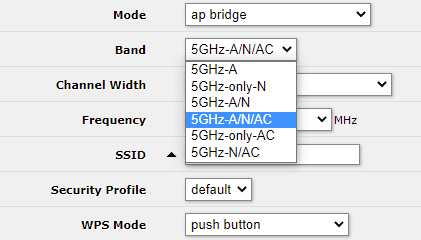
Also what I mean is that in WebFig dropdown menu there are only 5 GHz options listed (i.e. 5 GHz A, 5GHz N, 5 GHz A/N/AC when I believe there should also be 2,4 GHz options listed, but are not.
Just as in QuickSet there is no Dual option listed.
This is what I mean:
I am not that experienced in network config, so sorry if I seem stupid, but this legitimately puzzles me on a dual-band router…
On most MT devices WLAN1 is for 2.4GHz, and WLAN2 is for 5GHz.
If there is only one WLAN, then WLAN1 can be 5GHz or 2.4GHz depending on the device radio’s
Your device has both radio’s. So with the default names WLAN1 is 2.4GHz and WLAN2 is 5 GHz
Quickset is very limited and does NOT give access to both WLAN. And as already mentioned, release 6.48.2 changed from 2.4GHz to 5 GHz as the to be configured interface.
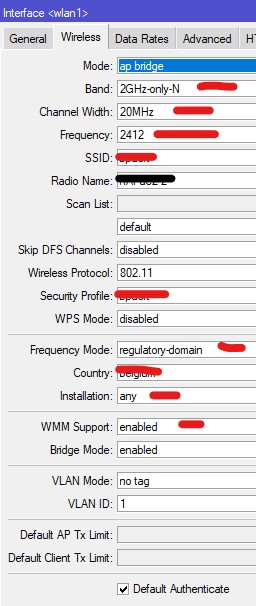
Use Webfig, and stay away from Quickset. It’s not very complicated, only the Wireless tab, in Advanced Mode, Compare the unconfigured WLAN with the one set by Quickset.
Fill in, the fields marked in RED. Your security profile is created by Quickset already, use that one.
Choose a congestion free freq (2412, 2437 or 2462), “auto” is not a smart thing.
…
Never ever utter that sentence. Always specify what version. For all you know a new version will come out five minutes after you make the statement, and sometimes answers to questions are very dependent on the actual version.
OK, you can utter that sentence as long as you include the version number.
“Newest version” is the one in the LT track (Long Term). Only use the latest version in Stable track, when you know the product well, and when you really need “that” new feature or change.
6.45.9 and 6.47.10 are good releases, the 6.48.x had many issues in the “Stable” releases and I feel uncomfortable with that release. ( It’s subjective , I know).
How can you know if a release is really good? Read the Forum !!!..“Version xx.yy.z is released”
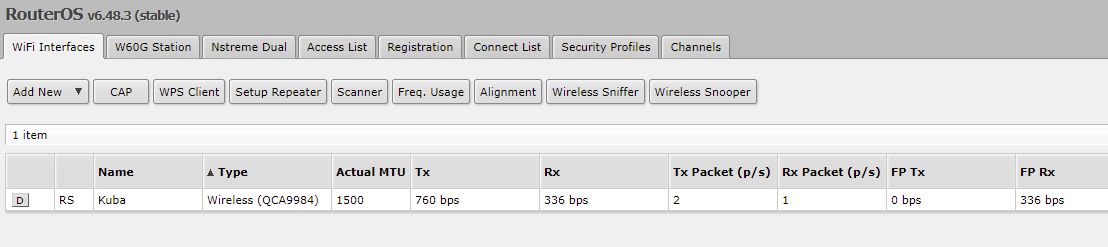
If you go to “WebFig>Wireless>Wifi Interfaces tab” do you have entries for “wlan1” & “wlan2”? If you don’t then your 2.4ghz mini PCIe module may be bad or loose.
Just an update in case anyone else encounters or will encounter this problem.
In short - in August eventually I just gave gave up and turned on and used 2.4 GHz network on my cable modem, this enabled me to use all the devices that cannot use 5 GHz again.
Now, in November, I “randomly” updated the router to software version 6.49.1, without doing anything else.
Behold, 2.4GHz interface - e.g. Wireless (Atheros AR9300) - magically appeared in WebFig and QuickSet, with default network name. My router is “Home AP Dual” again.
Good for me, I guess. Thanks again to everyone that tried to help me and gave good advice!
6.49
*) quickset - use 5GHz interface's country for "Home AP Dual" configuration;
6.48.2
*) quickset - prefer 5GHz interface for WiFi scan in CPE mode;
anyway to force routeros to let quick config to use the 2.4ghz again ?
all the IOT devices using esp32’s etc use 2.4ghz , and trying to setup repeater with this dual band keeps crashing the network when attempting to do it manually
quick config was as easy as click ap bridge and adding passphrase and done …
anyway to get this to downgrade its not letting me go any lower file version and it was running 6.47