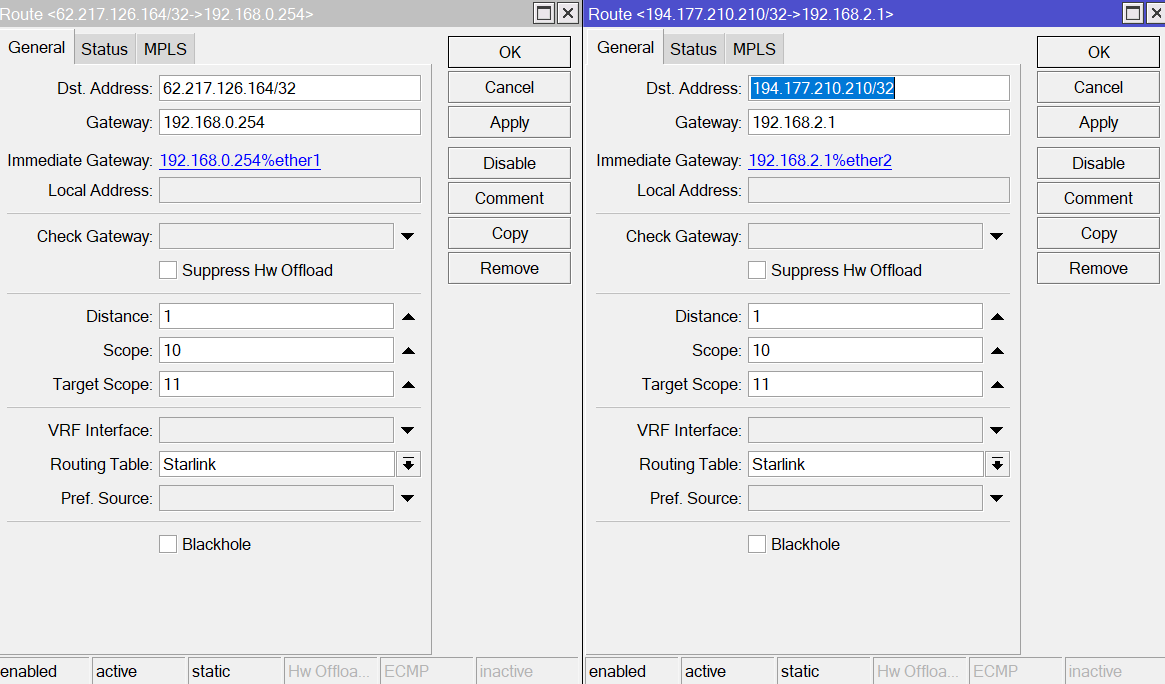
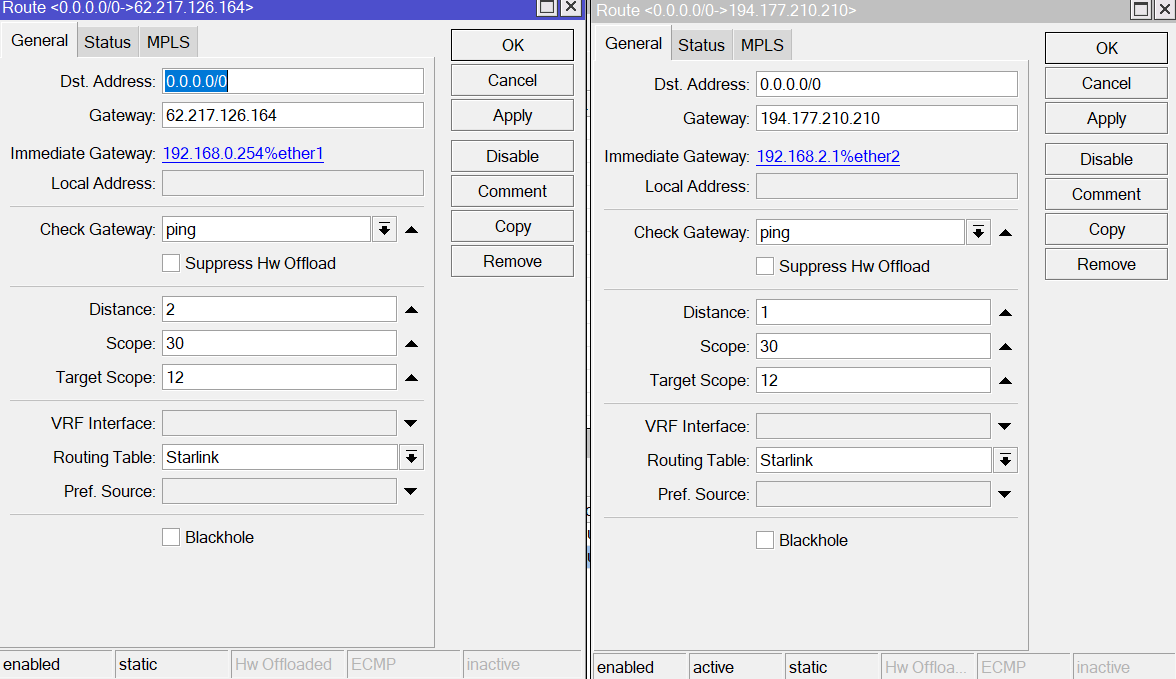
Hello I am using 2 WAN on a mikrotik (ether1 and ether2) and i have 2 subnets (native 192.168.1.0/24 and vlan10 192.168.10.0/24 )
I want clients on native 192.168.1.0/24 to use ether2 wan (starlink) while 192.168.10.0/24 use ether1 wan.
Also at each subnet, if a wan fails i want to have failover the other wan and vice versa.
I use recursive routing and tried to achive that with mangle rules but i don’t have internet connection on subnet 192.168.1.0/24 if i enable the rules (tried ping to external host )
this is my config:
/interface bridge
add admin-mac=F4:1E:57:5D:81:A4 auto-mac=no comment=defconf name=bridge \
    vlan-filtering=yes
/interface wireguard
add comment=back-to-home-vpn listen-port=50773 mtu=1420 name=back-to-home-vpn
/interface vlan
add interface=bridge name=Guest100 vlan-id=100
add interface=bridge name=vlan10_Market vlan-id=10
/interface list
add comment=defconf name=WAN
add comment=defconf name=LAN
/interface wireless security-profiles
set [ find default=yes ] supplicant-identity=MikroTik
/ip pool
add name=dhcp_pool0 ranges=192.168.1.59-192.168.1.253
add name=dhcp_pool1 ranges=192.168.100.2-192.168.100.254
add name=dhcp_pool2 ranges=192.168.10.2-192.168.10.254
/ip dhcp-server
add address-pool=dhcp_pool0 interface=bridge lease-time=1d name=dhcp1
add address-pool=dhcp_pool1 interface=Guest100 name=dhcp2
add address-pool=dhcp_pool2 interface=vlan10_Market name=dhcp3
/port
set 0 name=serial0
/routing table
add disabled=no fib name=Starlink
add disabled=no fib name=Nova
/interface bridge port
add bridge=bridge comment=defconf interface=ether3
add bridge=bridge comment=defconf interface=ether4 pvid=10
add bridge=bridge comment=defconf interface=ether5 pvid=10
add bridge=bridge comment=defconf interface=ether7
add bridge=bridge comment=defconf interface=ether8
add bridge=bridge comment=defconf interface=sfp1
/ip neighbor discovery-settings
set discover-interface-list=LAN
/interface bridge vlan
add bridge=bridge tagged=bridge untagged=ether4,ether5 vlan-ids=10
/interface list member
add comment=defconf interface=bridge list=LAN
add comment=defconf interface=ether1 list=WAN
/ip address
add address=192.168.1.254/24 comment=defconf interface=bridge network=\
    192.168.1.0
add address=192.168.0.100/24 interface=ether1 network=192.168.0.0
add address=192.168.2.100/24 interface=ether2 network=192.168.2.0
add address=192.168.100.1/24 comment="Guest VLAN" interface=Guest100 network=\
    192.168.100.0
add address=192.168.10.1/24 interface=vlan10_Market network=192.168.10.0
/ip cloud
set back-to-home-vpn=enabled ddns-enabled=yes ddns-update-interval=1m
/ip dhcp-client
add comment=defconf default-route-tables=main disabled=yes interface=ether1
/ip dhcp-server network
add address=192.168.1.0/24 gateway=192.168.1.254
add address=192.168.10.0/24 gateway=192.168.10.1
add address=192.168.100.0/24 gateway=192.168.100.1
/ip dns
set allow-remote-requests=yes servers=1.1.1.1,9.9.9.9
/ip dns static
add address=192.168.88.1 comment=defconf name=router.lan type=A
/ip firewall filter
add action=accept chain=input comment=\
    "defconf: accept established,related,untracked" connection-state=\
    established,related,untracked
add action=drop chain=input comment="defconf: drop invalid" connection-state=\
    invalid
add action=accept chain=input comment="defconf: accept ICMP" protocol=icmp
add action=accept chain=input comment=\
    "defconf: accept to local loopback (for CAPsMAN)" dst-address=127.0.0.1
add action=drop chain=input comment="defconf: drop all not coming from LAN" \
    in-interface-list=!LAN
add action=accept chain=forward comment="defconf: accept in ipsec policy" \
    ipsec-policy=in,ipsec
add action=accept chain=forward comment="defconf: accept out ipsec policy" \
    ipsec-policy=out,ipsec
add action=accept chain=forward comment=\
    "defconf: accept established,related, untracked" connection-state=\
    established,related,untracked
add action=drop chain=forward comment="defconf: drop invalid" \
    connection-state=invalid
add action=drop chain=forward comment=\
    "defconf: drop all from WAN not DSTNATed" connection-nat-state=!dstnat \
    connection-state=new in-interface-list=WAN
/ip firewall mangle
add action=mark-connection chain=prerouting comment=\
    "Mark connection: 192.168.1.0/24 > Starlink" disabled=yes \
    new-connection-mark=from-starlink src-address=192.168.1.0/24
add action=mark-routing chain=prerouting comment=\
    "Route mark prerouting > Starlink" connection-mark=from-starlink \
    disabled=yes new-routing-mark=Starlink passthrough=no
add action=mark-routing chain=output comment=\
    "Route mark output (router src) > Starlink" connection-mark=from-starlink \
    disabled=yes new-routing-mark=Starlink passthrough=no
/ip firewall nat
add action=masquerade chain=srcnat comment="defconf: masquerade" \
    ipsec-policy=out,none out-interface=ether1
add action=masquerade chain=srcnat comment="defconf: masquerade" \
    connection-mark=from-starlink ipsec-policy=out,none out-interface=ether2
/ip ipsec profile
set [ find default=yes ] dpd-interval=2m dpd-maximum-failures=5
/ip route
add check-gateway=ping comment="Route 1" disabled=no distance=1 dst-address=\
    0.0.0.0/0 gateway=62.217.126.164 routing-table=main scope=30 \
    suppress-hw-offload=no target-scope=11
add check-gateway=ping comment="Route 2" disabled=no distance=2 dst-address=\
    0.0.0.0/0 gateway=194.177.210.210 routing-table=main scope=30 \
    suppress-hw-offload=no target-scope=11
add comment="Monitor 1" disabled=no distance=1 dst-address=62.217.126.164/32 \
    gateway=192.168.0.254 routing-table=main scope=10 suppress-hw-offload=no \
    target-scope=10
add comment="Monitor 2" disabled=no distance=1 dst-address=194.177.210.210/32 \
    gateway=192.168.2.1 routing-table=main scope=10 suppress-hw-offload=no \
    target-scope=10
add check-gateway=ping comment="Route 1 SL" disabled=no distance=2 \
    dst-address=0.0.0.0/0 gateway=62.217.126.164 routing-table=Starlink \
    scope=30 suppress-hw-offload=no target-scope=11
add check-gateway=ping comment="Route 2 SL" disabled=no distance=1 \
    dst-address=0.0.0.0/0 gateway=194.177.210.210 routing-table=Starlink \
    scope=30 suppress-hw-offload=no target-scope=11
add comment="Monitor 1 SL" disabled=no distance=1 dst-address=\
    62.217.126.164/32 gateway=192.168.0.254 routing-table=Starlink scope=10 \
    suppress-hw-offload=no target-scope=10
add comment="Monitor 2 SL" disabled=no distance=1 dst-address=\
    194.177.210.210/32 gateway=192.168.2.1 routing-table=Starlink scope=10 \
    suppress-hw-offload=no target-scope=10
/ip service
set ftp disabled=yes
set ssh disabled=yes
set telnet disabled=yes
set www disabled=yes
set api disabled=yes
set api-ssl disabled=yes
/system clock
set time-zone-name=Europe/Athens
/system identity
set name=CoreRouter
/system routerboard settings
set enter-setup-on=delete-key
/tool mac-server
set allowed-interface-list=LAN
/tool mac-server mac-winbox
set allowed-interface-list=LAN
You mangle rules are not quite correct, you need to place restriction on them so that they only act on packets travelling in one direction (from the LAN subnet to the internet, not on the returning packets).
However, for your usecase it would be better and more performant to use routing rules instead of mangle rules. For that you should:
Either edit this NAT rule and remove connection-mark=from-starlink:
/ip firewall nat
add action=masquerade chain=srcnat comment="defconf: masquerade" connection-mark=from-starlink ipsec-policy=out,none out-interface=ether2
Or, much better, add ether2 to the WAN interface list (ether1 is already member of that list):
/interface list member add interface=ether2 list=WAN
Then replace the two masquerade NAT rules with the single original rule from the defconf configuration (so that your NAT table only has this one rule left):
/ip firewall nat
add action=masquerade chain=srcnat comment="defconf: masquerade" ipsec-policy=out,none out-interface-list=WAN
Remove the mangle rules (that you currently disable).
Add the following routing rules to the Routing → Rules table:
/routing rule
add action=lookup min-prefix=0 table=main
add action=lookup-only-in-table dst-address=0.0.0.0/0 src-address=192.168.1.0/24 table=Starlink
That should achieve what you wanted.
anav
July 22, 2025, 1:53pm
3
Repost config for review, once the recommended changes have been made.
@Haris013
Hello guys, i did the recommended routing rules but still no internet access. Maybe is something wrong with my recursive routes?
/interface bridge
add admin-mac=F4:1E:57:5D:81:A4 auto-mac=no comment=defconf name=bridge \
    vlan-filtering=yes
/interface wireguard
add comment=back-to-home-vpn listen-port=50773 mtu=1420 name=back-to-home-vpn
/interface vlan
add interface=bridge name=Guest100 vlan-id=100
add interface=bridge name=vlan10_Market vlan-id=10
add interface=bridge name=vlan20_Rooms vlan-id=20
/interface list
add comment=defconf name=WAN
add comment=defconf name=LAN
/interface wireless security-profiles
set [ find default=yes ] supplicant-identity=MikroTik
/ip pool
add name=dhcp_pool0 ranges=192.168.1.59-192.168.1.253
add name=dhcp_pool1 ranges=192.168.100.2-192.168.100.254
add name=dhcp_pool2 ranges=192.168.10.2-192.168.10.254
add name=dhcp_pool3 ranges=192.168.20.2-192.168.20.254
/ip dhcp-server
add address-pool=dhcp_pool0 interface=bridge lease-time=1d name=dhcp1
add address-pool=dhcp_pool1 interface=Guest100 name=dhcp2
add address-pool=dhcp_pool2 interface=vlan10_Market name=dhcp3
add address-pool=dhcp_pool3 interface=vlan20_Rooms name=dhcp4
/port
set 0 name=serial0
/routing table
add disabled=no fib name=Starlink
add disabled=no fib name=Nova
/disk settings
set auto-media-interface=bridge auto-media-sharing=yes auto-smb-sharing=yes
/interface bridge port
add bridge=bridge comment=defconf interface=ether3
add bridge=bridge comment=defconf interface=ether4 pvid=10
add bridge=bridge comment=defconf interface=ether5 pvid=10
add bridge=bridge comment=defconf interface=ether6 pvid=20
add bridge=bridge comment=defconf interface=ether7
add bridge=bridge comment=defconf interface=ether8
add bridge=bridge comment=defconf interface=sfp1
/ip neighbor discovery-settings
set discover-interface-list=LAN
/interface bridge vlan
add bridge=bridge tagged=bridge untagged=ether4,ether5 vlan-ids=10
add bridge=bridge tagged=bridge untagged=ether6 vlan-ids=20
/interface list member
add comment=defconf interface=bridge list=LAN
add comment=defconf interface=ether1 list=WAN
add interface=vlan10_Market list=LAN
add interface=vlan20_Rooms list=LAN
/interface ovpn-server server
add mac-address=FE:C1:D4:5A:A6:D9 name=ovpn-server1
/ip address
add address=192.168.1.254/24 comment=defconf interface=bridge network=\
    192.168.1.0
add address=192.168.0.100/24 interface=ether1 network=192.168.0.0
add address=192.168.2.100/24 interface=ether2 network=192.168.2.0
add address=192.168.100.1/24 comment="Guest VLAN" interface=Guest100 network=\
    192.168.100.0
add address=192.168.10.1/24 interface=vlan10_Market network=192.168.10.0
add address=192.168.20.1/24 interface=vlan20_Rooms network=192.168.20.0
/ip cloud
set back-to-home-vpn=enabled ddns-enabled=yes ddns-update-interval=1m
/ip dhcp-client
add comment=defconf default-route-tables=main disabled=yes interface=ether1
/ip dhcp-server network
add address=192.168.1.0/24 gateway=192.168.1.254
add address=192.168.10.0/24 gateway=192.168.10.1
add address=192.168.20.0/24 gateway=192.168.20.1
add address=192.168.100.0/24 gateway=192.168.100.1
/ip dns
set allow-remote-requests=yes servers=1.1.1.1,9.9.9.9
/ip dns static
add address=192.168.88.1 comment=defconf name=router.lan type=A
/ip firewall filter
add action=accept chain=input comment=\
    "defconf: accept established,related,untracked" connection-state=\
    established,related,untracked
add action=drop chain=input comment="defconf: drop invalid" connection-state=\
    invalid
add action=accept chain=input comment="defconf: accept ICMP" protocol=icmp
add action=accept chain=input comment=\
    "defconf: accept to local loopback (for CAPsMAN)" dst-address=127.0.0.1
add action=drop chain=input comment="defconf: drop all not coming from LAN" \
    in-interface-list=!LAN
add action=accept chain=forward comment="defconf: accept in ipsec policy" \
    ipsec-policy=in,ipsec
add action=accept chain=forward comment="defconf: accept out ipsec policy" \
    ipsec-policy=out,ipsec
add action=accept chain=forward comment=\
    "defconf: accept established,related, untracked" connection-state=\
    established,related,untracked
add action=drop chain=forward comment="defconf: drop invalid" \
    connection-state=invalid
add action=drop chain=forward comment=\
    "defconf: drop all from WAN not DSTNATed" connection-nat-state=!dstnat \
    connection-state=new in-interface-list=WAN
/ip firewall nat
add action=masquerade chain=srcnat comment="defconf: masquerade" \
    ipsec-policy=out,none out-interface-list=WAN
/ip ipsec profile
set [ find default=yes ] dpd-interval=2m dpd-maximum-failures=5
/ip route
add check-gateway=ping comment="Route 1" disabled=no distance=1 dst-address=\
    0.0.0.0/0 gateway=62.217.126.164 routing-table=main scope=30 \
    suppress-hw-offload=no target-scope=11
add check-gateway=ping comment="Route 2" disabled=no distance=2 dst-address=\
    0.0.0.0/0 gateway=194.177.210.210 routing-table=main scope=30 \
    suppress-hw-offload=no target-scope=11
add comment="Monitor 1" disabled=no distance=1 dst-address=62.217.126.164/32 \
    gateway=192.168.0.254 routing-table=main scope=10 suppress-hw-offload=no \
    target-scope=10
add comment="Monitor 2" disabled=no distance=1 dst-address=194.177.210.210/32 \
    gateway=192.168.2.1 routing-table=main scope=10 suppress-hw-offload=no \
    target-scope=10
add check-gateway=ping comment="Route 1 SL" disabled=no distance=2 \
    dst-address=0.0.0.0/0 gateway=62.217.126.164 routing-table=Starlink \
    scope=30 suppress-hw-offload=no target-scope=11
add check-gateway=ping comment="Route 2 SL" disabled=no distance=1 \
    dst-address=0.0.0.0/0 gateway=194.177.210.210 routing-table=Starlink \
    scope=30 suppress-hw-offload=no target-scope=11
add comment="Monitor 1 SL" disabled=no distance=1 dst-address=\
    62.217.126.164/32 gateway=192.168.0.254 routing-table=Starlink scope=10 \
    suppress-hw-offload=no target-scope=10
add comment="Monitor 2 SL" disabled=no distance=1 dst-address=\
    194.177.210.210/32 gateway=192.168.2.1 routing-table=Starlink scope=10 \
    suppress-hw-offload=no target-scope=10
/ip service
set ftp disabled=yes
set ssh disabled=yes
set telnet disabled=yes
set www disabled=yes
set api disabled=yes
set api-ssl disabled=yes
/routing rule
add action=lookup min-prefix=0 table=main
add action=lookup-only-in-table disabled=yes dst-address=0.0.0.0/0 \
    src-address=192.168.1.0/24 table=Starlink
/system clock
set time-zone-name=Europe/Athens
/system identity
set name=CoreRouter
/system routerboard settings
set enter-setup-on=delete-key
/tool mac-server
set allowed-interface-list=LAN
/tool mac-server mac-winbox
set allowed-interface-list=LAN
jaclaz
July 24, 2025, 10:00am
6
i actually changed the routes for Starlink table
and these are the actual routes to zeros
still no internet. i actually disabled all starlink routes and created a new with zeros and directly the gateway of starlink on Starlink routing table and still no internet, i suppose it is not the routes the problem
jaclaz
July 24, 2025, 10:20am
8
Set ALL 4 of of them as Scope=10
did that, still the same result, no internet connection on clients.
Hi, looking at your config, your 2nd gateway 192.168.2.1 is supposed to be reached through ether2, however, that interface is currently not part of the interface list WAN (unlike ether1 which is already member of that list).
The masquerade rule that you have only acts on out-interface-list=WAN (and that is also the right way) so connections going out of ether2 are currently not NAT-ed. What you need to do is to add ether2 to that WAN list like ether1.
/interface list member
add interface=ether2 list=WAN
That should fix your issue and you can re-enable the routing rule above.
Unrelated, but your route table can be made shorter. You don’t need to repeat the two monitor routes in the Starlink table. Instead of 8 routes you only need 6:
/ip route
add check-gateway=ping comment="Route 1" disabled=no distance=1
    dst-address=0.0.0.0/0 gateway=62.217.126.164 routing-table=main
    scope=30 suppress-hw-offload=no target-scope=11
add check-gateway=ping comment="Route 2" disabled=no distance=2
    dst-address=0.0.0.0/0 gateway=194.177.210.210 routing-table=main
    scope=30 suppress-hw-offload=no target-scope=11

add comment="Monitor 1" disabled=no distance=1
    dst-address=62.217.126.164/32 gateway=192.168.0.254 routing-table=main
    scope=11 suppress-hw-offload=no target-scope=10
add comment="Monitor 2" disabled=no distance=1
    dst-address=194.177.210.210/32  gateway=192.168.2.1 routing-table=main
    scope=11 suppress-hw-offload=no target-scope=10

add check-gateway=ping comment="Route 1 SL" disabled=no distance=2 \
    dst-address=0.0.0.0/0 gateway=62.217.126.164@main routing-table=Starlink \
    scope=30 suppress-hw-offload=no target-scope=11
add check-gateway=ping comment="Route 2 SL" disabled=no distance=1 \
    dst-address=0.0.0.0/0 gateway=194.177.210.210@main routing-table=Starlink \
    scope=30 suppress-hw-offload=no target-scope=11
Also, I prefer to set the correct scope instead of relying on RouterOS automatically increasing scope to be above target-scope. That’s why can see above scope=11 in the two Monitor X routes.
jaclaz
July 28, 2025, 8:40am
11
Regarding scope and target-scope, a good explanation by CGGXANNX and the simplified way are on this thread:
Hi all,
I have a 2 gateway setup. I have my primary gateway on ether1 and a secondary gateway on ether2. The primary gateway on ether1 has a static IP address.
The router is connected to the ISP’s DSL modem router. This connection is working. However, I am unable to connect by this gateway. I cannot see any error in the logs at least in the way they are currently configured. I had the ISP check their connection and it is working.
The secondary gateway however is working. This gateway has an I…
starting here, JFYI:
Strictly speaking you can “set scope to 10 and forget” because in the background RouterOS silently increases the scope value of the route to become at least 1 more than the scope of the gateway IP Routing - RouterOS - MikroTik Documentation
So, if we want to be explicit, your example routes should be like this:
add dst-address=0.0.0.0/0 gateway=8.8.8.8 distance=1 scope=> 12 > target-scope=> 11 > check-gateway=ping comment=“Primary default route”
add dst-address=8.8.8.8/32 gateway=122.1…
You were absolutely correct! i missed the interface list so the starlink was not masquerading.
Thank you very much! really appreciated
anav
January 18, 2026, 2:33pm
13
Couple of questions for CGGX.
Why do you need to specify dst-address=0.0.0.0/0 in the routing rule??
/routing ruledst-address=0.0.0.0/0
If the idea is that the users should be able to use the other WAN if starlink is down, would you not put just action=lookup
/routing rulelookup-only-in-table??
In this regard, one would not need two monitor rules with special table... just the one. Additionally then no need for check-gateway=ping, nor anything but defaults on scope so would look like:
add comment="Route 2 SL" dst-address=0.0.0.0/0 gateway=194.177.210.210 \
routing-table=Starlink
Hi @anav . Sorry for the delay!
My bad! There is no particular reason and in this case, it's not needed because src-address already specifies an IPv4 address. So, this is redundant and can be removed.
It's only needed when no src-address was specified and instead the interface was used as restriction. In that case dst-address=0.0.0.0/0 is a good way to restrict the rule only to IPv4 (otherwise it will also apply to IPv6 traffic).
anav:
If the idea is that the users should be able to use the other WAN if starlink is down, would you not put just action=lookup
Because his Starlink table has the backup route already, lookup-only-in-table works in this case for failover. But of course you are right that this can be changed to lookup and the Starlink table would only need to specify one default route instead of two.