7.26beta [development] is released!

From the CMR documentation -

WiFi provisioning - defines WiFi networks and radio settings once and applies them to the selected access points, also per band.

If using CMR, does this replace CapsMAN or rather does it have CapsMAN integrated in the CMR package?

Looks like it shares some CAPsMAN/wifi stuff, but new things are introduced (like "Radio Configuration" and "Network Configuration", though there is a "Network" tab) which are not part of the /interface wifi settings.
Will it replace...I have no clue. Maybe in time when all necessary stuff is available?

CMR looks promising, will dive into it later.

DoH and QUAD9 is still trouble...

I guess it does not replace CAPsMAN. IIRC documentation states that roaming and the like are not supposed. You can set up several individual APs, but not one huge network with roaming. The latter is still territory for CAPsMAN.

Those are great news, finally there is something done regarding controller. :grinning_face:

*) wifi-mediatek - update the wireless driver and firmware;
now on hap ax S 5Ghz Tx Rate in registration is stuck at 6.0Mbps and transmit speed does not exceed ~50-60Mb/s

Confirmed.

7.25b3

Speedtest S25: 542 Down, 85.6 up (ISP 1000/100 link)

7.26b1

Speedtest 65/20

EDIT: downgrade to 7.25rc1 and normal rates again.
So those "updates on mediatek" did something which may not have been the general idea.

Curious if down the road if that's territory CMR will cross into eventually. Not going to lie exciting stuff! The UI for web-fig for CMR is also looking really nice. Can't wait to see what they cook up.

cap ac (routeros+wifi-qcom-ac) before upgrade

/system/resource/print         
                  version: 7.25rc1                      
           free-hdd-space: 580.0KiB           
          total-hdd-space: 16.0MiB                  
               board-name: cAP ac             

cap ac (routeros+wifi-qcom-ac) after upgrade

/system/resource/print        
                  version: 7.26beta1                      
           free-hdd-space: 620.0KiB           
          total-hdd-space: 16.0MiB                        
               board-name: cAP ac             

D53G-5HacD2HnD (routeros+container+netinstall) before upgrade

/system/resource/print 
                  version: 7.25rc1                         
           free-hdd-space: 2140.0KiB          
          total-hdd-space: 16.0MiB                     
               board-name: D53G-5HacD2HnD     

D53G-5HacD2HnD (routeros+container+netinstall) after upgrade

/system/resource/print       
                  version: 7.26beta1                        
           free-hdd-space: 2172.0KiB          
          total-hdd-space: 16.0MiB                      
               board-name: D53G-5HacD2HnD     

D53G-5HacD2HnD (routeros+container+netinstall+cmr)

/system/resource/print      
                  version: 7.26beta1                       
           free-hdd-space: 1864.0KiB          
          total-hdd-space: 16.0MiB                      
               board-name: D53G-5HacD2HnD

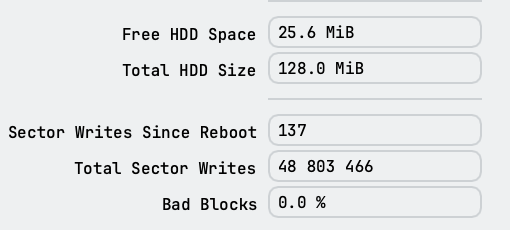
To free up the absolute maximum amount of space...
a netinstall also clears away certain temporary files left over from the migration between the two versions....

My poor RB1100Ahx that I use as my initial ginny pig has seen >1000 upgrades/downgrades and never netinstall'ed in it now ~10 year life.... So the beta freed up about 5-10MB, but still 50+MB of unaccounted for files. So it's a "light cleaning", so @rextended point is very valid still.... Now I was close needing netinstall even it had 128MB, but at this rate I have a few more beta->rc->stable->.... cycles before needing. And I don't netinstall it, to test upgrades work over time - without netinstall - since I have production things in hard to get places where a netinstall be costly.

That’s a welcome addition. Maybe IP Source Guard and Dynamic ARP Inspection will come next.

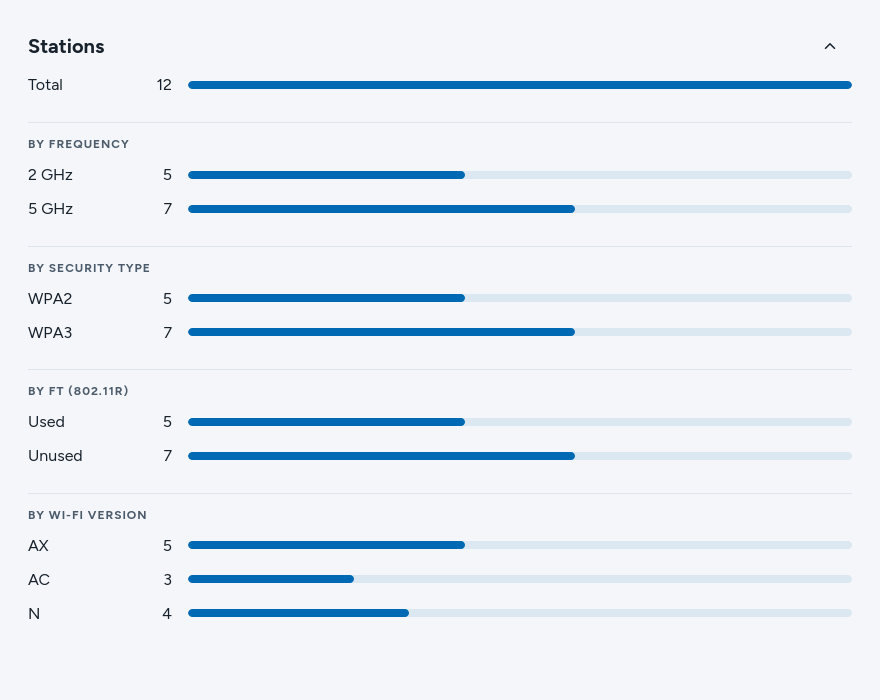
Something to make it feel better, instead of throwing everything together which makes everything too messy. You should split them into four different categories,

Stations

  • By Frequncy
  • By Used Security Type
  • By WiFi version
  • By FT

It helps split the information up, for example

Before:

After - Vertical Styling:

After - Horizontal Styling

I am no designer or UX expert just my two cents. Also short disclaimer these photos were made with claude, I don't typically use AI but I can't design anything to save my life.


Yes, it is correct, will update it shortly.

Nice ideas, thank you. Will pass it on to our designers.

So it is not considered suitable for RB4011?

RB4011 is powerful, you can use CMR there

Maybe it's a good idea to open separate topic regarding new feature so any suggestions from members are not lost here.

This is a very good build. What exact optimizations have been used for Intel i226 controller?

You can continue with the one that's 4 years old.
https://forum.mikrotik.com/t/mikrotik-devices-controller

I can't find out how to assign multiple device port-labels via CLI. It works via WinBox. Which logs

cmr device changed by tcp-msg(winbox):admin@192.x.x.x (/cmr device set cap@192.x.x.x identity=cap pairing-requirement=none port-labels=ether1:trunk,wifi1-virtual1:vlan-10)

But this is not valid CLI syntax. I have tried different variations. But all either show a syntax error or are applied wrongly.