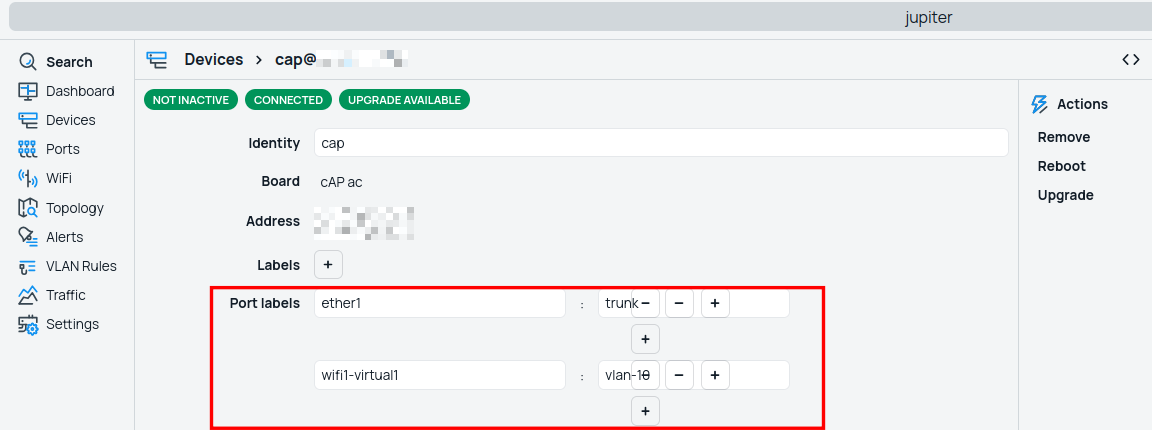
this works:
/cmr/device> set 1 port-labels="ether1:uplink,ether2:blabla,ether3:bla2"
this works:
/cmr/device> set 1 port-labels="ether1:uplink,ether2:blabla,ether3:bla2"
This was my first try. But it does not work properly. I've tried already plenty of things: array syntax, :toarray casting, and whatnot.
set port-labels="ether1:trunk,ether2:trunke" results in port-labels=ether1:,ether2:
then I thought of, when manual shows the label in quotes...
set port-labels=ether1:"trunk"
..then maybe that could work:
set port-labels="ether1:\"trunk\",ether2:\"trunke\""
but it gets even worse: port-labels=ether1:,trunk:,ether2:,trunke:
Then I hit F1 to see the synopis:
PortLabels ::= PortAndLabels[,PortLabels]
  PortAndLabels ::= PortLabels
    Port -- string value[:]
    Labels ::= Label[,Labels]
      Label -- string value
This confuses me. As I interpret it: the , is used as a separator for labels. Seems like you can assign multiple labels to a port. But the , is also used to separate port-label pairs. I don't get it.
Will see if bug or intended, and will get back to you about portlabels
This is already in the changelog of 7.25.
On 7.26 there will be a place to persist(on configuration) user defined variables ?
ive enabled CMR, and when i log in i can see:
ul parsing errors, some elements might not work.
are u awere of that?
I see that too , it pops-off in red bubble in lower corner of winbox4 on startup, but disappears quick enough I cannot full read it, but it does "parsing errors".
yes, CMR works on IPv6 networks only.
Yes, it is known, we will try to fix it until the stable version (hopefully).
What? Some have no IP6 at all.
I think this should read: Works in IPv6-only networks.
Works in IPv6-only networks too.
or
Works in IPv6-only networks only.
or
Works in any IP4, IP6, IP6 only, IP46 or IP64 combination if only devices could reach themselves on 54321 port.
CMR will work on the device with IPv6 address only. (IPv6 only).
In case both addresses are present (and reachable between controller and client), currently IPv4 communication would be preferred.
For CMR, i'm looking to use it as a real management tool, as i'm too lazy to use ansible, how do I allow some operation from CMR and disable some others ? As it's not a user I really wish i could allow or not the fact to change some sensitive info such as password, user, and service port. In order to secure router from know vulnerabilities.
What do you mean by IPv6? You can peer using IPv4.
there is option to push commands to controlled hosts:
[admin@main] /cmr/device> run-script labels=core script="/ip/serv/pr"
Columns: DEVICE, STATUS, OUTPUT
DEVICE          STATUS   OUTPUT
leaf1@10.0.0.8  success  Flags: D - DYNAMIC; X - DISABLED, I - INVALID; c - CONNECTION
                         Columns: NAME, PORT, PROTO, CERTIFICATE, VRF, MAX-SESSIONS, LOCAL
                          #     NAME            PORT  PROTO  CERTIFICATE  VRF   MA  LOCAL
                          0     ftp               21  tcp                 main  20
                          1     ssh               22  tcp                 main  20
                          2     telnet            23  tcp                 main  20
                          3     www               80  tcp                 main  20
                          4  X  www-ssl          443  tcp    none         main  20
                          5     reverse-proxy    443  tcp    none         main  20
                          6 D   btest           2000  tcp
                          7 D   discover        5678  udp
                          8     winbox          8291  tcp                 main  20
                          9     api             8728  tcp                 main  20
                         10     api-ssl         8729  tcp    none         main  20
                         11 D c ssld           36908  tcp                           10.0.0.8
leaf2@10.0.0.6  success  Flags: D - DYNAMIC; X - DISABLED, I - INVALID; c - CONNECTION
                         Columns: NAME, PORT, PROTO, CERTIFICATE, VRF, MAX-SESSIONS, LOCAL
                          #     NAME            PORT  PROTO  CERTIFICATE  VRF   MA  LOCAL
                          0     ftp               21  tcp                 main  20
                          1     ssh               22  tcp                 main  20
                          2     telnet            23  tcp                 main  20
                          3     www               80  tcp                 main  20
                          4  X  www-ssl          443  tcp    none         main  20
                          5     reverse-proxy    443  tcp    none         main  20
                          6 D   btest           2000  tcp
                          7 D   discover        5678  udp
                          8     winbox          8291  tcp                 main  20
                          9     api             8728  tcp                 main  20
                         10     api-ssl         8729  tcp    none         main  20
                         11 D c ssld           48478  tcp                           10.0.0.6
Kind of interesting thought. Someone able to compromise the cmr routeros unlocks god mode immediately. Not so cool.
There, I fixed it for you  :
:
Mikrotik seems to like not dislike double negations.