Thats quite handy information. Especially on CPU load.
I wonder if one/two of the cores was dedicated to that task thus the ~50%'ish cpu-load !! ?
Not bad I guess for a unit that’s only got a CPU and no dedicated switch chip. At least there is head room for other activities on the router such as firewall/actual routing/queues etc etc..
As for Mikrotik’s future switch range(CRS series) hopefully they will obtain switch chip’s that have macsec hardware offload options !!
Any examples how this works with VLAN-Interfaces and Bonding-Interfaces?
Lets say we have a Bonding eth1+eth2 as LAG0 and a 100 VLANs.
Is all we have to create 2 MACsec Inteface (eth1 and eth2) and thats it?
Or do we have it the cascading way: create MACsec-Interfaces → create the Bond with the MACsec-Interfaces
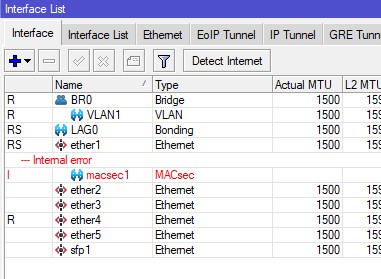
EDIT: Awesome “Internal Error”…
Thats a real-world Example: Bonding, VLANs and MACsec.
LAG0 consists of eth1, LAG0 is a Port of Bridge BR0. MACsec enabled on eth1.
There is no option to add macsec1 as Interface to the Bonding.
I think ( and probably wrong !! will need to test ). Based on some playing of other things a few nights ago
If you adjust the MTU of the ETH ( or adjust down the bridge ) by ~ +/- 64bytes, and take and try again, the error may go, as I dont think MTU gets corrected when you add it to bridges/vlans and may be the issue with the bonding.
Actually, default MACSEC Header is 32 Byte. Depending on cyphers used, it may go up to 160Byte in case of AES512.
Still, 64 Byte leaves you quite a bit of headroom
Hi golf0r.
Use ‘export’ rather than 'print to show configs. e.g /export file=MyFile.rsc and from the winbox / files you will see the MyFile.rsc which you can drag onto the windows desktop and open with a text editor
or use /export file=[filename] hide-sensitive command to not add in things pike passwords etc.
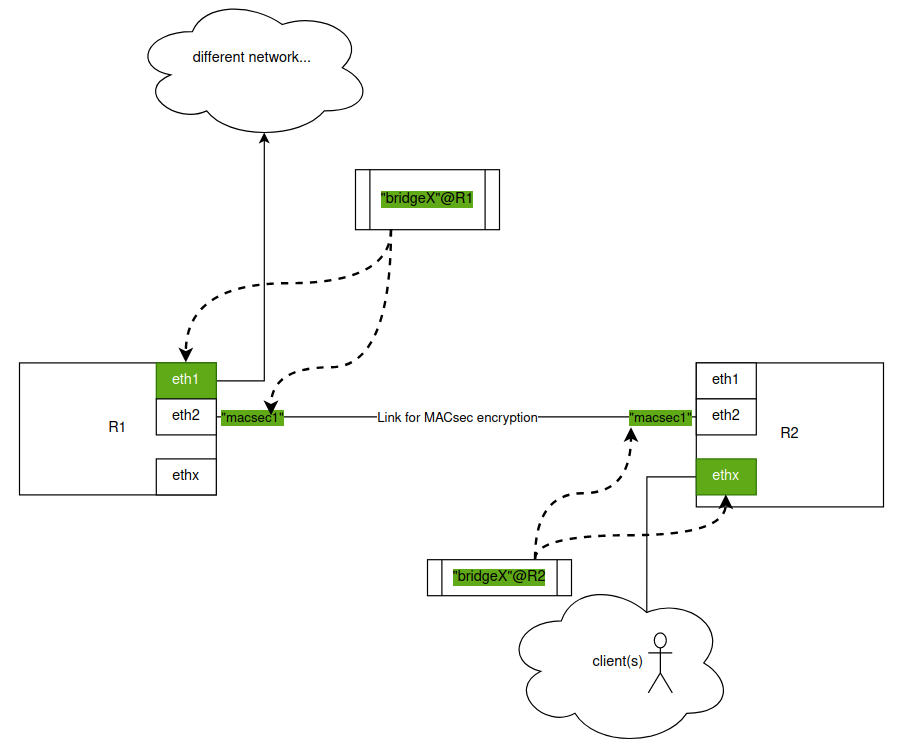
That said, you should make sure the Ethernet interface is NOT directly connected to a bridge, as MACSEC does not work like that. It requires the physical interface to itself, and then you would later bond the new UP’ed MACSEC1 interface to things like bridges/vlans etc.
I note your using a mAP2n, that does not have a lot of CPU so any macsec interface will be slow.
@killersoft:
the Ethernet interface used for MACsec is not connected to the bridge, I removed ether2 as port of the bridge.
@spippan:
when I am back home I will add macsec1 to the bridge and then try again.
My goal is to create a secure ethernet connection between my Router (CRS109-8G-1S-2HnD-IN) and a Wifi Accesspoint (mAP2nD), because the ethernet cabel goes outside of my house.
So on the Router side I would bridge the macsec interface with the internal ethernet ports and wifi and on the Accesspoint side I would bridge macsec interface only with wifi (now ether1 is also bridged until config runs)
sorry my english is not the best.
I used macsec on both ccr1072 an ist works. i got the status invalid if i had no link, negotiating if the link ist up, but MACsec doesn`t work and open-encrypted if all looks fine.
Now my question…
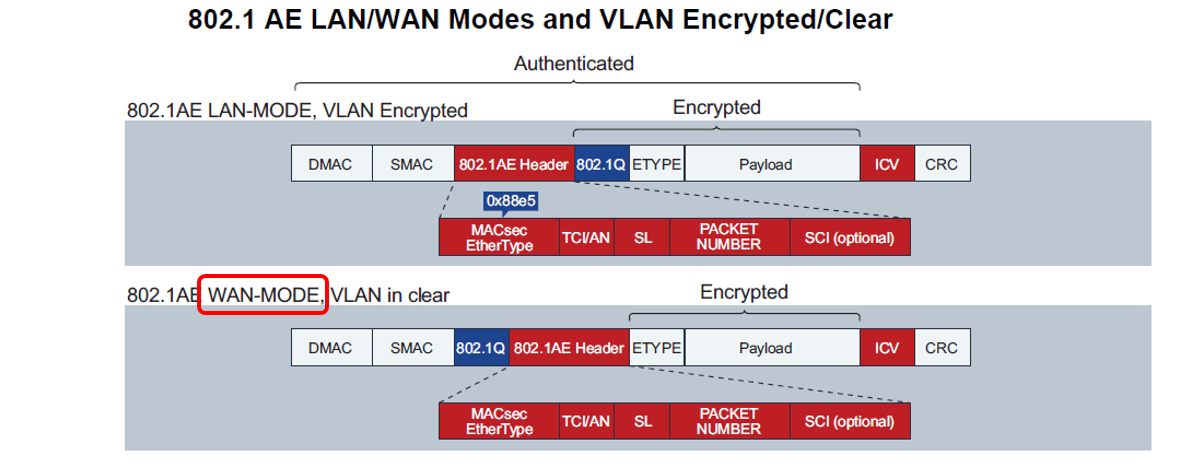
who can i see what kind of MACSec i have configure… MACSec 802.1Q Tag is encrypted oder 802.1Q Tag is clear. I think the first one calls also WAN MACSec and the other LAN MACSec.
my status ist open-encrypted, so i think i actually use WAN MACSec. What must i do if i will use LAN MACSec
it is very difficult to quite understand your problem here exactly.
could you paste your config. here and maybe a schematic drawing what you WOULD like to achieve?
Hallo ja spreche besser deutsch als englisch... aber das muss ja auch klappen und man muss seine Wohlfühlzone auch mal verlassen...
Anbei die Konfiguration meiner beiden Mikrotik Router, die MACSec miteinander sprechen.
Ich arbeite bei einem Provider und die Kunden fragen vermehrt an und wollen MACSec über unser Netz übertragen und fragen nach einer Transparenz für dieses Protokoll an. Wir als Provider stellen den Kunden "normale" L2 Switche zur Verfügung und die Kunden schließen an den Kundenport Ihre CPEn an, die dann MACSec übertragen von Punkt A nach Punkt B.
Wir haben um dies zu simulieren zwei Mikrotik Router konfiguriert und MACSec aktiviert. Dieses funktioniert auch und eine Verbindung kommt zu Stande. Im Status wird mir angezeigt "open-encrypted". Ich habe eine png Datei mit angehangen wo unterschieden wird zwischen WAN MACSec und LAN MACSec. Unsere Kunden möchten LAN MACSec über unser Netz übertragen, sprich das VLAN ist Encryprted.
Da mein Status auf den Mikrotik Routern "open-encrypted" anzeigt vermute ich, das meine Konfiguration LAN MACSec konform. Ich wollte dieses nun bestärtigt wissen und gleichzeitig nachfragen was ich konfigurieren müsste um den WAN Mode zu bekommen.
okay. also natively german speaking, but i will stick to english furthermore.
thanks for clearing up what your setup is made of.
to your question regarding "WAN mode" i guess it could be possible via switch configuration beforehand. so setting the PVID via the bridge menu for the macsec interface
so setting up a macsec interface (e.g. parent-interface ether1), adding the macsec(!) interface to a bridge and then setting the PVID in bridge > ports to the desired untagged VLAN
the bridge therefor has to be vlan-aware (vlan-filtering enabled)
Hi all.
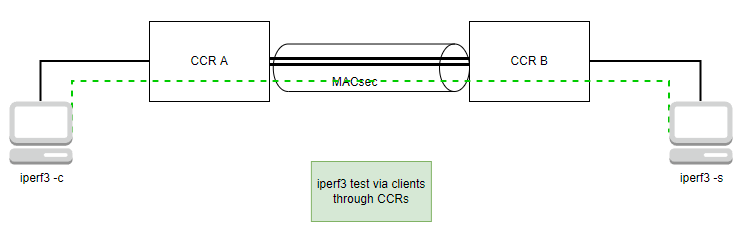
Same results, but ~28/33% CPU on 25Gbps, with CCR2216 (BW tool -UDP-rOS 7.7).
~450 Mbps Vs ~25Gbps. I can’t figure out how to use MACSec in production enviroment.
please consider the tests for that being done with 2 clients on each end and NOT with bandwidth test inside the 2 MACsec peers
MACsec is VERY cpu intense in relation to normal forwarding
and as long as there are no hw-offload options enabled in rOS7 with supported (marvell) switch chips, this will always be done in cpu (unlike cisco does it with dedicated ASICs)
These are 2 different beasts.
Lan-macsec is point-to-point topology.
WAN-macsec is point-to-multipoint ( multihop ) topology, it's need more components to work:
hub topology management ( peer2peer, star ),
CIA triad (confidentiality, integrity and availability) components,
Just like IPSEC infrastructure has: replay protection, key session/exchange, etc. (example: Strongswan - its an infrastructure not just a simple ipsec-tunnel ).
( The whole process is very similiar to a Switch 802.1X on LAN port where PC has to authenticate to get access to the network, the access request arrive to the NAC server where the Switch receives all the parameters what to do with LAN port: VLAN, IP-ADDRESS, ... ).
Linux has some basic stuff for that: macsec + wpa_supplicant, but the rest of the list is missing for the WAN-macsec.
Anyone got a dhcp-client up and running on a macsec secured LAN-interface?
I always get DHCP offers on the “remote” bridge (see it in the logs) but it never get’s the address.
EDIT: It’s all my fault! I missed setting the MTU of both macsec-interfaces to 1500. Shame on me!