802.1AE MACsec Progress or Examples ?

Hi, just wondering if there is any formal documentation for Mikrotik’s 802.1AE (AKA MACsec) in RoS v7.
Given its been in RoS v7 at least since its early beta release I was hoping to see some doco on it by now.
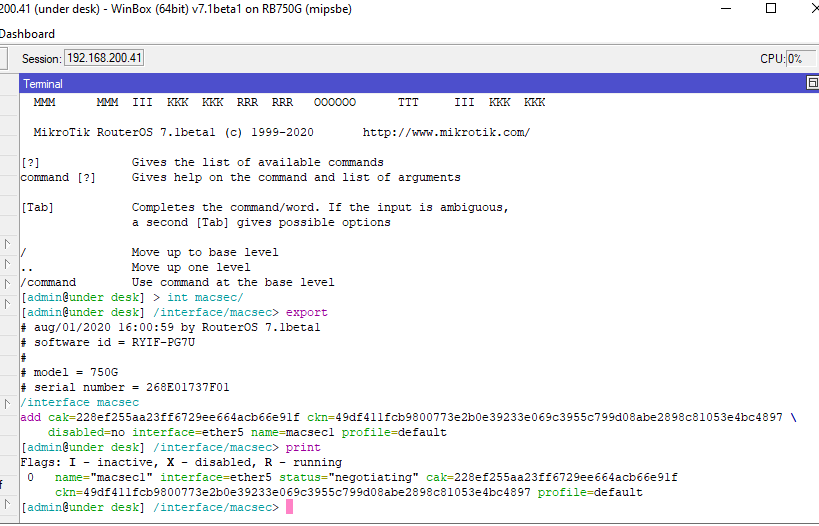
As of yet I have not got it working between devices( Get as far as it ‘negotiating’, and can see specific 802.1AE traffic via torch).
Is there a particular hardware requirement for it to work, or is it going to be a kernel feature no matter the HW ?

macsec1.png

/interface macsec
add cak=228ef255aa23ff6729ee664acb66e91f ckn=49df411fcb9800773e2b0e39233e069c3955c799d08abe2898c81053e4bc4897 \
    disabled=no interface=ether5 name=macsec1 profile=default
[admin@under desk] /interface/macsec> print
Flags: I - inactive, X - disabled, R - running 
 0   name="macsec1" interface=ether5 status="negotiating" cak=228ef255aa23ff6729ee664acb66e91f 
     ckn=49df411fcb9800773e2b0e39233e069c3955c799d08abe2898c81053e4bc4897 profile=default 
[admin@under desk] /interface/macsec>

Cheers

https://developers.redhat.com/blog/2016/10/14/macsec-a-different-solution-to-encrypt-network-traffic/

https://en.wikipedia.org/wiki/IEEE_802.1AE

Bump..
Any news on this front Mikrotik I have tried with 7.1beta4 and still cannot get MACSEC up???

another bump.
Really interested in MACSEC options.

Would this eventually also available on SWos?

same here … status hangs on “negotiating”
rOSv71.rc4 on both end devices

Device 1 = CRS109-8G-1S-2HnD
Device 2 = RB951Ui-2HnD

config on BOTH devices is identical

/interface macsec profile
add name=macsec-01 server-priority=5
/interface macsec
add ckn=766469656b336a356b733832336b3575 disabled=no interface=ether3-PtP_2_CRS name=S2S-L2-MACsec01 profile=macsec-01

this is what i see on BOTH devices (which are directly connected on ether3 each with a single ethernet cable)

 [spippan@MikroTik951Ui-RRZ-01] /interface/macsec> print int 1
Flags: I - inactive, X - disabled, R - running 
 0   name="S2S-L2-MACsec01" interface=ether3-PtP_2_CRS status="negotiating" cak=4ab8ab80a1730f9fcca040eabfbfe6ed 
     ckn=766469656b336a356b733832336b3575 profile=macsec-01 
-- [Q quit|D dump|C-z pause]

I have the same issues with 7.1rc5 when trying to establish a MACsec link between two CRS326-24G-2S+ devices.

The process hangs on:

[admin@MikroTik] /interface/macsec> print
Flags: I - inactive, X - disabled, R - running 
 0   name="macsec-test" interface=ether9 status="negotiating" cak=09db3ef1000000000000000000000000 ckn=e9ac profile=default

Is there any documentation or information available on how to setup/test MACsec?
Are there any log filters or outputs available to further track down those issues?
Has this feature been tested at Microtik site and should it work in general?

Please Mikrotik, can you add some comments on where MACSEC is currently at..
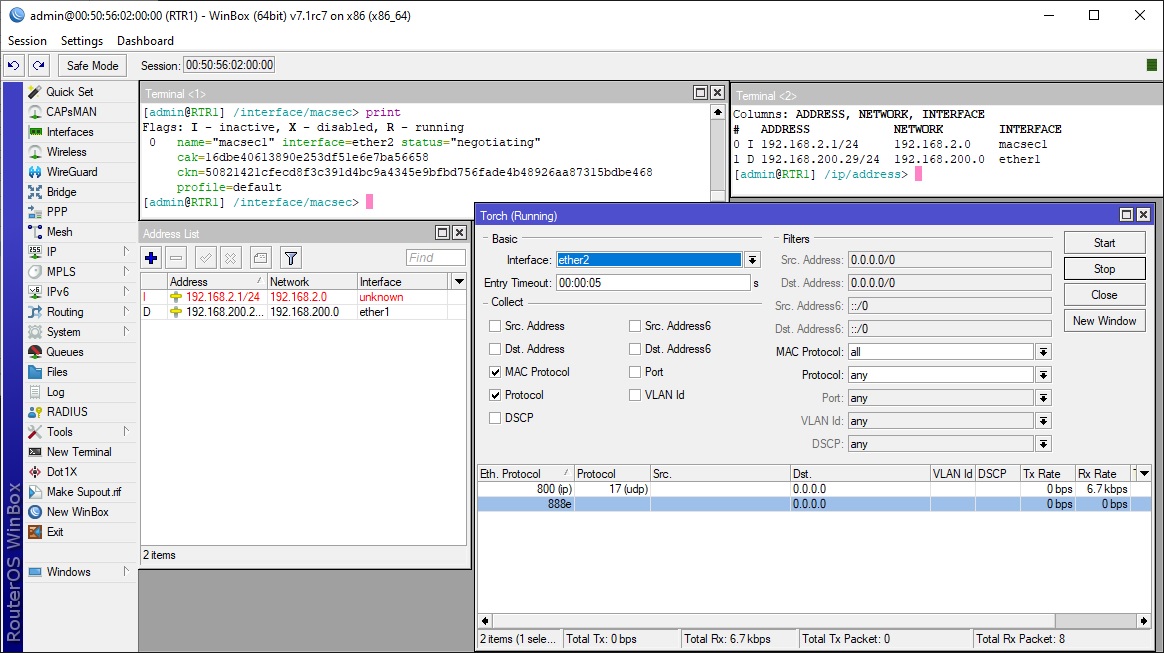
Now trying with 7.1rc7 using x86… All I see is ether-type traffic 888e on the interface I configured it on between 2x VM’s.
I can add an IP against the ‘macsec1’ interface using the command line( not winbox ) too,.

mikrotik macsec rc7.jpg

bump…
I’ve Tried to configure it on latest routeros 7.2 but it is negotiating only. Any documentation how to configure macsec on router v7.2 ?

I have not seen Mikrotik do anything in this area.!!!

The MACSEC option has been there in the console since the very first v7 RC public release back in 2019. Its 2022 and NOTHING, yet > interface/macsec is there hidden in place sight of the console terminal…


I’ve tried today to setup the MACsec between a 2004 and 1016, both with 7.3.1 that we have in LAB. We need to encrypt an internal gigabit link for a client.
When the MACsec is coming up, the 1016 is rebooting, till the interface is disabled.

With WireGuard the throughput is something less than 1G for UDP and 500M for TCP in both directions.

Noted, will take a look soon.

If you need wirespeed macsec, I suggest getting yourselves a couple of second hand Cisco 3850’s with an appropriate NIM module each.( config e.g https://community.cisco.com/t5/network-security/macsec-on-isr-4k-routers-and-switches-3850-interoperability/td-p/3368918 )

This appears to be just not done or I am missing something (which is perfectly feasible). 7.4 has the same behavior, stuck in “negotiating”.

nb


As I assume I will see a working macsec shortly before I die, I used wireguard (eth — eth) and VXLAN (bridge – wg — wg — bridge) now to get my external port towards my hAPac in the garden quite secure.

But I still hope for macsec! :winking_face_with_tongue:

this is something which frustrates me …
still have to work this around with a wireguard interconnect and vxlan bridged to PHY port to get a decent throughput
but MACsec would kill this overhead finally

please MT, do smth about this finally
this could be a killer feature against some way overpriced cisco hardware!

Agreed, I’d love to see hardware MACSEC available. Especially for the broadcast video world where it is often required.

so far we have it in 7.6beta8 working :wink:

I just saw that!

I know that some of the Marvell Prestera chips support MACSEC in hardware - would love to hear from MikroTik if there are plans to put MACSEC into the chip.

I need to add MACSEC in my v7 lab and play with it some.

Happy to report MACSEC on v7.6 beta 10 on CHR is now working and passing IP…
Excellent work…

Just make sure you use the same CAK / CKN on both ends and happy times ahead..
Now for VLAN’s over MACSEC… hmmm

Here with outside wAPac connected to hAPac MACSEC on v7.6 beta 10 works flawlessly. Even with PoE turned off and on again.

I’m so happy!

Could you give us some information regarding performance & CPU load?

Today I’ve tested MACsec between two CCR2004 in LAB. The interface is working without any problem.

These are the results on a 25G link between two sfp28 interfaces. The CCRs were reset to defaults with no other settings set but the ip addresses and the macsec interface.
ping-min-avg-max: 88us / 101us / 263us
jitter-min-avg-max: 0s / 7us / 147us
loss: 0% (0/200)
tcp-download: 334Mbps local-cpu-load:52%
tcp-upload: 336Mbps local-cpu-load:52% remote-cpu-load:52%
udp-download: 477Mbps local-cpu-load:50% remote-cpu-load:65%
udp-upload: 483Mbps local-cpu-load:65% remote-cpu-load:50%