Hi, my goal is to connect a device to a WiFi (without password, any kind of internet autorization, this is just a LAN environment, maximum security) and redirect device to an http LAN link, make as much as possible easy to use.
So, in short, I connect my phone to WiFi, automatically browser starts and I see to my phone the Node red Dashboard. Is it possible?
Please no need of radious servers and so on, the easist poor solution, if exists, thank you a lot 
It is something the connecting device needs to do. Often modern devices can do that, as a workaround for WiFi networks that require acceptance of ToS etc.
Search for “captive portal” and “captive portal detection” etc.
Isn’t this something hotspot can do?
I don’t use it myself, but this redirecting to URL looks supported:
https://help.mikrotik.com/docs/display/ROS/Hotspot+customisation
For iOS, there may some additional step/complexity since I recall iOS looks for some file with captive portals.
Yes, that should work.
But it is important to know: it only works when the client device does that “captive portal detection” and you can catch and redirect it.
There are “standards” like sending a URL via DHCP for the login page (which you could set to the wanted dashboard) but as far as I know, nobody supports it.
Everyone is using the “trial and error” method as described.
Thanks for answers, I see the argument it’s quite complex and there isn’t a simple settings.
First I would try the DHCP parameter, where can I set it? Options? May you pease give me simplu the command line for redirect by DHCP? Reading ton of documentation sometime is a useless pain. Thanks
Hotspot: does it workswith a very simple configuration? Just open a page. Internet may be active to overcome the phone error “internet not working on this wifi, would you like to say?”, so the philosophy “open that page only if internet not working” seams not the proper way.
It’s NOT some Wi-Fi standard to do anything after connected. It’s up the devices, which only go some browser via a captive portal detection logic. So how “easy” kinda depends on how many different types of devices involved. Maybe someone else has an instant answer… but I just don’t think you escape reading something and setting up certificates, adding files, etc. in any approach here…
Thanks for answering, ok I got, so I need to block internet and make it access to a page, press astipid button to allow internet and so I can redirect to the desidered page.
There is anything ready without need of external devices?
Another idea:
Use a very simple URL in browser, for example me.lan, which actually will open http://192.168.0.100:1880/ui
There are solutions? Thanks
You can add an option in DHCP server: number 114 with string value of your URL (single quotes).
Then put that in an option set, and attach that option set to your DHCP server.
That would work according to RFC 8910, but in practice it will not work because nobody ever requests that option.
But it would be the clean way that would not require tricks with hotspot and redirecting…
Thanks for help! I have no idea what can be “single quotes”, please explain me, thanks. Is it correct to put 114 like this?

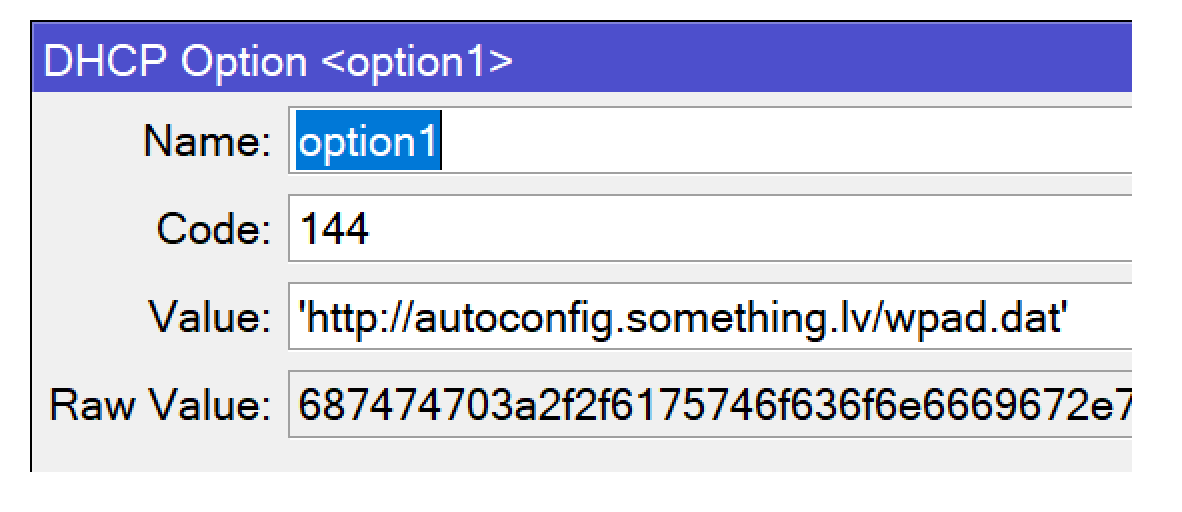
raw value appear automatically after you sucesfull ingress a value
https://wiki.mikrotik.com/wiki/Manual:IP/DHCP_Server#Example
This is not for wpad.dat!
And the option number is 114 not 144.
The only useful thing in that post is that it shows the single quotes that I already mentioned but that Giovanni had omitted.
Apple seems to support it. But some rules on using HTTPS and the MIME content (e.g. JSON) re option 114:
https://developer.apple.com/news/?id=q78sq5rv
FWIW…learn something new everyday. RFC-8910 had an interesting side-note:
Networks with no captive portals may explicitly indicate this condition by using this option with the IANA-assigned URI for this purpose. Clients observing the URI value > '> urn:ietf:params:capport:unrestricted> ’ > may forego time-consuming forms of captive portal detection.
Not helpful to OP’s case, but filing that away…
/ip dhcp-server option add code=114 name=no-captive-portal value="'urn:ietf:params:capport:unrestricted'"
/ip dhcp-server option sets add name=default options=no-captive-portal
/ip dhcp-server set [find] dhcp-option-set=default
That is a nice one! Now, we have to find which devices actually use that (I mean the special URI)
I see that a Samsung phone with Android 11 actually does ask for option 114, but when I set it to some valid URL it does not show that page in Chrome by default.
Probably when using that config it still does the trial-and-error determination of the portal status and skips it when it detects it has working internet…
So to actually use that to present a fixed page one probably has to do it on an isolated network. Did you already try that, Giovanni?
Temporarily add “dhcp” as a logging topic and watch the log to see if the phone is requesting the option and your URL is passed back.
I think the URL needs in option 114 needs to respond with a MIME type of application/captive+json with some JSON that contains something like:
{
    "captive": true,
    "user-portal-url": "https://example.org/portal.html",
    "venue-info-url": "https://example.org/info.html"
}
And I’d imagine the URLs inside the JSON have to be HTTPS with valid certs for a modern smartphone otherwise likely be ignored.
e.g. the URL in option 114 is an API, not just a URL to redirect. See the related RFC-8908:
https://datatracker.ietf.org/doc/html/rfc8908
Thank you, I did it, tested on windows and adroid, noone opens the web page after getting IP address. Unfortunately this solution is useless.
I have 2 roads, hotspot but it doesn’t seam easy to do, I’m waiting if somebody knows a simple way to activate it, just with the purpose to redirect.
But I feel the easiest way is to create a short URL, hopefully somehow the DNS may help me not only translating name to IP but also add port and path, possible? I’ve opened a specific topic for that to don’t go off topic here
FWIW, there is no easy solution to what you’re trying to do. You’re fighting many internet standards.
Bummer… why do they make those things so complicated? I had not studied it in detail and assumed that the URL in the DHCP option would simply point to the portal page.
And in fact there was an earlier standard where it worked that way (RFC-7710) so I blindly assumed it would still work.
However, the older standard used a different option number so there is little hope for clients that just autodetect if the returned data is a webpage or a JSON which they need to further interpret.
Don’t assume that every crazy idea you think of is always possible to implement, either with unlimited resources or within the limits of RouterOS!
In fact, the kind of thing you are trying to do here (present an unsolicited page to anyone connecting to the network) is widely frowned upon, and in fact lots of clients may be actively preventing that. Because it could easily be abused.
Sure I understand that you do not have bad intentions and are just trying to implement some nifty gadget, but general OS and browser software makers mainly have to think about the criminals and other malvolents.
We see many request here like “how can I redirect visitors of https://youtube.com/ to my webpage http://youarenotallowedtodothat.com/” but the simple answer is: that cannot be done, and for good reasons.
You couldn’t write better how the facts are… 
@ Giovanni
So, in short, I connect my phone to WiFi, > automatically browser starts > and I see to my phone the Node red Dashboard. Is it possible?
-
do you expect your wifi router to remotely execute your phone browser?
-
i am wondering, what is the point you want to eliminate the captive portal just to replace it with something similar?