Hallo,
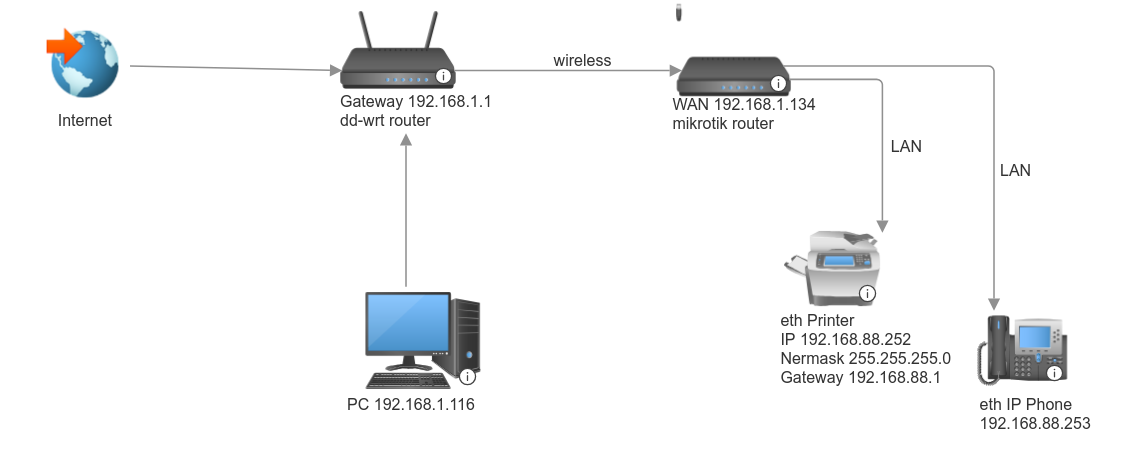
my case is similar to the topic creator, but not the same. The main difference is that the second router is wirelessly connected to the first.
My printer IP is 192.168.88.252 and it is behind a MikroTik router.
I want to print from different PCs which are behind another (ISP supplied) router with IP address network of 192.168.1.0/24).
When I ping from 192.168.1.116 to 192.168.88.1 , I get answer: “…icmp_seq=1 Packet filtered”
If I add a route with “ip add route 192.168.88.1 via 192.168.1.134”, the ping is now OK, but to 192.168.88.252 is still “Packet filtered”
The main consideration, following traffic flow, is how does your dd-wrt router know that any traffic headed for 192.168.88.x should be routed through 192.168.1.134, vice out the WAN port to the internet?? Once you are able to set a static route on the dd-wrt, I am sure your firewall rules will work out with some modification, in interface is NOT the bridge!!
The second rule is generally not required unless you want the printer to be able to originate traffic to the dd-wrt user.
Note return traffic will occur automatically and routing is not an issue as the MT knows about the 192.168.1.0 subnet.
As in the referenced thread, the “real” target gets a sort of “alias” in the “main” network.
But it all depends on the rest of configuration, in a “normal” setup of the Mikrotik the 192.168.1.0 would probably be WAN and the 192.168.88.0 the LAN, so likely there will be the need for some specific firewall rule to allow/accept in the forward chain the traffic to and from the printer.
Ok, quickly tested in a fairly default configuration in GNS3:
[admin@MikroTik] >> export
# 2025-02-21 19:26:16 by RouterOS 7.15.3
# software id =
#
/interface bridge
add name=bridge
/interface ethernet
set [ find default-name=ether1 ] disable-running-check=no
set [ find default-name=ether2 ] disable-running-check=no
set [ find default-name=ether3 ] disable-running-check=no
set [ find default-name=ether4 ] disable-running-check=no
set [ find default-name=ether5 ] disable-running-check=no
set [ find default-name=ether6 ] disable-running-check=no
set [ find default-name=ether7 ] disable-running-check=no
set [ find default-name=ether8 ] disable-running-check=no
/interface list
add comment=defconf name=WAN
add comment=defconf name=LAN
/ip pool
add name=dhcp_pool0 ranges=192.168.88.10-192.168.88.254
/port
set 0 name=serial0
/interface bridge port
add bridge=bridge interface=ether2
add bridge=bridge interface=ether3
add bridge=bridge interface=ether4
add bridge=bridge interface=ether5
/interface list member
add comment=defconf interface=bridge list=LAN
add comment=defconf interface=ether1 list=WAN
/ip address
add address=192.168.1.134/24 interface=ether1 network=192.168.1.0
add address=192.168.1.252/24 interface=ether1 network=192.168.1.0
add address=192.168.88.1/24 interface=bridge network=192.168.88.0
/ip dhcp-client
add interface=ether1
/ip dhcp-server
add address-pool=dhcp_pool0 interface=bridge name=dhcp1 relay=192.168.88.1
/ip dhcp-server network
add address=192.168.88.0/24 dns-server=192.168.88.1 gateway=192.168.88.1
/ip firewall filter
add action=accept chain=input comment=\
    "defconf: accept established,related,untracked" connection-state=\
    established,related,untracked
add action=drop chain=input comment="defconf: drop invalid" connection-state=\
    invalid
add action=accept chain=input comment="defconf: accept ICMP" protocol=icmp
add action=accept chain=input comment=\
    "defconf: accept to local loopback (for CAPsMAN)" dst-address=127.0.0.1
add action=drop chain=input comment="defconf: drop all not coming from LAN" \
    in-interface-list=!LAN
add action=accept chain=forward comment="defconf: accept in ipsec policy" \
    ipsec-policy=in,ipsec
add action=accept chain=forward comment="defconf: accept out ipsec policy" \
    ipsec-policy=out,ipsec
add action=fasttrack-connection chain=forward comment="defconf: fasttrack" \
    connection-state=established,related hw-offload=yes
add action=accept chain=forward comment=\
    "defconf: accept established,related, untracked" connection-state=\
    established,related,untracked
add action=drop chain=forward comment="defconf: drop invalid" \
    connection-state=invalid
add action=drop chain=forward comment=\
    "defconf: drop all from WAN not DSTNATed" connection-nat-state=!dstnat \
    connection-state=new in-interface-list=WAN
/ip firewall nat
add action=netmap chain=dstnat dst-address=192.168.1.252 to-addresses=\
    192.168.88.252
add action=masquerade chain=srcnat comment="defconf: masquerade" \
    ipsec-policy=out,none out-interface-list=WAN
/system clock
set time-zone-name=Europe/Rome
/system note
set show-at-login=no
/tool mac-server
set allowed-interface-list=LAN
/tool mac-server mac-winbox
set allowed-interface-list=LAN
and it seemingly “goes through” the default firewall, so a specific rule is not needed in this case.
I fail to see the relevance of 192.168.1.252 ??
The IP address of the MT router on the ISP LAN, ( the WANIP of the MT Router) is 192.168.1.134
The IP address of the device on the ISP LAN wishing access to the pinter on the MT LAN is 192.168.1.116.
Even if you did some funky netmap ON THE MT router associating the printer IP 192.168.88.252 to the IP address 192.168.1.252,
How are you proposing the User on the ISP LAN reach the printer.
a. the dd-wrt router has no knowledge of the existence of the 192.168.88.0/24 subnet ??
b. the dd-wrt router has no knowledge of 192.168.1.252 on its network and it certainly would not send dst traffic for that address to 192.168.1.134??
The right approach I was thinking of was a simple static route on the dd-wrt router. add dst-address=192.168.88.0/24 gateway=192.168.1.134
DONE!
Now the traffic will land at the MT router coming in on the WAN side.
Simple forward chain rule should sufffice. add chain=forward action=accept comment=“incoming WAN to printer” in-interface-list=WAN src-address=192.168.1.114 dst-address=192.168.88.252
+++++++++++++++++
Put another way, I do not believe the request is possible without some change of the config on the ISP router side.
The WAN port of the Mikrotik has BOTH the IP address 192.168.1.134 AND the 192.168.1.252.
Being on the same network the device with 192.168.1.116 can connect to 192.168.1.252 just fine, no routing involved, everything remains on the LAN side of the ISP router.
A connection with destination 192.168.1.252 is dst-natted to 192.168.88.252 (which is reachable on the LAN network of the Mikrotik).
The PC on 192.168.1.116 knows nothing of 192.168.88.252, on that PC the printer is installed as 192.168.1.252.
Well normally there is two ways, I am not sure why you are being so obtuse?
First the DHCP server on the dd-wrt router assigns LANIPs to mac addresses upon request, isnt this the most standard way?
Second, the OP may, if possible assign a static LANIP address to the mac address of the MT router (WLAN mac most likely).
In either case, I am not sure how the ISP router will be able to associate both addresses to the same WLAN port leading to the MT router (over wifi). My understanding is that one mac address is associated with one IP. My networking is weak so dont understand two IPs associated with one mac address and more specifically how the ISP router will handle that.
So as I thought all the OP has to do is create the static route.
…
…
Then create the firewall rule. add chain=forward action=accept comment=“ISP LAN user to printer” in-interface-list=WAN src-address=192.168.1.116 dst-address=192.168.88.252
Very likely there are more than two ways, I understand how the one(s) you suggest is/are the right one(s) and any other one not proposed by you is wrong, by definition.
Standard or non-standard matters little, whatever works, if it works, it works, and - specifically - I don’t think that the traffic between the PC and a printer needs to be optimized for efficiency, speed or bandwidth.
We don’t know if adding a route/accessing the ISP router is possible, and I have no idea if what works on “normal” ether would work on the real setup because of the wireless link.
But - for the sake of the reasoning - if it would be necessary to create a second bridge on the Mikrotik (even if it is “wrong”, it has no hardware offload, etc., etc.) I wouldn’t see it as a problem.
I see much more as possible issues (it depends on the printer and its drivers) if there are a sh*tload of strange protocols going on the network link, some network printers (and their drivers) are often too smart for their own good.
I am still waiting for you to provide a viable solution. I dont care how its done as the OP may feel more comfortable to do it one way or the other.
However, I still dont understand how you are going to solve the traffic dilemma.
How is a second bridge going to help?
How is netmap going to help?
How are you going to get the ISP router to know about another LANIP associated with the MT router.
If I dont understand these basics, how do you expect the OP to get it?
Please provide clearer and full details and stop deflecting to other things…focus on the issue at hand.
Yeah that is a default rule and once one starts making changes to the config that rule should be dumped for something much clearer with a bit more security.
REMOVE: add action=drop chain=forward comment=
“defconf: drop all from WAN not DSTNATed” connection-nat-state=!dstnat
connection-state=new in-interface-list=WAN
REPLACE WITH: add chain=forward action=accept comment=“internet traffic” in-interface-list=LAN out-interface-list=WAN
add chain=forward action=accept comment=“port forwarding” connection-nat-state=dstnat disabled=yes { enable if required or remove.
************ add additional accept rules here like a shared printer across vlans etc.***********
add chain=forward action=accept comment=“ISP user to printer” in-interface=ether1 src-address=192.168.1.116 dst-address=192.168.88.252
add chain=forward action=drop comment=“drop all else”
The idea has been posted, including its GNS3 CHR test configuration.
So you are waiting for something else, whatever it is.
The OP problem has been solved with the “right” added route solution, if I were you I wouldn’t wait for something that will never come.
An INCOMPLETE IDEA was posted, how does your non-solution address the ISP router talking to the MT router over both 192.168.1.134 AND 192.168.1.252, and doing so over a WLAN connection?
Either complete the idea or remove it as a bogus idea. Nothing worse then leading people astray, be it be or anyone else.

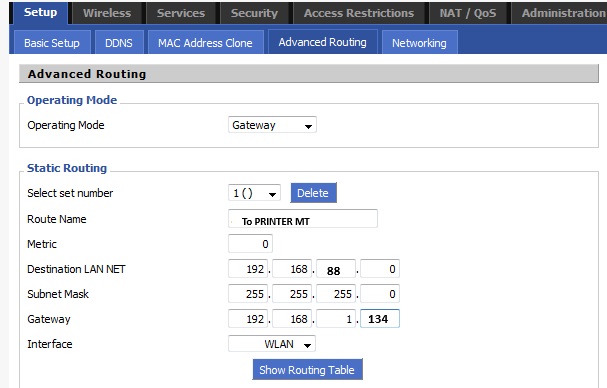
 with the “right” added route solution, if I were you I wouldn’t wait for something that will never come.