Hi everyone,
I purchased an ATL 5G R16 device with a physical SIM for my mountain house.
Current firmware version: 7.20.6 (2025-Dec-04 14:00).
Overall, it’s a great device… when it works.
After configuring the antenna in Passthrough mode, everything worked perfectly: I was reaching download speeds of about 600 Mbps.
However, after about one week, without any apparent reason, the device completely stopped showing any download traffic — as if the network interface had stopped working.
At that point, I updated all three firmware components, and magically everything started working again.
Now, after another week, the same issue has happened: the connection is basically dead again.
I haven’t gone back to the mountain house yet, but next time I go I really want to find a permanent solution.
I would really appreciate your help to understand:
What could be causing this issue?
Has this happened to anyone else?
Is there a way to access system logs that could explain what’s going wrong?
Without logs, it’s impossible to properly troubleshoot and prevent this in the future.
I don’t want to “fix” the problem every time just by updating the firmware.
Maybe the issue is already fixed in a newer version, but this would already be the second time I need to update firmware because of the same behavior.
One more detail:
Once there was a power outage, but I honestly doubt this is the cause, because once power is restored everything should normally start working again.
And what about the "3" firmwares?
The RouterBOARD only has one, excluding the factory-installed firmware.
Then there's the RG520F-EU module, which has its own firmware.
You just had to reboot it after some minutes down...
At the same time, it may have left and never returned...
Buy a UPS that sends an alert over the Internet when the power goes out, so you know if it's gone before everything shuts down because the batteries are dead.
Yes, go locally and connect the RouterBOARD with WinBox...
If is never powered off, the logs (if any) are there.
Your provider, like everyone else in the world, doesn't like blocked connections; they consider them parasitic connections.
It's common for those who install "fixed" connections to find them blocked after a while.
Every now and then you have to change connected cell and/or interrupt your connection,
not to mention the daily or monthly data limit.
Even "unlimited" plans have limits, and anyone who exploits them like a leech is blocked.
LTE connections aren't designed to replace fiber optics at home...
2) I will not lose my saved passthrough configuration, correct?
3) If I unplug the Ethernet cable that powers the device (PoE) and turn it off, that is not a real reset, correct?
4) As a test to understand whether this is an operator-related issue:
Does it make sense to force 4G only (which usually has softer policies) for 1–2 weeks and see if the same issue happens?
(This was suggested by GPT after reading your replies.)
5) Does this solution suggested by GPT make sense to you?
A minimal setup like this:
Periodic LTE reset script
Once per day (at night):
They would have made "the others" think too if specified before...
I'm sorry, but after reading GPT too many times in the text, I'm leaving. I am not an Artificial Deficiency Corrector.
Oh, one last thing... reset is reset, and reboot is reboot, is not the same thing.
and if I "simply" unplug the power cord and plug it back in, the device restarts, not resets.
You usually need a delay of a few seconds after disabling the LTE and before enabling It.
#3 Is a hardware reboot (power cycle) which Is actually more "powerful" than a software reboot, but better to avoid power cycling devices if not needed.
MOST people using this kind of devices use scripts that disable/enable the LTE interface, usually daily, but some times more often to workaround similar problems.
@jaclaz I have several hundreds of LTE devices with Iliad and only one with Vodafone, no one of them crashes or freezes (ignoring power side issues, that's another story)...
What do I do? They all still have RouterOS v6...
When I'm forced to use v7 we'll see...
I'm sorry if the reference to GPT bothered you, it was absolutely not my intention.
I only use it as support because I don't have a great experience on this MikroTik/LTE world, but I give much more value to the real experience of those who work with these devices every day.
Your answers were useful to me, so thank you very much. I would just like to clarify what, in your opinion, is the right approach to be adopted definitively.
The solution you suggest is to stay on RouterOS v6 (therefore a downgrade), why can v7 have these behaviors on the LTE side?
Otherwise, to manage the LTE modem lock is it better to use a real LTE reset or a disable/enable of the LTE interface with delay?
Also, I ask you one last piece of advice, what is the correct way to enable logging to be able to understand what happens before TX/RX goes to zero, especially on a remote device?
I spent more than 350 euros on this device and I'm a little frustrated that I have these problems, so I would really like to set it up in the most stable and correct way possible.
Thanks again for the time you are dedicating to me.
What rextended forgot to say explicitly is that the devices he manages are (were) actually "born" in v6 times.
Your ATL 5G R16 might (or might not) be downgradable to v6, generally speaking you cannot downgrade any Mikrotik devices to a version earlier than the "factory version".
If your device came with (say) version 7.4, there is no way you can downgrade it to anything earlier than 7.4.
Why not just setup the watchdog on this device? You can set it to ping and address like Google 8.8.8.8, if it fails after so many attempts it will just reboot the device. You can also have it monitor the hardware as well if it detects it's frozen for some reason again it will reboot the device. I've done this with my Chateau 5g as every now and again the modem will crash in it so it loses connectivity. The modem in these is like a complete separate little computer running it's own firmware to manage the lte / 5g connection. I've not had to intervene with mine since setting up the watchdog on it, it's always managed to recover of its own accord.
The reboot of the device implies in most cases the blanking of the log.
If disabling and re-enabling the LTE interface is enough to re-establish the connection, it should be preferred (i.e. use netwatch as opposed to watchdog) as the log will remain available (allowing among other things to monitor how many of these resets were needed and when).
BTW other "volatile" settings such as DHCP leases to connected devices will need not to be renewed/no device will be disconnected.
I understand that this dish is a recent product (released in 2025) and that the firmware is still under active development, but I honestly find it difficult to accept the current situation.
The previous dish, purchased on Amazon for about 78 USD, worked for more than 3 years without a single interruption.
This one, on the other hand, has already lost connectivity three times in less than two months.
The only real positive aspect is the download speed, which is excellent, but apart from that I feel like I’ve gone from being a customer to a beta tester, which is something I honestly did not expect nor appreciate (especially since I’m not an expert in this field).
At this point, it seems to me that the only sensible approach is to properly extract and preserve the logs, in order to understand what happens before TX/RX drops to zero, and possibly provide useful information to the developers.
So, if I understood correctly, the recommended approach is the following:
Handle the issue automatically
Use Netwatch, which can detect loss of connectivity and reset only the LTE interface/module (disable/enable with a delay), without performing a full reboot and therefore without losing the logs.
Understand what caused the issue
Logging to internal flash: possible, but not recommended if too difficult, since internal storage is limited and may become saturated or wear out. It should only be used for a small number of critical events (warning / error).
Remote logging: strongly recommended.
Logs can be sent to an external syslog server (NAS, server, another router), so that:
they remain available even after a crash or reboot,
they can be accessed remotely,
internal flash memory is not stressed.
Alternatively, can logs also be safely sent to another router (even one running in passthrough mode, as in my case)?
Yep, first thing is to verify that disabling and re-enabling the LTE actually makes the connection live again.
Sure, though that may be not so easy. Loading the log externally is doable, but not really straightforward, normally logs are saved in RAM (and this is the reason why they are lost on reboot), the standard allowance of 1000 lines for logging allows (provided that whatever happens before and after reconnection and is logged is within ten lines or so) for some 100 disconneciton/reconnection events.
IMHO, leaving normal logging and attempting the LTE disable/reenable cycle via netwatch costs nothing, is easy to implement and it is enough to start analyzing the issue.
Ok, I prepared a small step-by-step plan before going to the mountain site, just to verify in practice what was suggested.
I’m not an expert, so I also wrote down the commands, please let me know if this approach makes sense.
Check the log before doing anything
GUI (WinBox / WebFig)
→ Log
Terminal
/log print
To see only the latest entries:
/log print without-paging
Useful filters:
/log print where topics~"lte"
/log print where message~"error"
/log print where message~"warning"
The goal is to see if there is any message explaining why the connection stopped.
But if you are going to use command line, simply enter the first command, count slowly up to ten while you write the second One and don't press ENTER until you reach 10.
I would use Netwatch and maybe another script to update the checked host with the gateway, just an idea…
Intresting that I’m experiencing a similar (if not the same) issue but with an ATL LTE18 kit.
When the provider renews the IP, sometimes ATL assings passtrough IP to the router but router can’t communicate outbound. Rebooting router is not enough and after that the ATL can’t pass through the IP anymore, rebooting ATL is the only thing that fixes it.
Please bear with me. I honestly don't understand much of what you are about to read. This explanation is entirely the result of an AI analysis that helped me troubleshoot the logs to find a solution. I understand very little of the technical details it gave me, but I am sharing them here to see if this logic makes sense to you experts and to see if this configuration will actually work.
1. The "PC Test" Before looking at the logs, I did a physical test. When I realized the router had no internet, I unplugged the ethernet cable from the ASUS WAN port and plugged it directly into my laptop. The internet worked immediately on the laptop. However, when plugging it back into the ASUS router, it still wouldn't work. This confirmed that the MikroTik ATL was actually online and working, but the ASUS router was somehow "stuck" and unable to navigate.
2. Log Analysis Findings (via AI) I managed to extract logs from both devices and the AI helped me reconstruct what happened.
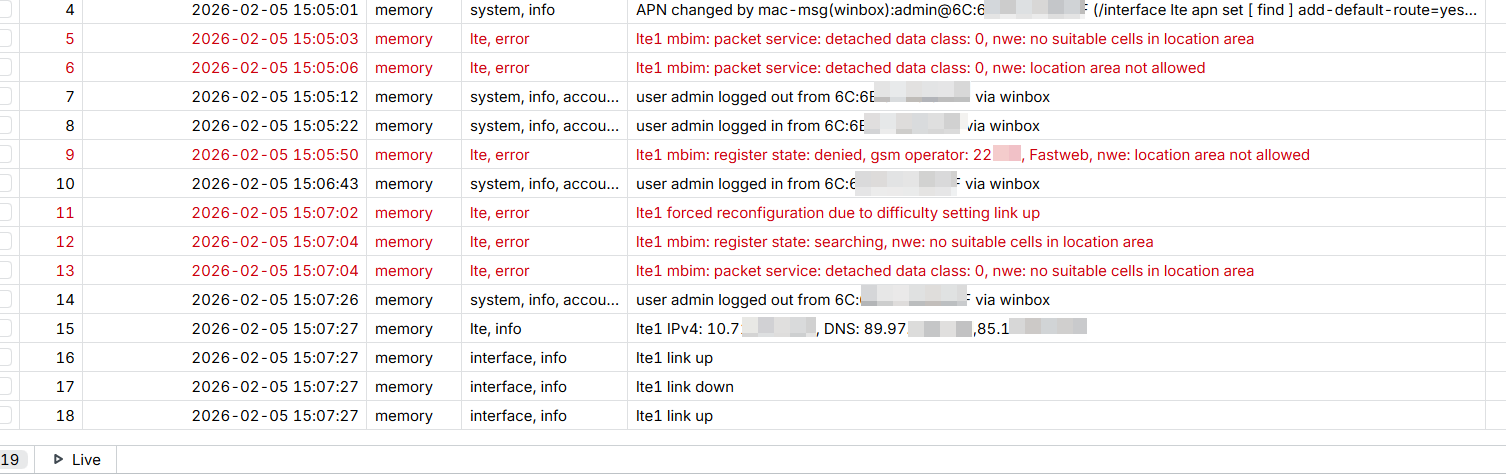
From the ATL WinBox logs, we found these errors:
This confirms that at some point the LTE module lost registration with Fastweb (probably after a power outage on Jan 24th based on the router logs).
From the ASUS router logs, the AI reconstructed this timeline:
Jan 24, 08:27 — WAN link went down and never recovered.
Feb 6, 23:04 — When I arrived, the router got a DHCP lease (10.226.140.219/29 via 10.226.140.220) but the ping to the gateway failed immediately. WAN dropped again 4 minutes later.
Feb 7, 00:07 — I rebooted the router from the web interface.
Feb 7, 00:09 — After reboot, the router got a completely different IP and subnet (10.234.170.174/30 via 10.234.170.173), ping was successful, and internet was restored.
3. The Conclusion According to the analysis, the issue was a Subnet Mismatch. While the connection was unstable, the ISP changed the IP subnet (from .226 to .234). The MikroTik (in Passthrough) updated correctly, but my ASUS router kept trying to talk to the old Gateway IP because the physical link never dropped long enough to force a full DHCP DISCOVER.
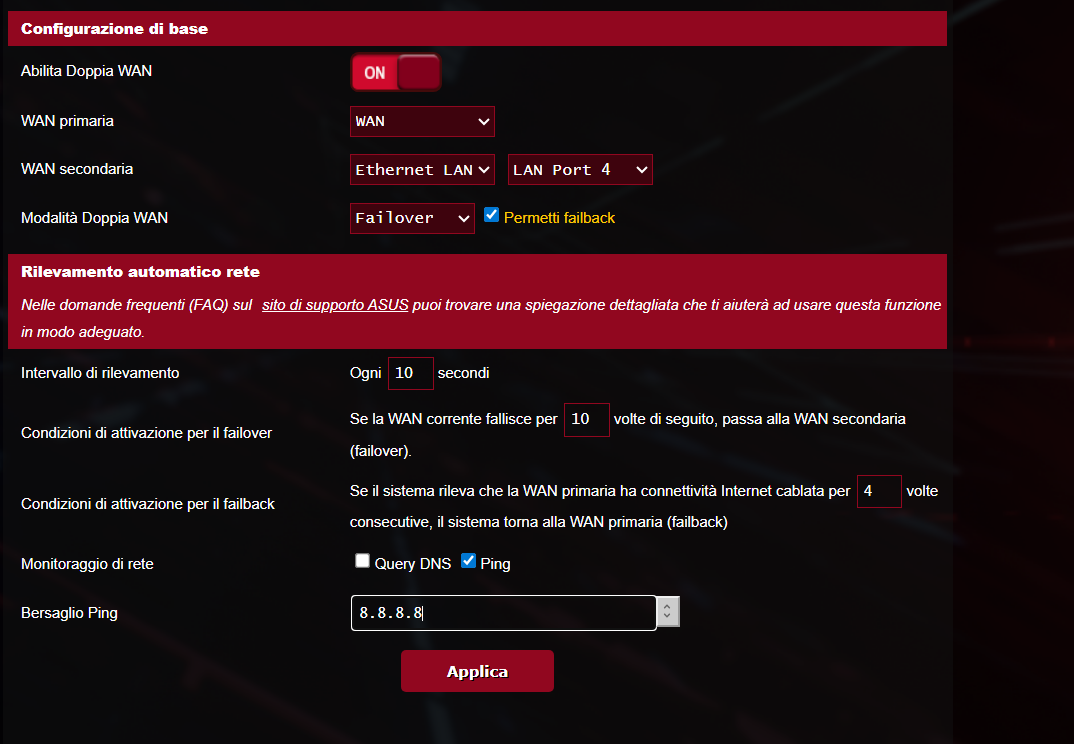
4. The Solution I Implemented To prevent this in the future, I configured a "Watchdog" on my ASUS GT-AX6000 using a Dual WAN workaround (to unlock the network monitoring reboot feature):
Dual WAN: Enabled (Failover Mode)
Primary WAN: WAN (Connected to ATL)
Secondary WAN: Ethernet 4 (I selected this LAN port but left it empty/disconnected, just to act as a dummy interface).
Network Monitoring: Ping 8.8.8.8
Interval: 5 seconds
Trigger: If ping fails for 12 counts -> Failover/Reset WAN.
My Questions:
Is this "Dual WAN" workaround a solid solution, or is there a "cleaner" way to force the router to refresh the DHCP Lease when the Passthrough subnet changes?
WinBox Issue: While troubleshooting via Ethernet connected to the ATL, WinBox disconnects me every 10-15 seconds. Is this normal behavior for Passthrough mode? It seems like once the public IP is passed through, the management connection drops. Is there a way to fix this?
There's nothing wrong with your solution, given that it works reliably.
This is, by the way, why I dislike passthrough mode a bit. The LTE side has the capability to "push" addressing updates from the provider side, while the DHCP you device passes this configuration on with doesn't really have a comparable feature, at least it's not really implemented.
Two alternative solutions:
You could force the link down in case of an address change via a script.
You could use a routed setup and give your ASUS router a private network and gateway, with DMZ-like forwarding of all externally initiated traffic to it. This usually works fine for all protocols, except for IPSec where some software may have certain difficulties.
Thank you for the two alternative solutions. For now, I will wait for the next IP change to see how my router behaves with the current "Watchdog" configuration. If that doesn't work reliably, I will definitely evaluate your suggestions (likely the routed DMZ) or just disable passthrough once and for all.
I am using Winbox 4.0rc1 (the latest version). Do you recommend using a different one (like v3)? Unfortunately, connecting via MAC or IP makes no difference in my case: I get kicked out after about 30 seconds. In those 30 seconds, I have to rush to disable passthrough to regain stable access. Is there a known solution or a specific configuration to keep passthrough active and still maintain stable Winbox access?
 This does NOT affect:
 ),
), Check the log before doing anything
 “Clean” LTE reset (first choice)
 NO reboot
 Software reboot (only if LTE reset does not work)
 Last resort: firmware upgrade


 There is nothing wrong with it that I can see, at least if/until you need to use your Asus ether4.