Recently I experienced an Internet disconnection. I immediately connected to the ATL via SSH and tried to check the signal strength using the monitor command. However, it returned a “sim not present” message. The ATL itself seems to work fine - no errors in log, I can access all functions and commands, so I don’t expect the ATL hardware to have failed (right?). It is always powered via a UPS, so there are no surges, there have been no thunders either (it is winter time here).
Is it possible that the MNO has somehow deactivated the SIM card (sound highly unlikely but who knows)? Or would the message in that case be different?
Since the ATL is mounted on a high pole (difficult to reach and difficult to dismount) and if actual SIM replacement is necessary, I decided to ask for advice here first.
The mobile ISPs use different approaches, but typically either the SIM is banned from logging into the network or just the data service is suspended. I hazily remember some old SIMs were treated as “invalid” in a phone but I have never seen the phone to see a SIM as absent. So if you give the ATL a power cycle and nothing changes, I am afraid you’ll have to climb. I hazily remember there used to be issues with SIM thickness in the past, and also if you touched the contact area of the SIM with bare hand when handling it, a thin layer of corrosion may have built up.
I tried power cycling before posting here without success. I have not touched the electric contacts of the SIM card. I am always careful not to do that.
Something strange happened though - a few hours after posting here, the ATL magically started working again. The log shows a few link up/down messages within ~15 minutes, after which there is stable link up.
It is a mystery to me. If the SIM card was temporarily deactivated by MNO, then the “sim not present” message is surely misleading. If it was a poor electric contact, I really see no physical factors related to it. The disconnect happened late at night, there were no unusual atmospheric phenomena. The reconnect happened at noon on the next day. I have been using this hardware for about 2 years and this has never happened before.
Could be temperature related … IIRC your ATL is high in the mountains where night temperatures might be quite low. And if some moisture entered ATL, it could add water condensation to the “happy mix”.
That indeed reinforces trust I hate this kind of mysteries. Condensation or an insect? I’ve heard of a spider squatting in a satellite receiver LNA but he did not interrupt electrical contacts, just changed the capacity/inductance of something there, changing the parameters of a frequency filter.
So a misleading error message sounds more likely to me. Do you happen to have the complete status message? Tx/Rx state would be interesting, it should be disabled if the modem sees the SIM as absent.
ETA: It just happened again - “sim not present” and no way to make it work.
Hi again, mkx!
It is not really high. The altitude is less than 1000 m. Just a rural area with some hills.
I thought about temperature but it still makes no sense. It is fairly warm now (about 10C) and there are no extreme temperature drops at night.
Moisture - theoretically, maybe, but I don’t see how it could possibly enter. The cap is pretty tight, the rubber sealing around the cable which enters the SIM compartment is also quite good.
FWIW, I tried knocking hard on the metal pole (in case vibration might trigger mechanically electric contact) - nothing changed. Still “sim not present”. Disabling/enabling the interface and hard rebooting didn’t help either.
It can’t enter. On the ATL there are no gaps allowing that.
So a misleading error message sounds more likely to me. Do you happen to have the complete status message? Tx/Rx state would be interesting, it should be disabled if the modem sees the SIM as absent.
Hm, so it apparently depends on the particular modem type: [me@myTik] > /interface/lte/monitor lte1 status: radio off
pin-status: SIM not inserted functionality: tx and rx rf circuit disabled
manufacturer: “MikroTik”
model: “R11e-LTE”
revision: “MikroTik_CP_2.160.000_v021”
imei:
My device is running ROS 7.16.2., what about yours?
BTW, I tried to be clever and did a bandwidth test between the hAP and the ATL, hoping that it may raise the temperature of ATL’s CPU (as this loads it to 100%), thus raising the temperature near the SIM card slot (simulating daytime temperature, in case this is the reason), thus probably triggering electrical contact. Witty me LOL. It didn’t work though (10 min test)
I would recommend reaching out to MikroTik support for guidance. They might be willing to assist with troubleshooting. Enabling “lte,debug” logging could also provide more insights, but it’s important to know what to look for. Alternatively, the issue could be hardware-related, such as a loose SIM or a defect. In any case, it would be best to rule out software-related causes before climbing up the pole.
I have done that already and sent a supout.rif as they asked for it. I am waiting for further feedback.
Enabling “lte,debug” logging could also provide more insights, but it’s important to know what to look for.
Support instructed me to do that too.
Alternatively, the issue could be hardware-related, such as a loose SIM or a defect.
ATL-related would be quite unfortunate. SIM-related (needing a SIM replacement) is much more acceptable, although reaching the SIM slot in my case is still not easy.
In any case, it would be best to rule out software-related causes before climbing up the pole.
That’s what I am trying to do.
FWIW, regarding what was discussed above, support said:
While SIM deactivation by the MNO is rare, if that were the case, you would typically see an error indicating “registration failed” rather than “SIM not present.”
Do you remember if it was a "proper sized" SIM or a smaller one with an adapter?
There are reports (not only on Mikrotik hardware) of issues with the latter, see: Device got hacked 1 min after connected to internet - #14 by jaclaz Device got hacked 1 min after connected to internet - #23 by jaclaz
but it depends on type/model (and probably manufacturer) of the actual SIM socket, I have seen an installer of elevators/alarms that puts a bit of electrician sticky tape on the back on the SIM and then "forces" it in the slot, but there is the risk of bending the pins.
Hi to all,
I remember that problems on LHGR and some connector spray help or office tape And this was a popular problem with fist and second revision of LHGR. Second problems was how exit(take out) a sim card - this was not easy job.
I remember that some ppl report that replace a sim card in operator solve them a problem but the sim card have all the same sizes.
I have 2x ATL who logs me all internal stuff and no problem.
SIM-tray might be not that tight, so try adding piece of tape to the free side of SIM. It has helped me when SXT LTE and ltAP have had the same problem.
Yeah, I remember a few years ago when we switched MNO and had to swap out a whole bunch of SIM cards. Many times, we couldn’t even get the card out and had to break open the casing. And inside, we often found a whole family of insects and spiders because the cable entry was poorly sealed.
The ATL accepts micro-SIM, so I have extracted the micro-SIM piece by removing the outermost plastic frame, and that piece is in the ATL.
What if I need to use only the nano-SIM piece in a different device some day? Removing the tape which has been there for a long time might be problematic and result in damaging the SIM. A SIM-adapter to compensate for thickness differences sounds better. However, I am not sure how necessary it is. Should I break out only the nano-SIM piece and use it with a nano-to-micro adapter?
BTW, after reviewing the supout.rif, support have confirmed there are no software issues. So, I am waiting for proper weather to be able to reach the SIM slot.
The “generic/theoretical” issue (by - stupid BTW - design) is that the nano is slightly less thick than the micro, 0.67 instead of 0.76 mm.
The multi mini/micro/nano SIMs may be either thickness, I believe (even if they shouldn’t)
A socket “properly” made should not have these issues (1/10 of mm non-tolerance! ), but a number of them have “worse” contact with a thinner SIM, and at least some Mikrotik devices seemingly use these “defective” sockets.
There are nano to micro adapters that do have a thin sheet of plastic on the back, that should compensate for the difference in thickness.
But the above is only theory, in practice some SIM sockets are “loose” also for micro SIMs, hence the tape on the back..
Anyway a device that is installed outdoors is likely to suffer from condensation/moisture/oxidation/insects/excessive cold/excessive heat/whatever.
The only rational solution will be when/if there will be support for e-sims for these outdoor devices on top of poles.
Yes, I know. I own such adapters. However, when I tested the micro-to-mini adapter with a micro-SIM on a Huawei router, it didn’t fit because the result turned out to be too thick. So, for that particular router I simply used the outer plastic frame, broken out earlier. This is the reason why I question how exactly to approach the ATL.
Anyway a device that is installed outdoors is likely to suffer from condensation/moisture/oxidation/insects/excessive cold/excessive heat/whatever.
It has not suffered that for 2 years (in far more extreme conditions). I wonder why it should be suffering now. I guess I will find out when I see the SIM card.
The only rational solution will be when/if there will be support for e-sims for these outdoor devices on top of poles.
 I hate this kind of mysteries. Condensation or an insect? I’ve heard of a spider squatting in a satellite receiver LNA but he did not interrupt electrical contacts, just changed the capacity/inductance of something there, changing the parameters of a frequency filter.
 And this was a popular problem with fist and second revision of LHGR. Second problems was how exit(take out) a sim card - this was not easy job.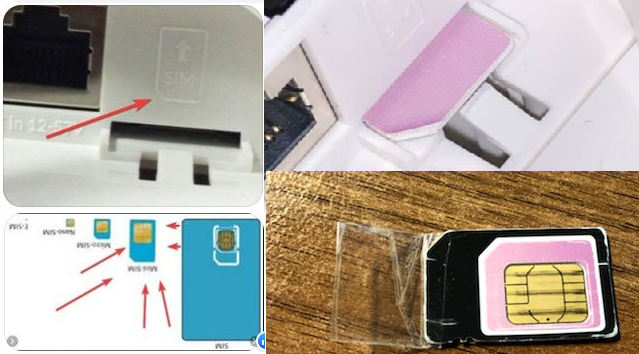

 ), but a number of them have “worse” contact with a thinner SIM, and at least some Mikrotik devices seemingly use these “defective” sockets.