Basic firewall packet traversal

When applying firewall rules at L3 I tend to become unsure of where to place specific information. For example, a blanket drop on in-interface=WAN will block, presumably, the return path of traffic from the WAN resulting in no internet connectivity. So you might specify “block all input on ether1 when src-IP is not in LAN-list”. But then you can get into the weeds of “from what perspective” input/output? And how might that implicate the need for a further rule or changing the one you intended to make? This boils down to not really understanding packet flow, but reading the docs, I still feel there’s a need for illustrative examples to grasp. It is complex.

So as a teaching aid can somebody illustrate the traversal taking place for a simple ping to the Google DNS? So your computer sends a ping outbound, this passes the WAN interface, Google’s servers return ICMP and the router returns that back to your computer. What does the firewall/iptables chain/traversal for this look like in terms of INPUT/OUTPUT, SRC-IP/DST-IP? Bearing in mind you will also have IP masquerading taking place to have all inbound/outbound traffic over the WAN replaced with or destined to the WAN interface IP rather than what’s behind it (your private LAN IP’s).

What does this look like?
This is not such a basic question, but one must be aware of these things in order to create well functioning firewalls.

The firewall processes packets one by one, but as you correctly suspect, there is a distinction between stateless matchers, that are evaluated only based on the packet that is being processed at the time, and stateful matchers, that associate a packet with the connection it’s part of, and then makes decisions based on additional information obtained by this.

The “normal” matchers, such as in/out-interface(-list), src/dst-address, ports, protocols, etc. are all stateless. And you are totally correct that the outgoing packet is addressed (internal addr)->(external ip), and the reply packet is addressed (external ip)->(internal addr)

It’s also important that when the firewall rules are processed, they are processed in strict order. The first rule that matches and has an action that is final (accepr, drop, etc.), then that action is taken, and processing is halted at that point.

Also, every chain in Mikrotik has an implicit “accept everything” at the end, this is called having a “default policy accept” in other systems. (On Mikrotiks, this cannot be changed.)

So your initial outgoing packet is allowed - at least in the default firewall - by progressing to the end of the chain without action.

The return packet however can be associated with the connection created by the outgoing packet. This packet is accepted by the “action=accept connection-state=established,related” rule.

In these situations it’s useful to apply “log=yes” entries in the firewall in order to see the progression of packets through the firewall. You can easily add logging rules with “action=passthrough”, which - as the name suggests - don’t alter packet flow, just log and count.

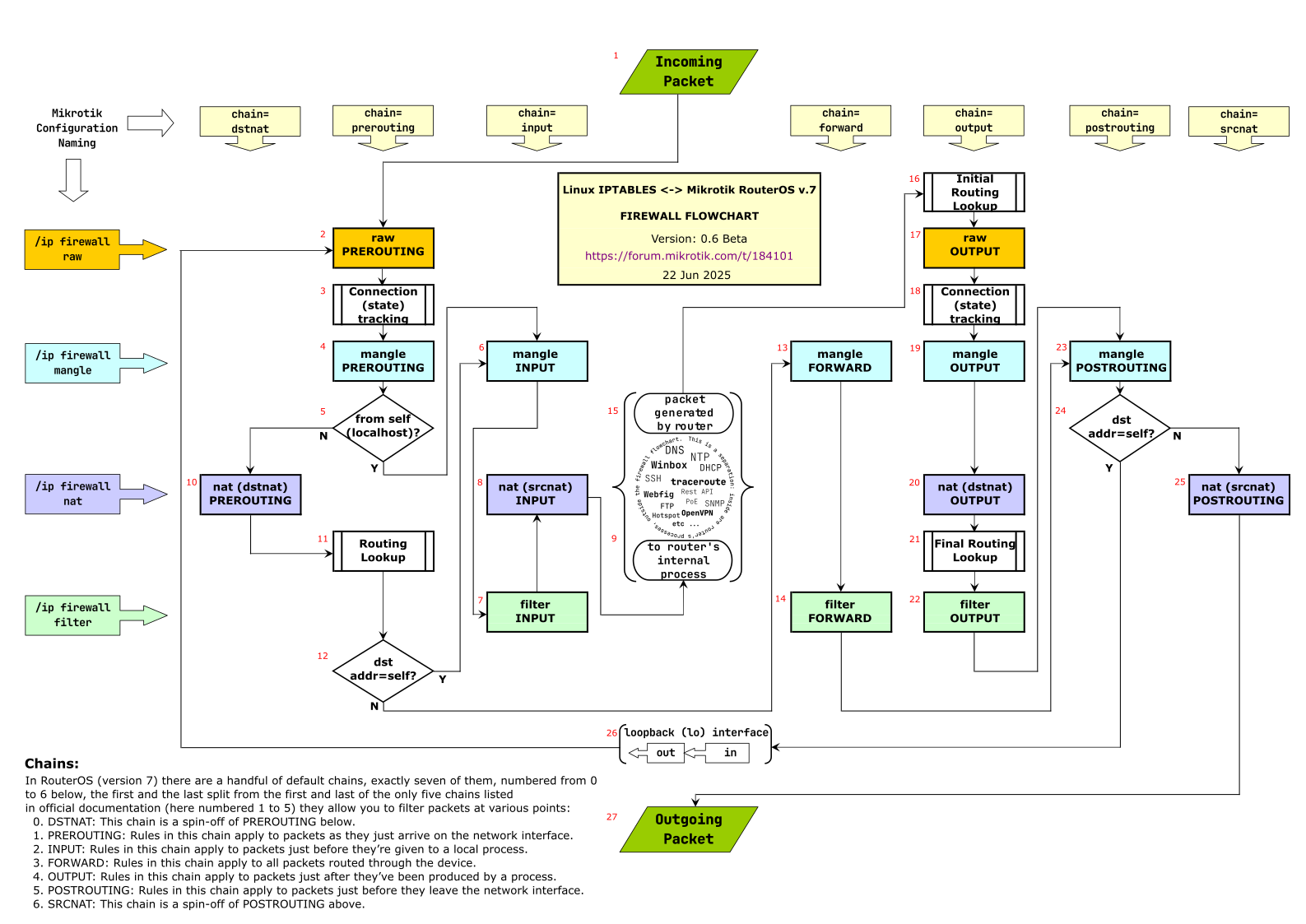
For when exactly processing steps occur, you may want to refer to @jaclaz’s excellent packet flow diagram.

You need a rule to accept “related” and “established” packets.
Former one means “firewall knows this connection was created to help some other “main” connection”.
Latter means “this is not new (no SYN only in case of TCP) connection”.

Usually, you do:

  1. accept all RELATED, ESTABLISHED (both: forward and input)
  2. accept certain types of connections you need for your work (i.e access management interface, access DNS, DHCP, VPN, whatever you run on your device)
  3. forward all connections from your users to the internet (WAN) or other networks (if you need them)
  4. drop input (means “drop anything else”)
  5. reject forward (reject is better for debugging)

Here is an example of packet travelling from a user machine to the google:

  1. Client sends a packet SRC:192.168.1.2, DST:8.8.8.8 to the default router
  2. Router checks routing tables to see where 8.8.8.8 should go
  3. It makes sure forwarding is enabled and no firewal rule blocks it
  4. It forwards it further.
  5. Just before packet leaves the router, it hits POSTROUTING.
  6. In POSTROUTING the “SNAT” or “masq” rule is applied, so SRC:192.168.1.2 gets replaced with a router public IP
  7. Router makes a note “I’ve send this packet by the name of this client, once I get an answer, I must return it to this client”. (port_number,ip) tuple is used an identifier.
  8. Once router gets answer, it checks it against firewall rules. Ok, it is allowed to send “established, related” packet back to user.
  9. It forwards the answer.

Linux network stack and netfilter rulers are complex. An addition to the link I already provided (it has a nice diagram): Filter - RouterOS - MikroTik Documentation google for “Netfilter packet flow”.

I remember “The Network Administrators’ Guide” (there must be a free version on TLDP) had a nice netfilter overview as well, but it might be a little bit outdated.

That’s why usually (and it’s what MikroTik also put in their defconf firewall) there should be an accept rule at the top of the input and forward chain, matching on connection-state=established,related (the defconf FW also has untracked for the case where you also had RAW rules with action=notrack).

You can use the flowchart from this @jaclaz’s thread:

The ultimate Mikrotik iptables flowchart - RouterOS / Useful user articles - MikroTik community forum

Here as embedded image of version 0.6beta:

We will use the numbering from that image to illustrate the path taken when you ping 8.8.8.8 from a PC 192.168.88.5 on your main bridge subnet. Your router public IP address is 12.34.56.78. We assume there is no fasttrack rule:

  • Packet from PC src-address=192.168.88.5 dst-address=8.8.8.8 protocol=icmp#1#2#3 (for first ping packet, new conntrack entry is created, with connection-state=new, for 2nd, 3rd, etc… in short interval, packet is associated with existing entry and has connection-state=established) → #4#5 (N) → #10#11 (outgoing interface is determined here based on dst-address=8.8.8.8) → #12 (N) → #13#14 (here is where you have filter rules that block or allow forwarding, the defconf FW has no rule to block this packet) → #23#24 (N) → #25 (here is where SRCNAT/masquerade happen, the source IP address is changed from the PC’s LAN address to the router’s WAN address src-address=12.34.56.78) → #27 (packet is sent out)

  • Response packet from dns.google src-address=8.8.8.8 dst-address=12.34.56.78 protocol=icmp#1#2#3 (here the packet is assigned the tracked connection, dst-address is changed to the PC’s address 192.168.88.5 and connection-state=established) → #4#5 (N) → #10#11 (out-interface=bridge) → #12 (N) → #13#14 (for defconf FW this is allowed by the rule:

    /ip firewall filter
    add action=accept chain=forward \
        comment="defconf: accept established,related, untracked" \
        connection-state=established,related,untracked
    

    ) → #23#24 (N) → #25#27 (packet out on bridge interface to LAN).

Hi
Although I’m quite new to RouterOS (got my first device only a week ago) I think I can explain:
When you look on your default-FW-Rules (they have a the prefix “defconf:” in the comment) there are two rules “defconf: accept established,related,untracked”. One rule on the “input”-chain and one on the “forward”-chain.

These rules are quite on the top of both chains. And these rules allow all (input resp. forward) packets which belong to an already established connection.

So when you start a connection (i.e. TCP-SYN) from LAN-to-WAN, then these rules do not match as RouterOS doesn’t know this new connection. Some other rule (later in the chains) must then match to allow this SYN-Packet going out (resp. going through).
But then, RouterOS ‘learned’ this connection, i.e. for TCP it learns the combination Src-IP/Port with Dst-IP/Port (and probably also the Sequence counters).

Further packets belonging to this connection is then quickly accepted by those two “top in the chains” rules.