That’s why usually (and it’s what MikroTik also put in their defconf firewall) there should be an accept rule at the top of the input and forward chain, matching on connection-state=established,related (the defconf FW also has untracked for the case where you also had RAW rules with action=notrack).
You can use the flowchart from this @jaclaz’s thread:
Here as embedded image of version 0.6beta:
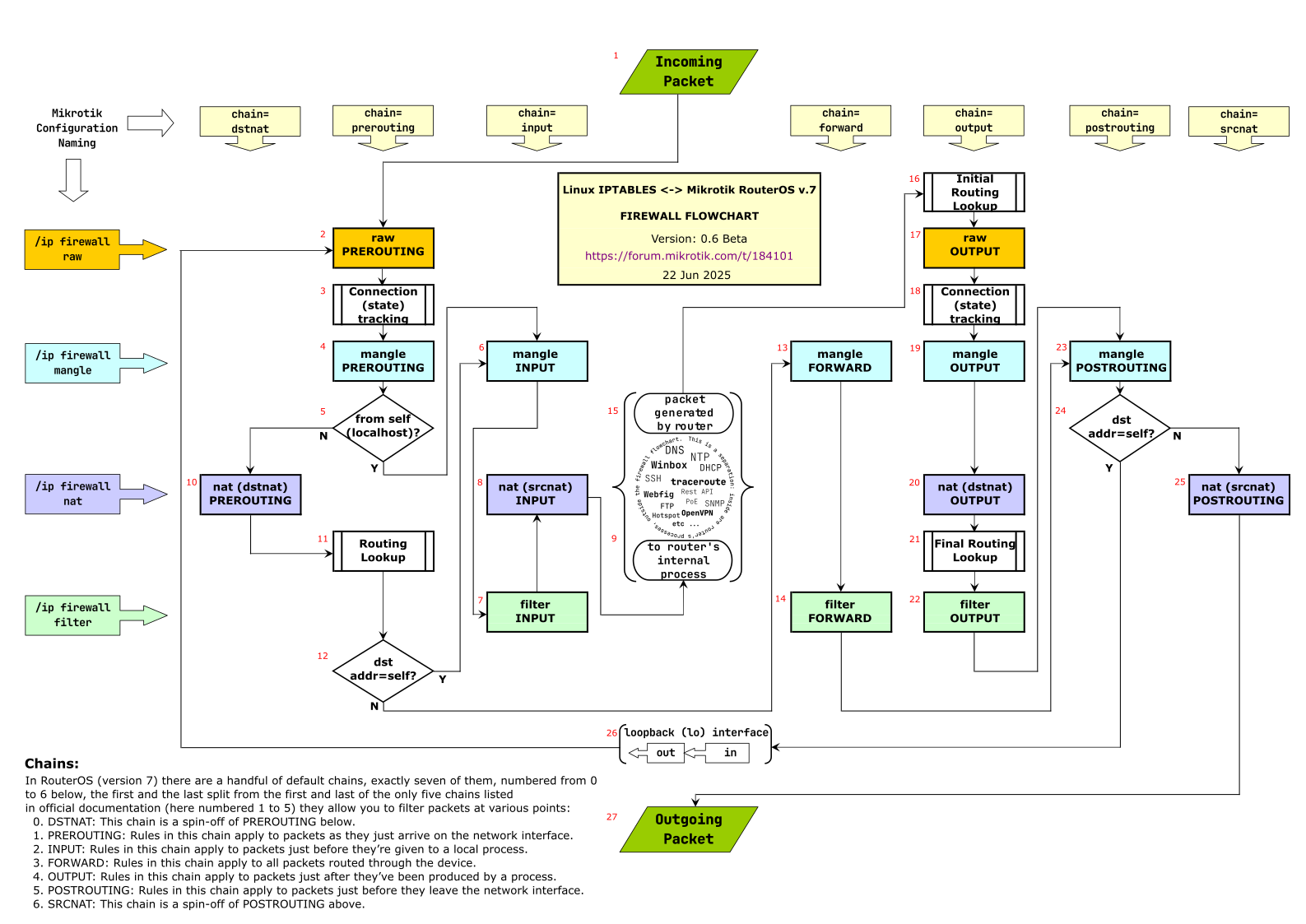
We will use the numbering from that image to illustrate the path taken when you ping 8.8.8.8 from a PC 192.168.88.5 on your main bridge subnet. Your router public IP address is 12.34.56.78. We assume there is no fasttrack rule:
-
Packet from PC
src-address=192.168.88.5dst-address=8.8.8.8protocol=icmp→ #1 → #2 → #3 (for first ping packet, new conntrack entry is created, withconnection-state=new, for 2nd, 3rd, etc… in short interval, packet is associated with existing entry and hasconnection-state=established) → #4 → #5 (N) → #10 → #11 (outgoing interface is determined here based ondst-address=8.8.8.8) → #12 (N) → #13 → #14 (here is where you have filter rules that block or allow forwarding, the defconf FW has no rule to block this packet) → #23 → #24 (N) → #25 (here is where SRCNAT/masquerade happen, the source IP address is changed from the PC’s LAN address to the router’s WAN addresssrc-address=12.34.56.78) → #27 (packet is sent out) -
Response packet from dns.google
src-address=8.8.8.8dst-address=12.34.56.78protocol=icmp→ #1 → #2 → #3 (here the packet is assigned the tracked connection,dst-addressis changed to the PC’s address192.168.88.5andconnection-state=established) → #4 → #5 (N) → #10 → #11 (out-interface=bridge) → #12 (N) → #13 → #14 (for defconf FW this is allowed by the rule:/ip firewall filter add action=accept chain=forward \ comment="defconf: accept established,related, untracked" \ connection-state=established,related,untracked) → #23 → #24 (N) → #25 → #27 (packet out on bridge interface to LAN).