Basic routeros setup on crs310-8g+2s+

I thought l did setup the device correctly with the “quick set” as a router. I realized later apparent it wasn’t “complete”.

Found this on the internet {Mikrotik CRS310-8G+2S+IN Config · GitHub} and followed the steps per line using Winbox not CLI only. From line “22 - 30” for some unknown reason l can’t succeed. I can perform all task with winbox from line “3 - 20” and “32- 85”… l guess.

I believe I need that block line “22 - 30” to configure from line “86 - 142”. Any suggestions or guidance would be appreciated.

Current using

  1. crs310-8g+2s+
  2. routeros 7.22.1
  3. winbox 4.0.1

That github was probably assuming a "blank config".

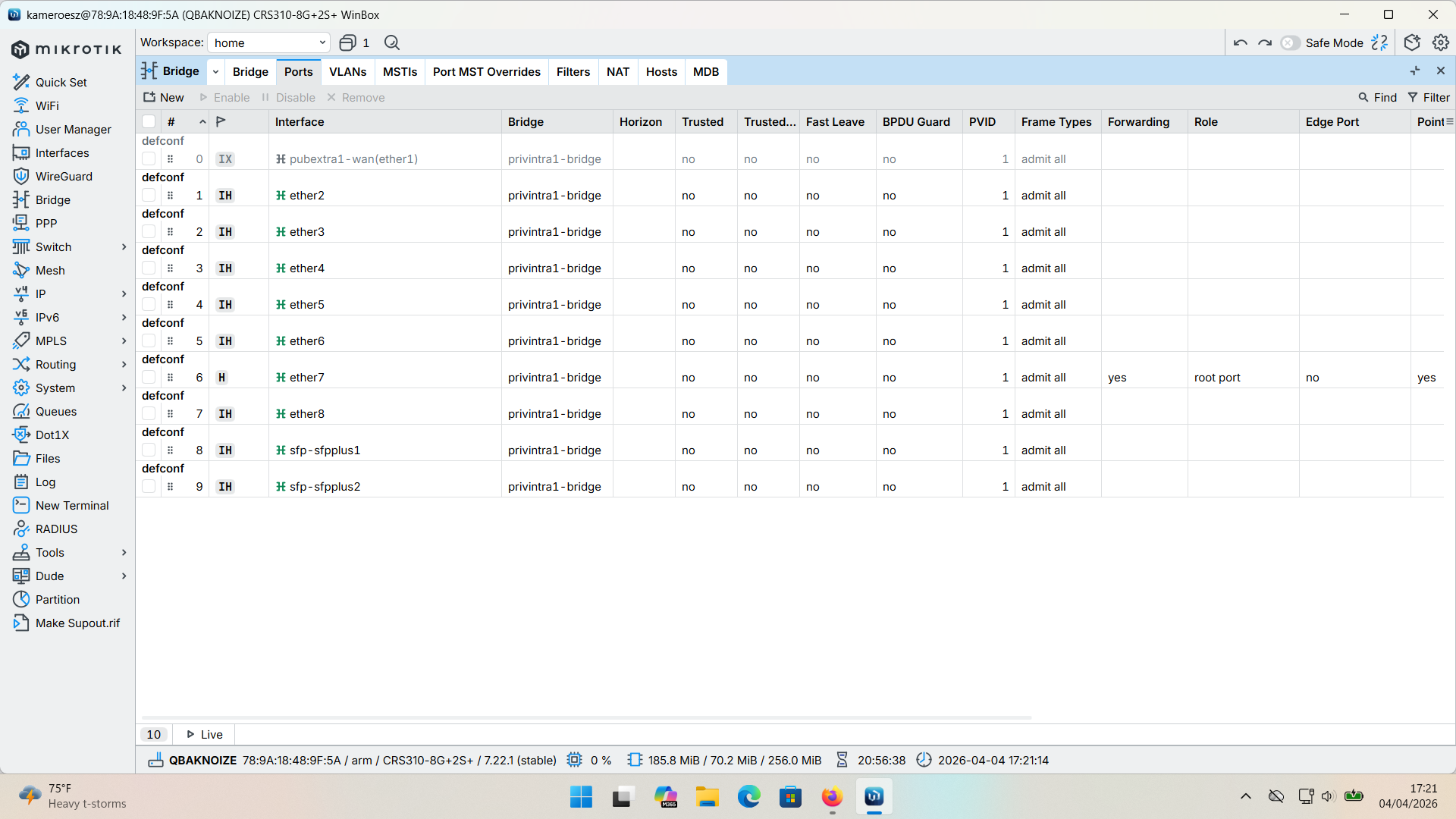
Are you sure there isn't alread a bridge defined that is using the ether ports?

Post sanitized config export you are starting from.

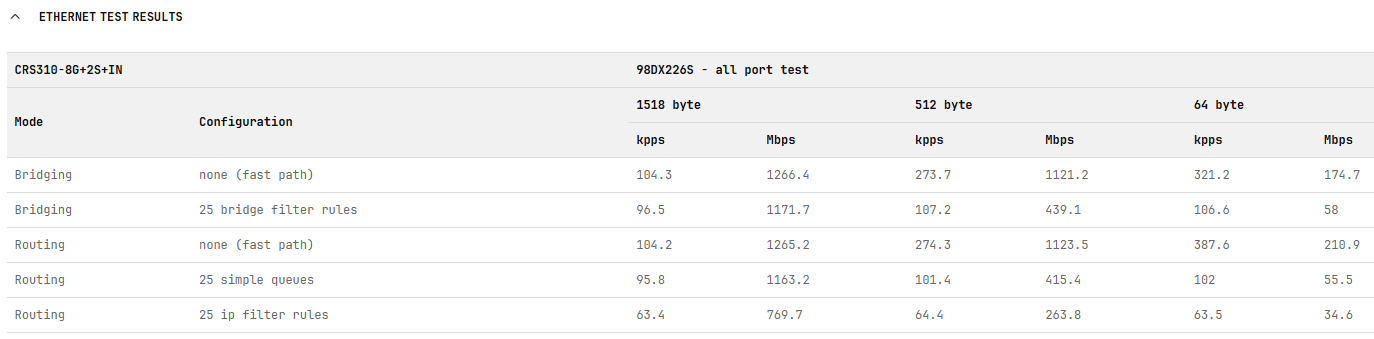
I think you are going to be disappointed with routing performance of the CRS310-8g+2s+, that's why the recommendation to look at the RB5009 in this thread

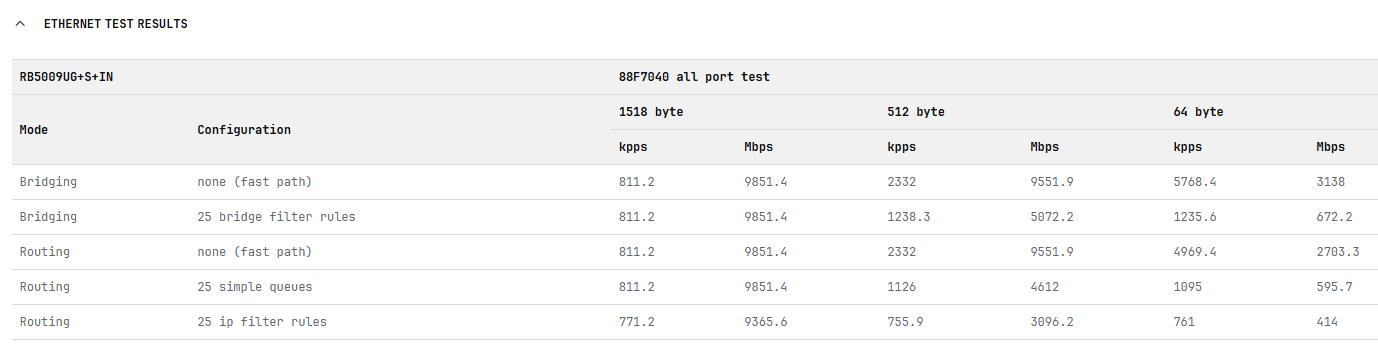
The RB5009 has over 10x the routing performance of the CRS310-8g+2s+ unless the L3HW "inter-vlan" routing is good enough for your "routing" needs. See Issues with l3-hw-offloading on CRS310-8G+2S+

For comparison of CRS "routing" performance see https://mikrotik.com/product/crs310_8g_2s_in#product_specification and look for Ethernet Test Results

and compare to RB5009 (which has a much better CPU and routing performance and a more limited switch (but still quite capable, just no L3HW in the switch chip).

https://mikrotik.com/product/rb5009ug_s_in#product_specification

1 Like

Check what you have now.
Export your configuration and compare it to the github example.
Post it on the Forum for review.
Instructions here:

I’m having issues

The export in RouterOS V7 has hide sensitive active by default. Just perform export with only filename as argument.

as erlinden said, in V7 to export sensitive info now requires the use of show-sensitive.

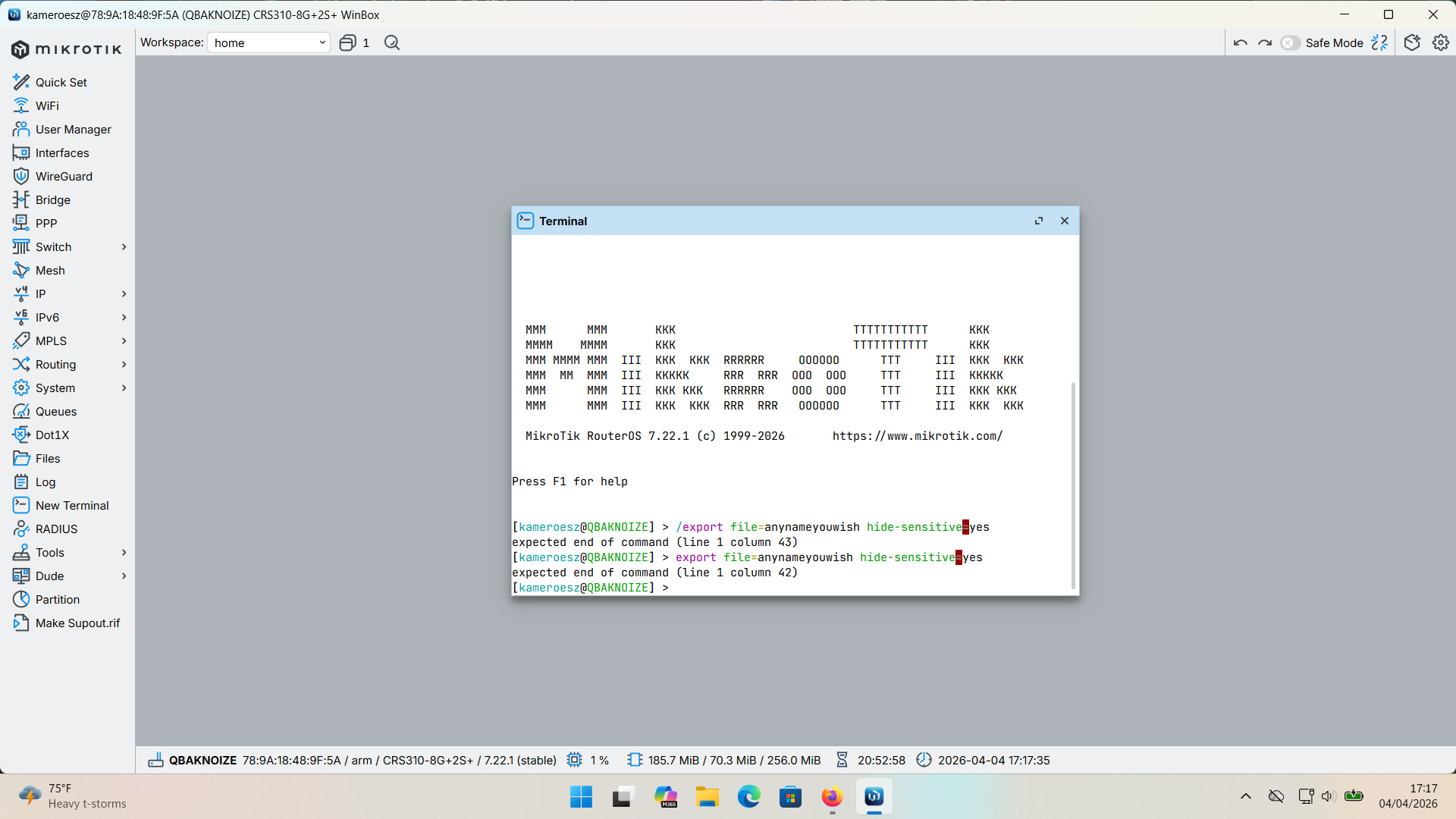
The reason for the error message is that the correct syntax does not have a value associated with hide sensitive.

So

/export file=my_crs310 

or

/export file=my_crs310 hide-sensitive

will both work, and both will create the same file (other than time of export)

the problem was the hide-sensitive=yes

[demo@RB760iGS v7.19.6] > /export file=anynameyouwish hide-sensitive=yes
expected end of command (line 1 column 43)
[demo@RB760iGS v7.19.6] > /export file=anynameyouwish hide-sensitive    
[demo@RB760iGS v7.19.6] > /export file=anynameyouwish1              

That is what the link shows but it said for "V6". I don't have a V6 device around to test if that is a valid option on V6 or not. @gigabyte091 do you know if the =yes does work with V6? If it does not, can you edit the post (maybe add "for V7 do this" and "for V6 do this" in code blocks.

But even with hide sensitive, it will show your router's SN, and it is best not to share that (if you plan to ever use the mikrotik ddns feature).

Is the only way to report documentation errors to open a ticket? Edit: submitted SUP-214110

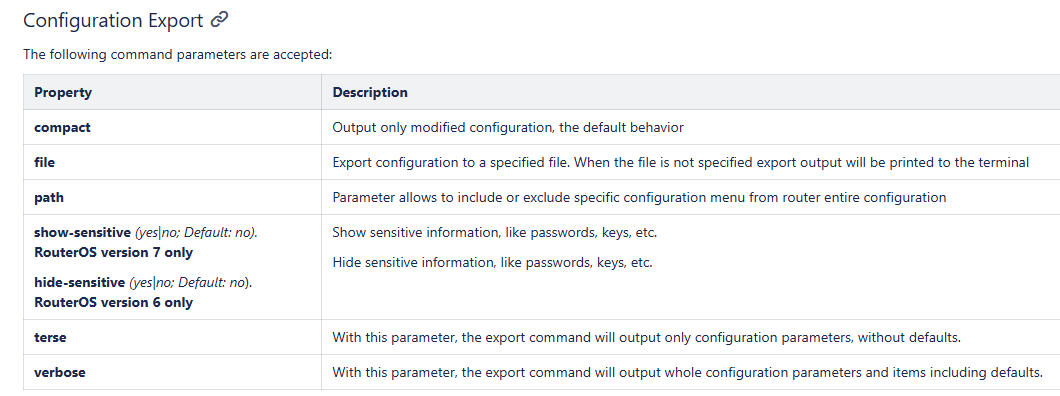
From Configuration Management - RouterOS - MikroTik Documentation

There are several errors here.

It at least implies that yes and no are acceptible values for hide-sensitive and show-sensitive. But

[demo@MikroTik] > export show-sensitive=yes
expected end of command (line 1 column 22)
[demo@MikroTik] > export show-sensitive    
# 2025-09-11 09:28:04 by RouterOS 7.19.6
# software id = *****
#
# model = RB760iGS

you can see that show-sensitive=yes is not accepted.

And the description of the options compact, terse, and verbose are misleading at least.

But the description of terse is just plain wrong.

This is a valid export command:

/export verbose terse

which will show all options but in "self contained" format.

So is

/export compact terse

and it is same as /export terse

Example from reset device (without default config)

[demo@MikroTik] > export 
# 2025-09-11 09:42:37 by RouterOS 7.19.6
# software id = *****
#
# model = RB760iGS
# serial number = *****
/ip hotspot profile
set [ find default=yes ] html-directory=hotspot
[demo@MikroTik] > export compact
# 2025-09-11 09:42:44 by RouterOS 7.19.6
# software id = *****
#
# model = RB760iGS
# serial number = *****
/ip hotspot profile
set [ find default=yes ] html-directory=hotspot
[demo@MikroTik] > export terse
# 2025-09-11 09:42:55 by RouterOS 7.19.6
# software id = *****
#
# model = RB760iGS
# serial number = *****
/ip hotspot profile set [ find default=yes ] html-directory=hotspot
[demo@MikroTik] > export compact terse
# 2025-09-11 09:43:07 by RouterOS 7.19.6
# software id = *****
#
# model = RB760iGS
# serial number = *****
/ip hotspot profile set [ find default=yes ] html-directory=hotspot
[demo@MikroTik] > 

I don’t have any V6 devices but just tested with ROS 7.19.6 and 7.22 and with and without hide-sensitive my export always shows sensitive data.

Software id, serial number, WG keys, IP addresses… Everything is visible… Also hide-sensitive is only accepted without =yes or =no.

@gigabyte091

image

This is in Forum rules - #5 by gigabyte091

It’s changed now.

But I noticed that it doesn’t remove any sensitive data from the configuration export for some reason.

Thanks for changing that.

You are correct, hide-sensitive (default on V7) doesn't sanitize a config.

And show-sensitive doesn't export a config that can be used to restore from.

This is one thing vyatta/edgeos does much better. The config.boot file there is text based and will recreate users and passwords. The hashed passwords are saved, similar to the way that cisco show startup will display hashed passwords. The backup made with the webUI is a gziped tar archive of the /config tree so if you have wg, it also gets the saved wg private key. But you have to treat the vyatta backups as sensitive, because they are easily extracted with utilities like 7-Zip. These should not be published because they can be "offline brute forced", but it at least makes it possible to store configurations offline that will be able to restore to a differnent device. And you can use encyryption tools (even 7-zip with aes) for archiving a more secure backup.

The vyatta/edgeos show configuration command will replace the hashed passwords with ********* but it does nothing to sanitize any dhcp reserved mac addresses, public ip addresses, etc. That still needs to be done there as well.

The ROS export (at least through 7.19.6 which is last I tested) never saves any users or login passwords (not even hashed) when show-sensitive is used.

What hide-sensitive (default for v7) hides is what is described in the responses to this /user export show-sensitive not showing any sensitive informations

The only things that hide-sensitive redacts is what is described here and here. The official documentation (as of 2026-04-05) is not very explicit.

This is something Mikrotik should repair ASAP as many users will automatically just copy/paste their configuration on the forum with sensitive data thinking everything is sanitized…

I also tested with 7.20.8 long term and same thing is happening.

I will open a ticket for that so they check what’s happening and I will put warning in tutorial to check if sensitive data is redacted.
EDIT: Ticket opened SUP-214121

@BartoszP I don't want to polute the other topic, and I don't know of any way to send PM.

Can you please edit GP & CSA for Mikrotik devices - #2 by BartoszP

to remove the =yes from

image

because that is incorrect syntax as was pointed out by @aldek here

@jaclaz has updated the corollary [18] in GP & CSA for Mikrotik devices BTW, @jaclaz wouldn't the title "Good practice and common sense advice for Mikrotik devices" be easier to understand? Was the concern to make it more easy to display on a mobile device? I found the topic due to your reference to it in Wrong "DHCP server" appears in Windows with Mikrotik hEX S - #14 by jaclaz

Well, you found it via a direct link.
Everyone else should find it as a continuation of the twelve rules:
The twelve Rules of Mikrotik Club

But I see nothing wrong in de-abbreviating the title.

Done. :slightly_smiling_face:

1 Like

Done. Should have been done months ago.

1 Like

The documentation has now also been updated. :hugs:

1 Like

Yes and no.

The change has been from this:

Property Description
show-sensitive (yes|no; Default: no). RouterOS version 7 only Show sensitive information, like passwords, keys, etc.
hide-sensitive (yes|no; Default: no). RouterOS version 6 only Hide sensitive information, like passwords, keys, etc.

to:

Property Description
show-sensitive Show sensitive information, like passwords, keys, etc. By default, sensitive information is hidden.

A welcome change (in the future) would be to expand on this:

Show sensitive information, like passwords, keys, etc. By default, sensitive information is hidden.

with a FULL, DETAILED, EXHAUSTIVE list[1] of what is considered "sensitive information".

I know it won't happen :woozy_face:, but a man can dream ... :wink:

[1] a hyperlink to a dedicated page would be good as well