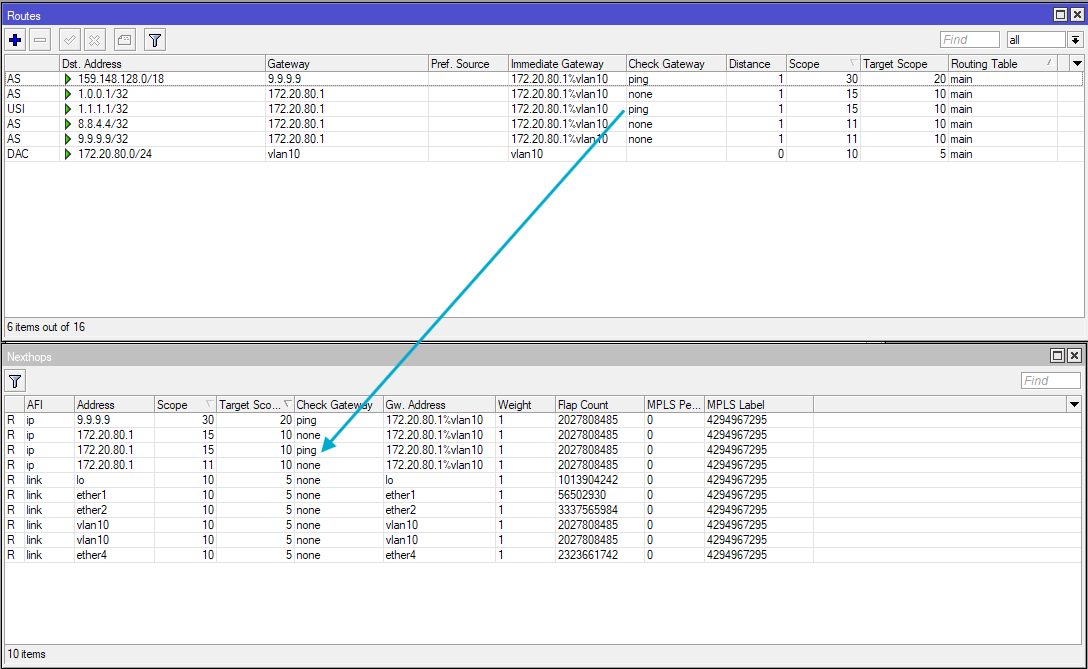
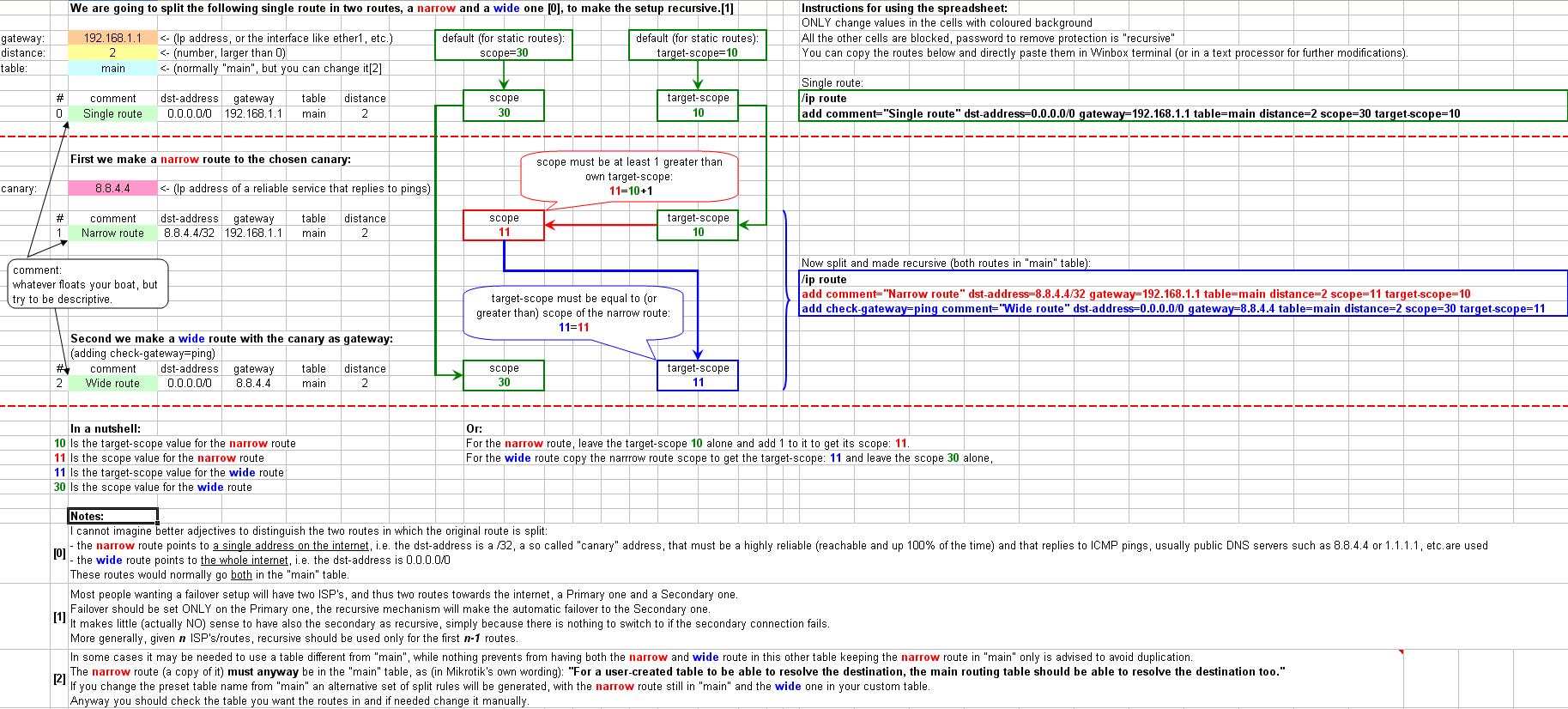
There is no reason on earth (as I see it) that - given the extreme simplicity of the proposed method - why the good Mikrotik guys could not make in Winbox (or in Webfig, or in both) a little "wizard" (similar to the one that can be used to setup a DHCP server) to the same effect of the spreadsheet.
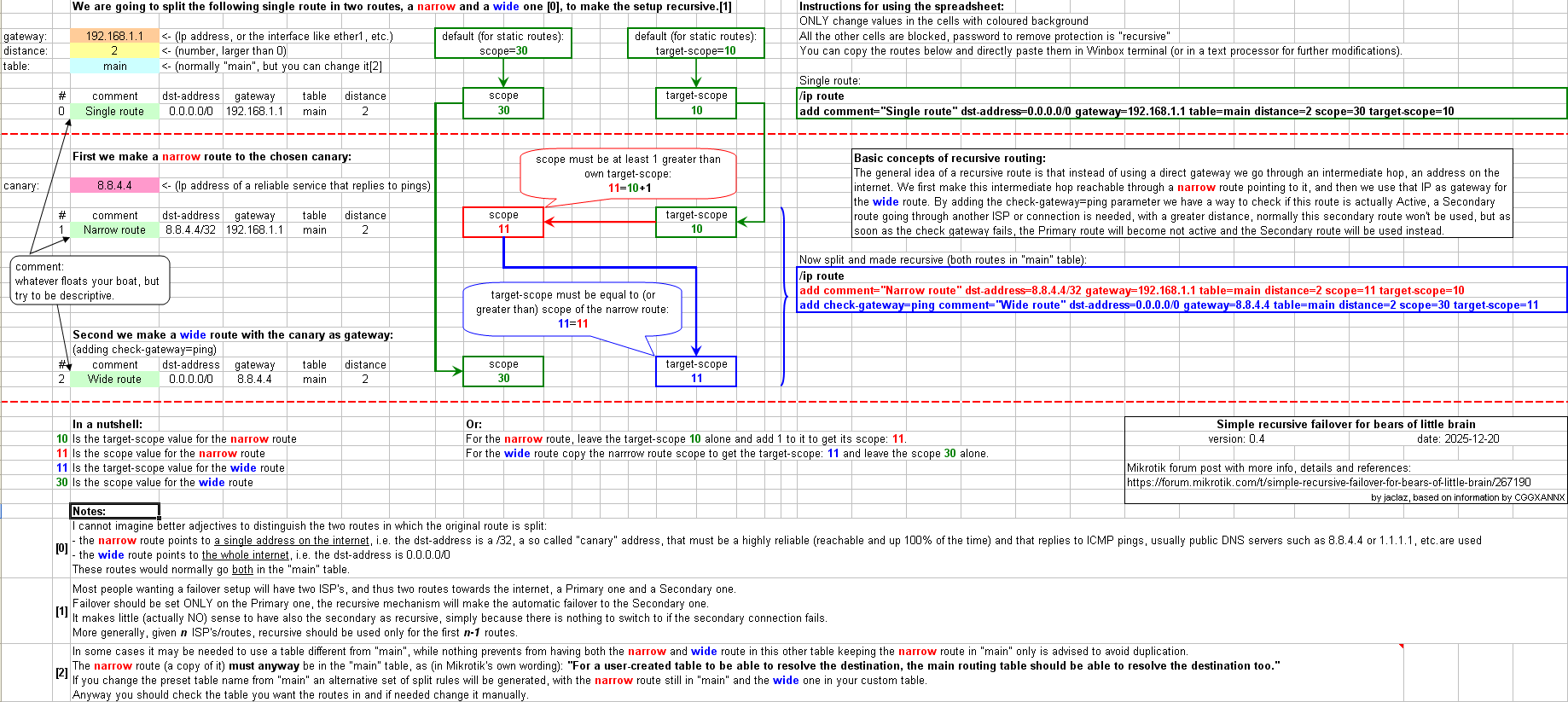
And next version will be even busier as I intend to add bottom right a box with title, version/date and link to the forum thread and in the white space above the generated set of routes another box with something like (I am working on it):
Basic concepts of recursive routing:
The general idea of a recursive route is that instead of using a direct gateway we go through an intermediate hop, an address on the internet. We first make this intermediate hop reachable through a narrow route pointing to it, and then we use that IP as gateway for the wide route. By adding the check-gateway=ping parameter we have a way to check if this route is actually Active, a Secondary route going through another ISP or connection is needed, with a greater distance, normally this secondary route won't be used, but as soon as the check gateway fails, the Primary route will become not active and the Secondary route will be used instead.
Tagged as suggested.
However I suggest Centarius to consider if the topic could be corrected from "+ warp" to "+ Cloudflare Warp" as my first thought was: "Is cpt. Picard's Enterprise diving into warp speed with Mikrotik's gear"?
Really? It's 41 minute read, according to Discorse, & I'm not sure the real conclusion or "guide" here. More quibbling about what a guide might include.
If you are someone who already knows the two requirements (scope of same route >target-scope, and target-scope>=scope of gateway route) then you don't have to stick to the formula that the increment must be 1, and can choose other gaps between the scopes of the routes as you want. In some post above I've also had an example with 30-15 and 15-10.
But you should then of course make the scope, target-scope and intermediate-gw columns in WinBox visible, or include them in proplist= when using /ip route print. You should do that to be able to verify (with your knowledge of the rules) that routes that depend on others for the gateway lookup can use those dependencies (target-scope large enough), and that they do not accidentally include other unwanted routes in the candidate list for gateway lookup (if a route has dst-address wide enough to contain that gateway, and scope low enough to be included by target-scope, then that route can be a candidate for gateway lookup).
=> In your case, for you, all your 3 examples will do fine, because you know how to debug / check the dependencies.
For a beginner who maybe doesn't fully understand the two requirements yet, it's probably better that we, when we give them configuration examples, start slowly with the increment of scope/target-scope of the intermediate routes (the routes with dst-address having /32 prefix length), only increase to what is really required (so 11-10, 12-11. etc...), while for the final (the one with larger prefix length in dst-address, the "wider" route) we still keep target-scope as low as possible, but make scope of that wider route way higher (preferably scope=30).
Doing that would make sure that target-scope of all the routes are very low, in fact, their target-scope will all be the strict minimum possible. This significantly reduces the risk of unwanted routes being included in the candidate list for gateway lookup (this is an issue that beginners probably don't know how to diagnose/resolve yet). If you have target-scope=11, then you don't risk including routes with scope=15 in the gateway look up process, for example. And the "wider" route having really high scope (actually the default value of 30) also make sure they will not be used to lookup the gateway for the other routes.
In a previous post I have this screenshot showing how a "wider" route (the one with gateway=pppoe-out1) with too low "scope" can accidentally be included (and used) in the gateway lookup of other routes. In this case, the problem would not exist if that pppoe-out1 route had a scope greater than 13, or better had scope=30, for example.
So, for beginners, we would advise the sequence that @jaclaz documented in his thread:
Widest dst-address with scope=30 and target-scope=n+11
n-th intermediate route with dst-address=gateway of above route and scope=n+11 target-scope=n+10
...
3rd intermediate route with dst-address=gateway of above route and scope=13 target-scope=12
2nd intermediate route with dst-address=gateway of above route and scope=12 target-scope=11
1st intermediate route with dst-address=gateway of above route and scope=11 target-scope=10 and having gateway using a connected route!
This results in a "safer" configuration for beginners that they can copy & paste. In most case, there is only one intermediate ("narrow" route as @jaclaz calls them) so the sequence is 30-11 and 11-10.
And, now that how to set the most common and used case is settled, can I ask what is the actual use case for recursive routing with more than one intermediate hops?
I am struggling to imagine where such a setup would be wanted (or needed) for failover, and would like to see an example.
That is assuming the gateway address "ISP1" can be resolved using a route with scope=10. Which is normally the case for all connected routes (they have scope=10 target-scope=5 by default, so target-scope=10 is enough to be able to use those routes).
In point-to-point like cases where "ISP1" is not an IP address, but an interface, for example pppoe-out1 or wireguard1, then specifying target-scope=10 there is also ok, but is actually not the minimum possible, because target-scope=5 or even lower there would also work. But we don't want to mention too many exceptions to beginners, so we just put 10 there too.
To be fair (besides distance that is not dst and TS that is not target-scope), following the reasoning in the spreadsheet (and in simple cases) I would have only 3 (three) routes, narrow and wide on ISP1 and failover on ISP2, something like:
What is the use of having two set of routes going through the same ISP1, one working when 1.1.1.1 is reachable (and due to greater distance of 4 the 8.8.8.8 is NOT pinged at all normally) and the other one when 1.1.1.1 is down but 8.8.8.8 is reachable?
What are the chances that 1.1.1.1 is down but 8.8.8.8 is not?
I mean, if we know that - hypothetically - 8.8.8.8 is more reliable than 1.1.1.1, why not using directly only 8.8.8.8?
The target-scope value is a parameter that specifies the "maximum accepted scope for gateway lookup". In quotes are the wording that MikroTik now uses in the updated part of the documentation.
So, you do not avoid the value 10 or 11, you specify a value high enough so that the other routes can still be used to lookup the gateway specified in this route. When you write gateway=XYZ target-scope=10, you specify "the gateway XYZ can only be resolved with next hops having scope not bigger than 10.
If XYZ can be resolved using only connected routes (those routes attached to "vlans and subnets" as you wrote above), then all those connected routes only have scope=10, which means specifying "maximum accepted scope for gateway lookup"=10 is fully sufficient. It's also why when you add a new route without changing anything, target-scope=10 is the default.
You can set it to 11 if you want, and it will also work fine, because "maximum accepted"=11 of course also accepts 10 and below.
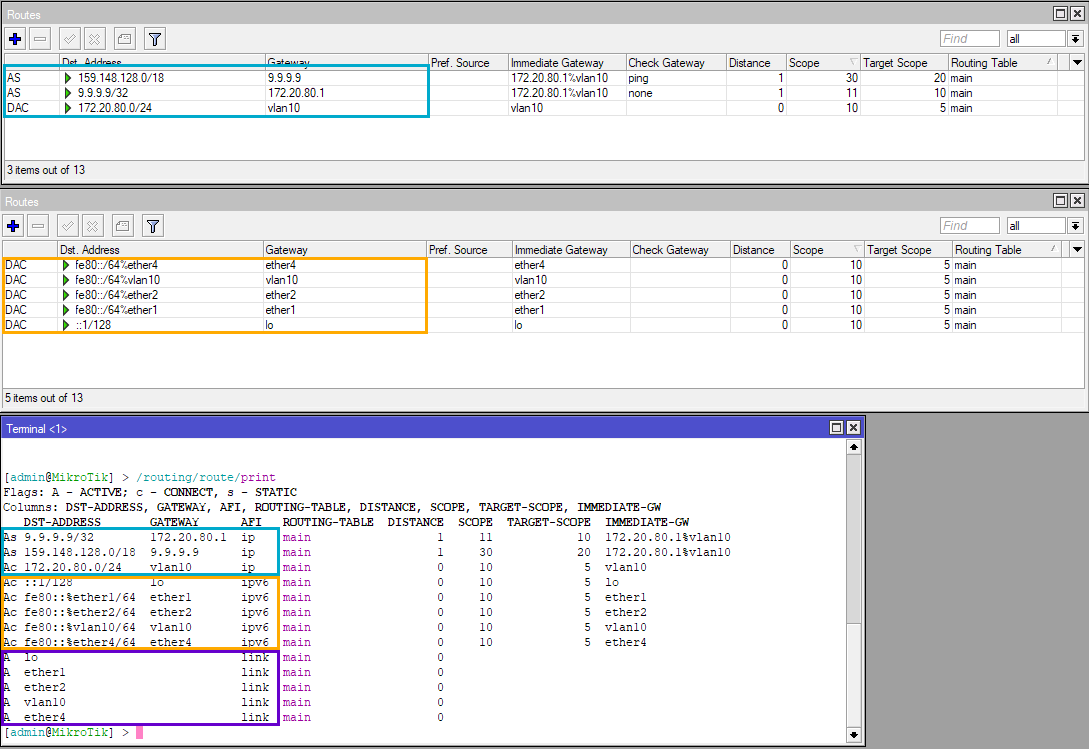
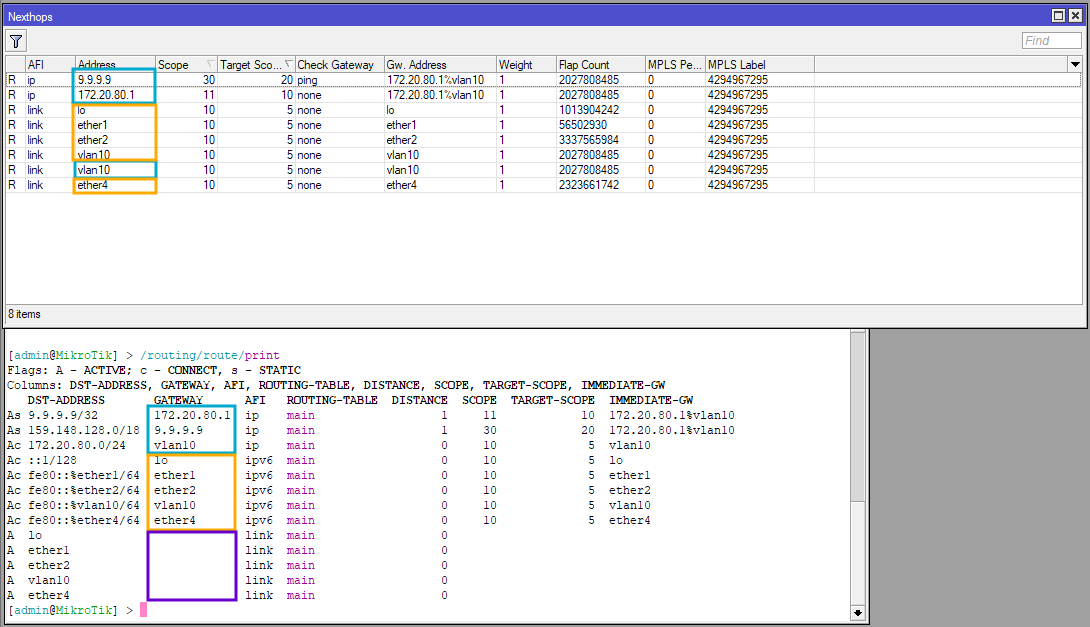
First, what we see in IP -> Routes and IPv6 -> Routes are actually filtered views of /routing/routes. You don't see that table in WinBox but you can do /routing/routes/print and see routes for all protocols mixed up in a single table. The table also have "link" routes for each interface, that are neither IPv4 nor IPv6. That's why in WinBox 3 if you go to IP -> Routes, you see in the status bar "X items out of Y", with Y being larger than the number of IPv4 routes.
In the Nexthops you see the "extraction" of the gateway data from this big /routing/routes table, with corrected value for scope (the purple routes with AFI = link have no gateway and do not appear in Nexthops):
The "Address" column in Nexthops is the address of the gateway, and the AFI column is the AFI of the gateway. The dst-address or distance value of the original routes are irrelevant here.
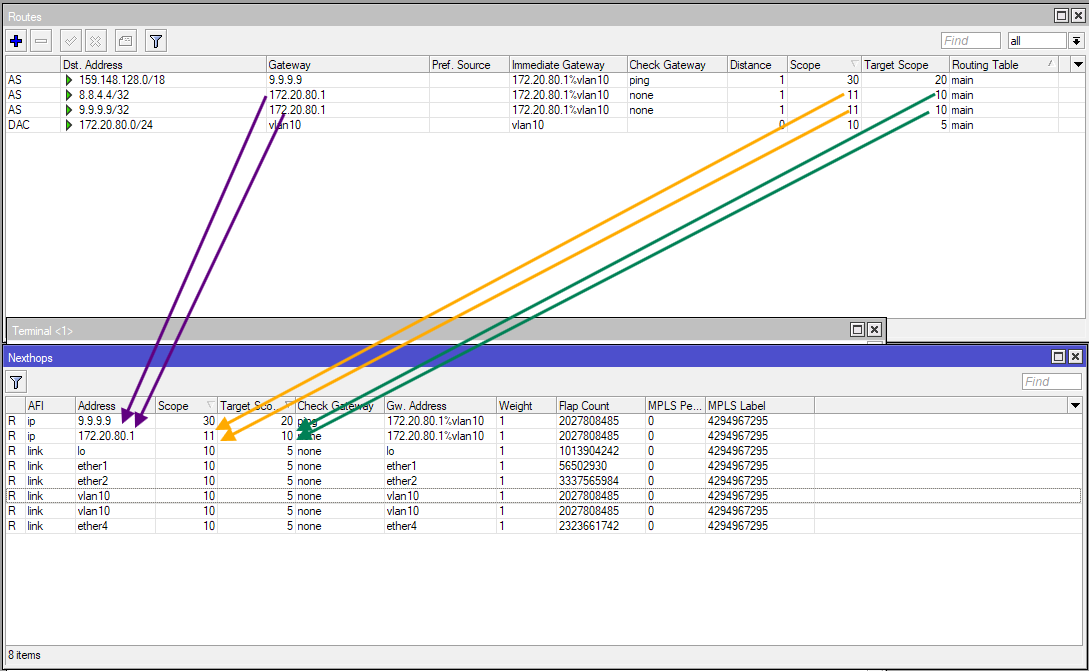
Within the same AFI of the original routes (IPv4 and IPv6 are separated), the rows have unique values! In the following screenshot, two routes with the same gateway 172.20.80.1 and same scope and target-scope are added, those two routes are consolidated into an single Nexthops row, because all the relevant values are the same:
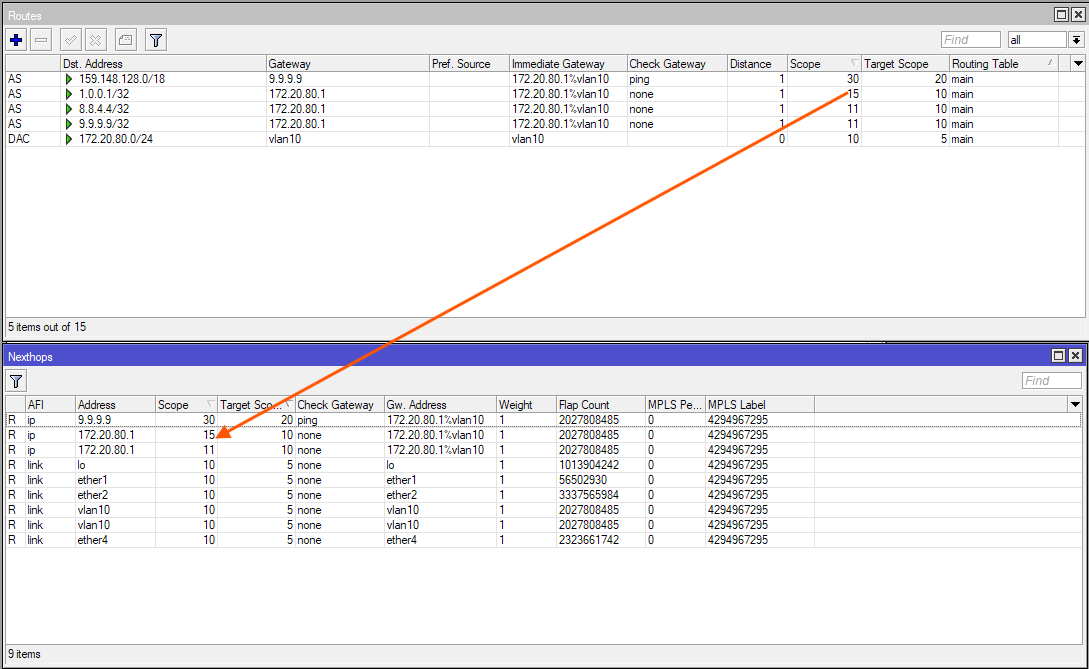
However, if we add another route with the same gateway address 172.20.80.1, but modify the value of scope. we'll get a separate entry in Nexthops, because the two rows have distinct value for scope:
Same when we add another route, with same gateway, scope, target-scope, but modify the value of check-gateway, we'll also have a separate Nexthops entry:
Please note that the two entry with vlan10 as address looks identical, but they are not merged, because one entry belongs to the IPv4 routes, and one to the IPv6 routes.
Again, what matters in Nexthops is not the dst-address or distance of the routes. You can have tons of routes with different distances and and destinations, if they all have the same properties that you see in the Nexthops columns, they'll all share one Nexthops entry.
I hope that explained this question from you:
About this:
What entry is used depends on whether it pass the target-scope limit check. The "maximum accepted scope for gateway lookup". If a route has target-scope=11 then obviously the gateway of that route will not be looked up using the other route with scope=30.
Here @jaclaz is correct in his response to you. The first two routes specify target-scope=11.
So the first route, when trying to figure out how it can reach 1.1.1.1 only looks at all the candidates with real scope not bigger than 11. Route #3 does not satisfy this condition, because it has scope=30, it won't be candidate.
If your route table has no other route that can both contain 1.1.1.1 in dst-address and having scope <= 11, then the 1st route will be unreachable. The ISP2 route, with dst-adddress=0.0.0.0/0 is ok for 1.1.1.1 but having scope=30 disqualifies it.
Same for the 2nd route, when trying to figure out how it can reach 8.8.8.8 only looks at all the candidates with real scope not bigger than 11. Route #4 does not satisfy this condition, because it has scope=30, it won't be candidate.
If your route table has no other route that can both contain 8.8.8.8 in dst-address and having scope <= 11, then the 1st route will be unreachable. The ISP2 route, with dst-adddress=0.0.0.0/0 is ok for 8.8.8.8 but having scope=30 disqualifies it.
As a result, both static routes #1 and #2 are unreachable & inactive (USI).
So the first route I usually make, the recursive route ( not connected to the local gateway ), should be given a SCOPE of 30, which is also what static routes (default) also use. The wording used by jaclaz is WIDE.
The first rule I need to worry about is that to ensure the SCOPE is larger than its Target Scope, valid for any route. So on the first rule I have to ensure TS is less than 30.
Secondly, I need to consider the MT document quote: " TS represents the maximum acceptable SCOPE value in the next hop." Therefore whatever value I put in for TS on this wide route determines the scope value of the next route, the recursive or narrow route.
For the resolving/narrow route route which is connected to the router via the local ISP gateway, I have two considerations.
a. as above the Scope has to be greater than the TS.
and
b. the scope of this route has to be less than or equal to the TS from the previous route.
Therefore, it does seem for ease of programming the router we arbitrarily pick numbers that have to be less then 30, and since other routes commonly use 10 for scope, we choose something higher than 10 so that there is no confusion. Hence 12 or 11.
We note that the router itself if detects a violation of the two rules, will modify the Scope and TS on a config line, such that Scope>=TS+1. and that Scope of narrow route < or = TS of wide route.
+++++++++++++++++++++++
example I have setup on my router
via 1.1.1.1 S=10 TS=12 ( wide/recursive )
via 9.9.9.9 S=10 TS=12 ( wide/recursive ) dst=2
+++++++++++++++++++++++++++++++++++++
via ISP1 S=10 TS=11 (narrow/resolving)
WHAT ROUTING NEXT HOP LOOKS LIKE ( actual router applied fixes )
via 1.1.1.1 S=13 TS=12 ( wide/recursive )
via 9.9.9.9 S=13 TS=12 ( wide/recursive ) dst=2
+++++++++++++++++++++++++++++++++++++
via ISP1 S=12 TS=11 ( narrow/resolving )
The router corrected the actual numbers to reflect the rules stated above. The only question left for me is why didn't the router choose 30 for a target scope on the wide routes and in this case what is the practical difference between recommended 30 and what the router fixed to 13??????
Now two statements from mikrotik documents add some confusion for me,... Firstly, the docs say the routes are processed in order of scope size, but they don't say smaller to bigger or bigger to smaller????
Secondly, this statement needs more explanation for me to understand. Quote: " When target-scope or gateway check of a route is changed, it will not affect other routes, because these properties are internally attached to the nexthop object, not to the route." Unquote.

 ).
).