Can HAP ax S do 1g inet routing?

I live in a small condo in the city and need to replace my old China router and wireless AP ASAP, as I might as well not have any. I don't do anything interesting, but would like that internet thiefs don't chose me, because its the weakest link.

Currently we have 1g wired inet on RJ45. I would get a HAP Be³ with its dual 2.5g, but it lacks SFP+ interface and I have little use for wifi 7. The price is 3x (240€) of what a 1g HAP ax S is here in DK, which cost 80€. The HAP as S has a SFP port and cost 80€ here in DK. I saw that the hEX S can do 1g routeing (60€), if not too complicated rules. Can the ax S do the same or close?
We are 2 using it, no gaming. 10g sfp+ 8 port Mikrotik switch, NAS, HTPC. 2 laptops. Little heavy use.
The plan is to setup a opensense router later on a N150 or similar, when I then can reuse the HAP as wireless AP only. But that is for later.
I bough a (openWRT ready) W7 AP by mistake for 200€, that could also do the wireless part, or I could sell it again.

As I don't know if we will get faster inet speed, then getting the router W6 w fiber port, the HAP ax S is what I will do, unless there are something I missed?
The TLDR is: NO.

Long version:
The usual approximated metrics to judge a Mikrotik device speed is the test results for routing, 25 firewall rules, 512 byte packet. for the Ax S this number is 498.1 Mbits.
With particular configurations it is possible to get as faster as almost twice that, but I wouldn't count on that.

Additionally there are (still) some issues with Wan speed on hap Ax S, so don't choose it for a 1 Gb connection.

Get an Ax 3 that has 1145.2 Mbits or an Ax 2 that has 912.9.

If you don't need Ax Wifi speed (or wifi at all) an Ac 3 might do, 912.6, same speed as the Ax 2.

These can often be found used for 50-60 Euro or so, sold by people that want/need Ax Wiifi speed.

Do you really need that SFP+ port ? Because hAP ax S doesn't have SFP+, only 2.5G SFP port.

Closest device that have SFP+ and it's a router is RB4011, but I would buy RB5009 in that case, but they are more than 80 euros...

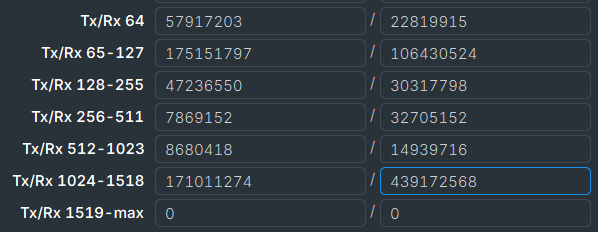
I'm just curious why you chose the 512-byte packet size for the evaluation.

It is statistically significant, of course, but it is not decisive for the throughput of the port/interface.

Just for illustration:

How do you buy socks?

Create my first Mikrotik Network - #17 by jaclaz

On the essential nature of the "512 byte 25 rule" heuristic

With a line speed of 1gb, 900 mbits should do.

With a 1gbit inet, filling the downstream to say a NAS, means the wireless clients will have 100mbit to share, no? I don't use the router&APs switch, due to where it is located.
2.5gbit LAN from the router&AP and 1Gbit as WAN. As I use a SFP+ main switch, I prefer gear that can talk to it directly, as RJ45 transceivers costs, so the fewer I need the better, also when they run 2.5g. The designers who put switches in router-APs that also need to be high should .... It may be cheap, but there is also wires running all over the place. Not wife friendly in a small condo...

Also, there are 8 other condos in the same building, who share a 10g business fiber, via a transparent NAT, that gives us internal IPs and mixes the traffic to one external IP.

The current TP-Link a 3000 Archer AX53, runs d/u 690/750mbit according to my ISPs speedtest. Its the one I want to replace. If I could get 750-850mbit downstream, that would do, until I can setup a N150 or similar for the firewall, and then move the HAP AX S to AP only on a SFP. I stream films to the laptops, and that is pretty much it, beside web/office.

EDIT: I assume the hAP ac will not do so either?

What model do you mean? https://scoop.co.za/blog/mikrotik-haps-ac-vs-ax

The main disadvantage of the hAP ac2 is the 16GB flash (unless you want wifi6 ax). If I were buying something new, I would go for the ax, but you may have found a good deal on an AC2.

If this is just to get you by until you get your opensense router, and you just have one "LAN" then the ac2 may be ok. It's just older generation than the ax line, and you are more likely to run into storage issues (limits). Personally, I prefer to keep my "wifi" separate from the router, but depending on where the router is placed, a router-wifi combo may work if its a small appartment. Any you may not have easy access to install ceiling mounted access points.

As far as the connection from the router to the switch, yes it would be best to use a link > 1Gbps, but if you have only a single "LAN" network, then the only traffic going across the router will be traffic to the internet; traffic between clients on the LAN will all be switched by the external switch. So a copper wire at 1Gbps should do. It will consume one of your RJ45 ports on the switch, but that would be better than using an RJ45 SFP (in my opinion).

The best advice is not to buy incomplete and problematic routers like the Hap AX S or Be Lite/Media; buy a regular AX2, and it will make you happy.

Its quite difficult to know from the statements on Ms website alone, what products have problems. They do say its great for wifi, which I read more broadly...
This was the one I was thinking about linked below. My TPLink is both AP & router, and as I have come to distrust China and US hardware, I need to replace both functions, hence the idea of buying a the S, and later replace the routing w opensense, so moving it to AP duty only.

On the ax S vs ax 2, the S seems to be better for its planned later life as AP, while the ax 2 provide better routing/compute, but no 2.5G ports and no SFP port and is slightly more expensive. The ax 3 does both well, and have 2.5g port, but no SFP. Its also 40€ more expensive. There does not really seem to be any GOAT choices to me. It could also be 2 separate units, if that makes sense.

I can see M seem to have some products in the pipeline, likely later this year. I have run the TP-Link for +6 years, so while its questionable security is concerning, it does provide the basic services, and I have updated its firmware, and my W11 boxes, and now I have also hidden and changed the SSID as per my new macs recommendation.

Tested it again, and is on 660mbit dl on the windows box, so its likely always has been in that neighborhood.
I have just discovered WinBox, so while I planned to move to a opensense x86 router, lets see how far I get...

ADDIT: the S is already imn the mail, so if say we can get it to 650-700-800 mbits with nothing advanced, it may be worth it, and then I get more time to solve the router problem long term.. I don't need VPNs or anything advanced like that, just normal firewall for a household.

https://mikrotik.com/product/RB962UiGS-5HacT2HnT#product_specification

AX2, AX3, after the Wi‑Fi was fixed (380 days of denial of the problem, waiting for a fix :)), it works quite stably, providing 1 Gbps at home and about 700 Mbps via Wi‑Fi with a regular iPhone. But these routers do have some nuances, for example, they process work only on the CPU, which sometimes causes glitches, for example.

Summary

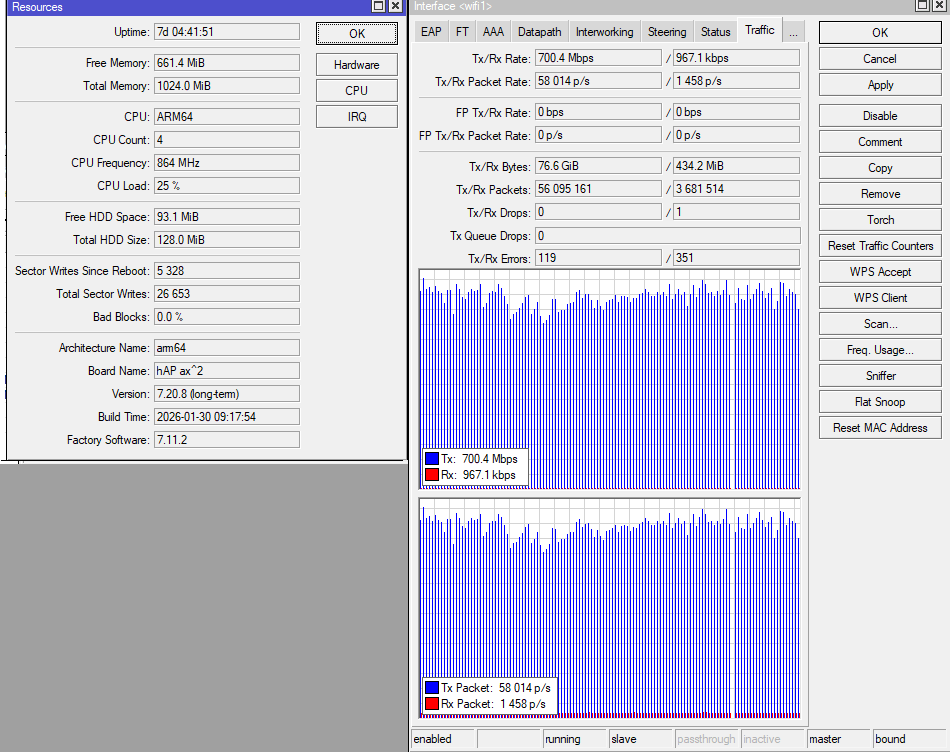
In this example, I’m simply copying a movie to an iPhone 17 via Wi‑Fi with AX2. We can see the interface speed and the overall CPU load, but pay attention to the white interval — it’s a complete loss of connection for less than 1 second. At that time, I opened the resources tab in WinBox, i.e., the router needed some time and resources to display the tab, and during that time, a data transmission failure occurred. Unfortunately, this is a common problem with AX2 and AX3 due to their architecture. But that doesn’t make these routers bad; they’re fast and stable.

Hap AX S is a strange device; it has fast ports, but it can’t operate at that speed — its CPU is weak. It’s the successor to the entire HEX Refresh series, HEX S, with their problem on the ether1, sfp port. Let’s add that Wi‑Fi 7 works just as poorly and doesn’t offer any advantages compared to AX.

The only thing worse is Be Lite, https://youtu.be/0dAgRPFk480?si=3SR5ttKY9HmWg7Pf

It’s also worth mentioning Be Media — it’s an interesting device with extensive functionality, but right now it’s not working well.

In my personal opinion, the latest devices are poorly made. We’ve seen progress with the L009, 5009, AX Lite, and AX 2/3 — these are all interesting and good devices, albeit with their own nuances and issues, but the current lineup: hex, hap, be — is a disgrace.

The hAP Ac is a relatively low power device, it will do ONLY as an AP, don't even think of using it as a router on a 1 Gb connection.

Please take note that it has only 16 Mb storage[1] and an architecture that is considered obsolete for todays standards.

Otherwise it is a good, solid device.

But at US$ 129 list price is way too expensive for what it gives.

An Ax3 is only 10 US$ more expensive (still list price) and an Ax2 is 30 US$ less, has adequate RAM and storage, it has Ax wi-fi and it is Arm64 (the best current architecture).

https://mikrotik.com/products/compare?compare=C52iG-5HaxD2HaxD-TC,RB962UiGS-5HacT2HnT,C53UiG%2B5HPaxD2HPaxD

[1] which may create issues when upgrading, often needing to use netinstall to reset the device and upgrade it.

The website is created by marketing department. Usually when a new devices is launched, very often the technical specifications are wrong in the first few weeks. And the marketing promises the software can't keep. And I say software because in many cases the hardware would be capable.

I use a hEX S 2025 (same chipset as the hAP AX s) as a router for my 1 G/500M fibre connection.

The ONT is connected to it via ether1, and ether2 goes to a CSS326. SFP is not in use. On the CSS I have 4 APs (2 wAP ax, 1 hAP AX lite, 1 hAP AX s) plus a dozen wired devices.

There are 5 VLANs and the hEX does the required firewalling job.

All I can say: Wired devices connected to the CSS, to any VLAN, can max out the 1G download generally.