I have RB4011 router in my home as main router and 2 CAP AC XL for upstairs and downstairs. They connected the rb4011 with directly. My ISP provides 1000/100mbps. i can reach 950mbps download speed with cable.
I enabled the capsman it recognize the radios. Even though I set 80 mhz bandwidth and am only 50 cm away from the access point, the download speed does not exceed 350mbps. My tested clients are iphone 14 pro max and Asus B650E-F Gaming builtin wifi.What is the problem? Currently there is more than one channel in 5ghz channels, but the result did not change even when I try only one channel.
If you decide to follow suggestion by @whatever, be prepared for a couple of caveats:
cAP ac xl comes with 16MB flash storage, which is very tight (on ARM architecture) for 7.13. You may run into “flash storage full” issues (but keep fingers crossed not to)
there are a few manual steps when replacing wireless package with wifi-qcom-ac (read WiFi manual to prepare in advance)
you’ll have to reconfigure settings on capsman on RB4011 (wave2/wifi capsman settings are under /interface/wifi)
Good thing: after you get the new capsman working as desired, you will be able to remove wireless package from RB4011 and free around 2MB of flash storage. But don’t do it until you get new capsman working, after removing wireless package you’ll loose /capsman settings as well).
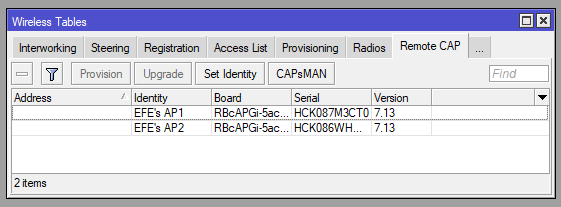
I installed the 7.13 firmware for both RB4011 and CAP AC XL, and configured capsman and cap. i configured new drivers CAPSMAN. Although CAPSMAN detect The Remote CAP’s does not recognize radios. What is the problem?
CAPSMAN Config is;
# 2023-12-26 10:35:19 by RouterOS 7.13
# software id = 6U7K-ZXXE
#
# model = RBcAPGi-5acD2nD
# serial number = HCK087M3CT0
/interface wifi cap
set certificate=request discovery-interfaces=bridgeLocal enabled=yes
thanks for replies.
I watched videos and changed drivers with wifi-qcom-ac and reconfigure capsman. but my download speed did not above 400-410mbps again. I tried different channels but result did not change.
i was monitoring CPU usage and memory while speedtest running. cpu usage was max %50 and free ram was min 32mb. when i forced my clients wifi driver only AC bands i see 450mbps. But these result still so far from mikrotiks promised results. It should be near to 700-800mbps. The teorical speed 833mbps for 80mhz bw at 5Ghz.
This is not a correct statement.
You are mistaken in terms and definitions.
833 is not a theoretical speed, but a channel speed. In this case, the data rate is usually 1/2. 420mbps is the actual data rate for this device.