i noticed issues with Chateau 5G with DNS.
If i use standard setting that work on LHGR LTE on Chateau 5g DNS doesnt work.
Here is the example:
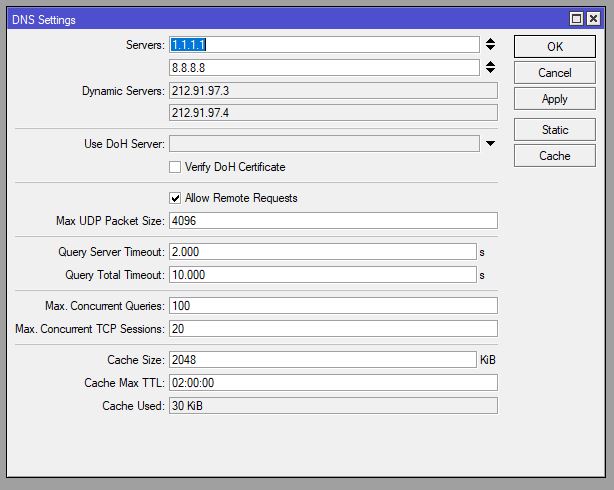
on LHGR v6.49 - this works
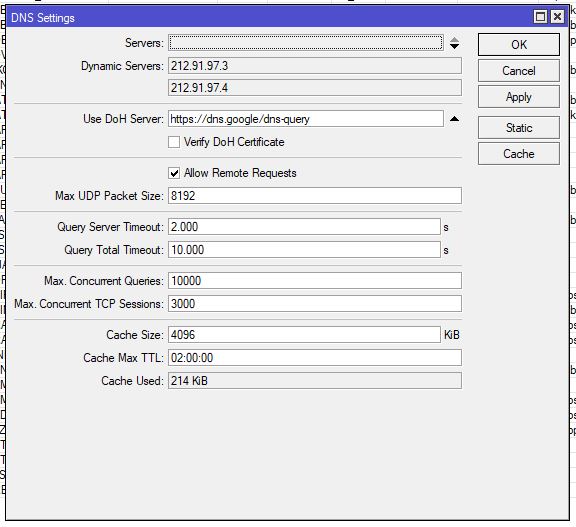
on Chateau 5G v7.1rc6 - only DOH works
firewall is the same. only difference is router OS version
I can see in DNS logs on Chateau that even with standard DNS setting it resolves IP but it never gives that to clients or it never stores it into DNS cache.
Are you sure the DNS from your ISP provider work? The LHG specifies public 1.1.1.1 and 8.8.8.8 as a DNS servers, while the Chateau does not – so they don’t appear to be “the same config”. Basically, the screenshots show
isn’t quite true.
To prove this, you might want to remove the 1.1.1.1 and 8.8.8.8 from the LHG, and I suspect it also won’t work for DNS if all else is really “the same”.
Since I’d imagine your ISP DNS servers do actually work, you may want to look at your firewall/NAT config since it could be the ISP ones are getting block or not NAT’ed, somehow.
DNS from my ISP also doesnt work on Chateau 5g, on LGH LTE it works.
there are no specific firewall roules. only the once to allow established and related connections and to drop invalid and DNS attacks from outside.
Its the same like that on LHG and Chateau.
But in your photo of the DNS configuration, it shows the LHG having a DNS servers of 1.1.1.1 and 8.8.8.8 – that the difference. If you add those to the Chateau, like on your LHG, you should be set.
RouterOS will use manually configured DNS servers over the dynamic ones. If you look at Tools>Torch on the LHG out the wan interface, you’d like see port 53 traffic going to either 1.1.1.1 or 8.8.8.8, not the ISP DNS that the Chateau is using.
if i put in Chateau 8.8.8.8 and 1.1.1.1 it wont work at all. That was the purpose of those picutres to point to that.
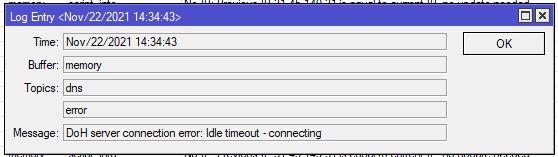
Chateau doesnt work with custom DNS servers or ISP ones!! It only works with DOH server and that is also not stable.
On the DHCP client you can disable the “Use Peer DNS”. Then the dynamic DNS servers won’t be shown (neither will they be used) in the /ip dns settings.
Can you please share your firewall settings (remove any public IP’s)?
/ip firewall export
@kresozg…is that your complete firewall? I think it is not really safe…
Yes i know that it not so secure.
Chateau 5G isnt stable. At least once a week it needs reset of configuration.
So i didnt push security because i need it to work somehow.
I think that somehow we mised point of this topic. General point is that Chateau 5G doesnt work with static DNS or dynamic ISP once.
It works somehow with Doh server but it is not stable for Production use.
It would be good if someone else check configuration of his Chateau 5G.
I guess what I’m saying is I doubt this has anything to do with the fact it’s a Chateau – this screams config issue. Basically, other than CPU/memory performance limits, not a lot of reason to think some L3 thing like DNS issue has anything to do with the specific hardware.
DoH working isn’t a mystery – DoH doesn’t use normal DNS port 53 & screenshot of firewall don’t do anything with HTTPS… So that working, only highlights the need to look at the specifics of the config here… Since the firewall does more than security – it’s always in the routing path – what it does is important, even if you don’t care about network security for testing. I know you say there identical, but my bet is they actually aren’t .
e.g. it appears you’re dropping DNS on “input” before accepting related connection. Since the router is doing the lookup, the return DNS response is seemingly getting dropped. If you move those rules below the “accept” using “related” flag, that might fix your issue.
But hard to know the screenshot doesn’t necessary show all the firewall options…
On why DoH is flaky, assuming this is using LTE, I’d setting up a Tools>Netwatch to ping 8.8.8.8 or 1.1.1.1 every second or few. If the LTE interface or underlying cell network was slow/not responding, that also could be why you see the DoH error. DNS happens a lot, so if the internet has congestion, DNS be first to fail and you won’t get to next operation. e.g. maybe DoH timeout being an indicator of some congestion else where?
NOW, since v7.1 is new/under development, as is DoH, it also could very well be a bug – but might want to eliminate that the timeout may isn’t on the LTE or cellular network side.

 .
.