I’m trying to use cell lock on a Chateau LTE12 unit running RouterOS 7.0 - stable version when checking for updates.
I have done this on other Mikrotik LTE devices using the command /interface lte1 at-chat lte1 input=“AT*Cell=2,3,,”. However this is not working on the Chateau. When entering the command it returns output error and won’t lock onto the given cell.
Can anyone advise what I’m doing incorrectly to utilise cell lock on this router?
I also know that the command is not enduring and will default back to auto on reboot. I can solve that with a script run at startup. However at present I can’t get the command to work.
Thanks SiB, really appreciate your reply. I couldn’t find that in the documentation and support had told me the old cell lock command worked.
So just to be clear I need to lock to a mast with EARFCN of 1392 and cellID 156. At the Terminal prompt I just enter:
interface/lte/at-chat lte1 input="at+qnwlock="common/4g",1,1392,156”
Is that correct? I don’t need a / before interface?? That was required under RouterOS 6 for cell lock. Apologies if that’s a dumb question but noticed it wasn’t in your thread link.
hello
sorry if I get involved in the discussion but I have a problem with the chateau cell lock
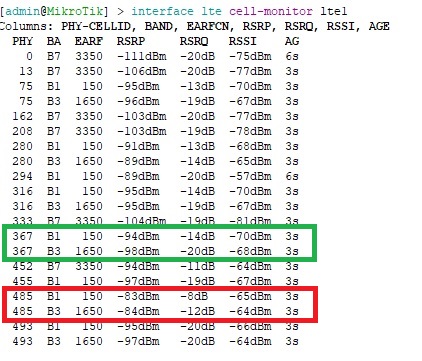
in the example I highlighted in red the cells that the chateau takes by default; in green those I would like to try even if with worse signal (B3)
i try in this order this commands:
after this last command i get error on the LTE1 (see), and my internet connection goes down.
can anyone kindly help me?
i don’t understand the error..
if i try the cell lock with the the two main (cell 485) i have no problem.
in practice I would like to test the neighboring cells even if the signal is less strong than the main one
any help will be appreciated. thank you
I have Chateau-LTE12 running with RouterOS v7.1beta6 and lte is not working for me but 4g is.
Will this command survive router reboot/shutdown or it needs to be issued every time upon router start?
Also could you please tell me if the syntax from https://wiki.mikrotik.com/wiki/Manual:Interface/LTE
/interface lte at-chat lte1 input=“AT*Cell=0”
is working for removing cell lock or it has been changed too?
Thanks.
Update:
According to new syntax figured out this should disable cell lock:
interface lte at-chat lte1 input=“at+qnwlock="common/4g",0”