Configuring VLANs correctly

Hi, I am having some trouble configuring my devices to correctly use VLANs.

I am already on my third attempt, and am this close to scrapping everything and trying for my fourth.

My setup consists of 6 devices:

  • RB5009
  • CRS309-1G-8S+
  • CRS326-24G-2S+
  • RB260GSP x2
  • cAP ax

The connections are:

  • RB5009 -> cAP ax
  • RB5009 -> CRS309
  • CRS309 -> CRS326
  • CRS309 -> RB260GSP
  • CRS309 -> RB260GSP

I have followed the "Using RouterOS to VLAN your network" guide, the VLAN with multiple SSIDs guide, the Basic VLAN Switching help page, the Bridging and Switching help page, and more.

My latest attempt has the appearance of a working network, but I know I have something wrong. To name a few issues:

  • I have tried to configure management access to each device on VLAN 99; yet some devices show in the neighbours list on the WinBox login screen as being via VLAN 100. Additionally, some devices are shown in that list multiple times.
  • Further to the above, the switches can see (some) of their neighbours via VLAN99 just fine.
  • I have managed to lock myself out of my RB260GSP (again), by configuring the "Allowed VLAN" to be VLAN99. I do have a forwarding rule configured in the router (RB5009) which should allow me access to VLAN99, from VLAN100.
  • I have needed to manually add a default route to the router (on its VLAN 99 ip), otherwise after enabling vlan-filtering I lose access.
  • I cannot access the cAP via its managment IP, I need to use the dedicated ethernet port.
  • While I can access some devices (CRS309/CRS326) via VLAN99, I cannot access the router RB5009 via VLAN99 (i.e. a firewall rule on the RB5009, forwarding from the VLAN100 interface to the VLAN99 interface). So a separate input rule is in place to accept from VLAN100.
  • The WiFi APs wouldn't configure when both ends (CAP, CAPsMAN) were set to "bridge" as the interface, but it worked once the interface was set to "vlan99".
  • The slave WiFi interface (for IoT) doesn't get used, instead a dynamic WiFi interface gets created instead.

These are the exported configurations for the router and two main switches:

RB5009
/interface bridge
add comment="LAN Bridge" frame-types=admit-only-vlan-tagged name=bridge vlan-filtering=yes
/interface ethernet
set [ find default-name=ether1 ] comment="WAN Port - ONT" l2mtu=1514
set [ find default-name=ether2 ] comment="LAN - PoE Temp Wireless AP" l2mtu=1514
set [ find default-name=ether3 ] comment="LAN - PoE Unused" l2mtu=1514
set [ find default-name=ether4 ] comment="LAN - PoE Unused" l2mtu=1514
set [ find default-name=ether5 ] comment="LAN - PoE Unused" l2mtu=1514
set [ find default-name=ether6 ] comment="LAN - PoE Unused" l2mtu=1514
set [ find default-name=ether7 ] comment="LAN - PoE Unused" l2mtu=1514
set [ find default-name=ether8 ] comment="LAN - PoE Unused" l2mtu=1514
set [ find default-name=sfp-sfpplus1 ] comment="LAN - Fibre Aggregator Switch" l2mtu=1514
/interface vlan
add comment="Management VLAN" interface=bridge name=vlan99-mgmt vlan-id=99
add comment="Trusted VLAN" interface=bridge name=vlan100-trusted vlan-id=100
add comment="Untrusted VLAN" interface=bridge name=vlan110-untrusted vlan-id=110
add comment="Lab VLAN" interface=bridge name=vlan120-lab vlan-id=120
add comment="IoT VLAN" interface=bridge name=vlan130-iot vlan-id=130
/caps-man configuration
add country="united kingdom" datapath.bridge=bridge installation=indoor mode=ap name=CAP-Main security.authentication-types=wpa2-psk .encryption=aes-ccm ssid=MainSSID
/interface list
add comment="WAN Interface List" name=WAN
add comment=defconf name=LAN
add comment="Management Interface List" name=MGMT
add comment="All VLANs except management" name=VLAN
/interface wifi channel
add band=5ghz-ax deprioritize-unii-3-4=yes disabled=no frequency=5500,5580,5660,5745 name="5ghz channel" width=20/40/80mhz
add band=2ghz-ax deprioritize-unii-3-4=yes disabled=no frequency=2447,2457 name="2ghz channel" width=20/40mhz
/interface wifi datapath
add bridge=bridge comment="Datapath for VLAN100" disabled=no name=dp-vlan100 vlan-id=100
add bridge=bridge comment="Datapath for VLAN130" disabled=no name=dp-vlan130 vlan-id=130
/interface wifi security
add authentication-types=wpa3-psk comment="Trusted WiFI Security" disabled=no encryption=gcmp-256 ft=yes ft-over-ds=yes name=sec-trusted
add authentication-types=wpa2-psk,wpa3-psk comment="IoT WiFI Security" disabled=no encryption=ccmp ft-over-ds=yes name=sec-iot
/interface wifi steering
add comment="Band Steering" disabled=no name=steering-main rrm=yes wnm=yes
/interface wifi configuration
add channel="5ghz channel" country="United Kingdom" datapath=dp-vlan100 disabled=no name=cfg-trusted-wifi-5ghz security=sec-trusted ssid=SSID steering=steering-main
add channel="2ghz channel" country="United Kingdom" datapath=dp-vlan130 disabled=no mode=ap name=cfg-IoT-wifi-2ghz security=sec-iot security.ft=yes ssid=SSID-IoT steering=steering-main
add channel="2ghz channel" country="United Kingdom" datapath=dp-vlan100 disabled=no mode=ap name=cfg-trusted-wifi-2ghz security=sec-trusted ssid=SSID steering=steering-main
/interface wireless security-profiles
set [ find default=yes ] supplicant-identity=MikroTik
/ip dhcp-server option
add code=6 name=DNS
/ip pool
add name=default-dhcp ranges=192.168.88.10-192.168.88.254
add comment="Trusted IPv4 Pool" name=pool-trusted ranges=10.10.0.100-10.10.0.199
add comment="Untrusted IPv4 Pool" name=pool-untrusted ranges=10.11.0.100-10.11.0.199
add comment="Management IPv4 Pool" name=pool-mgmt ranges=10.99.0.100-10.99.0.199
add comment="Lab IPv4 Pool" name=pool-lab ranges=10.12.0.100-10.12.0.199
add comment="IoT IPv4 Pool" name=pool-IoT ranges=10.13.0.100-10.13.0.199
/ip dhcp-server
add address-pool=default-dhcp disabled=yes interface=bridge name=defconf
add address-pool=pool-mgmt interface=vlan99-mgmt lease-time=1d name=dhcp-management
add address-pool=pool-trusted interface=vlan100-trusted lease-time=1d name=dhcp-trusted
add address-pool=pool-untrusted interface=vlan110-untrusted lease-time=1d name=dhcp-untrusted
add address-pool=pool-lab interface=vlan120-lab lease-time=1d name=dhcp-lab
add address-pool=pool-IoT interface=vlan130-iot lease-time=1d name=dhcp-iot
/ppp profile
add change-tcp-mss=yes name=ISP only-one=yes use-mpls=no
/interface pppoe-client
add add-default-route=yes comment="PPPoE - Internet" disabled=no interface=ether1 max-mru=1492 max-mtu=1492 name=ISP-PPPoE profile=ISP use-peer-dns=yes user=<USERNAME>
/caps-man manager
set enabled=yes
/caps-man provisioning
add action=create-dynamic-enabled comment=Main hw-supported-modes=gn master-configuration=CAP-Main
/disk settings
set auto-media-interface=bridge auto-media-sharing=yes auto-smb-sharing=yes
/interface bridge port
add bridge=bridge comment=defconf frame-types=admit-only-vlan-tagged interface=ether2
add bridge=bridge comment=defconf interface=ether3
add bridge=bridge comment=defconf interface=ether4
add bridge=bridge comment=defconf interface=ether5
add bridge=bridge comment=defconf interface=ether6
add bridge=bridge comment=defconf interface=ether7
add bridge=bridge comment="Fibre Trunk Port" frame-types=admit-only-vlan-tagged interface=sfp-sfpplus1
/ip neighbor discovery-settings
set discover-interface-list=all lldp-mac-phy-config=yes lldp-vlan-info=yes
/ipv6 settings
set accept-router-advertisements=yes
/interface bridge vlan
add bridge=bridge comment="Management VLAN" tagged=bridge,sfp-sfpplus1,ether2 vlan-ids=99
add bridge=bridge comment="Trusted VLAN" tagged=bridge,sfp-sfpplus1,ether2 vlan-ids=100
add bridge=bridge comment="Lab VLAN" tagged=bridge,sfp-sfpplus1 vlan-ids=120
add bridge=bridge comment="IoT VLAN" tagged=bridge,sfp-sfpplus1,ether2 vlan-ids=130
/interface list member
add comment=defconf interface=bridge list=LAN
add comment=defconf interface=ether1 list=WAN
add comment="PPPoE WAN Interface" interface=ISP-PPPoE list=WAN
add comment="Dedicated Management Port" interface=ether8 list=MGMT
add comment="Management VLAN" interface=vlan99-mgmt list=MGMT
add comment="Trusted VLAN" interface=vlan100-trusted list=VLAN
add comment="Untrusted VLAN" interface=vlan110-untrusted list=VLAN
add comment="Lab VLAN" interface=vlan120-lab list=VLAN
add comment="IoT VLAN" interface=vlan130-iot list=VLAN
/interface wifi capsman
set ca-certificate=auto certificate=auto enabled=yes interfaces=vlan99-mgmt
/interface wifi provisioning
add action=create-dynamic-enabled disabled=no master-configuration=cfg-trusted-wifi-5ghz supported-bands=5ghz-ax
add action=create-dynamic-enabled disabled=no master-configuration=cfg-trusted-wifi-2ghz slave-configurations=cfg-IoT-wifi-2ghz supported-bands=2ghz-n
/ip address
add address=192.168.88.1/24 comment=defconf interface=bridge network=192.168.88.0
add address=10.100.0.1/30 comment=Addr-Mgmt-Backup interface=ether8 network=10.100.0.0
add address=10.10.0.1/24 comment="Trusted Addresses" interface=vlan100-trusted network=10.10.0.0
add address=10.99.0.1/24 comment="Management Addresses" interface=vlan99-mgmt network=10.99.0.0
add address=10.11.0.1/24 comment="Untrusted Addresses" interface=vlan110-untrusted network=10.11.0.0
add address=10.12.0.1/24 comment="Lab Addresses" interface=vlan120-lab network=10.12.0.0
add address=10.13.0.1/24 comment="IoT Addresses" interface=vlan130-iot network=10.13.0.0
/ip cloud
set update-time=no
/ip dhcp-client
add comment=defconf disabled=yes interface=ether1 name=ether1
/ip dhcp-server network
add address=10.10.0.0/24 comment="Trusted DHCPv4 Network" dns-server=10.10.0.1 gateway=10.10.0.1
add address=10.11.0.0/24 comment="Untrusted DHCPv4 Network" dns-server=10.11.0.1 gateway=10.11.0.1
add address=10.12.0.0/24 comment="Lab Network" dns-server=10.12.0.1 gateway=10.12.0.1
add address=10.13.0.0/24 comment=IoTNetwork dns-server=10.13.0.1 gateway=10.13.0.1
add address=10.99.0.0/24 comment="Management DHCPv4 Network" dns-server=10.99.0.1 gateway=10.99.0.1
add address=192.168.88.0/24 comment=defconf dns-server=192.168.88.1 gateway=192.168.88.1
/ip dns
set allow-remote-requests=yes max-udp-packet-size=512
/ip dns static
add address=10.99.0.1 comment=defconf name=router.lan type=A
/ip firewall filter
add action=accept chain=input comment="defconf: accept established,related,untracked" connection-state=established,related,untracked
add action=drop chain=input comment="defconf: drop invalid" connection-state=invalid
add action=accept chain=input comment="defconf: accept ICMP" protocol=icmp
add action=accept chain=input comment="defconf: accept to local loopback (for CAPsMAN)" dst-address=127.0.0.1
add action=accept chain=input comment="Allow DNS from LAN" dst-port=53 in-interface-list=!WAN protocol=tcp
add action=accept chain=input comment="Allow DNS from LAN" dst-port=53 in-interface-list=!WAN protocol=udp
add action=accept chain=input comment="Allow full management Access" in-interface-list=MGMT
add action=accept chain=input comment="Allow full management Access" in-interface=vlan100-trusted
add action=drop chain=input comment="Drop Everything Else"
add action=drop chain=input comment="defconf: drop all not coming from LAN" disabled=yes in-interface-list=!LAN
add action=fasttrack-connection chain=forward comment="defconf: fasttrack" connection-state=established,related
add action=accept chain=forward comment="defconf: accept established,related, untracked" connection-state=\
    established,related,untracked
add action=drop chain=forward comment="defconf: drop invalid" connection-state=invalid
add action=accept chain=forward comment="Allow Trusted -> Untrusted" connection-state=new in-interface=vlan100-trusted out-interface=vlan110-untrusted
add action=accept chain=forward comment="Allow Trusted -> Lab" connection-state=new in-interface=vlan100-trusted out-interface=vlan120-lab
add action=accept chain=forward comment="Allow Trusted -> Management" connection-state=new in-interface=vlan100-trusted out-interface=vlan99-mgmt
add action=accept chain=forward comment="Allow IoT -> Management" connection-state=new in-interface=vlan130-iot out-interface=vlan99-mgmt
add action=accept chain=forward comment="Internet Access (VLANs)" connection-state=new in-interface-list=VLAN out-interface-list=WAN
add action=accept chain=forward comment="Internet Access (Mangement)" connection-state=new in-interface-list=MGMT out-interface-list=WAN
add action=accept chain=forward comment="defconf: accept in ipsec policy" disabled=yes ipsec-policy=in,ipsec
add action=accept chain=forward comment="defconf: accept out ipsec policy" disabled=yes ipsec-policy=out,ipsec
add action=accept chain=forward comment="Allow Port Forwarding" connection-nat-state=dstnat
add action=drop chain=forward comment="defconf: drop all from WAN not DSTNATed" connection-nat-state=!dstnat connection-state=new in-interface-list=WAN
/ip firewall nat
add action=masquerade chain=srcnat comment="defconf: masquerade" ipsec-policy=out,none out-interface-list=WAN
/ip firewall service-port
set ftp disabled=yes
set tftp disabled=yes
set h323 disabled=yes
set sip disabled=yes
set pptp disabled=yes
/ip service
set ftp disabled=yes
set ssh address=0.0.0.0/0
set telnet disabled=yes
set api disabled=yes
set api-ssl disabled=yes
/ip ssh
set host-key-type=ed25519 password-authentication=no strong-crypto=yes
CRS309
/interface bridge
add admin-mac=D0:EA:11:A0:EA:CD auto-mac=no comment=defconf frame-types=admit-only-vlan-tagged name=bridge vlan-filtering=yes
/interface ethernet
set [ find default-name=ether1 ] comment="Management Backup"
set [ find default-name=sfp-sfpplus1 ] comment="Upstream - Trunk - Router"
set [ find default-name=sfp-sfpplus2 ] auto-negotiation=no comment="Downstream - Trunk - Office" speed=1G-baseX
set [ find default-name=sfp-sfpplus3 ] auto-negotiation=no comment="Downstream - Trunk - Living Room" speed=1G-baseX
set [ find default-name=sfp-sfpplus4 ] comment=Unused disabled=yes
set [ find default-name=sfp-sfpplus5 ] comment=Unused disabled=yes
set [ find default-name=sfp-sfpplus6 ] comment=Unused disabled=yes
set [ find default-name=sfp-sfpplus7 ] comment=Unused disabled=yes
set [ find default-name=sfp-sfpplus8 ] comment="Downstream - Trunk - Copper Switch"
/interface vlan
add comment="Management VLAN" interface=bridge name=vlan99-mgmt vlan-id=99
add comment="Trusted VLAN" interface=bridge name=vlan100-trusted vlan-id=100
add comment="Untrusted VLAN" interface=bridge name=vlan110-untrusted vlan-id=110
add comment="Lab VLAN" interface=bridge name=vlan120-lab vlan-id=120
/interface bridge port
add bridge=bridge comment="Upstream - Trunk - Router" frame-types=admit-only-vlan-tagged interface=sfp-sfpplus1
add bridge=bridge comment="Downstream - Trunk - Office" frame-types=admit-only-vlan-tagged interface=sfp-sfpplus2
add bridge=bridge comment="Downstream - Trunk - Living Room" frame-types=admit-only-vlan-tagged interface=sfp-sfpplus3
add bridge=bridge comment=Unused disabled=yes frame-types=admit-only-vlan-tagged interface=sfp-sfpplus4
add bridge=bridge comment=Unused disabled=yes frame-types=admit-only-vlan-tagged interface=sfp-sfpplus5
add bridge=bridge comment=Unused disabled=yes frame-types=admit-only-vlan-tagged interface=sfp-sfpplus6
add bridge=bridge comment=Unused disabled=yes frame-types=admit-only-vlan-tagged interface=sfp-sfpplus7
add bridge=bridge comment="Downstream - Trunk - Copper Switch" frame-types=admit-only-vlan-tagged interface=sfp-sfpplus8
/ip neighbor discovery-settings
set discover-interface-list=all lldp-mac-phy-config=yes lldp-vlan-info=yes
/interface bridge vlan
add bridge=bridge comment="Management VLAN" tagged=sfp-sfpplus1,sfp-sfpplus8,bridge vlan-ids=99
add bridge=bridge comment="Trusted VLAN" tagged=bridge,sfp-sfpplus1,sfp-sfpplus2,sfp-sfpplus8 vlan-ids=100
add bridge=bridge comment="Untrusted VLAN" tagged=bridge,sfp-sfpplus1,sfp-sfpplus2,sfp-sfpplus3,sfp-sfpplus8 vlan-ids=110
add bridge=bridge comment="Lab VLAN" tagged=bridge,sfp-sfpplus1,sfp-sfpplus8 vlan-ids=120
/ip address
add address=192.168.88.2/24 comment=defconf disabled=yes interface=bridge network=192.168.88.0
add address=10.99.0.2/24 comment="Management IP" interface=vlan99-mgmt network=10.99.0.0
/ip route
add disabled=no distance=1 dst-address=0.0.0.0/0 gateway=10.99.0.1 routing-table=main suppress-hw-offload=no
CRS326
/interface bridge
add admin-mac=78:9A:18:E7:99:94 auto-mac=no comment=defconf frame-types=admit-only-vlan-tagged name=bridge port-cost-mode=short vlan-filtering=yes
/interface ethernet
set [ find default-name=ether1 ] comment="Patch 1 - RPI5 - DNS"
set [ find default-name=ether2 ] comment="Mgmt Backup\?"
set [ find default-name=ether3 ] comment="Patch 2 - RPI5 - Cluster"
set [ find default-name=ether5 ] comment="Patch 3 - RPI4 - Mimir"
set [ find default-name=ether6 ] comment=Unused disabled=yes
set [ find default-name=ether7 ] comment="Patch 4 - Unused" disabled=yes
set [ find default-name=ether8 ] comment="RPI2 - 01"
set [ find default-name=ether9 ] comment="Patch 5 - Unused" disabled=yes
set [ find default-name=ether10 ] comment=Unused disabled=yes
set [ find default-name=ether11 ] comment="Patch 6 - Unused" disabled=yes
set [ find default-name=ether12 ] comment="RPI2 - 02"
set [ find default-name=ether13 ] comment="Patch 7 - Unused" disabled=yes
set [ find default-name=ether14 ] comment=Unused disabled=yes
set [ find default-name=ether15 ] comment="Patch 8 - Unused" disabled=yes
set [ find default-name=ether16 ] comment="RPI2 - 03"
set [ find default-name=ether17 ] comment="Patch 9 - Unused" disabled=yes
set [ find default-name=ether18 ] comment=Unused disabled=yes
set [ find default-name=ether19 ] comment="Patch 10 - Unused" disabled=yes
set [ find default-name=ether20 ] comment="RPI2 - 04"
set [ find default-name=ether21 ] comment="Patch 11 - Unused" disabled=yes
set [ find default-name=ether22 ] comment=Unused disabled=yes
set [ find default-name=ether23 ] comment="Patch 12 - Unused" disabled=yes
set [ find default-name=ether24 ] comment="RPI2 - 05"
set [ find default-name=sfp-sfpplus1 ] comment=Upstream
set [ find default-name=sfp-sfpplus2 ] comment=Unused disabled=yes
/interface vlan
add comment="Management VLAN" interface=bridge name=vlan99-mgmt vlan-id=99
add comment=Trusted interface=bridge name=vlan100-trusted vlan-id=100
add comment="Untrusted VLAN" interface=bridge name=vlan110-untrusted vlan-id=110
add comment="Lab VLAN" interface=bridge name=vlan120-lab vlan-id=120
/interface list
add name=WAN
add name=LAN-List
add comment="Management List" name=MGMT
/interface wireless security-profiles
set [ find default=yes ] supplicant-identity=MikroTik
/interface bridge port
add bridge=bridge comment="RPI5 - DNS" frame-types=admit-only-untagged-and-priority-tagged interface=ether1 internal-path-cost=10 path-cost=10 pvid=120
add bridge=bridge comment="RPI5 - Cluster" frame-types=admit-only-untagged-and-priority-tagged interface=ether3 internal-path-cost=10 path-cost=10 pvid=120
add bridge=bridge comment="RPI4 - Mimir" frame-types=admit-only-untagged-and-priority-tagged interface=ether5 internal-path-cost=10 path-cost=10 pvid=120
add bridge=bridge comment=Unused frame-types=admit-only-untagged-and-priority-tagged interface=ether6 internal-path-cost=10 path-cost=10 pvid=120
add bridge=bridge comment="Unused - Patch 4" frame-types=admit-only-untagged-and-priority-tagged interface=ether7 internal-path-cost=10 path-cost=10 pvid=120
add bridge=bridge comment="RPI2 - 01" frame-types=admit-only-untagged-and-priority-tagged interface=ether8 internal-path-cost=10 path-cost=10 pvid=120
add bridge=bridge comment="Unused - Patch 5" frame-types=admit-only-untagged-and-priority-tagged interface=ether9 internal-path-cost=10 path-cost=10 pvid=120
add bridge=bridge comment=Unused frame-types=admit-only-untagged-and-priority-tagged interface=ether10 internal-path-cost=10 path-cost=10 pvid=120
add bridge=bridge comment="Unused - Patch 6" frame-types=admit-only-untagged-and-priority-tagged interface=ether11 internal-path-cost=10 path-cost=10 pvid=120
add bridge=bridge comment="RPI2 - 02" frame-types=admit-only-untagged-and-priority-tagged interface=ether12 internal-path-cost=10 path-cost=10 pvid=120
add bridge=bridge comment="Unused - Patch 7" frame-types=admit-only-untagged-and-priority-tagged interface=ether13 internal-path-cost=10 path-cost=10 pvid=120
add bridge=bridge comment=Unused frame-types=admit-only-untagged-and-priority-tagged interface=ether14 internal-path-cost=10 path-cost=10 pvid=120
add bridge=bridge comment="Unused - Patch 8" frame-types=admit-only-untagged-and-priority-tagged interface=ether15 internal-path-cost=10 path-cost=10 pvid=120
add bridge=bridge comment="RPI2 - 03" frame-types=admit-only-untagged-and-priority-tagged interface=ether16 internal-path-cost=10 path-cost=10 pvid=120
add bridge=bridge comment="unused - Patch 9" frame-types=admit-only-untagged-and-priority-tagged interface=ether17 internal-path-cost=10 path-cost=10 pvid=120
add bridge=bridge comment=Unused frame-types=admit-only-untagged-and-priority-tagged interface=ether18 internal-path-cost=10 path-cost=10 pvid=120
add bridge=bridge comment="Unused - Patch 10" frame-types=admit-only-untagged-and-priority-tagged interface=ether19 internal-path-cost=10 path-cost=10 pvid=120
add bridge=bridge comment="RPI2 - 04" frame-types=admit-only-untagged-and-priority-tagged interface=ether20 internal-path-cost=10 path-cost=10 pvid=120
add bridge=bridge comment="Unused - Patch 11" frame-types=admit-only-untagged-and-priority-tagged interface=ether21 internal-path-cost=10 path-cost=10 pvid=120
add bridge=bridge comment=Unused frame-types=admit-only-untagged-and-priority-tagged interface=ether22 internal-path-cost=10 path-cost=10 pvid=120
add bridge=bridge comment="Unused  - Patch 12" frame-types=admit-only-untagged-and-priority-tagged interface=ether23 internal-path-cost=10 path-cost=10 pvid=120
add bridge=bridge comment="RPI2 - 05" frame-types=admit-only-untagged-and-priority-tagged interface=ether24 internal-path-cost=10 path-cost=10 pvid=120
add bridge=bridge comment="Upstream Trunk" frame-types=admit-only-vlan-tagged interface=sfp-sfpplus1 internal-path-cost=10 path-cost=10
add bridge=bridge comment="Unused - SFP" interface=sfp-sfpplus2 internal-path-cost=10 path-cost=10
/ip firewall connection tracking
set udp-timeout=10s
/ip neighbor discovery-settings
set lldp-mac-phy-config=yes lldp-vlan-info=yes
/interface bridge vlan
add bridge=bridge comment="Management VLAN" tagged=sfp-sfpplus1,bridge vlan-ids=99
add bridge=bridge comment="Lab VLAN" untagged=LAN-List vlan-ids=120
add bridge=bridge comment="Trusted VLAN" untagged=LAN-List vlan-ids=100
/interface list member
add interface=ether1 list=LAN-List
add interface=ether2 list=LAN-List
add interface=ether3 list=LAN-List
add interface=ether4 list=LAN-List
add interface=ether5 list=LAN-List
add interface=ether6 list=LAN-List
add interface=ether7 list=LAN-List
add interface=ether8 list=LAN-List
add interface=ether9 list=LAN-List
add interface=ether10 list=LAN-List
add interface=ether11 list=LAN-List
add interface=ether12 list=LAN-List
add interface=ether13 list=LAN-List
add interface=ether14 list=LAN-List
add interface=ether15 list=LAN-List
add interface=ether16 list=LAN-List
add interface=ether17 list=LAN-List
add interface=ether18 list=LAN-List
add interface=ether19 list=LAN-List
add interface=ether20 list=LAN-List
add interface=ether21 list=LAN-List
add interface=ether22 list=LAN-List
add interface=ether23 list=LAN-List
add interface=ether24 list=LAN-List
add interface=sfp-sfpplus1 list=LAN-List
add interface=sfp-sfpplus2 list=LAN-List
add comment="Management Backup" interface=ether2 list=MGMT
add comment="Management VLAN" interface=vlan99-mgmt list=MGMT
/interface ovpn-server server
add mac-address=FE:8B:BB:F7:F4:9C name=ovpn-server1
/ip address
add address=10.99.0.3/24 comment="Management IP" interface=vlan99-mgmt network=10.99.0.0
add address=10.100.0.1/30 comment="Management - Backup" interface=ether2 network=10.100.0.0
/ip dhcp-client
add interface=bridge name=client1
/ip dns
set servers=192.168.2.100
/ip hotspot profile
set [ find default=yes ] html-directory=hotspot
/ip ipsec profile
set [ find default=yes ] dpd-interval=2m dpd-maximum-failures=5
/ip route
add disabled=no distance=1 dst-address=0.0.0.0/0 gateway=10.99.0.1 routing-table=main suppress-hw-offload=no
/ip service
set ftp disabled=yes
set telnet disabled=yes

I feel like something isn't meshing right with my understanding of VLANs, firewalls, etc; and the way Mikrotik devices implement them. If I'm honest, it is probably understanding which interface is used to access the switch.

I have seen the bridge interface mentioned as being the CPU interface. But also, all the examples say the bridge should be tagged; but surely the bridge is the "access" port and so must be Untagged. Right?

Especially if all of the other VLANs have the bridge tagged too, would explain why some of them are showing in the WinBox neighbour list. But if I don't explicitly tag the bridge in /interfaces/bridge/vlans, once filtering is enabled, the bridge gets an implicit "tagged" entry anyway.

Am I missing something fundamental here? Have I done too much, or configured things I shouldn't have?

Thanks in advance

The learning curve for vLANs on Mikrotik is steep. While it is a good thing to have a plan in mindfor where you want to get to, my best advice for anyone who has never done a vLAN before is that you start with a basic network and add just 1 vLAN to that network and get that working.

Also worth mentioning that there are several ways of doing a Management vLAN, so if you start with that one and seek help you will be battling against diverse preconceptions, so better to start with another vLAN. Make sure that you can articulate what the vLAN is supposed to achieve too - in this context, a wireless Guest Network may be one of the best things to start with.

Edit: As noted by CGGXANNX in this post, the l2mtu=1514 isnt' related to your issue.

I was confusing full frame MTU with l2mtu, which is also validated by the link I posted below. The l2mtu does not include the 14 byte fixed ethernet header (DSTMAC:6bytes,SRCMAC:6bytes,ethertype:2bytes), so the l2mtu value of 1514 allows for a Full Frame MTU of 1528 (and the Full Frame MTU doesn't include the trailing CRC-32 Frame Check Sequence) as those 4 bytes are checked, discarded, then regenerated when the frame is retransmitted.

So the value of l2mtu=1514 is probably sufficient for any common usage where the IP MTU is the standard 1500 bytes, as it reserves an extra 14 bytes for the data beyond the fixed 14 byte ethernet header.
I've removed the incorrect stuff, see post for what the incorrect assertion was.

My advice would be to add all vlan interfaces as members of LAN and get that working first. Trying to debug vlans and firewall at the same time while you are learning ROS will add to the frustration of learning ROS. Once you get vlans working (without the firewall blocking traffic between your internal devices), then you can work on getting the firewall to work.

Going from a flat network where all local devices are in a single broadcast domain with a single subnet, and no vlans or firewalls interferring with traffic between you local devices to a set of networks segregated with separate subnets in separate vlans and with firewall rules that may be blocking traffic provides many possible places to interfere with traffic flow. Tryng to do this all at the same time can be frustrating.

Try to keep it as simple as possible to start with. Even without a firewall in the RB5009, there are many other things (like the Window firewall) that by default may be blocking traffic from other subnets, even though they are local private rfc1918 ip addresses.

And things that depend on non-routed ethernet traffic will be another issue that you may or may not need to worry about.

I only glanced at your configuration, but the VLAN setup on CRS326 is currently wrong. You have the big interface list LAN-List with all ports inside that list, then you are doing this:

which means all ports are untagged egress ports for both VLAN 100 and 120. That will not work. You need to fix that.

  • When most of the ports are untagged ports for a particular VLAN, then you don't need to manually list them in the untagged list of the /interface bridge vlan entries. Just set the correct pvid on the ports under /interface bridge port, and the correct frame-types, either admit-only-untagged-and-priority-tagged for pure access port, or admit-all for hybrid ports.

  • Then you only need /interface bridge vlan entries for the trunk / hybrid ports. In this case for the CRS326, probably these should be enough:

    /interface bridge vlan
    add bridge=bridge comment="Management VLAN" tagged=sfp-sfpplus1,bridge vlan-ids=99
    add bridge=bridge comment="Lab VLAN" tagged=sfp-sfpplus1 vlan-ids=120
    add bridge=bridge comment="Trusted VLAN" tagged=sfp-sfpplus1 vlan-ids=100
    

    The untagged entries will be automatically created for you, based on the pvid setting on the /interface bridge port entries.

These three entries under /interface vlan of the CRS326 are also not needed and can be removed:

That CRS326 switch has no need to access layer 3 on those 3 VLANs, thus you don't need to add /interface vlan entries for them.


Similarly, on the CRS309, you don't need these /interface vlan entries:

As well as under /interface bridge vlan, the interface bridge can be removed from the tagged list of these 3 entries:

So that the table only needs to have:

/interface bridge vlan
add bridge=bridge comment="Management VLAN" tagged=sfp-sfpplus1,sfp-sfpplus8,bridge vlan-ids=99
add bridge=bridge comment="Trusted VLAN" tagged=sfp-sfpplus1,sfp-sfpplus2,sfp-sfpplus8 vlan-ids=100
add bridge=bridge comment="Untrusted VLAN" tagged=sfp-sfpplus1,sfp-sfpplus2,sfp-sfpplus3,sfp-sfpplus8 vlan-ids=110
add bridge=bridge comment="Lab VLAN" tagged=sfp-sfpplus1,sfp-sfpplus8 vlan-ids=120

On the RB5009, I can't comment on all the WiFi related stuffs at all, because I don't have any experience with MikroTik WiFi offers. Some remarks about the other parts:

  • You don't have IPv6 disabled but are missing the IPv6 firewall, you should restore the default IPv6 FW rules or disable IPv6 completely (and reboot).

  • Because you use PPPoE, you should not enable this:

    Revert that to the default setting value accept-router-advertisements=yes-if-forwarding-disabled.

  • You appear to want to restrict access between VLANs, but currently your IPv4 firewall filter table is not doing that. This drop rule on the forward chain is still the default defconf rule:

    and only acts on in-interface-list=WAN. So devices from vlan130-iot can still make new connections to devices in vlan100-trusted for example.


As a side note, use this guide from @tangent MikroTik Solutions: Configuration Flotsam to clean up the configuration export, remnants like internal-path-cost=10 path-cost=10. Same with the default L2MTU on the RB5009, which are now 1596 instead of the old 1514 value.

The L2MTU value in RouterOS does not include the MAC addresses or the 2-byte EtherType/Size, nor the CRC. So 1514, which was for a few years (until recently) the default value for the RB5009 was well enough to allow 1500 IP MTU + 8-bytes PPPoE + 4-bytes VLAN header because 1500 + 8 + 4 = 1512 < 1514 for example. You can watch this MikroTik video for the details (from 3m02s):

https://www.youtube.com/watch?v=7a_z1jAdIME&t=182s

The downside (from that video above) is that the buffer consumption might double. However, in the recent RouterOS version the default L2MTU of the RB5009 has been increased to 1596, which means there is no memory usage difference between setting l2mtu=1514 and the default l2mtu=1596 anymore.

I agree that trying to do it all at once can be too much; so I did start with just 2 VLANs, the "Trusted" and the "Management". That appeared to work so I added the others, but after doing so I realised I hadn't actually got the first two configured properly.

I explained it to a friend elsewhere, that it's like thinking you have a firewall configured correctly, only to find out that you're just bypassing it entirely.

Currently, most of my devices are disconnected from the network. The Idea was to get the "Trusted" VLAN up and running to get off of the default non-VLAN 192.168.88.x network; and to put the switches into a separated "Management" (or "Infrastructure") VLAN. Once they were up, I could add my other VLANs and reconnect my devices.

I didn't. I think that was the default. But I'll take a look.

I agree; except:

  1. The RB5009 is my gateway to the internet, so I'd like to keep the firewall up thanks :wink:
  2. I don't use windows, so no windows Firewall :wink:

Ack'd.

Ack'd.

Ack'd. I think I see where I was getting some of the router vs switch configurations mixed up! So, interfaces are only needed (in /interface vlan) if the device needs to access the VLAN itself. Switching will happen automatically without that.

Ack'd.

I left the ipv6 stuff out of the configs as I have been focussing on getting the IPv4 stuff working first. So I do have the default IPv6 firewall in place.

Ack'd, though I can't remember if this was something I had to do to get my IPv6 working.

Ack'd. You're right. I assume then, that a generic "Drop All" as the final rule, rather than "Drop not dstnat from WAN" would prevent everything not explicitly allowed?

I'll take a look.


Thank you for the detailed response. I'll try and apply those changes later today, and see where it gets me.

That's correct.

BTW make sure your devices run 7.16 or newer, otherwise the dynamic /interface bridge vlan entries might not be automatically created.

Yep, all of the RouterOS ones are on 7.23.3

If you have made changes post your latest 5009 config and the first switch config...

I've made a few changes, but I haven't made all of them yet.

I did manage to get access to my office switch; the issue was that I hadn't added the sfp-sfpplus2interface as a tagged interface for the management VLAN on the CRS309 switch. But adding it confirms that my firewall rule for Trusted->Management at least did something.

I'm going to take a look at the MTU values later, though I am considering jumbo frames.

Here are the latest configs; and this time, I've left in some of the things I omitted in the original post:

RB5009
/interface bridge
add admin-mac=D0:EA:11:69:DB:39 auto-mac=no comment="LAN Bridge" frame-types=admit-only-vlan-tagged name=bridge vlan-filtering=yes
/interface ethernet
set [ find default-name=ether1 ] comment="WAN Port - ONT" l2mtu=1514
set [ find default-name=ether2 ] comment="LAN - PoE Temp Wireless AP" l2mtu=1514
set [ find default-name=ether3 ] comment="LAN - PoE Unused" l2mtu=1514
set [ find default-name=ether4 ] comment="LAN - PoE Unused" l2mtu=1514
set [ find default-name=ether5 ] comment="LAN - PoE Unused" l2mtu=1514
set [ find default-name=ether6 ] comment="LAN - PoE Unused" l2mtu=1514
set [ find default-name=ether7 ] comment="LAN - PoE Unused" l2mtu=1514
set [ find default-name=ether8 ] comment="LAN - PoE Unused" l2mtu=1514
set [ find default-name=sfp-sfpplus1 ] comment="LAN - Fibre Aggregator Switch" l2mtu=1514
/interface wireguard
add comment="Wireguard Tunnel" disabled=yes listen-port=55999 mtu=1420 name=wg1
/interface vlan
add comment="Management VLAN" interface=bridge name=vlan99-mgmt vlan-id=99
add comment="Trusted VLAN" interface=bridge name=vlan100-trusted vlan-id=100
add comment="Untrusted VLAN" interface=bridge name=vlan110-untrusted vlan-id=110
add comment="Lab VLAN" interface=bridge name=vlan120-lab vlan-id=120
add comment="IoT VLAN" interface=bridge name=vlan130-iot vlan-id=130
/caps-man configuration
add country="united kingdom" datapath.bridge=bridge installation=indoor mode=ap name=CAP-Main security.authentication-types=wpa2-psk .encryption=aes-ccm ssid=AetherNet-Main
/interface list
add comment="WAN Interface List" name=WAN
add comment=defconf name=LAN
add comment="Management Interface List" name=MGMT
add comment="All VLANs except management" name=VLAN
/interface wifi channel
add band=5ghz-ax deprioritize-unii-3-4=yes disabled=no frequency=5500,5580,5660,5745 name="5ghz channel" width=20/40/80mhz
add band=2ghz-ax deprioritize-unii-3-4=yes disabled=no frequency=2447,2457 name="2ghz channel" width=20/40mhz
/interface wifi datapath
add bridge=bridge comment="Datapath for VLAN100" disabled=no name=dp-vlan100 vlan-id=100
add bridge=bridge comment="Datapath for VLAN130" disabled=no name=dp-vlan130 vlan-id=130
/interface wifi security
add authentication-types=wpa3-psk comment="Trusted WiFI Security" disabled=no encryption=gcmp-256 ft=yes ft-over-ds=yes name=sec-trusted
add authentication-types=wpa2-psk,wpa3-psk comment="IoT WiFI Security" disabled=no encryption=ccmp ft-over-ds=yes name=sec-iot
/interface wifi steering
add comment="Band Steering" disabled=no name=steering-main rrm=yes wnm=yes
/interface wifi configuration
add channel="5ghz channel" country="United Kingdom" datapath=dp-vlan100 disabled=no name=cfg-trusted-wifi-5ghz security=sec-trusted ssid=AetherNet steering=steering-main
add channel="2ghz channel" country="United Kingdom" datapath=dp-vlan130 disabled=no mode=ap name=cfg-IoT-wifi-2ghz security=sec-iot security.ft=yes ssid=AetherNet-IoT steering=steering-main
add channel="2ghz channel" country="United Kingdom" datapath=dp-vlan100 disabled=no mode=ap name=cfg-trusted-wifi-2ghz security=sec-trusted ssid=AetherNet steering=steering-main
/interface wireless security-profiles
set [ find default=yes ] supplicant-identity=MikroTik
/ip dhcp-server option
add code=6 name=DNS
/ip pool
add name=default-dhcp ranges=192.168.88.10-192.168.88.254
add comment="Trusted IPv4 Pool" name=pool-trusted ranges=10.10.0.100-10.10.0.199
add comment="Untrusted IPv4 Pool" name=pool-untrusted ranges=10.11.0.100-10.11.0.199
add comment="Management IPv4 Pool" name=pool-mgmt ranges=10.99.0.100-10.99.0.199
add comment="Lab IPv4 Pool" name=pool-lab ranges=10.12.0.100-10.12.0.199
add comment="IoT IPv4 Pool" name=pool-IoT ranges=10.13.0.100-10.13.0.199
/ip dhcp-server
add address-pool=default-dhcp disabled=yes interface=bridge name=defconf
add address-pool=pool-mgmt interface=vlan99-mgmt lease-time=1d name=dhcp-management
add address-pool=pool-trusted interface=vlan100-trusted lease-time=1d name=dhcp-trusted
add address-pool=pool-untrusted interface=vlan110-untrusted lease-time=1d name=dhcp-untrusted
add address-pool=pool-lab interface=vlan120-lab lease-time=1d name=dhcp-lab
add address-pool=pool-IoT interface=vlan130-iot lease-time=1d name=dhcp-iot
/ppp profile
add change-tcp-mss=yes name=ISP only-one=yes use-mpls=no
/interface pppoe-client
add add-default-route=yes comment="PPPoE - Internet" disabled=no interface=ether1 max-mru=1492 max-mtu=1492 name=ISP-PPPoE profile=ISP use-peer-dns=yes user=<USERNAME>
/caps-man manager
set enabled=yes
/caps-man provisioning
add action=create-dynamic-enabled comment=Main hw-supported-modes=gn master-configuration=CAP-Main
/disk settings
set auto-media-interface=bridge auto-media-sharing=yes auto-smb-sharing=yes
/interface bridge port
add bridge=bridge comment=defconf frame-types=admit-only-vlan-tagged interface=ether2
add bridge=bridge comment=defconf interface=ether3
add bridge=bridge comment=defconf interface=ether4
add bridge=bridge comment=defconf interface=ether5
add bridge=bridge comment=defconf interface=ether6
add bridge=bridge comment=defconf interface=ether7
add bridge=bridge comment="Fibre Trunk Port" frame-types=admit-only-vlan-tagged interface=sfp-sfpplus1
/ip neighbor discovery-settings
# ipv6 *accept router advertisements* configuration has changed, please restart device to apply settings
set discover-interface-list=all lldp-mac-phy-config=yes lldp-vlan-info=yes
/interface bridge vlan
add bridge=bridge comment="Management VLAN" tagged=bridge,sfp-sfpplus1,ether2 vlan-ids=99
add bridge=bridge comment="Trusted VLAN" tagged=bridge,sfp-sfpplus1,ether2 vlan-ids=100
add bridge=bridge comment="Lab VLAN" tagged=bridge,sfp-sfpplus1 vlan-ids=120
add bridge=bridge comment="IoT VLAN" tagged=bridge,sfp-sfpplus1,ether2 vlan-ids=130
/interface list member
add comment=defconf interface=bridge list=LAN
add comment=defconf interface=ether1 list=WAN
add comment="PPPoE WAN Interface" interface=ISP-PPPoE list=WAN
add comment="Dedicated Management Port" interface=ether8 list=MGMT
add comment="Management VLAN" interface=vlan99-mgmt list=MGMT
add comment="Trusted VLAN" interface=vlan100-trusted list=VLAN
add comment="Untrusted VLAN" interface=vlan110-untrusted list=VLAN
add comment="Lab VLAN" interface=vlan120-lab list=VLAN
add comment="IoT VLAN" interface=vlan130-iot list=VLAN
/interface wifi capsman
set ca-certificate=auto certificate=auto enabled=yes interfaces=vlan99-mgmt
/interface wifi provisioning
add action=create-dynamic-enabled disabled=no master-configuration=cfg-trusted-wifi-5ghz supported-bands=5ghz-ax
add action=create-dynamic-enabled disabled=no master-configuration=cfg-trusted-wifi-2ghz slave-configurations=cfg-IoT-wifi-2ghz supported-bands=2ghz-n
/ip address
add address=192.168.88.1/24 comment=defconf disabled=yes interface=bridge network=192.168.88.0
add address=10.100.0.1/30 comment=Addr-Mgmt-Backup interface=ether8 network=10.100.0.0
add address=10.10.0.1/24 comment="Trusted Addresses" interface=vlan100-trusted network=10.10.0.0
add address=10.99.0.1/24 comment="Management Addresses" interface=vlan99-mgmt network=10.99.0.0
add address=10.11.0.1/24 comment="Untrusted Addresses" interface=vlan110-untrusted network=10.11.0.0
add address=10.12.0.1/24 comment="Lab Addresses" interface=vlan120-lab network=10.12.0.0
add address=10.13.0.1/24 comment="IoT Addresses" interface=vlan130-iot network=10.13.0.0
/ip cloud
set update-time=no
/ip dhcp-client
add comment=defconf disabled=yes interface=ether1 name=ether1
/ip dhcp-server network
add address=10.10.0.0/24 comment="Trusted DHCPv4 Network" dns-server=10.10.0.1 gateway=10.10.0.1
add address=10.11.0.0/24 comment="Untrusted DHCPv4 Network" dns-server=10.11.0.1 gateway=10.11.0.1
add address=10.12.0.0/24 comment="Lab Network" dns-server=10.12.0.1 gateway=10.12.0.1
add address=10.13.0.0/24 comment=IoTNetwork dns-server=10.13.0.1 gateway=10.13.0.1
add address=10.99.0.0/24 comment="Management DHCPv4 Network" dns-server=10.99.0.1 gateway=10.99.0.1
add address=192.168.88.0/24 comment=defconf dns-server=192.168.88.1 gateway=192.168.88.1
/ip dns
set allow-remote-requests=yes max-udp-packet-size=512
/ip dns static
add address=10.99.0.1 comment=defconf name=router.lan type=A
/ip firewall filter
add action=accept chain=input comment="defconf: accept established,related,untracked" connection-state=established,related,untracked
add action=drop chain=input comment="defconf: drop invalid" connection-state=invalid
add action=accept chain=input comment="defconf: accept ICMP" protocol=icmp
add action=accept chain=input comment="defconf: accept to local loopback (for CAPsMAN)" dst-address=127.0.0.1
add action=accept chain=input comment="Allow DNS from LAN" dst-port=53 in-interface-list=!WAN protocol=tcp
add action=accept chain=input comment="Allow DNS from LAN" dst-port=53 in-interface-list=!WAN protocol=udp
add action=accept chain=input comment="Allow full management Access" in-interface-list=MGMT
add action=accept chain=input comment="Allow full management Access" in-interface=vlan100-trusted
add action=drop chain=input comment="Drop Everything Else"
add action=drop chain=input comment="defconf: drop all not coming from LAN" disabled=yes in-interface-list=!LAN
add action=fasttrack-connection chain=forward comment="defconf: fasttrack" connection-state=established,related
add action=accept chain=forward comment="defconf: accept established,related, untracked" connection-state=established,related,untracked
add action=drop chain=forward comment="defconf: drop invalid" connection-state=invalid
add action=accept chain=forward comment="Allow Trusted -> Untrusted" connection-state=new in-interface=vlan100-trusted out-interface=vlan110-untrusted
add action=accept chain=forward comment="Allow Trusted -> Lab" connection-state=new in-interface=vlan100-trusted out-interface=vlan120-lab
add action=accept chain=forward comment="Allow Trusted -> Management" connection-state=new in-interface=vlan100-trusted out-interface=vlan99-mgmt
add action=accept chain=forward comment="Allow IoT -> Management" connection-state=new in-interface=vlan130-iot out-interface=vlan99-mgmt
add action=accept chain=forward comment="Internet Access (VLANs)" connection-state=new in-interface-list=VLAN out-interface-list=WAN
add action=accept chain=forward comment="Internet Access (Mangement)" connection-state=new in-interface-list=MGMT out-interface-list=WAN
add action=accept chain=forward comment="defconf: accept in ipsec policy" disabled=yes ipsec-policy=in,ipsec
add action=accept chain=forward comment="defconf: accept out ipsec policy" disabled=yes ipsec-policy=out,ipsec
add action=accept chain=forward comment="Allow Port Forwarding" connection-nat-state=dstnat
add action=drop chain=forward comment="defconf: drop all from WAN not DSTNATed" connection-nat-state=!dstnat connection-state=new in-interface-list=WAN
/ip firewall nat
add action=masquerade chain=srcnat comment="defconf: masquerade" ipsec-policy=out,none out-interface-list=WAN
/ip firewall service-port
set ftp disabled=yes
set tftp disabled=yes
set h323 disabled=yes
set sip disabled=yes
set pptp disabled=yes
/ip service
set ftp disabled=yes
set ssh address=0.0.0.0/0
set telnet disabled=yes
set api disabled=yes
set api-ssl disabled=yes
/ip ssh
set host-key-type=ed25519 password-authentication=no strong-crypto=yes
/ipv6 dhcp-client
add accept-prefix-without-address=no add-default-route=yes allow-reconfigure=yes interface=ISP-PPPoE pool-name=delegation pool-prefix-length=48 prefix-hint=::/48 request=address,prefix use-interface-duid=yes
/ipv6 dhcp-server option
add code=23 name=DNS
/ipv6 firewall address-list
add address=::/128 comment="defconf: unspecified address" list=bad_ipv6
add address=::1/128 comment="defconf: lo" list=bad_ipv6
add address=fec0::/10 comment="defconf: site-local" list=bad_ipv6
add address=::ffff:0.0.0.0/96 comment="defconf: ipv4-mapped" list=bad_ipv6
add address=::/96 comment="defconf: ipv4 compat" list=bad_ipv6
add address=100::/64 comment="defconf: discard only " list=bad_ipv6
add address=2001:db8::/32 comment="defconf: documentation" list=bad_ipv6
add address=2001:10::/28 comment="defconf: ORCHID" list=bad_ipv6
add address=3ffe::/16 comment="defconf: 6bone" list=bad_ipv6
/ipv6 firewall filter
add action=accept chain=input comment="defconf: accept established,related,untracked" connection-state=established,related,untracked
add action=drop chain=input comment="defconf: drop invalid" connection-state=invalid
add action=accept chain=input comment="defconf: accept ICMPv6" protocol=icmpv6
add action=accept chain=input comment="defconf: accept UDP traceroute" dst-port=33434-33534 protocol=udp
add action=accept chain=input comment="defconf: accept DHCPv6-Client prefix delegation." dst-port=546 protocol=udp src-address=fe80::/10
add action=accept chain=input comment="defconf: accept IKE" dst-port=500,4500 protocol=udp
add action=accept chain=input comment="defconf: accept ipsec AH" protocol=ipsec-ah
add action=accept chain=input comment="defconf: accept ipsec ESP" protocol=ipsec-esp
add action=accept chain=input comment="defconf: accept all that matches ipsec policy" ipsec-policy=in,ipsec
add action=drop chain=input comment="defconf: drop everything else not coming from LAN" in-interface-list=!LAN
add action=fasttrack-connection chain=forward comment="defconf: fasttrack6" connection-state=established,related
add action=accept chain=forward comment="defconf: accept established,related,untracked" connection-state=established,related,untracked
add action=drop chain=forward comment="defconf: drop invalid" connection-state=invalid
add action=drop chain=forward comment="defconf: drop packets with bad src ipv6" src-address-list=bad_ipv6
add action=drop chain=forward comment="defconf: drop packets with bad dst ipv6" dst-address-list=bad_ipv6
add action=drop chain=forward comment="defconf: rfc4890 drop hop-limit=1" hop-limit=equal:1 protocol=icmpv6
add action=accept chain=forward comment="defconf: accept ICMPv6" protocol=icmpv6
add action=accept chain=forward comment="defconf: accept HIP" protocol=139
add action=accept chain=forward comment="defconf: accept IKE" dst-port=500,4500 protocol=udp
add action=accept chain=forward comment="defconf: accept ipsec AH" protocol=ipsec-ah
add action=accept chain=forward comment="defconf: accept ipsec ESP" protocol=ipsec-esp
add action=accept chain=forward comment="defconf: accept all that matches ipsec policy" ipsec-policy=in,ipsec
add action=drop chain=forward comment="defconf: drop everything else not coming from LAN" in-interface-list=!LAN
/system clock
set time-zone-name=Europe/London
/system identity
set name=Router
/tool bandwidth-server
set enabled=no
/tool mac-server
set allowed-interface-list=MGMT
CRS309
/interface bridge
add admin-mac=D0:EA:11:A0:EA:CD auto-mac=no comment=defconf frame-types=admit-only-vlan-tagged name=bridge vlan-filtering=yes
/interface ethernet
set [ find default-name=ether1 ] comment="Management Backup"
set [ find default-name=sfp-sfpplus1 ] comment="Upstream - Trunk - Router"
set [ find default-name=sfp-sfpplus2 ] auto-negotiation=no comment="Downstream - Trunk - Office" speed=1G-baseX
set [ find default-name=sfp-sfpplus3 ] auto-negotiation=no comment="Downstream - Trunk - Living Room" speed=1G-baseX
set [ find default-name=sfp-sfpplus4 ] comment=Unused disabled=yes
set [ find default-name=sfp-sfpplus5 ] comment=Unused disabled=yes
set [ find default-name=sfp-sfpplus6 ] comment=Unused disabled=yes
set [ find default-name=sfp-sfpplus7 ] comment=Unused disabled=yes
set [ find default-name=sfp-sfpplus8 ] comment="Downstream - Trunk - Copper Switch"
/interface vlan
add comment="Management VLAN" interface=bridge name=vlan99-mgmt vlan-id=99
/interface list
add comment="Management Interfaces" name=mgmt-list
/interface bridge port
add bridge=bridge comment="Upstream - Trunk - Router" frame-types=admit-only-vlan-tagged interface=sfp-sfpplus1
add bridge=bridge comment="Downstream - Trunk - Office" frame-types=admit-only-vlan-tagged interface=sfp-sfpplus2
add bridge=bridge comment="Downstream - Trunk - Living Room" frame-types=admit-only-vlan-tagged interface=sfp-sfpplus3
add bridge=bridge comment=Unused disabled=yes frame-types=admit-only-vlan-tagged interface=sfp-sfpplus4
add bridge=bridge comment=Unused disabled=yes frame-types=admit-only-vlan-tagged interface=sfp-sfpplus5
add bridge=bridge comment=Unused disabled=yes frame-types=admit-only-vlan-tagged interface=sfp-sfpplus6
add bridge=bridge comment=Unused disabled=yes frame-types=admit-only-vlan-tagged interface=sfp-sfpplus7
add bridge=bridge comment="Downstream - Trunk - Copper Switch" frame-types=admit-only-vlan-tagged interface=sfp-sfpplus8
/ip neighbor discovery-settings
set discover-interface-list=all lldp-mac-phy-config=yes lldp-vlan-info=yes
/interface bridge vlan
add bridge=bridge comment="Management VLAN" tagged=sfp-sfpplus1,sfp-sfpplus2,sfp-sfpplus3,sfp-sfpplus8,bridge vlan-ids=99
add bridge=bridge comment="Trusted VLAN" tagged=sfp-sfpplus1,sfp-sfpplus2,sfp-sfpplus8 vlan-ids=100
add bridge=bridge comment="Untrusted VLAN" tagged=sfp-sfpplus1,sfp-sfpplus2,sfp-sfpplus3,sfp-sfpplus8 vlan-ids=110
add bridge=bridge comment="Lab VLAN" tagged=sfp-sfpplus1,sfp-sfpplus8 vlan-ids=120
/interface list member
add comment="Management VLAN" interface=vlan99-mgmt list=mgmt-list
add comment="Management Port" interface=ether1 list=mgmt-list
/ip address
add address=192.168.88.2/24 comment=defconf disabled=yes interface=bridge network=192.168.88.0
add address=10.99.0.2/24 comment="Management IP" interface=vlan99-mgmt network=10.99.0.0
/ip route
add disabled=no distance=1 dst-address=0.0.0.0/0 gateway=10.99.0.1 routing-table=main suppress-hw-offload=no
/ipv6 nd
# automatic dns option advertising is not started, re-apply dns config
set [ find default=yes ] advertise-dns=yes
/system identity
set name="Fibre Switch"
/system routerboard settings
set enter-setup-on=delete-key
/tool mac-server
set allowed-interface-list=mgmt-list
/tool mac-server mac-winbox
set allowed-interface-list=mgmt-list
CRS326
/interface bridge
add admin-mac=78:9A:18:E7:99:94 auto-mac=no comment=defconf frame-types=admit-only-vlan-tagged name=bridge port-cost-mode=short vlan-filtering=yes
/interface ethernet
set [ find default-name=ether1 ] comment="Patch 1 - RPI5 - DNS"
set [ find default-name=ether2 ] comment="Mgmt Backup\?"
set [ find default-name=ether3 ] comment="Patch 2 - RPI5 - Cluster"
set [ find default-name=ether5 ] comment="Patch 3 - RPI4 - Mimir"
set [ find default-name=ether6 ] comment=Unused disabled=yes
set [ find default-name=ether7 ] comment="Patch 4 - Unused" disabled=yes
set [ find default-name=ether8 ] comment="RPI2 - 01"
set [ find default-name=ether9 ] comment="Patch 5 - Unused" disabled=yes
set [ find default-name=ether10 ] comment=Unused disabled=yes
set [ find default-name=ether11 ] comment="Patch 6 - Unused" disabled=yes
set [ find default-name=ether12 ] comment="RPI2 - 02"
set [ find default-name=ether13 ] comment="Patch 7 - Unused" disabled=yes
set [ find default-name=ether14 ] comment=Unused disabled=yes
set [ find default-name=ether15 ] comment="Patch 8 - Unused" disabled=yes
set [ find default-name=ether16 ] comment="RPI2 - 03"
set [ find default-name=ether17 ] comment="Patch 9 - Unused" disabled=yes
set [ find default-name=ether18 ] comment=Unused disabled=yes
set [ find default-name=ether19 ] comment="Patch 10 - Unused" disabled=yes
set [ find default-name=ether20 ] comment="RPI2 - 04"
set [ find default-name=ether21 ] comment="Patch 11 - Unused" disabled=yes
set [ find default-name=ether22 ] comment=Unused disabled=yes
set [ find default-name=ether23 ] comment="Patch 12 - Unused" disabled=yes
set [ find default-name=ether24 ] comment="RPI2 - 05"
set [ find default-name=sfp-sfpplus1 ] comment=Upstream
set [ find default-name=sfp-sfpplus2 ] comment=Unused disabled=yes
/interface vlan
add comment="Management VLAN" interface=bridge name=vlan99-mgmt vlan-id=99
/interface list
add name=WAN
add name=LAN-List
add comment="Management List" name=MGMT
/interface wireless security-profiles
set [ find default=yes ] supplicant-identity=MikroTik
/interface bridge port
add bridge=bridge comment="RPI5 - DNS" frame-types=admit-only-untagged-and-priority-tagged interface=ether1 internal-path-cost=10 path-cost=10 pvid=120
add bridge=bridge comment="RPI5 - Cluster" frame-types=admit-only-untagged-and-priority-tagged interface=ether3 internal-path-cost=10 path-cost=10 pvid=120
add bridge=bridge comment="RPI4 - Mimir" frame-types=admit-only-untagged-and-priority-tagged interface=ether5 internal-path-cost=10 path-cost=10 pvid=120
add bridge=bridge comment=Unused frame-types=admit-only-untagged-and-priority-tagged interface=ether6 internal-path-cost=10 path-cost=10 pvid=120
add bridge=bridge comment="Unused - Patch 4" frame-types=admit-only-untagged-and-priority-tagged interface=ether7 internal-path-cost=10 path-cost=10 pvid=120
add bridge=bridge comment="RPI2 - 01" frame-types=admit-only-untagged-and-priority-tagged interface=ether8 internal-path-cost=10 path-cost=10 pvid=120
add bridge=bridge comment="Unused - Patch 5" frame-types=admit-only-untagged-and-priority-tagged interface=ether9 internal-path-cost=10 path-cost=10 pvid=120
add bridge=bridge comment=Unused frame-types=admit-only-untagged-and-priority-tagged interface=ether10 internal-path-cost=10 path-cost=10 pvid=120
add bridge=bridge comment="Unused - Patch 6" frame-types=admit-only-untagged-and-priority-tagged interface=ether11 internal-path-cost=10 path-cost=10 pvid=120
add bridge=bridge comment="RPI2 - 02" frame-types=admit-only-untagged-and-priority-tagged interface=ether12 internal-path-cost=10 path-cost=10 pvid=120
add bridge=bridge comment="Unused - Patch 7" frame-types=admit-only-untagged-and-priority-tagged interface=ether13 internal-path-cost=10 path-cost=10 pvid=120
add bridge=bridge comment=Unused frame-types=admit-only-untagged-and-priority-tagged interface=ether14 internal-path-cost=10 path-cost=10 pvid=120
add bridge=bridge comment="Unused - Patch 8" frame-types=admit-only-untagged-and-priority-tagged interface=ether15 internal-path-cost=10 path-cost=10 pvid=120
add bridge=bridge comment="RPI2 - 03" frame-types=admit-only-untagged-and-priority-tagged interface=ether16 internal-path-cost=10 path-cost=10 pvid=120
add bridge=bridge comment="unused - Patch 9" frame-types=admit-only-untagged-and-priority-tagged interface=ether17 internal-path-cost=10 path-cost=10 pvid=120
add bridge=bridge comment=Unused frame-types=admit-only-untagged-and-priority-tagged interface=ether18 internal-path-cost=10 path-cost=10 pvid=120
add bridge=bridge comment="Unused - Patch 10" frame-types=admit-only-untagged-and-priority-tagged interface=ether19 internal-path-cost=10 path-cost=10 pvid=120
add bridge=bridge comment="RPI2 - 04" frame-types=admit-only-untagged-and-priority-tagged interface=ether20 internal-path-cost=10 path-cost=10 pvid=120
add bridge=bridge comment="Unused - Patch 11" frame-types=admit-only-untagged-and-priority-tagged interface=ether21 internal-path-cost=10 path-cost=10 pvid=120
add bridge=bridge comment=Unused frame-types=admit-only-untagged-and-priority-tagged interface=ether22 internal-path-cost=10 path-cost=10 pvid=120
add bridge=bridge comment="Unused  - Patch 12" frame-types=admit-only-untagged-and-priority-tagged interface=ether23 internal-path-cost=10 path-cost=10 pvid=120
add bridge=bridge comment="RPI2 - 05" frame-types=admit-only-untagged-and-priority-tagged interface=ether24 internal-path-cost=10 path-cost=10 pvid=120
add bridge=bridge comment="Upstream Trunk" frame-types=admit-only-vlan-tagged interface=sfp-sfpplus1 internal-path-cost=10 path-cost=10
add bridge=bridge comment="Unused - SFP" interface=sfp-sfpplus2 internal-path-cost=10 path-cost=10
/ip firewall connection tracking
set udp-timeout=10s
/ip neighbor discovery-settings
set lldp-mac-phy-config=yes lldp-vlan-info=yes
/interface bridge vlan
add bridge=bridge comment="Management VLAN" tagged=sfp-sfpplus1,bridge vlan-ids=99
add bridge=bridge comment="Lab VLAN" tagged=sfp-sfpplus1 vlan-ids=120
add bridge=bridge comment="Trusted VLAN" tagged=sfp-sfpplus1 vlan-ids=100
/interface list member
add interface=ether1 list=LAN-List
add interface=ether2 list=LAN-List
add interface=ether3 list=LAN-List
add interface=ether4 list=LAN-List
add interface=ether5 list=LAN-List
add interface=ether6 list=LAN-List
add interface=ether7 list=LAN-List
add interface=ether8 list=LAN-List
add interface=ether9 list=LAN-List
add interface=ether10 list=LAN-List
add interface=ether11 list=LAN-List
add interface=ether12 list=LAN-List
add interface=ether13 list=LAN-List
add interface=ether14 list=LAN-List
add interface=ether15 list=LAN-List
add interface=ether16 list=LAN-List
add interface=ether17 list=LAN-List
add interface=ether18 list=LAN-List
add interface=ether19 list=LAN-List
add interface=ether20 list=LAN-List
add interface=ether21 list=LAN-List
add interface=ether22 list=LAN-List
add interface=ether23 list=LAN-List
add interface=ether24 list=LAN-List
add interface=sfp-sfpplus1 list=LAN-List
add interface=sfp-sfpplus2 list=LAN-List
add comment="Management Backup" interface=ether2 list=MGMT
add comment="Management VLAN" interface=vlan99-mgmt list=MGMT
/interface ovpn-server server
add mac-address=FE:8B:BB:F7:F4:9C name=ovpn-server1
/ip address
add address=10.99.0.3/24 comment="Management IP" interface=vlan99-mgmt network=10.99.0.0
add address=10.99.1.1/30 comment="Management - Backup" interface=ether2 network=10.99.1.0
/ip dhcp-client
add interface=bridge name=client1
/ip dns
set servers=192.168.2.100
/ip hotspot profile
set [ find default=yes ] html-directory=hotspot
/ip ipsec profile
set [ find default=yes ] dpd-interval=2m dpd-maximum-failures=5
/ip route
add disabled=no distance=1 dst-address=0.0.0.0/0 gateway=10.99.0.1 routing-table=main suppress-hw-offload=no
/ip service
set ftp disabled=yes
set telnet disabled=yes
/ipv6 nd
set [ find default=yes ] advertise-dns=yes
/system identity
set name="Copper Switch"
/system routerboard settings
set enter-setup-on=delete-key
/tool mac-server
set allowed-interface-list=MGMT
/tool mac-server mac-winbox
set allowed-interface-list=MGMT

And for one of the RB260GSP switches:

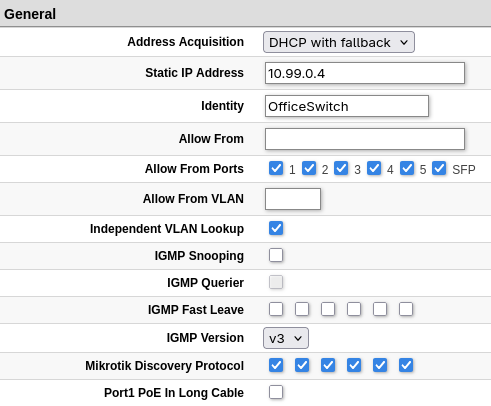
RB260GSP - “Office“

I am still seeing this in winbox though, which suggests I still haven't completely solved my issues.

Winbox

image

I'm guessing the vlan100-trusted board port is due to the presence of that interface on the RB5009 bridge.

Also, I was able to see all of the devices previously, when on the same network segment/VLAN; how can I get winbox to see the other VLAN(s)?