I want to separate two subnets on the same router in a way that I can connect from subnet A to subnet B, but not from subnet B to subnet A.
I have blocked traffic A -> B
I have blocked traffic B -> A
I have created a NAT for all traffic that wants to go out through the interface behind which Subnet B is. Of course, this does not work, so I wonder why?
Generally, even if this isn't entirely the case, only TCP should be used, not the rest, since all non-TCP packets would be blocked regardless, because any non-TCP responses wouldn't be part of an already open connection...
Do you want B to understand which A is contacting it, or do you want to mask the entire As as a router, so that B doesn't understand which A is purposely contacting it?
You'll need a rule that accept forwarding for packets with the connection state established or related (and also untracked to follow the defconf firewall) first, this rule should be placed above the other drop rules in the forward chain.
Communication is two-way. You want A to connect to B, but not B to A, so you instinctively added the forward drop rule from B to A. However, don't forget that when A connects to B, it would want to receive the answers that B send back to it too. If you immediately blocks all packets from B to A, then these answers will never arrive.
That's why you need the established,related rule placed in front. Its purpose is to catch those response packets that B sent back to A and allow them before the drop rules below block them.
Here you can find the MikroTik default firewall rules used on their home router, which is a sane and safe configuration:
Implement those rules (don't forget the interface lists, add ether3 and ether5 to LAN and ether1 to WAN), THEN add the
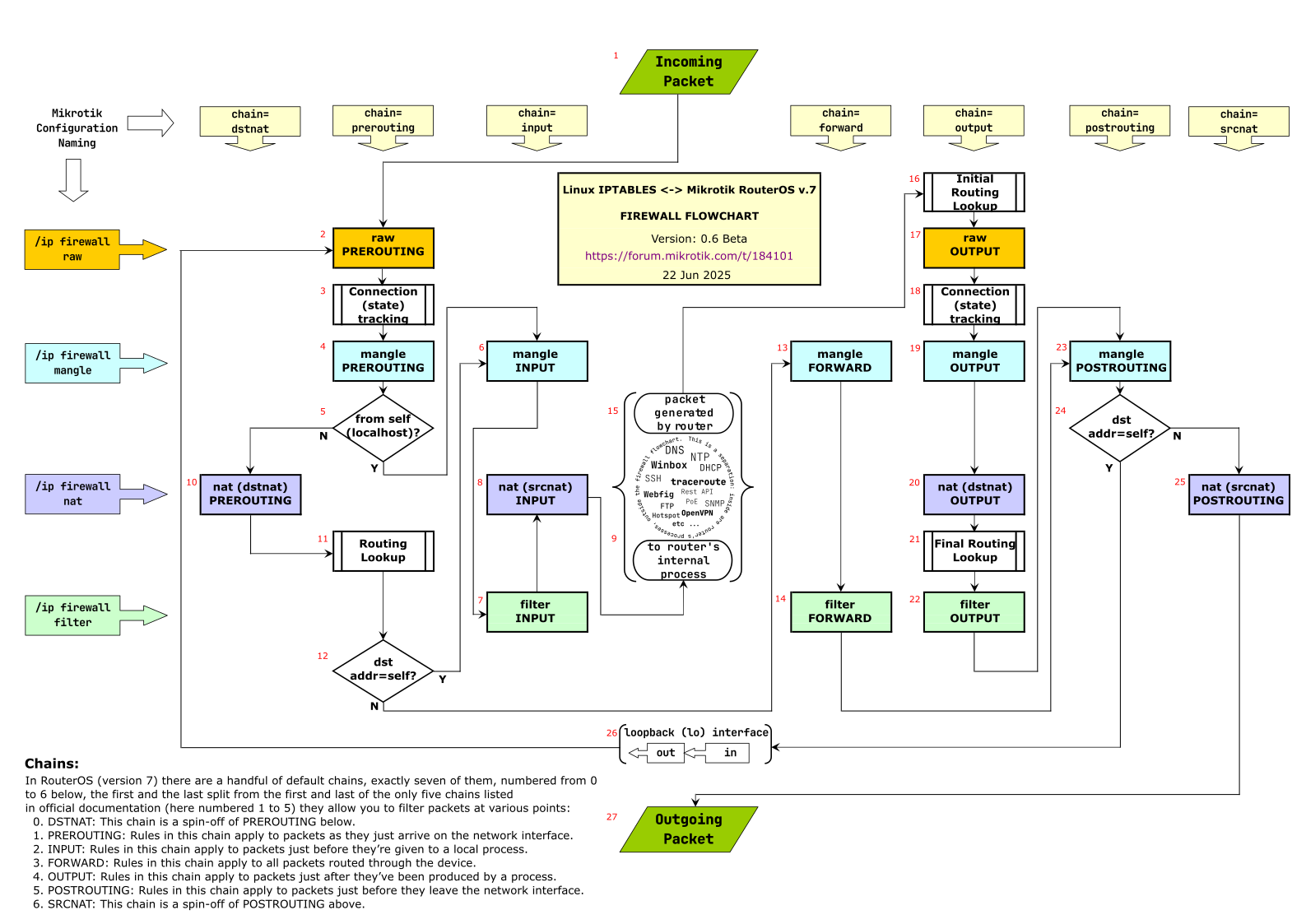
I don't think that's the case. The masquerade rule is a SRCNAT rule that happens after filter. See The ultimate Mikrotik iptables flowchart. When you properly apply the accept established,related rule first, then the other filter rules normally only affect packets in connection-state=new, which means before SRCNAT masquerade. Which means the src-address is still the original one.
It's different when the NAT rule is a DSTNAT rule, because DSTNAT is in prerouting and comes before filter
If you have made any changes to the config since the original post, it is not the same config and thus always ask for the latest rendition. It seems once again people making changes or deviating from the default rules without knowing what they do/how they work, leads to issues.
Glad you learned something and issue is resolved! The fact that it took so many posts was due to the lack of information you provided in the first place besides your ‘special’ changes to default config that cocked things up. It is actually arrogant if you have an issue which you cannot solve, magically then know which parts of the config we need to see.
The fact that it took so long is not a fact at all.
It took a long time and unnecessarily with you who did not contribute in any way to the solution. I will repeat once again, IN THE ORIGINAL POST IS THE WHOLE AND COMPLETE ROUTER CONFIGURATION and there is no arrogance in it, you are just a little curious snoop who I see in the thread of every post but with very little useful contribution.
The people who wanted to help - I thank them once again - immediately understood what it was about without asking questions or setting conditions.