Recently, I updated three MiKroTik CCR2004-1G-12S+2XS routerboards to version 7.11.2.
Everything is working fairly well. The three routerboards are in three different IXPs.
Upon activating the RPKI functionality, I noticed an unusual behavior with the CPU.
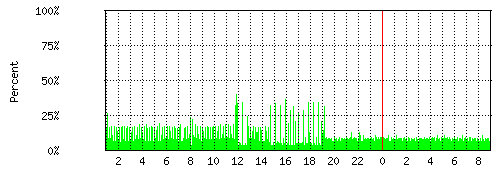
At every refresh, and sometimes at random, the CPU spikes to 100% and for two or three minutes, it’s not possible to query the router via SNMP.
The processor affinity mode (input/output) is set to main, but I tried all the possible modes. The issue still persists.
The RPKI check is carried out correctly through a routing filter.
RPKI Chain
rpki-verify GOLINE
if (rpki invalid) {reject}
I tried modifying the filter without including any jump, but in sequence in the input filter, to no avail. The problem persists.
I have no other ideas to solve the problem… maybe it’s a bug, but I see from the release notes of the next version that there will be no fix related to the RPKI functionality, so I am a bit resigned to leaving it disabled.
Has anyone else encountered the same problem and perhaps has a solution?
Thanks for your reply.
Unfortunately, the technical article refers to VLANs or ports in bridge mode.
On my MikroTik RBs, there are no VLANs or bridges.
There are only two network interfaces: one connected to the IXP switch and the other to the our switch, in access mode and not VLAN, connected to our switch.
So, I really wouldn’t know how to adapt the solution you suggested to my issue.
CCR2004 configuration will be the “Other devices with a built-in switch chip” in the basic VLAN switching documentation, based on the switch chip model.
Assuming you are right, why does everything work perfectly when I disable the RPKI received prefix verification feature?
Furthermore, I reiterate that both ports are in access mode and not VLAN, because at the Internet Exchange Points they don’t tag the packets in a VLAN but give you a port in access mode.
Today we upgraded to version 7.12.1 and it seems that the issue with SNMP stopping working when RPKI was active has been resolved.
Additionally, the problem of OSPF announcements timing out has been fixed.
Now, we hope that in a few hours the SNMP polling doesn’t go into a tilt again
False alarm
The RPKI refresh timing is still off and after about an hour the SNMP still goes into tilt for a couple of minutes. Disabling RPKI validation makes everything perfect.
Hoping for the next update.
I also recently enabled RPKI verification on my BGP routes and am also noticing regular spikes of 70%+ cpu usage on the router, where it can sometimes become unresponsive (SNMP & winbox).
Disabling RPKI verification (or restricting it to a small handful of BGP sessions) brings the CPU usage down to a reasonable amount.
See the attached CPU graph, where I limited RPKI verification to only one session at 19:30.
This is still a problem, and in fact, its worse that I originally thought.
When the CPU utilization gets too high, BGP session lock up and never resume. New routes are not added, and old routes are not removed. The only fix I’ve found for this is to manually turn down the BGP sessions and then re-enable them. This seems like a fairly critical problem.
I’ve had a support ticket open for the past few months with no movement.
We are observing the same. We have a CCR2216 (arm64) router in a region with around 3.8 million routes where we are seeing the CPU spiking from the normal average 20% utilization to around 70% upon RPKI refresh interval. We are not observing the same on another router (CCR2116) in another region with around 2.6 million routes. Hoping there might be a fix by now?
I faced a similar problem with the 2116 router, where the CPU occasionally spikes to 100% for 2-3 minutes while I run eBGP. Have you found a solution yet?