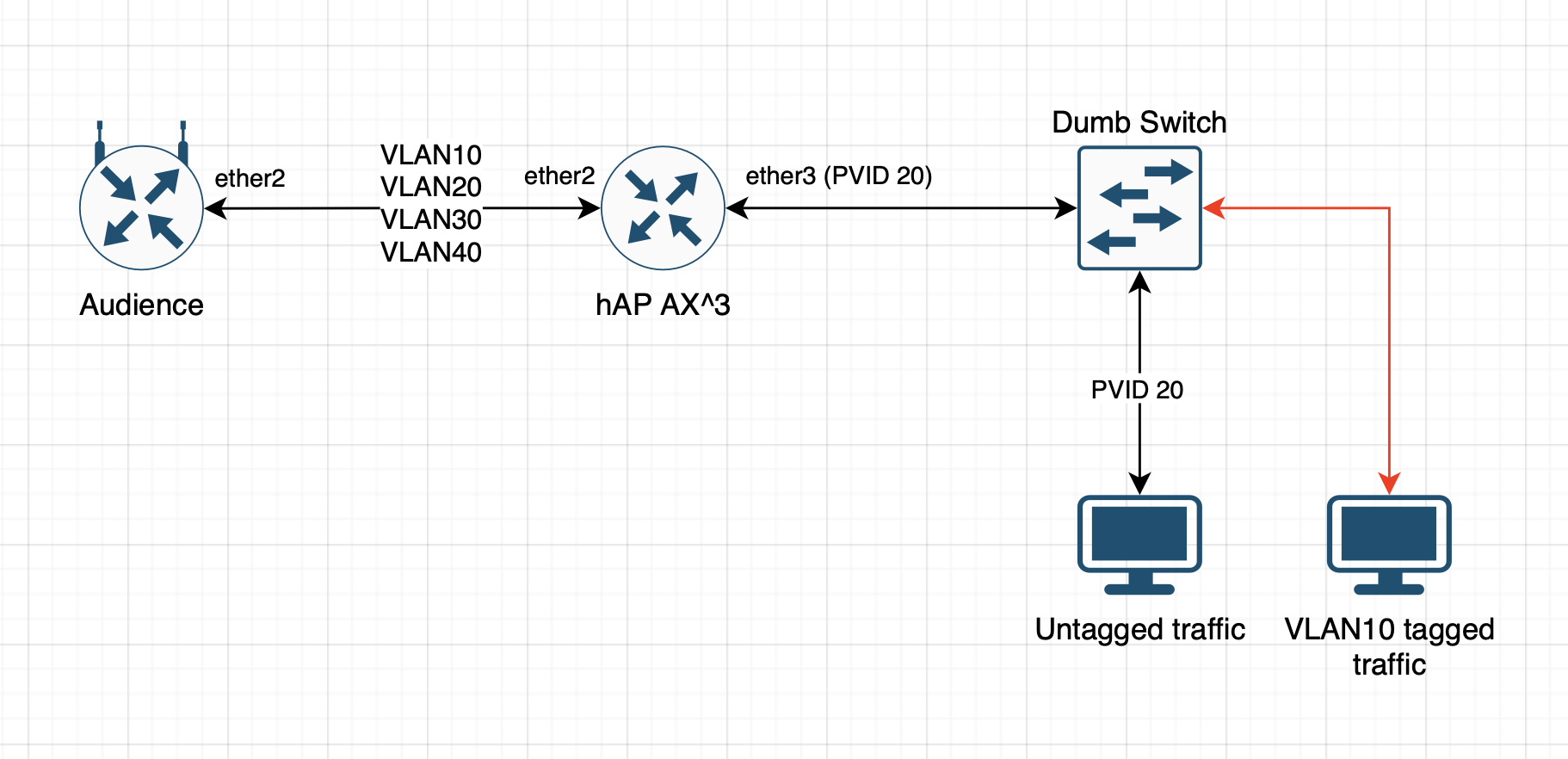
I have attempted to set up a VLAN trunk between my hAP AX3 and Audience (using as access point). I have ether2 on the hAP AX3 trunking VLANs 10,20,30,40 to the Audience on ether2. This seems to be working. I am using VLAN10 as a management VLAN and off the hAP AX3 ether3 port I have a dumb switch connected to the wired network. I have confirmed the PVID 20 is working for anything wired and devices get an IP on the 192.168.20.0/24 subnet. I have a Debian server set up to tag packets with VLAN ID 10 on this same network segment but I am unable to access it. I set up a tagged interface on my laptop but am unable to get an IP address in the 192.168.10.0/24 MGMT subnet on VLAN10.
Please draw a network diagram because the explanation muddles devices relationship and clarity is required.
In general, the management vlan needs to go to all smart devices ( such as the audience) as smart devices should get their IP address from the managment vlan.
There are several options.
a. connect PC requiring vlan 10 directly to the audience OR ax3
b. replace the un-managed switch with a managed switch (could even be a hex) and then send the two vlans to the new device 10,20
c. buy a second cheap unmanaged switch untagged to vlan 10 and then plug in the pC requiring vlan10 to that switch
The current setup is not tenable in my opinion.
I have no idea what would happen if you used two ports on each device aka added a port to the bridge on ax3 and untaggged it for vlan20..
Thus you would have two ports from the axe3 one feeding untagged vlan10 to the switch and one feeding untagged vlan20 to the switch.
Assuming the PCs attached to the unmanaged switch have IPs manually configured for the appropriate subnet, it could work or maybe tis a complete mess.
Give it a shot it may be amusing
An unmanaged (dumb) switch simply ignores the existence of VLAN tags, so in Mikrotik terms, it acts the same as a Mikrotik bridge with vlan-filtering set to no. It forwards all frames verbatim. So if ether3 is an access port to VLAN 20 and a trunk port for VLAN 10, so will be all the ports of the dumb switch connected to it. Or, the other way round, any device connected to a port of the dumb switch will feel as if connected directly to ether3. Hence a Debian machine that sends and expects VLAN-tagged frames with VID 10 will work if ether3 is a trunk member of VLAN 10.
Okay, so depending upon the ability of the unmanaged switch then we have two options and one, both, or none may work.
a. make it a trunk port to the un-managed switch both vlans tagged
b. make it a hybrid port to the un-managed switch, tagged for one, and untagged for the other.
May the best option win! …
a. /interface bridge port
add bridge=bridge ingress-filtering=no interface=ether3
/interface bridge vlan
add bridge=bridge tagged=bridge,ether3 vlan-id=10,20
I don’t understand the ingress filtering option. From what I read with ingress filtering turned on non VLAN tagged packets will be ignored. How is this option different on the bridge and port pages? Does it have any effect when frame types is set to admit all?
Properties pvid, ingress-filtering (and similar), set on bridge, are about behaviour of bridge CPU-facing port (see explanation in this tutorial). So essentially there’s no difference in what settings do, the difference is on which bridge port they are effective.
The way untagged (access) ports work on bridge with vlan-filtering enabled is the following:
upon arrival of ingress frame, port first checks frame-types property. If ingress frame doesn’t satisfy the setting (e.g. ingress frame is untagged while frame-types is set to admit-only-vlan-tagged), it gets discarded
if ingress frame is untagged, it gets tagged with VLAN header, VID set to value of PVID (per port)
Mind that there’s implicit default setting of pvid=1 on every bridge port in ROS and if vlan-filtering is enabled, then this setting kicks into action. Implicit meaning this setting is not explicitly shown in exported config (and IIRC neither in GUIs). It’s shown when e.g. executing export verbose though.
When vlan-filtering is enabled, every frame passing bridge (the “virtual switch functional block”) will be tagged (even if with VLAN ID=1).
if property ingress-filtering is enabled, then bridge consults VLAN table (defined in /interface/bridge/vlan) whether frame’s VLAN value is one of allowed VIDs for ingress port. If it’s not, then ingress frame gets discarded
If port is set to accept untagged frames, then in recent ROS versions (where ports get added to appropriate VLAN table automatically) it’s highly unlikely to see frame dropped. In older versions device admin had to maintain VLAN table manually and if he fogot to add ingress port as untagged member of that particular VLAN, untagged frames could get discarded.
If ingress frame is VLAN tagged, then step #2 obviously doesn’t get executed. The rest of steps are the same.
And in this case, it’s more likely for step #3 to discard ingress frames … if connected device tries to pass frame with VLAN ID set to value which is not permitted on ingress port according to VLAN table. Without ingress-filtering enabled, such ingress frame (with invalid VALN ID set) would be accepted on ingress … however any return traffic (using same VID) would not be able to egress through this port. This might seem to suffice to block unsolicited traffic … but it’s not enough, broadcast traffic (or unicast UDP packets) can still be injected into disallowed VLAN, hence need for ingress-filtering to be enabled on any security-conscious network.
 …
…