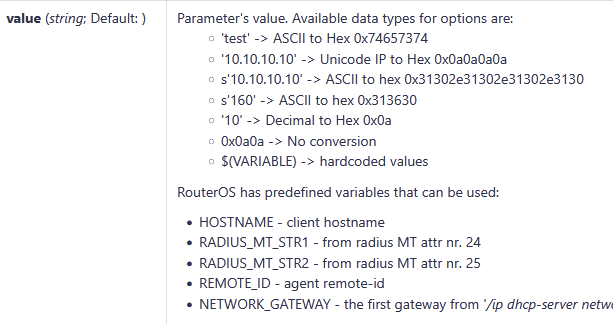
More precisely value="s'108'" (double quotes are required), alternatively value="0x313038" (double quotes are permitted but not required). Both are converted to the raw option value bytes 313038. Pick your favorite. Since the option 132 value is a string, the phone will convert this raw value to the integer value 108.
I tried s'108' which translates to 313038. With this vlaue the phone is not reachable anymore. Not in the native VLAN nor in VLAN 108. I have to power it down: PoE-off -> set the DHCP-Option to something else (I think something lower than 2^12) -> PoE-on -> phone is again in the native-VLAN.
I wrote again to the phone-support because I suspect a bug tbh... The exact same constellation works without issues with Unify OpenStage phones. But not with this vendor.
For someone who will find this thread in few years , after a lot of trial-and-error and a switch-port-sniffing (disable HW-offload for this) I got it working!
The follwoing is the correct value (Option 132) for VLAN 108: 0x31303800
The trailing "00" were needed, without it, the phone translated the VLAN to 10 - with the "00" to the correct ID of 108.
Good work! Your phone manufacturer has some work to do though as requiring a trailing null/zero is a clear violation of RFC 2132. Section 2 states:
Options containing NVT ASCII data SHOULD NOT include a trailing NULL; however, the receiver of such options MUST be prepared to delete trailing nulls if they exist. The receiver MUST NOT require that a trailing null be included in the data.
Many phones seem to support either/both lldp and dhcp. Having a dhcp option used in a "switch to..." semantic isn't that outrageous.
The null termination thingy is strange. Apparently there's more than one phone that requires it. One might even conclude that there's some common code.
Phones are Fanvil H2U. They have a manual about the diffrent ways how to obtain the correct VLAN.
But the DHCP-Option is (imho) not correct described, because if I enter '108', ROS converts this to 0x6c and this value ignores the phones completely.
Support says:
Our phone does not support single byte, you need to configure it to double byte or multi byte mode.
I testet the following pattern:
0x6c does not work (phones ignores this totally / single-byte)
0x006c does not work (phones ignores this totally / 2-byte)
0x6c00 does not work (phones ignores this totally / 2-byte)
0x313038 does not work (phone switches to VLAN10, sniffed via switch)
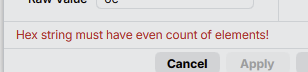
0x3130380 does not work (ROS throws hex-error)
0x31303800 works, VLAN108
It looks like there is an off-by-one bug in the code that extracts the value from the option using the option length. When your option is 0x313038 they get length 3 but somehow they subtract 1 from that (maybe after observing that some DHCP servers return length 4 when an option is configured with value 108) and they mistakenly disregard the last character.
It would probably have worked when you added 1 extra character after the 108, which character would not matter, but the 00 value is the cleanest one to use.
Did you try the LLDP configuration? It should work as well. Then you would not need the DHCP option.
It actually quite logical. I have used this mechanism in a distant past where you'd connect a desktop computer to the second port on the phone (which then acted as a small switch). Those were the ages where the best wifi you could get was 802.11g and offices had insufficient network cabling for these new digital IP phones. The voice VLAN would have qos configured.
Yes, that is a normal configuration that we also use(d) in the office. It has some pitfalls though.
Problems we have encountered in the past:
many phones will go in a (slow) reboot loop when they cannot obtain their lease or the connection to the PABX, and some of them will reset the built-in switch as part of that. so when your PABX is somehow down or in maintenance, you cannot use your computer anymore.
some popular operating system for light home tasks and gaming, which unfortunately is widely used in professional settings as well, cannot handle a tagged VLAN without reconfiguration, depending on the actual ethernet adapter in the computer. this can really confuse the operating system, and cause e.g. slow performance when browsing the internet.
Even worse, it is a violation of RFC 2132 (section 2, see above). Option 132 is historically site/vendor specific, so neither the function nor the format is defined by any RFC. But IP Phone vendors seem to agree on using option 132 for VLAN assignment with a string value.
Attached computers would always use the native VLAN in the office where I worked in those days (around 2006), so we had no reconfiguration issues. Phones were Mitel IIRC.
IMHO the problem is that device compares strings with C library strcmp function that expects '\0' terminated strings.If you provide not "properly" terminated string then it goes wild.
Probably it doesn't compare strings (against what?), it probably converts it to unsigned integer using C library function sscanf() ... but the same principle (null-terminated string) applies.

 , after a lot of trial-and-error and a switch-port-sniffing (disable HW-offload for this) I got it working!