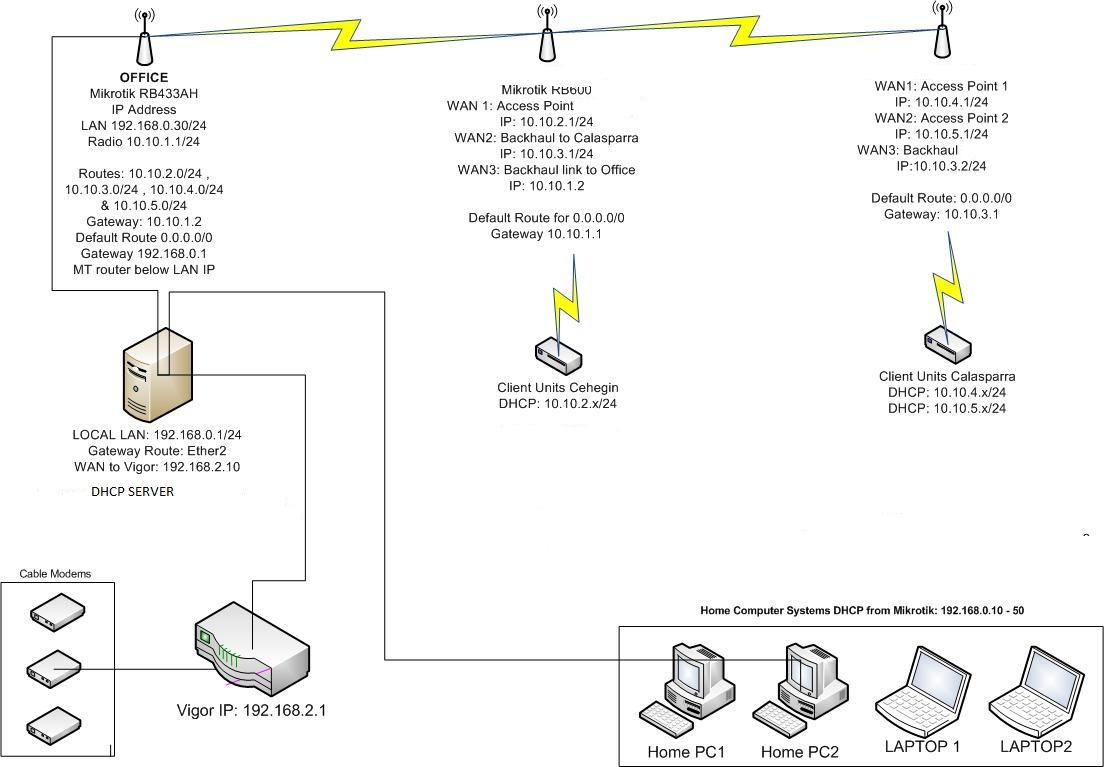
I have a split network and i want to have 1 dhcp server to handle all the leases for the lot.
Gateway is on 192.168.0.0/24 - Where DHCP server will be on
Local Machines addresses - 192.168.0.0/24
1st Access Point is 10.10.2.0/24
2nd Access Point is 10.10.4.0/24
3rd Access Point is 10.10.5.0/24
I thought using DHCP relay, but i must be missing something as i cant get it to work, I have looked at the wiki and could not get it working..
If that doesn’t work for you, post the configuration you applied on the router running the DHCP server and on one of the access points. Include a quick drawing of your network.
Do you have a firewall in between, e.g. on the destination networks router/firewall ? RouterOS will use the IP address of the egress interface for the DHCP relay request. e.g. if the network the relay is listening on is 192.168.5.254/24 but the uplink to the DHCP server network is 10.8.9.77/24 the packet will come from 10.8.9.77 rather than 192.168.5.254.
This means you will need to ensure packets from 10.8.9.77 are allowed to traverse the far end gateway to the DHCP server.
This is the opposite behavior to say Cisco, Netscreen and Fortinet who use the IP address of the interface the DHCP relay is listening on to send the request (this is tick box option on Netscreen).
If any of the RouterOS dev’s are wtaching, It would be nice if there was a tick box to allow this behavior
The DHCP server you configured doesn’t have the relay option set like the wiki link above outlines, you also didn’t show the configuration on an AP and how you relay to the server. Is ether1 on the DHCP server the interface that connects to the APs?
Hi everyone! There are so many topics with relay problems and so few answers =(
Maybe someone will help me with this one…
I have set the DHCP relay on my mikrotik (10.254.43.2). The DHCP server is on Windows machine (10.254.255.16) and not administrated by me.
Windows server serves many subnets, my subnet is 10.254.43.0/24. I’m getting the right IP (pool 10.254.43.0/24) from the Windows server but cannot acces the internet and cannot ping mikrotik.
Please help! What am I doing wrong? Shoud I add some firewall rules?
The STUDENTS interface is a BRIDGE
[root@MikroTik] > /ip dhcp-relay print
 #   NAME                INTERFACE                DHCP-SERVER     LOCAL-ADDRESS
 0   edu.lan             STUDENTS                 10.254.255.16   10.254.43.2

[root@MikroTik] > /ip address print
 #   ADDRESS            NETWORK         INTERFACE
 1   ;;; WAN
     10.254.43.2/24     10.254.43.0     ether1-gateway
 7   ;;; students
     10.254.43.5/24     10.254.43.0      STUDENTS

[root@MikroTik] > /ip route print
 #      DST-ADDRESS        PREF-SRC        GATEWAY            DISTANCE
 0 A S  0.0.0.0/0    		10.254.43.1               1
 3 ADC  10.254.43.0/24     10.254.43.2     ether1-gateway, STUDENTS            0
xx.yy.zz.0/24 is the network address. xx.yy.zz.255 is the broadcast address of
this network. Usable range for IP addresses is from 1 to 254 This is for /24
networks, or 255.255.255.0 netmask.
So it is appropriate that other network devices refuse to communicate with you.
I think you really need to start a new thread for this as your issue doesn’t seem to have anything to do with this thread, but I’ll bite anyway…
The most obvious problem I can see here is that you have two interfaces on your router in overlapping subnets. This is a fundamental obstacle to getting anything working, and until you resolve this, nothing will work how you expect it to.
What are you trying to achieve here? Did you choose either of these subnets yourself?
Do you intend your Routerboard to actually do anything at L3? From your description it just sounds like you want to use it as an L2 device [ie a basic switch/AP].
I would also like to add VLANs to the STUDENTS interface and forward them to other switches and AP’s (restrict traffic with firewall), but do not know if it’s possible. Mikrotik really lacks of examples and documentation.
My theoretical config is similar to this:
current-rb750g-setup.png
Move the 43.2/24 address to the students bridge and remove DHCP relay.
Add the current “wan” Ethernet interface to the bridge in the ‘ports’ sub-menu. Also add any Ethernet interfaces to this bridge where you will connect PCs for the students network.
Next create your own private LAN bridges with the 192.168.x.x space, and configure the Mikrotik as the DHCP server for these ranges. Connect the desired Ethernet interfaces to these private bridges as ports as you did with the students bridge.
In the firewall NAT table, be sure there’s a masquerade rule for out-interface=students in the srcnat chain.
Filter traffic between your LAN segments using firewall filter rules.
If you want firewall filters for your students-network-attached host(s) then enable the “use IP firewall” option on that bridge.
If your networks are high speed, be sure to use fast-track rules for established and related connections for maximum performance.