Difficulty communicating between VLANs

Greetings. I'm working on setting up my home network, based on the RB5009UG+S. I've had MikroTik gear on my network for a couple years, but not split into VLANs. My end goal is one or more CRS309s connected to the router, with fiber connecting 8-port switches in any room with electronics. I'm about 2/3 there, but am having routing issues.
The first thing I did was follow a guide from "The Network Berg", with focus on getting one VLAN stable for my work PCs. Through all configurations, that must stay as stable as possible. I have a number of VLANs added, but to try to keep things as simple as possible for my troubleshooting session, I connected a Raspberry Pi to port 5 and set the PVID of that port to 3. I have a second Raspberry Pi connected to port 6, with the PVID of that port set to 20. The two devices get IP addresses from their respective VLANs.

My initial request was going to be assistance figuring out the communication block between VLANs, but just getting a test environment for two devices set up is being a challenge. Interestingly, the Pi on VLAN20 can't reach the Internet, but when connected to the switch in my office, on the same VLAN, it could. If my office PC was also having an issue, then I would suspect the issue to be something in the dhcp configuration, but since that computer is working, maybe the issue there is the way the interface is bound.

I'm not very familiar with the command line interface for MikroTik, so have been doing all configuration either through a web browser or through Winbox. I'm not really sure how to proceed here. The forum wouldn't let me upload my configuration file, so I've dropped it as a blockquote below. Anything for VLAN30 or above can be ignored for this example. I'm looking at just VLAN3 and VLAN20 right now. 10.10.3.x is what I was using before I started adding VLANs, therefore it's named Legacy. I added two firewall rules last night, but have them currently disabled in order to reduce variables.

2026-09-23 08:37:51 by RouterOS 7.24.4

software id = AMC4-PU7I

model = RB5009UG+S+

serial number = REMOVED

/interface bridge
add admin-mac=38:32:7A:51:13:65 auto-mac=no comment="LAN - Bridge" name=
"LAN - Bridge" vlan-filtering=yes
/interface ethernet
set [ find default-name=ether1 ] comment="WAN - Allo"
set [ find default-name=ether7 ] comment="UnRaid 2 - Backup"
set [ find default-name=ether8 ] comment="UnRaid 1 - Backup"
set [ find default-name=sfp-sfpplus1 ] comment="To Primary Switch"
/interface vlan
add comment="Cameras - 50" interface="LAN - Bridge" name="Cameras - 50"
vlan-id=50
add comment="IoT - 40" interface="LAN - Bridge" name="IoT - 40" vlan-id=40
add comment=Legacy interface="LAN - Bridge" name=Legacy vlan-id=3
add comment="Management - 20" interface="LAN - Bridge" name="Management - 20"
vlan-id=20
add comment="Printers - 70" interface="LAN - Bridge" name="Printers - 70"
vlan-id=70
add comment="Servers - 30" interface="LAN - Bridge" name="Servers - 30"
vlan-id=30
add comment="Televisions - 60" interface="LAN - Bridge" name=
"Televisions - 60" vlan-id=60
/interface list
add comment=defconf name=WAN
add comment=defconf name=LAN
/ip pool
add comment=VLAN20 name=dhcp_pool20 ranges=10.10.20.2-10.10.20.254
add comment=VLAN30 name=dhcp_pool30 ranges=10.10.30.2-10.10.30.254
add comment=VLAN40 name=dhcp_pool40 ranges=10.10.40.2-10.10.40.254
add comment=VLAN50 name=dhcp_pool50 ranges=10.10.50.2-10.10.50.254
add comment=VLAN60 name=dhcp_pool60 ranges=10.10.60.2-10.10.60.254
add comment=VLAN70 name=dhcp_pool70 ranges=10.10.70.2-10.10.70.254
add comment=VLAN3 name=dhcp_pool3 ranges=10.10.3.2-10.10.3.254
add comment="No VLANs" name=dhcp_pool2 ranges=10.10.2.2-10.10.2.254
/ip dhcp-server
add add-dns-entries=yes address-pool=dhcp_pool2 comment="No VLANs" interface=
"LAN - Bridge" name=dhcp2
add address-pool=dhcp_pool20 interface="Management - 20" name=dhcp20
add address-pool=dhcp_pool30 interface="Servers - 30" name=dhcp30
add address-pool=dhcp_pool40 interface="IoT - 40" name=dhcp40
add address-pool=dhcp_pool50 interface="Cameras - 50" name=dhcp50
add address-pool=dhcp_pool60 interface="Televisions - 60" name=dhcp60
add address-pool=dhcp_pool70 interface="Printers - 70" name=dhcp70
add address-pool=dhcp_pool3 interface=Legacy name=dhcp3
/disk settings
set auto-media-interface="LAN - Bridge" auto-media-sharing=yes
auto-smb-sharing=yes
/interface bridge port
add bridge="LAN - Bridge" comment=defconf interface=ether2
add bridge="LAN - Bridge" comment=defconf interface=ether3
add bridge="LAN - Bridge" comment=defconf interface=ether4
add bridge="LAN - Bridge" comment=defconf interface=ether5 pvid=3
add bridge="LAN - Bridge" comment=defconf interface=ether6 pvid=20
add bridge="LAN - Bridge" comment=defconf interface=ether7
add bridge="LAN - Bridge" comment=defconf interface=ether8
add bridge="LAN - Bridge" comment="CRS309-1G-8S - Primary" interface=
sfp-sfpplus1
/ip neighbor discovery-settings
set add-dns-entries=yes discover-interface-list=LAN
/interface bridge vlan
add bridge="LAN - Bridge" comment="Management - 20" tagged=
"sfp-sfpplus1,LAN - Bridge,ether7,ether8,ether6,ether5" vlan-ids=20
add bridge="LAN - Bridge" comment="Servers - 30" tagged=
"sfp-sfpplus1,LAN - Bridge" vlan-ids=30
add bridge="LAN - Bridge" comment="IoT - 40" tagged=
"sfp-sfpplus1,LAN - Bridge" vlan-ids=40
add bridge="LAN - Bridge" comment="Cameras - 50" tagged=
"sfp-sfpplus1,LAN - Bridge" vlan-ids=50
add bridge="LAN - Bridge" comment="Televisions - 60" tagged=
"sfp-sfpplus1,LAN - Bridge" vlan-ids=60
add bridge="LAN - Bridge" comment="Printers - 70" tagged=
"LAN - Bridge,sfp-sfpplus1" vlan-ids=70
add bridge="LAN - Bridge" comment=Legacy tagged=
"LAN - Bridge,sfp-sfpplus1,ether8,ether7,ether6,ether5" vlan-ids=3
/interface list member
add comment=defconf interface="LAN - Bridge" list=LAN
add comment=defconf interface=ether1 list=WAN
add comment="LAN Management Interface" interface="Management - 20" list=LAN
/ip address
add address=10.10.2.1/24 comment=defconf interface="LAN - Bridge" network=
10.10.2.0
add address=10.10.20.1/24 comment="Management - 20" interface=
"Management - 20" network=10.10.20.0
add address=10.10.30.1/24 comment="Servers - 30" interface="Servers - 30"
network=10.10.30.0
add address=10.10.40.1/24 comment="IoT - 40" interface="IoT - 40" network=
10.10.40.0
add address=10.10.50.1/24 comment="Cameras - 50" interface="Cameras - 50"
network=10.10.50.0
add address=10.10.60.1/24 comment="Televisions - 60" interface=
"Televisions - 60" network=10.10.60.0
add address=10.10.70.1/24 comment="Printers - 70" interface="Printers - 70"
network=10.10.70.0
add address=10.10.3.1/24 comment=Legacy interface=Legacy network=10.10.3.0
/ip dhcp-client
add comment=defconf default-route-tables=main interface=ether1 name=client1
/ip dhcp-server lease
add address=10.10.20.254 client-id=1:d0:ea:11:c3:2e:79 comment=
"MikroTik CSS318-16G-2S+IN" mac-address=D0:EA:11:C3:2E:79 server=dhcp20
add address=10.10.20.253 client-id=1:7c:10:c9:d3:54:4e comment=
"Windows 11 Desktop PC" mac-address=7C:10:C9:D3:54:4E server=dhcp20
add address=10.10.20.252 client-id=1:e8:cf:83:ad:30:1a comment=
"Dell Work Notebook" mac-address=E8:CF:83:AD:30:1A server=dhcp20
add address=10.10.20.251 client-id=1:88:a2:9e:42:95:b2 mac-address=
88:A2:9E:42:95:B2 server=dhcp20
add address=10.10.40.239 mac-address=EC:B5:FA:AE:24:79 server=dhcp40
add address=10.10.20.198 client-id=1:f4:1e:57:67:fa:c0 comment=CRS309-1G-8S+
mac-address=F4:1E:57:67:FA:C0 server=dhcp20
add address=10.10.20.195 comment="Access Point - Front Yard" mac-address=
D4:E5:C9:00:EC:F3 server=dhcp20
add address=10.10.20.181 comment="Access Point - Basement Common"
mac-address=C4:E3:CE:73:70:13 server=dhcp20
add address=10.10.20.180 comment="Access Point - Back Yard" mac-address=
C4:E3:CE:65:E8:8E server=dhcp20
add address=10.10.20.178 comment="Access Point - Work Room" mac-address=
88:DC:97:4E:A1:2E server=dhcp20
add address=10.10.20.175 client-id=1:d0:ea:11:53:11:f4 comment="Media Room"
mac-address=D0:EA:11:53:11:F4 server=dhcp20
add address=10.10.20.174 client-id=1:78:9a:18:7:23:2 comment="Family Room"
mac-address=78:9A:18:07:23:02 server=dhcp20
add address=10.10.20.164 client-id=1:48:a9:8a:52:8d:38 comment=
"Network Rack 24-port" mac-address=48:A9:8A:52:8D:38 server=dhcp20
add address=10.10.20.172 client-id=1:d8:8b:4c:fa:8d:d6 comment=
"Yolink Bridge" mac-address=D8:8B:4C:FA:8D:D6 server=dhcp20
add address=10.10.20.161 client-id=1:d0:ea:11:5e:83:6c mac-address=
D0:EA:11:5E:83:6C server=dhcp20
/ip dhcp-server network
add address=10.10.2.0/24 comment=defconf dns-server=10.10.1.1,9.9.9.9,1.1.1.1
domain=battletech-home.net gateway=10.10.2.1 netmask=24
add address=10.10.3.0/24 dns-server=10.10.2.1,9.9.9.9,1.1.1.1 gateway=
10.10.3.1
add address=10.10.20.0/24 dns-server=10.10.2.1,9.9.9.9,1.1.1.1 gateway=
10.10.20.1
add address=10.10.30.0/24 dns-server=9.9.9.9,1.1.1.1 gateway=10.10.30.1
add address=10.10.40.0/24 dns-server=9.9.9.9,1.1.1.1 gateway=10.10.40.1
add address=10.10.50.0/24 dns-server=9.9.9.9,1.1.1.1 gateway=10.10.50.1
add address=10.10.60.0/24 dns-server=9.9.9.9,1.1.1.1 gateway=10.10.60.1
add address=10.10.70.0/24 dns-server=9.9.9.9,1.1.1.1 gateway=10.10.70.1
/ip dns
set allow-remote-requests=yes
/ip dns static
add address=10.10.10.1 comment=defconf name=router.lan type=A
/ip firewall address-list
add address=10.10.2.0/24 comment=Local-VLAN2 list=Local-VLAN2
add address=10.10.3.0/24 comment=Local-VLAN3 list=Local-VLAN3
add address=10.10.20.0/24 comment=Local-VLAN20 list=Local-VLAN20
add address=10.10.30.0/24 comment=Local-VLAN30 list=Local-VLAN30
add address=10.10.40.0/24 comment=Local-VLAN40 list=Local-VLAN40
add address=10.10.50.0/24 comment=Local-VLAN50 list=Local-VLAN50
add address=10.10.60.0/24 comment=Local-VLAN60 list=Local-VLAN60
add address=10.10.70.0/24 comment=Local-VLAN70 list=Local-VLAN70
/ip firewall filter
add action=accept chain=input comment=
"defconf: accept established,related,untracked" connection-state=
established,related,untracked
add action=drop chain=input comment="defconf: drop invalid" connection-state=
invalid
add action=accept chain=input comment="defconf: accept ICMP" protocol=icmp
add action=accept chain=input comment=
"defconf: accept to local loopback (for CAPsMAN)" dst-address=127.0.0.1
in-interface=lo src-address=127.0.0.1
add action=drop chain=input comment="defconf: drop all not coming from LAN"
in-interface-list=!LAN
add action=accept chain=forward comment="defconf: accept in ipsec policy"
ipsec-policy=in,ipsec
add action=accept chain=forward comment="defconf: accept out ipsec policy"
ipsec-policy=out,ipsec
add action=fasttrack-connection chain=forward comment="defconf: fasttrack"
connection-state=established,related
add action=accept chain=forward comment=
"Allow traffic from Management VLAN into all others" connection-state=new
disabled=yes dst-address=10.10.0.0/24 src-address-list=Local-VLAN20
add action=accept chain=forward comment=
"defconf: accept established,related, untracked" connection-state=
established,related,untracked
add action=drop chain=forward comment="defconf: drop invalid"
connection-state=invalid
add action=drop chain=forward comment=
"defconf: drop all from WAN not DSTNATed" connection-nat-state=!dstnat
in-interface-list=WAN
add action=drop chain=forward comment=
"Drop sessions initiated from printers, to televisions" connection-state=
new disabled=yes dst-address-list=Local-VLAN60 src-address-list=
Local-VLAN70
/ip firewall nat
add action=masquerade chain=srcnat comment="defconf: masquerade"
ipsec-policy=out,none out-interface-list=WAN
/ipv6 firewall address-list
add address=::/128 comment="defconf: unspecified address" list=bad_ipv6
add address=::1/128 comment="defconf: lo" list=bad_ipv6
add address=fec0::/10 comment="defconf: site-local" list=bad_ipv6
add address=::ffff:0.0.0.0/96 comment="defconf: ipv4-mapped" list=bad_ipv6
add address=::/96 comment="defconf: ipv4 compat" list=bad_ipv6
add address=100::/64 comment="defconf: discard only " list=bad_ipv6
add address=2001:db8::/32 comment="defconf: documentation" list=bad_ipv6
add address=2001:10::/28 comment="defconf: ORCHID" list=bad_ipv6
add address=3ffe::/16 comment="defconf: 6bone" list=bad_ipv6
/ipv6 firewall filter
add action=accept chain=input comment=
"defconf: accept established,related,untracked" connection-state=
established,related,untracked
add action=drop chain=input comment="defconf: drop invalid" connection-state=
invalid
add action=accept chain=input comment="defconf: accept ICMPv6" protocol=
icmpv6
add action=accept chain=input comment="defconf: accept UDP traceroute"
dst-port=33434-33534 protocol=udp
add action=accept chain=input comment=
"defconf: accept DHCPv6-Client prefix delegation." dst-port=546 protocol=
udp src-address=fe80::/10
add action=accept chain=input comment="defconf: accept IKE" dst-port=500,4500
protocol=udp
add action=accept chain=input comment="defconf: accept ipsec AH" protocol=
ipsec-ah
add action=accept chain=input comment="defconf: accept ipsec ESP" protocol=
ipsec-esp
add action=accept chain=input comment=
"defconf: accept all that matches ipsec policy" ipsec-policy=in,ipsec
add action=drop chain=input comment=
"defconf: drop everything else not coming from LAN" in-interface-list=
!LAN
add action=fasttrack-connection chain=forward comment="defconf: fasttrack6"
connection-state=established,related
add action=accept chain=forward comment=
"defconf: accept established,related,untracked" connection-state=
established,related,untracked
add action=drop chain=forward comment="defconf: drop invalid"
connection-state=invalid
add action=drop chain=forward comment=
"defconf: drop packets with bad src ipv6" src-address-list=bad_ipv6
add action=drop chain=forward comment=
"defconf: drop packets with bad dst ipv6" dst-address-list=bad_ipv6
add action=drop chain=forward comment="defconf: rfc4890 drop hop-limit=1"
hop-limit=equal:1 protocol=icmpv6
add action=accept chain=forward comment="defconf: accept ICMPv6" protocol=
icmpv6
add action=accept chain=forward comment="defconf: accept HIP" protocol=139
add action=accept chain=forward comment="defconf: accept IKE" dst-port=
500,4500 protocol=udp
add action=accept chain=forward comment="defconf: accept ipsec AH" protocol=
ipsec-ah
add action=accept chain=forward comment="defconf: accept ipsec ESP" protocol=
ipsec-esp
add action=accept chain=forward comment=
"defconf: accept all that matches ipsec policy" ipsec-policy=in,ipsec
add action=drop chain=forward comment=
"defconf: drop everything else not coming from LAN" in-interface-list=
!LAN
/system clock
set time-zone-name=America/Denver
/system ntp client
set enabled=yes
/system ntp server
set broadcast=yes
/system ntp client servers
add address=pool.ntp.org
/tool mac-server
set allowed-interface-list=LAN
/tool mac-server mac-winbox
set allowed-interface-list=LAN
Quick things to check:

  • VLANs configured in the bridge section?
  • VLANs configured in the interfaces section?
  • VLANs have been added to the "LAN" interface list so the firewall wil not eat them?
  • Links between the RB5009 and the switches all have the appropriate VLANs configured?

If this is all correct, they should both route, as well as be able to get to the outside world using your NAT configurattion.

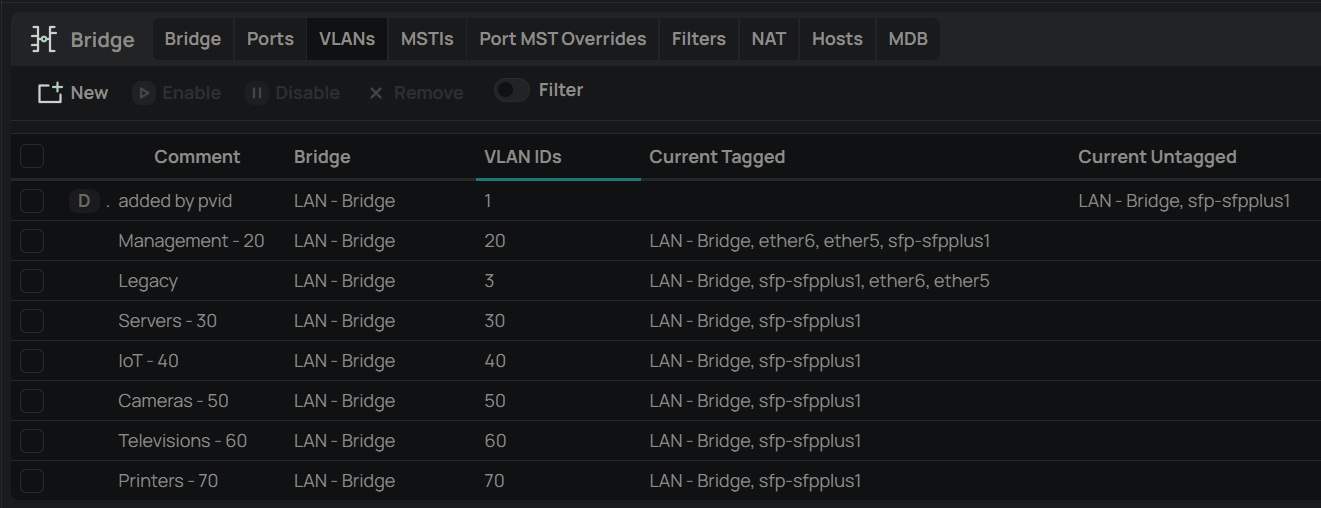
Thank you. tadawson, looking at your suggestions, this is what I find. I'm thinking the Interface List doesn't look right.

First, bridge VLANs. The bridge is named "LAN - Bridge". For the Current Tagged column, do I have some redundancies here? If "sfp-sfpplus1" is a member of "LAN - Bridge", I'm not sure why I would need to include it separately.

I can't post more than one image, so I guess I'll have to respond to the check recommendations individually.

I would suspect that the issues lie with ether5 and ether6 being set to be both tagged and untagged members of the same VLAN ID.

An /interface bridge port is automatically made an untagged member of the /interface bridge vlan corresponding to the port pvid= setting (unless the port is also has frame-types=admit-only-vlan-tagged which makes the port tagged-only, ignoring any PVID setting, rather than hybrid). Adding the same port as a tagged member of the /interface bridge vlan results in undefined behaviour.

Edit: I see @tdw responded before I finished writing my response.

First, you are taking the correct approach to troubleshooting, i.e. trying to limit the scope.

I would first find out why vlan 20 isn't working consistently on ether6 and the switch.

You said

First, does the Pi have the vlan package loaded, or it it just using eth0 (and not eth0.20)?

The reason I ask is because you have this in the posted config: (just including vlans 3 and 20)

/interface bridge port
add bridge="LAN - Bridge" comment=defconf interface=ether5 pvid=3
add bridge="LAN - Bridge" comment=defconf interface=ether6 pvid=20
add bridge="LAN - Bridge" comment="CRS309-1G-8S - Primary" interface=
sfp-sfpplus1
---snip---
/interface bridge vlan
add bridge="LAN - Bridge" comment="Management - 20" tagged=
"sfp-sfpplus1,LAN - Bridge,ether7,ether8,ether6,ether5" vlan-ids=20
add bridge="LAN - Bridge" comment=Legacy tagged=
"LAN - Bridge,sfp-sfpplus1,ether8,ether7,ether6,ether5" vlan-ids=3

The bridge port for ether6 is set with pvid 20, so it is expecting traffic for vlan 20 to be untagged on reception.

/interface bridge port
add bridge="LAN - Bridge" comment=defconf interface=ether6 pvid=20

The bridge vlan for vlan 20 is set to transmit vlan 20 tagged on ether6. This is inconsistent; the pvid=20 on the port setting is telling the switch to use vlan 20 for untagged (standard ethernet from a client that is not vlan-aware), but /interface/bridge/vlan entry for vlan 20 is telling the ether6 port to send vlan 20 traffic with a vlan tag.

/interface bridge vlan
add bridge="LAN - Bridge" comment="Management - 20" tagged=
"sfp-sfpplus1,LAN - Bridge,ether7,ether8,ether6,ether5" vlan-ids=20

Are you sure that the RPi is getting an IP address from for the same subnet when connected via the switch (which I assume is the CRS309). How is the CRS309 configured? As you suggested, if the RPi is connected to the same vlan (with the same framing), it should behave the same whether it is directly connected to a bridge port on the RB5009 or a similarly configured bridgeport on the CRS309.

So do verify that the RPi is in fact getting the same IP address (it should get the same IP from dhcp because the mac address will be the same, and there should still be a lease for the mac (although you appear to be using the default lease time, which may be only 10 minutes, I always change that to 1 day for home use where I don't have lots of churn with multiple clients, as you would for a public hotspot). But for sure it should get an IP address from the ip pool for vlan 20 (dhcp_pool20 range 10.10.20.2-10.10.20.254)

You probably want to add more items to your address list membership for LAN too. But I don't think that is what is causing you problem with vlan20 internet access (because you have

/interface list member
add comment=defconf interface="LAN - Bridge" list=LAN
add comment=defconf interface=ether1 list=WAN
add comment="LAN Management Interface" interface="Management - 20" list=LAN

You may want to enter a simple mulitple device site in Free RouterOS configuration generator (browser-based, no account)

so you can see what type of a config it would produce. You don't need to load it the config it produces, but it is a great learning tool, as you can change things and see real-time what gets changed in the the generated configuration.

It may just be a wonder that anything is working at all. I've been a Linux admin for 20 years, but VLAN tags make me feel dumb. I'm trying to wrap my head around tagged vs untagged, access ports vs trunk ports. I've not seen "trunk" in the web interface anywhere, but my understanding was that a port configured to allow traffic on more than one VLAN was a trunk. That may be completely wrong.

I don't have the vlan package installed on my Raspberry Pi devices. I don't have a concept of tags being stripped from packets for working with operating systems that don't understand VLAN IDs. I just found that if I set the PVID of a port on the router to 20, then the switch, or computer attached to that port would get an IP address assigned by the DHCP server and network assigned to that VLAN. While both Windows and the Raspberry Pi OS will get an IP address, Pi OS acts like it doesn't have a gateway. Or can't ping it's gateway. The route shows up, although seems slow to return the information.

For both ports 5 and 6, I set the default PVID back to 1. I installed the vlan package on both Pi, configured it for VLAN20 and brought up the interface. They now each have two IP addresses, one for the primary, non-VLAN network, and one for VLAN20. They can talk to each other, can pull updates from the Internet and do seem quite a bit more responsive. I disconnected the Pi from the RB5009 and plugged it back into the switch in my office. On that switch, I'm still probably using tags the wrong way, but it works, for now. For the other Pi, I put it back in my network rack, checked connectivity, then rebooted and checked connectivity again and it seems fine. That one goes RB5009 - CRS309 - CRS309 - CSS326. I have a dozen or so other Pi that I need to configure for VLANs. I wonder if the issues I'm having with my UnRaid servers are the same thing. They get IPs, but can't communicate with the gateway.

OK . . . a few notes:

On Linux, VLANS are accessed via <interface>.<VLAN ID>, so to hit VLAN 20 say on eth0, you would configure "eth0.20" On the switch, you would configure the port to that VLAN, and typicall enforce tagging.

If you want to connect a device to a single VLAN and not use tagging on said host (such as your Pi), you would assign the switch port to 20 untagged, the port PVID to 20, and "untagged only". On the Pi, this would be eth0.

Multiple VLANs (trunking) looks like the first case, just repeated for each VLAN.

Hybrid trunking (tagged and untagged) is kind of a blend. The PVID and the untagged VLAN assignment would be on (in this example) eth0, and the VLANs on eth0.<VLAN ID>. You would set the access to "allow all" for this case.

If you are getting two IPs, then you likely have (again, in my example) eth0 and eth0.20 running, and are connected to both VLAN1 (default untagged) and VLAN20 (since I recall you set the port PVID to 1)

expanding a bit on what @tadawson said.

If you are interested only in what you need to do to fix, you can skip to the end, but I think if you read and try to understand the explanation, it will be helpful to you in the future.

What loading the vlan package on the RPi did was to allow the RPi to communicate with the tagged vlan 20 packets, and it does this by creating a new linux kernel L3 interface (that can have an ip address given to it). The linux kernel expects to have all interfaces "appear" the same so the ip stack only has to deal with one case. The vlan package is a "shim" driver that takes the standard format and adds a vlan tag to it on egress, and removes the tag and delivers to the correct "vlan interface" on ingress. See IEEE 802.1Q for an example of what the ethernet frame for an untagged "standard ethernet frame" and a tagged ethernet frame look like. When a tag is inserted, a new ethertype 0x8100 is inserted immediately after the dst-mac address (this is the Tag Protocol ID) and after that another 2 bytes that contain the 12 bit vlan id and 4 bits for priority. This modified frame is then passed raw to the parent interface (in the case of the RPi to the eth0 interface, in the case of the CRS309 to the bridge interface).

But there are other ways to get to a vlan a switch. The so called "access port" for a vlan. This is what the pvid does. If a port receives an untagged frame, it has to either be associated with one specific vlan or it must be dropped. The pvid tells the switch which vlan untagged traffic should be classified as. On cisco switches, setting the "native vlan" on a trunk, or the "access vlan" on an access port is essentially setting the pvid of the port, but it also affects how traffic for the vlan will be transmitted. ROS allows you to send and receive traffic for the same vlan with different framing, and in my opinion it shouldn't (at least not without more work than it does). Recent versions of ROS 7.16+ will try to do this behind the scenes with dynamic entries in the vlan table; you can see these in the output of the /interface/bridge/vlan print cli command.

I wasn't suggesting that you should load the vlan package on the RPi.

Here's my guess as to what is happening:

RPi connects to port, link status changes to up, linux kernel notices and trys to get an ip address for the eth0 interface, and eventually sends a DHCP discover (ethernet broadcast). The RB5009 ether6 port (which is configured as a bridge port, and vlan filtering is on so the "switch" is vlan aware) receives this untagged packet and because the pvid was set to 20, the frame was received onto the switch as belonging to vlan 20. Because it is a broadcast, the frame is flooded out all other switch ports that are vlan 20 members, that includes the "port" that is connected to the CPU. This internal "hybrid" link between the CPU and the Switch chip in the RB5009 is configured to send traffic tagged for vlan 20 (toward to CPU/Routing engine). That is configured here (the "LAN - Bridge" is what represents the switch port connected to the CPU, and note that is "tagged")

/interface bridge vlan
add bridge="LAN - Bridge" comment="Management - 20" tagged=
"sfp-sfpplus1,LAN - Bridge,ether7,ether8,ether6,ether5" vlan-ids=20

The packet arrives at the CPU, where the driver notices the frame has ethertype 0x8100, so it then demultiplexes and strips the tag and delivers to the "Management - 20" (in linux terms br0.20) which then gets delivered to the dhcp server for "Management - 20".

The dhcp server responds with an offer, which an sends back to the vlan 20 interface "Management - 20" and it gets sent back across the internal trunk tagged with vlan 20.

It arrives back at the switch, and because it is tagged, gets assocaited with vlan20 on the switch. It finds that needs to be forwarded out ether6 (because that's the port with the RPi's mac address, but when it get transmitted, the tag is not removed, because your config explicitly tells the port to tag traffic for vlan20 when it egresses ether6.

I am surprised that the RPi just didn't drop the tagged packet. That is what I would have expected to happen.

What you need to do.

Change the following line

/interface bridge vlan
add bridge="LAN - Bridge" comment="Management - 20" tagged=
"sfp-sfpplus1,LAN - Bridge,ether7,ether8,ether6,ether5" vlan-ids=20

To

/interface bridge vlan
add bridge="LAN - Bridge" comment="Management - 20" tagged=
"sfp-sfpplus1,LAN - Bridge,ether7,ether8" vlan-ids=20

This lets ROS create dynamic untagged entries for the ports with pvid specified. And it make it easy to change the pvid of an access port and not need to change anything else. This is my preference.

Or if you like the explicit (but more error prone when a bridge port's pvid is changed, because you will also need to update the /interface/bridge/vlan line for vlan 20 if the port is explicitly mentioned).

/interface bridge vlan
add bridge="LAN - Bridge" comment="Management - 20" tagged=
"sfp-sfpplus1,LAN - Bridge,ether7,ether8" untagged="ether6,ether5" vlan-ids=20

That's what the Free RouterOS configuration generator (browser-based, no account) tool will do in the configurations it creates.

You should not need the vlan package or eth0.20 on the RPi for it to work when connected to an access port (a port that just uses standard ethernet framing, but is "connected" to a specific vlan, vlan 20 in the case when the RB5009 has pvid 20 on ether6).

Please see this post for instructions on how to upload configs to the forum, and then upload the latest configurations for both the RB5009 and the CRS309 connected via sfp1.

If thinga are configured correctly, you should be able to connect to an access port on the RB5009 or an access port on the CRS309 and if they are access ports for the same vlan, they should behave identically.

Here are some useful resources:

  1. Official ROS MikroTik documentation (original page, now frozen)
  2. New MikroTik ROS documentation (updated, but not as complete?)
  3. MikroTik RouterOS Documentation (AI digested documentation - not official)
  4. Manual for Extreme Hosting's MikroTik configuration generation tool (this has some good introductory material)
  5. Link to the Extreme Hosting's MikroTik configuration generation tool with ENglish selected
  6. Thread discussing the MikroTik configuration generation tool
  7. Non-MikroTik specific network fundamentals by Ed Harmoush playlist on youtube Understanding this stuff will be very helpful when you are troubleshooting.
  8. Ed Harmoush's vlan index with good vlan fundamentals
  9. webarchive copy of anav's Config Issues / Locked Out - Accessing Router/AP Config Without Bridge Largly replaced by jaclaz's ​Once and for all COMPLETE Offbridge Port setup

This statement is not really correct. When setting things up this way, things are very well defined ... it's just that it doesn't work as expected.

Setting PVID on /interface/bridge/port makes bridge to add VLAN tag when untagged frame enters bridge. It does nothing for already tagged frames.

Setting port a member of VLAN on /interface/bridge/vlan allows frame, belonging to that VLAN, to egress through that port. If port is set as tagged member, then frame keeps the VLAN tag. If port is set as untagged member, then VLAN tag gets stripped when leaving through that port.

The above setup works just fine when connected device uses VLAN tags ... it sends VLAN tagged frame towards bridge and bridge accepts it on ingress without processing VLAN header. When frame passes from bridge towards such device, it keeps VLAN tag and device accepts it (as tagged).

However, if device doesn't know anything about VLAN tags, then it sends untagged frames towards bridge. Since port is set with PVID, bridge adds a tag upon reception. But when frame travels from bridge towards device, it keeps the VLAN tag. And if device (properly!) ignores frame with VLAN tag, then it can only drop it. Some (windows) drivers, if unconfigured for VLAN, silently strip VLAN tags, so this kind of setup somehow works.