Disable mobile data for sim card

Hi,

I recently bought a LtAP mini LTE kit and put in the sim card today. How do I tell it to use its "lte1" interface only for SMS messages but never for mobile data (or calls)? The internet should only ever be accessed with "ether1"/the bridge that was already set up (didn’t have to create a new one as shown in the "Getting started" guide).

Is it sufficient to simply remove the default (and only) “internet” APN that shows up in the “Interfaces/LTE/LTE APNs” list?

It has to be seen, but probably you need the apn also for sms.
Woldn't it be easier/simpler to add a firewall rule preventing internet connection through lte?
(possibly still allowing - say - ping to have a way to verify that connection is active before attempting to send a SMS)
In any case it depends on how you have the thingy configured, post your current configuration for review:

Forum rules - #5 by gigabyte091

Is that a ping to see if the sim card is connected to a cell tower/has reception? That would be quite useful!

I don’t need any internet access with the simcard because it’s only a prepaid card and I have to pay for every text message, call and mb used (I’m using it to send a few sms every month, so it’s a lot cheaper than an actual contract). I do however need access to RouterOS via the LAN port, of course, so I can use the API SMS commands.

Is “hide-sensitive=yes” not available in RouterOS 7.16.2 anymore? It just says “expected end of command”.

Iirc I haven’t changed any settings after doing the initial setup via wifi on my phone, then on my PC via the web interface.

Here’s the config with sensitive data “redacted”:

# redacted by RouterOS 7.16.2
# software id = redacted
#
# model = RB912R-2nD
# serial number = redacted
/interface bridge
add admin-mac=redacted auto-mac=no comment=defconf name=bridge
/interface wireless
set [ find default-name=wlan1 ] band=2ghz-b/g/n channel-width=20/40mhz-XX \
    country=redacted disabled=no distance=indoors frequency=auto installation=\
    outdoor mode=ap-bridge ssid=MikroTik wireless-protocol=802.11
/interface lte
set [ find default-name=lte1 ] allow-roaming=no band="" sms-protocol=auto \
    sms-read=no
/interface list
add comment=defconf name=WAN
add comment=defconf name=LAN
/interface wireless security-profiles
set [ find default=yes ] authentication-types=wpa-psk,wpa2-psk comment=\
    defconf disable-pmkid=yes mode=dynamic-keys supplicant-identity=MikroTik
/ip pool
add name=default-dhcp ranges=192.168.88.10-192.168.88.254
/port
set 0 name=serial0
/queue type
add fq-codel-ecn=no kind=fq-codel name=fq-codel-ethernet-default
/queue interface
set ether1 queue=fq-codel-ethernet-default
/interface bridge port
add bridge=bridge comment=defconf interface=ether1
add bridge=bridge comment=defconf interface=wlan1
/interface list member
add comment=defconf interface=bridge list=LAN
add comment=defconf interface=lte1 list=WAN
/interface wireless access-list
add comment=myphone interface=wlan1 mac-address=redacted
/ip address
add address=redacted/16 comment=defconf interface=bridge network=redacted
/ip dhcp-client
add interface=*4
/ip dhcp-server
add address-pool=default-dhcp disabled=yes interface=bridge name=defconf
/ip dhcp-server network
add address=redacted/16 comment=defconf dns-server=redacted gateway=\
    redacted netmask=16
/ip dns
set allow-remote-requests=yes servers=redacted
/ip dns static
add address=redacted comment=defconf name=router.lan type=A
/ip firewall filter
add action=accept chain=forward comment="defconf: accept in ipsec policy" \
    ipsec-policy=in,ipsec
add action=accept chain=forward comment="defconf: accept out ipsec policy" \
    ipsec-policy=out,ipsec
add action=fasttrack-connection chain=forward comment="defconf: fasttrack" \
    connection-state=established,related hw-offload=yes
add action=accept chain=forward comment=\
    "defconf: accept established,related, untracked" connection-state=\
    established,related,untracked
add action=drop chain=forward comment="defconf: drop invalid" \
    connection-state=invalid
add action=drop chain=forward comment=\
    "defconf: drop all from WAN not DSTNATed" connection-nat-state=!dstnat \
    connection-state=new in-interface-list=WAN
/ip firewall nat
add action=masquerade chain=srcnat comment="defconf: masquerade" disabled=yes \
    ipsec-policy=out,none out-interface-list=WAN
/ip hotspot profile
set [ find default=yes ] html-directory=hotspot
/ipv6 firewall address-list
add address=::/128 comment="defconf: unspecified address" list=bad_ipv6
add address=::1/128 comment="defconf: lo" list=bad_ipv6
add address=fec0::/10 comment="defconf: site-local" list=bad_ipv6
add address=::ffff:0.0.0.0/96 comment="defconf: ipv4-mapped" list=bad_ipv6
add address=::/96 comment="defconf: ipv4 compat" list=bad_ipv6
add address=100::/64 comment="defconf: discard only " list=bad_ipv6
add address=2001:db8::/32 comment="defconf: documentation" list=bad_ipv6
add address=2001:10::/28 comment="defconf: ORCHID" list=bad_ipv6
add address=3ffe::/16 comment="defconf: 6bone" list=bad_ipv6
/ipv6 firewall filter
add action=accept chain=input comment=\
    "defconf: accept established,related,untracked" connection-state=\
    established,related,untracked
add action=drop chain=input comment="defconf: drop invalid" connection-state=\
    invalid
add action=accept chain=input comment="defconf: accept ICMPv6" protocol=\
    icmpv6
add action=accept chain=input comment="defconf: accept UDP traceroute" \
    dst-port=33434-33534 protocol=udp
add action=accept chain=input comment=\
    "defconf: accept DHCPv6-Client prefix delegation." dst-port=546 protocol=\
    udp src-address=fe80::/10
add action=accept chain=input comment="defconf: accept IKE" dst-port=500,4500 \
    protocol=udp
add action=accept chain=input comment="defconf: accept ipsec AH" protocol=\
    ipsec-ah
add action=accept chain=input comment="defconf: accept ipsec ESP" protocol=\
    ipsec-esp
add action=accept chain=input comment=\
    "defconf: accept all that matches ipsec policy" ipsec-policy=in,ipsec
add action=drop chain=input comment=\
    "defconf: drop everything else not coming from LAN" in-interface-list=\
    !LAN
add action=accept chain=forward comment=\
    "defconf: accept established,related,untracked" connection-state=\
    established,related,untracked
add action=drop chain=forward comment="defconf: drop invalid" \
    connection-state=invalid
add action=drop chain=forward comment=\
    "defconf: drop packets with bad src ipv6" src-address-list=bad_ipv6
add action=drop chain=forward comment=\
    "defconf: drop packets with bad dst ipv6" dst-address-list=bad_ipv6
add action=drop chain=forward comment="defconf: rfc4890 drop hop-limit=1" \
    hop-limit=equal:1 protocol=icmpv6
add action=accept chain=forward comment="defconf: accept ICMPv6" protocol=\
    icmpv6
add action=accept chain=forward comment="defconf: accept HIP" protocol=139
add action=accept chain=forward comment="defconf: accept IKE" dst-port=\
    500,4500 protocol=udp
add action=accept chain=forward comment="defconf: accept ipsec AH" protocol=\
    ipsec-ah
add action=accept chain=forward comment="defconf: accept ipsec ESP" protocol=\
    ipsec-esp
add action=accept chain=forward comment=\
    "defconf: accept all that matches ipsec policy" ipsec-policy=in,ipsec
add action=drop chain=forward comment=\
    "defconf: drop everything else not coming from LAN" in-interface-list=\
    !LAN
/system clock
set time-zone-name=redacted
/system gps
set port=serial0
/system note
set show-at-login=no
/system routerboard settings
set enter-setup-on=delete-key

1 Like

It doesn't allow me to do that.


I think you should just ensure that there is no DHCP client on your LTE interface, and no any routes to it, so there will be no way to send the data over mobile network.

Probably there are also some AT commands for that, but not sure.

Consider just removing the default route on the LTE interface:

/interface/lte/apn/set [find ] add-default-route=no

That should prevent most if not all traffic on the LTE.

I haven’t tried to remove the APN yet.

I’m not worried that someone will try to access the internet with the sim card manually (or through my code) because the kit is only going to be accessible from within the same network but only about e.g. auto updates (Router OS). I haven’t been able to find any settings for those yet, so hopefully they aren’t enabled. In the “Traffic” section of the sim card (Interfaces - lte1) it also says:

Tx/Rx Bytes: 184.5 KiB

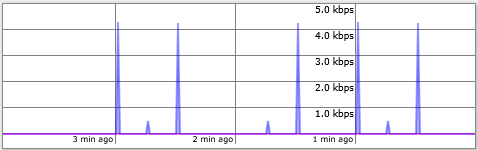
There’s a spike in the byte and packet graphs once a minute. I’m guessing that it has to check for a signal every once in a while (no idea how this works tbh) but I do not want it to use mobile data at all.

Here you have an issue, see point #21 :

You want the device itself or traffic through the device (or both) to be blocked?

Rules could be like:
/ip firewall filter
add action=drop chain=forward in-interface-list=LAN out-interface-list=WAN
add action=drop chain=output out-interface-list=WAN

but no idea if the second would block also SMS sending, maybe you need to insert an accept rule for the port(s) used.

Try to check your "spikes" via Torch tool, you'll see which addresses are accessed. Signal is checked via AT commands, data network is not used for that. It could be DHCP traffic, also it could be time sync (uncheck 'Update time' checkbox in IP->Cloud). In my case, DHCP traffic is not accounted, so I don't care about it, I just set higher Distance for LTE route, so it's only active, if all other networks are unavailable.

SMS are sent via modem interface and not affected by data network or firewall.

Path in the webinterface is:

Interfaces - LTE - LTE APNs - click on “default”

What does it not block?

Is that for the bridge? I gave the kit a fixed IP (and set the DNS server) when I set it up through wifi on my phone, which probably also disabled DHCP (I won’t use it anyway).

What device? The kit?

My setup: The kit’s got a fixed IP within the network and it’s connected to the same LAN switch that my PC is also connected to. I open a socket to the kit in Java and send commands like /tool/sms/send through it. This obviously has to work and the kit should also have a connection to the internet, so I can download updates (should never happen automatically) but it must always use the wired LAN connection for this, never lte1. This should always only be used to send SMS, nothing else.

Two list entries (#: 0 and 1) keep popping up in Torch tool (no filters used): The “Tx Rate” jumps to a value of 4.3kbps or 496bps (yes, always those exact values), then back down to 0 but the other fields are either “0” or empty.

I just unticked “Update time” and hit “apply” but there are still the same spikes. The small spikes are always one minute apart and the big ones seem to be distanced equally around them.

What addresses are shown there? Could you make a screenshot of Torch tool with these entries?

Just added a screenshot of the spikes. There are no addresses shown and the entries vanish quickly. Only the Tx Rate changes.

Torch

Ip firewall filter rules are rules for the firewall, they are not "for the bridge" or "for" something, if not what is in the rule itself, the proposed ones mean:

add action=drop chain=forward in-interface-list=LAN out-interface-list=WAN

drop each and every packet that enters the router from the interface(s) belonging to the interface list "LAN" (in your case the bridge) and want to go out through the interface(s) belonging to the interface list "WAN" (in your case lte1)

This one instead:
add action=drop chain=output out-interface-list=WAN
means drop anything that tries to go out the interface(s) belonging to the interface list "WAN" (in your case lte1), but not those forwarded.

The second catches everything that is generated from router, the first packets originated from LAN.

You can check how the chains are set in RouterOS in this diagram:

The first two sentences were my reply to

Here you have an issue, see point #21

Going to edit my comment.

Strange. At least there should be Eth. protocol shown. To avoid quick vanishing, 'Entry timeout' could be increased, just FYI.

Then Packet sniffer tool should help to capture these packets and then look at them in Wireshark. Btw, do they cause real charges for traffic?

The point is only that this entry:

is invalid and should be either corrected or deleted.
Though it won't do any harm and in a simple configuration like yours it doesn't add to complexity, it is good practice to keep configuration clean from this kind of invalid entries, as the simplest check that one does (should do) in case of issues is to make an export, paste it in notepad and search for entires with asterisk, and the prerequisite is that there should be none in a clean configuration.

Thanks for the Packet Sniffer tip! I limited it to the “lte1” interface:

It doesn’t mention the source or destination addresses on the “packets” screen but on “connections” it says that the source address is my PC and the destination is the kit. Is that the connection of the web interface? Why is it using the LTE connection for that, instead of LAN? The bridge is set up with “ether1”, as described in the set up guide.

It's definitely not a web interface. May be some multicast, i don't know. Can't say without looking at these packets.

That’s the table in “IP - DHCP Client”, correct?

It’s weird, I checked it before and I’m pretty sure there was a greyed out list entry there but now there’s an active one for “lte1” with an IP address that I do not know (please also read my reply to teslasystems, it’s connected). I exported the file again but it still says “'*4”.