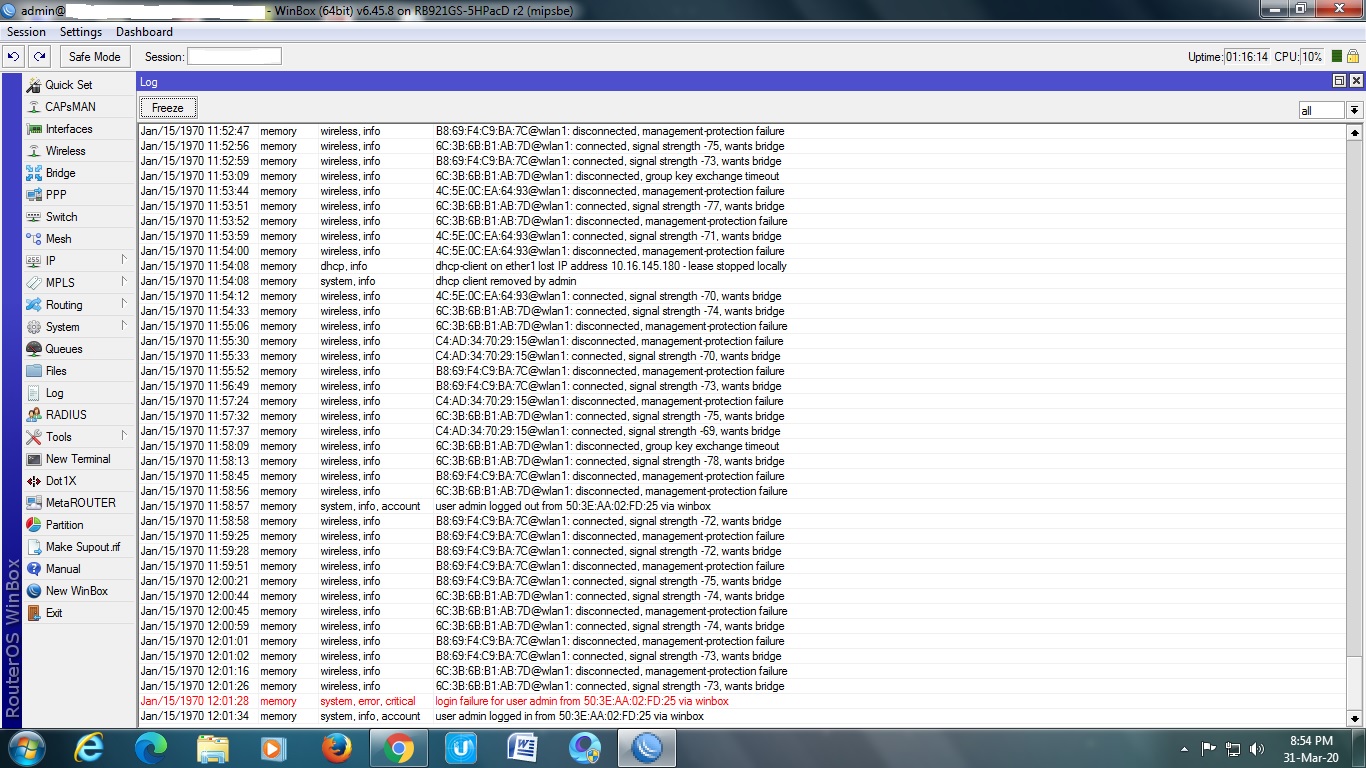
disconnected, received deauth

Hello

I have CRS125-24G-1S-2HnD
RouterOS 6.42

But error in Wireless:

disconnected, received deauth: authentication not valid (2)
disconnected received deauth class 3 frame received (6)
disconnected received deauth class 3 frame received (7)

How to fix it?

Thanks.

Hello
security mode - None
All clients in one room.
All clients are allowed access.
The same situation at different frequencies

Someone is attacking your WiFi?
https://null-byte.wonderhowto.com/how-to/hack-wi-fi-creating-evil-twin-wireless-access-point-eavesdrop-data-0147919/
Step 5

But error:

Have you changed anything in your configuration? Security changed from WPA PSK to none? And all clients have “remembered” settings for the old configuration and computers tries to connect with password?

No changed anything in configuration.

I see the same error for one of my clients since upgrading to 6.42.1
We are using wpa2

ay/01 10:02:14 wireless,debug wlan1: 68:84:70:3F:75:90 not in local ACL, by default accept
may/01 10:02:14 wireless,info 68:84:70:3F:75:90@wlan1: connected, signal strength -73
may/01 10:02:45 wireless,info 68:84:70:3F:75:90@wlan1: disconnected, received deauth: authentication not valid (2)
may/01 10:02:55 wireless,debug wlan1: 68:84:70:3F:75:90 attempts to associate
may/01 10:02:55 wireless,debug wlan1: 68:84:70:3F:75:90 not in local ACL, by default accept
may/01 10:02:55 wireless,info 68:84:70:3F:75:90@wlan1: connected, signal strength -72
may/01 10:03:26 wireless,info 68:84:70:3F:75:90@wlan1: disconnected, received deauth: authentication not valid (2)
may/01 10:03:30 wireless,debug wlan1: 68:84:70:3F:75:90 attempts to associate
may/01 10:03:30 wireless,debug wlan1: 68:84:70:3F:75:90 not in local ACL, by default accept
may/01 10:03:30 wireless,info 68:84:70:3F:75:90@wlan1: connected, signal strength -71
may/01 10:04:01 wireless,info 68:84:70:3F:75:90@wlan1: disconnected, received deauth: authentication not valid (2)
may/01 10:04:18 wireless,debug wlan1: 68:84:70:3F:75:90 attempts to associate
may/01 10:04:18 wireless,debug wlan1: 68:84:70:3F:75:90 not in local ACL, by default accept
may/01 10:04:18 wireless,info 68:84:70:3F:75:90@wlan1: connected, signal strength -77
may/01 10:04:49 wireless,info 68:84:70:3F:75:90@wlan1: disconnected, received deauth: authentication not valid (2)
may/01 10:04:52 wireless,debug wlan1: 68:84:70:3F:75:90 attempts to associate
may/01 10:04:52 wireless,debug wlan1: 68:84:70:3F:75:90 not in local ACL, by default accept
may/01 10:04:52 wireless,info 68:84:70:3F:75:90@wlan1: connected, signal strength -72
may/01 10:05:23 wireless,info 68:84:70:3F:75:90@wlan1: disconnected, received deauth: authentication not valid (2)
may/01 10:05:27 wireless,debug wlan1: 68:84:70:3F:75:90 attempts to associate
may/01 10:05:27 wireless,debug wlan1: 68:84:70:3F:75:90 not in local ACL, by default accept
may/01 10:05:27 wireless,info 68:84:70:3F:75:90@wlan1: connected, signal strength -70
may/01 10:05:58 wireless,info 68:84:70:3F:75:90@wlan1: disconnected, received deauth: authentication not valid (2)
may/01 10:06:02 wireless,debug wlan1: 68:84:70:3F:75:90 attempts to associate
may/01 10:06:02 wireless,debug wlan1: 68:84:70:3F:75:90 not in local ACL, by default accept
may/01 10:06:02 wireless,info 68:84:70:3F:75:90@wlan1: connected, signal strength -80
may/01 10:06:33 wireless,info 68:84:70:3F:75:90@wlan1: disconnected, received deauth: authentication not valid (2)
may/01 10:06:37 wireless,debug wlan1: 68:84:70:3F:75:90 attempts to associate
may/01 10:06:37 wireless,debug wlan1: 68:84:70:3F:75:90 not in local ACL, by default accept
may/01 10:06:37 wireless,info 68:84:70:3F:75:90@wlan1: connected, signal strength -69
may/01 10:07:08 wireless,info 68:84:70:3F:75:90@wlan1: disconnected, received deauth: authentication not valid (2)
may/01 10:23:56 wireless,debug wlan1: D0:DF:9A:43:D5:E6 attempts to associate
may/01 10:23:56 wireless,debug wlan1: D0:DF:9A:43:D5:E6 not in local ACL, by default accept
may/01 10:23:56 wireless,info D0:DF:9A:43:D5:E6@wlan1: connected, signal strength -52
may/01 10:41:24 wireless,debug wlan1: 68:84:70:3F:75:90 attempts to associate


I’m seeing the same issues, on 2 out of 10 in my upgrade test group.

I’ve confirmed that the credentials are correct.
Ultimately she did get the phone connected,

09:31:01 wireless,debug wlan1: 68:84:70:3F:75:90 attempts to associate

09:31:01 wireless,debug wlan1: 68:84:70:3F:75:90 not in local ACL, by default accept
09:31:01 wireless,info 68:84:70:3F:75:90@wlan1: connected, signal strength -74
09:31:32 wireless,info 68:84:70:3F:75:90@wlan1: disconnected, received deauth: authentication not valid (2)

Repeated many times before

09:48:07 wireless,debug wlan1: 68:84:70:3F:75:90 attempts to associate

09:48:07 wireless,debug wlan1: 68:84:70:3F:75:90 not in local ACL, by default accept
09:48:07 wireless,info 68:84:70:3F:75:90@wlan1: connected, signal strength -86


I hear similar tales form other customers, primarily on 6.42rc6 not 6.42.1

I’m also having this issue on 6.42.6. Signal strength -63, so not too weak. Sometimes I also get deauth due to MIC failure (14), for the same device

I have noticed this in my home wlan too…by any chance clients are android devices?

This is mostly fixed for our customers.

Were using the setting in the script in post one of “Wireless woes and how to fix em :slight_smile:

It is caused by congestion.
When reported we look at the network; resolve if internal (such as getting those stupid Direct print printers on the network instead of competing with it}.
If not internal do a scan and determine the best channel; then modify the scan-list in order of preference.

It’s a lot better in 6.42.3 as well, haven’t tested newer.

Me too log- disconnected, received deauth: class 3 frame received (7)
device Redmi note 7. Routeros 6.45.7

i lave router
RB921GS-5HPacD r2
plz solve my problem
dsds.jpg

Same here.
Xiaomi Redmi Note 8 Pro / MIUI Global 11.0.4 / Android 10 (with 2020-05-01 security patch)
2.4GHz is working, but 5GHz drops.
Both with wAP AC lite on workplace and hAP AC lite at home.

Hi, I have disabled “aes ccm” on 5GHZ security profile; so now I have only “tkip” and it works fine with my Redmi Note 8 pro.
It’s not the best solution… but is a workaround.
On 2,4Ghz band AES+TKIP works fine.

Hi, I can confirm, disabling aes com on 5GHz solved the issue for my Redmi note 9 on hAP ac2, v6.47.9.

Please Help,
I have same problem with my Xiaomi 11T Mikrotik HapAc2 If I forgot network I can connect 5ghz (both secured network and open network (hotspot)) but after disconected I cant connect anymore.
and I’m not get issue with 5ghz unifi & ruckus, I can connect to 5ghz unfi&ruckus. Just mikrotik. Anyone can help please?

It’s a long standing issue.

Use the hAP AC2 as a router and turn off it’s wireless. Use the ruckus or UniF–k for wifi.

interface/wireless/set distance=indoors numbers=wlan1

i hope this helped. :slight_smile:

Thank you!
That was it, I just couldn’t figure out what I’d changed