Do I deploy Dude in the network?

I understand Dude is no longer supported by Mikrotik can someone tell me if it is still capable of being deployed and functional?

I have a network with 12 devices. 2 routers, 5 switches and 3 access points that are all Mikrotik devices. A point-to-point and one wifi access point are Unifi.

I have an RB750Gr3 router that I have managed to get Dude operating on. I need to go back and do a reinstall with the SD card for production. I have the impression I can make it work.

Sober second thought suggests, how far down the rabbit hole of installing Dude will I get to discover it has limitations that will never be addressed.

This forum has been great in sharing their insights. What honest questions should I be asking myself before jumping feet first?

Check the unofficial successor to The Dude:

It still works just fine. It pretty ideal for the "12 devices. 2 routers, 5 switches and 3 access points" case as that all fits on one map.

The Dude does take a little configuration, but if you do it first, then run the "auto-scan", it will pre-populate all your devices. e.g. for the non-mirkotik things, you'll likely want to enable SNMP and then configure that in using dude.exe settings for "SNMP Profiles" once connected your hEX with dude.npk+SD-card. For the MikroTik devices, you just need to provide the RouterOS username/password on each device and it will use "winbox-protocol" to do the monitoring (winbox being more efficient since it binary than SNMP). There are "probes" you can configure to customize monitoring, but it does basic thing like `ping, and also CPU/mem/disk for SNMP-enabled devices.

The one thing that's easy to miss is using the "Add Link" on the map view. Once you have devices populated, you need to draw link between devices... which then will let you pick how you want to monitor the link (so speeds) between interface/devices. Again if you have SNMP, you can use that. If it's RouterOS (with username/password set on the linked device), the it just picking the RouterOS interface to use for the speed of the link. The "Add Link" is essentially a special probe for to track network traffic speeds. Like "probes" (e.g. ping, http, SNMP get, etc), the link speeds are captured on certain intervals/polling. This polling can be controlled on the device/map/"global" level.

What the probe monitors is then written the dude.db SQLite DB that (should) live on the SD-Card, so thing like ping (up/down +ms) are recorded. The level of polling will determine how big the DB can get. But the default are pretty reasonable, and the default also "rolls up" data so more recent data is more granular while older data becomes summarized by a longer timespan. So the growth of the DB is entirely controllable. And the defaults are reasonable, but it fully customizable.

It's "dense" in the configuration is main thing. So some things like variables/functions are just plain weird in how the work. Or the notification scheme are dated, but extendable to modern things. But functionally speaking, I've used for a decade since I have have a few isolated sites, with various dozen(s) of devices each... so each site gets a dude instances, and all the data is recorded. Mostly just sitting there if needed for troubleshooting some problem with all the current/historical data "just there".

The only complaint, other than probes/function being complex, is that once you add a device to a map it's "stuck", so while you can delete/recreate same device on a new map... that blows aways it historical data. So in 10 years, a missing "move device to map..." is only "missing features".

Now... if you have dozen devices... that likely be one map, so won't run into that. But the real benefit of the dude is no extra servers/containers or internet/cloud is needed to do basic monitoring. Since the dude.exe lets you export CSV... you can then use the raw data in whatever report/tool you want... as the basic reporting tools in dude.exe are reasonable but Excel likely be more customizable Charts from Dude export.

Now it's sad MikroTik let it languish as long as they have. They seem to lump it in with "new controller" that been discussed for years. IMO it the data collection side that's most useful, especially now with AI being able to create you whatever interface/report you want if it had data the Dude already collects.

Anyway worth a try, since it free. You can also disable/remove the page/SD-card if you don't like it.
Thank you for the reply. I am keen to give it a try. I just finished the install on the RB750Gr3 router without any issues. I did install a 16G SD card and used that.

I've searched to try and find a step-by-step guide to work through the process. Mikrotik has abandoned all reference material (or I don't know where to look). I found some stuff on an archive site but it is version 4.

Do you recommend any docs as a starting point?

The Dude manual is on wayback machine.

So installation is here:

https://web.archive.org/web/20240807030945/https://wiki.mikrotik.com/wiki/Manual:The_Dude_v6/Installation

And the page with doc links on the various parts is here:

https://web.archive.org/web/20240615034741/https://wiki.mikrotik.com/wiki/Manual:The_Dude

I had found those links in my cull of Dude resources. Appreciate the share just the same. At least I know I'm using what is most available.

On router, you just add the Dude package and set the DB path to SD Card. Perhaps formating the SD card beforehand. Once enabled, it ride on top of WinBox, so in dude.exe you use the winbox port to access the dude server on that router.

The tricker part is all the layers of settings in dude.exe, since you can control things at a variety of levels. And understanding "Services" == "Probes" is also important, and that what both checks for up/down, and collect data on the underlying probe/service response at each polling time. And I mentioned above, adding "Links" will get you traffic data on whatever interface you want by drawing it on a map. One "pro tip" is you can create a non-device (like a static text, to have a link where you don't have the other device in the dude in the map. e.g. "Internet" or port like "ether3" since link/traffic tracking from "Add Link" requires two ends to connect in the map view.

WOW! Need tanks to get that deep.

Going to start with device detection and then work through each device to determine what can be discovered.

I really like the idea of overlaying the network map on a physical site map. The network is on a farmsite almost 1/2Km in dimensions. Showing each device where it is physically located goes a long way to helping other understand.

I have Dude 7.21 setup. There are 29 components in the network. 13 of those are Mikrotik devices.

Each component has one or more of these methods gathering data, ping,ssh,snmp or routeros. All components display link data. Popped up on the boardroom 65 screen the network map looks impressive. At least the owner seems to think so.

Now for learning questions.

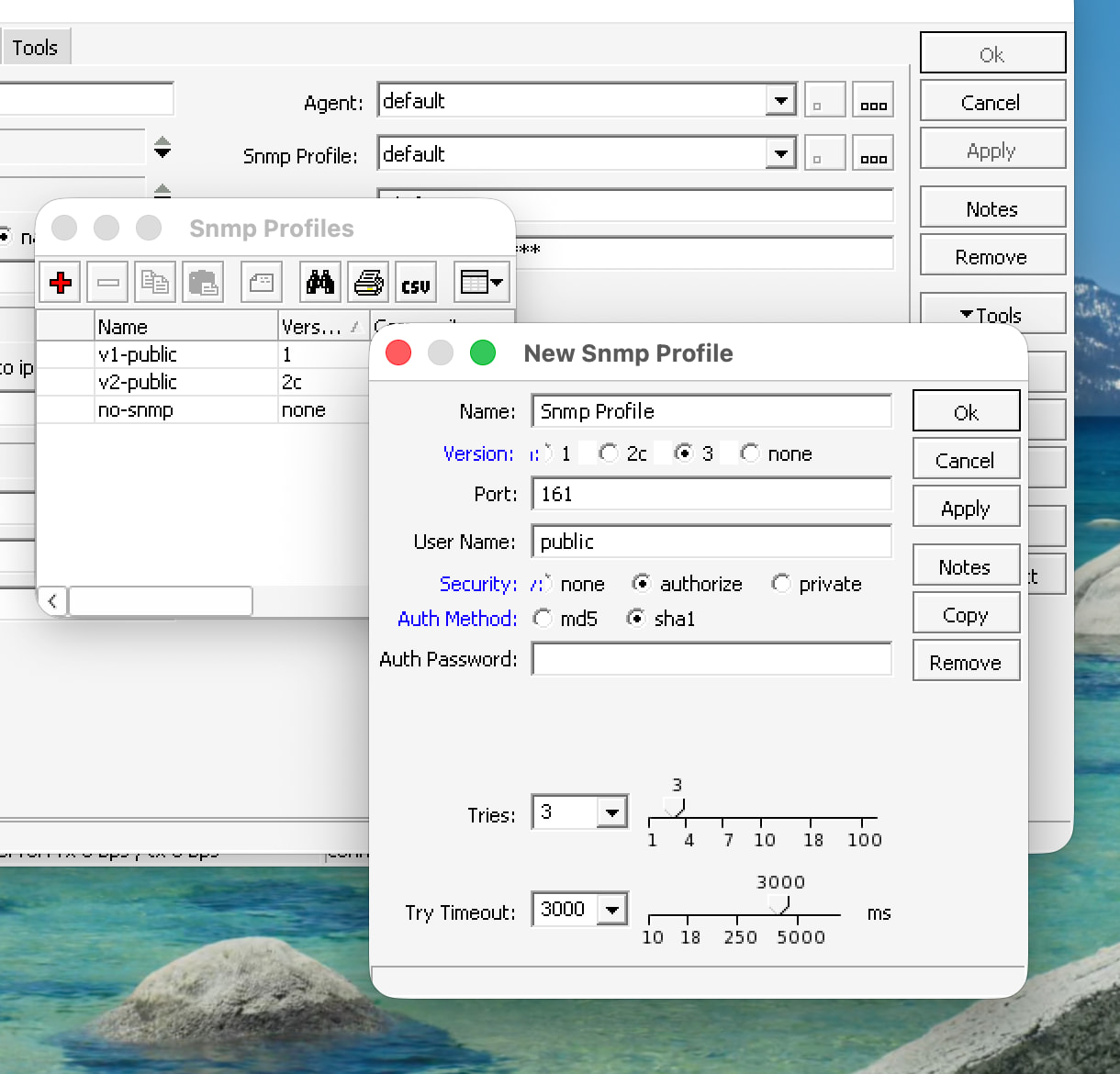
I've enabled snmp on all Mikrotik devices. I can't seem to find support for snmpv3. Changing the community string does little to hide the fact the protocols below v3 are not secure.

I've done nothing with probes. I was thinking of setting it up for DNS and maybe the web host. ANy other probe idea you can share would be great.

On a device, you'll see SNMP Profile. There is a button that opens the SNMP profiles, where you can add your own profile using SNMP v3. Now you're limited SHA1, so newer SHA256/etc are not support for SNMP v3. And, I have not tested this recently, since use a trusted network work read-only SNMP with v2 since it's simple... but recall V3 works.

I only use one custom probe, so IDK what to suggest. And the only reason it's a custom probe is that if need to "massage" SNMP data, like getting OID for a "first LTE modem" in my example below:

Related, you can custom the map view to should more data on a device from SNMP or other data, or even "custom functions":