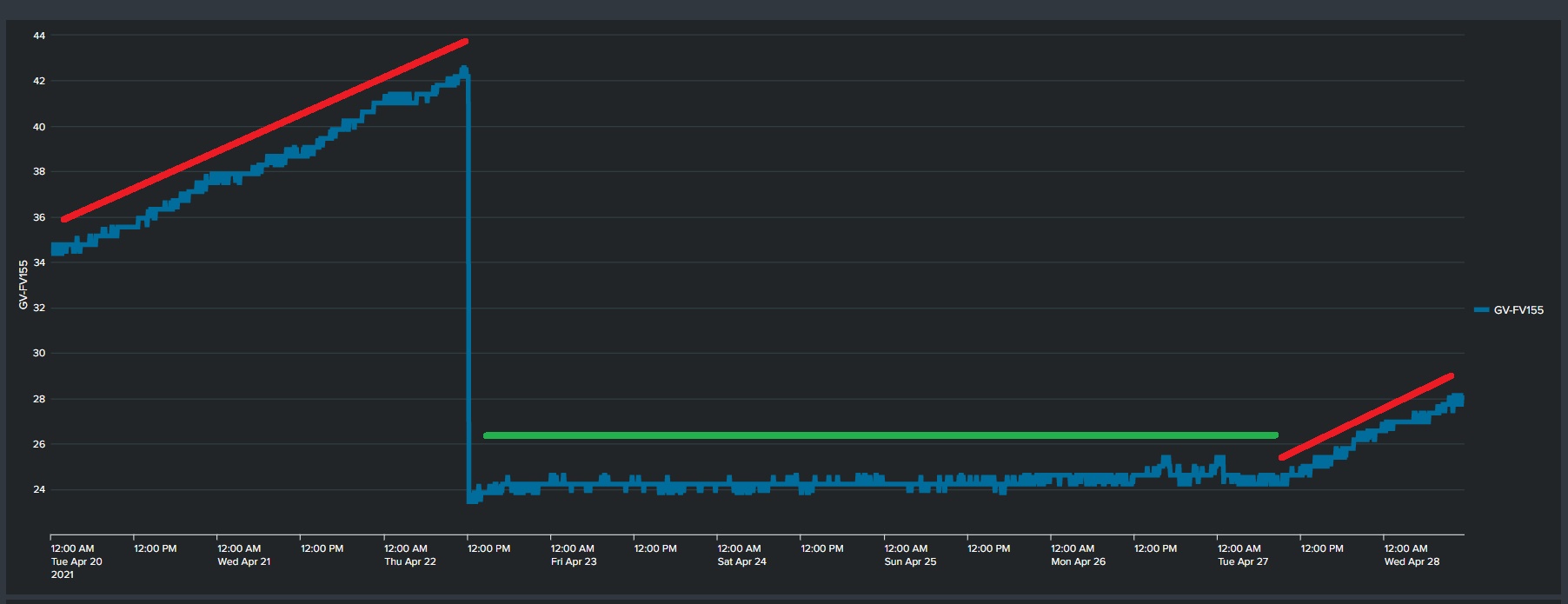
I have done som more investigation in the DoH memory leakage on all Router OS.
In previous setup I have replaced the DNS with IP in DNS setup and some comment that the certificate was by name only.
So here are the reult of my test.
Is this possibly related to the certificate type? Chances are that cloudflare uses ECC certificates and others do not. I will check when I am back to a physical keyboard.
Thanks for the info, successfully switched to the NextDNS.
If someone needs, the script for adding NextDNS can be found here: https://my.nextdns.io/start
I’d like to confirm that hAP ac^2 6.48.3 (stable) is affected by this issue, the memory leak. Once I disable “Verify DoH Certificate” memory leak stops.
I’m grateful to topic starter, without you it would take me ages to realize what causing it without any profiler available for us.
@mikrotik - guys do you have this bug reported and fix in progress?
*Leaving this here for the next internet soul trying to search for a solution.
This bug seems to be fixed in v6.49. Personally, I have a lot of issues with 7.x version, so if you want to run v6, then this is the minimal version to install.
I’m running v6.49.6 for 2 days now and it looks good.
Cheers!
LE: spoke too soon. Using CF servers and Verify cert on a CCR1009 with 6.49.6 still causes memory leaks.
We have been trying to reproduce this problem in our lab with the latest RouterOS v7 releases and have not managed to notice such behavior.
If anyone is still experiencing memory leak caused by DoH services with v7.5 or later, then please send a supout file from your device (generated while the problematic configuration is set on the router and leak is already noticeable) to use - https://help.mikrotik.com/servicedesk/servicedesk/customer/portal/1.
Did some testing now and do not see the problem any more.
Tested with same configuration (as gave problem on 6.x) on 7.2.5 and 7.5 without seeing the problem. I looks like it was solved in 7.x
I am using Mikrotik Haplite and I noticed my router keeps on rebooting after I activate the “Use DoH Server”. How can I fix this issue?
Log:
router was rebooted without proper shutdown
kernel failure in previous boot
out of memory condition was detected
DNS Settings:
Max UDP Packet Size: 4096
Query Server Timeout: 2.000
Query Total Timeout: 10.000
Max Concurrent Queries: 100
Max Concurrent TCP Sessions: 20
Cache Size: 8192
Cache Max TTL: 1d 00:00:00
I have version 6.49.18 and I'm experiencing a memory leak when I enable certificate verification for https://8.8.8.8/dns-query
Will this issue be fixed in version 6?
P.S. The tests were conducted on three different devices, and memory leaks were found on all of them.