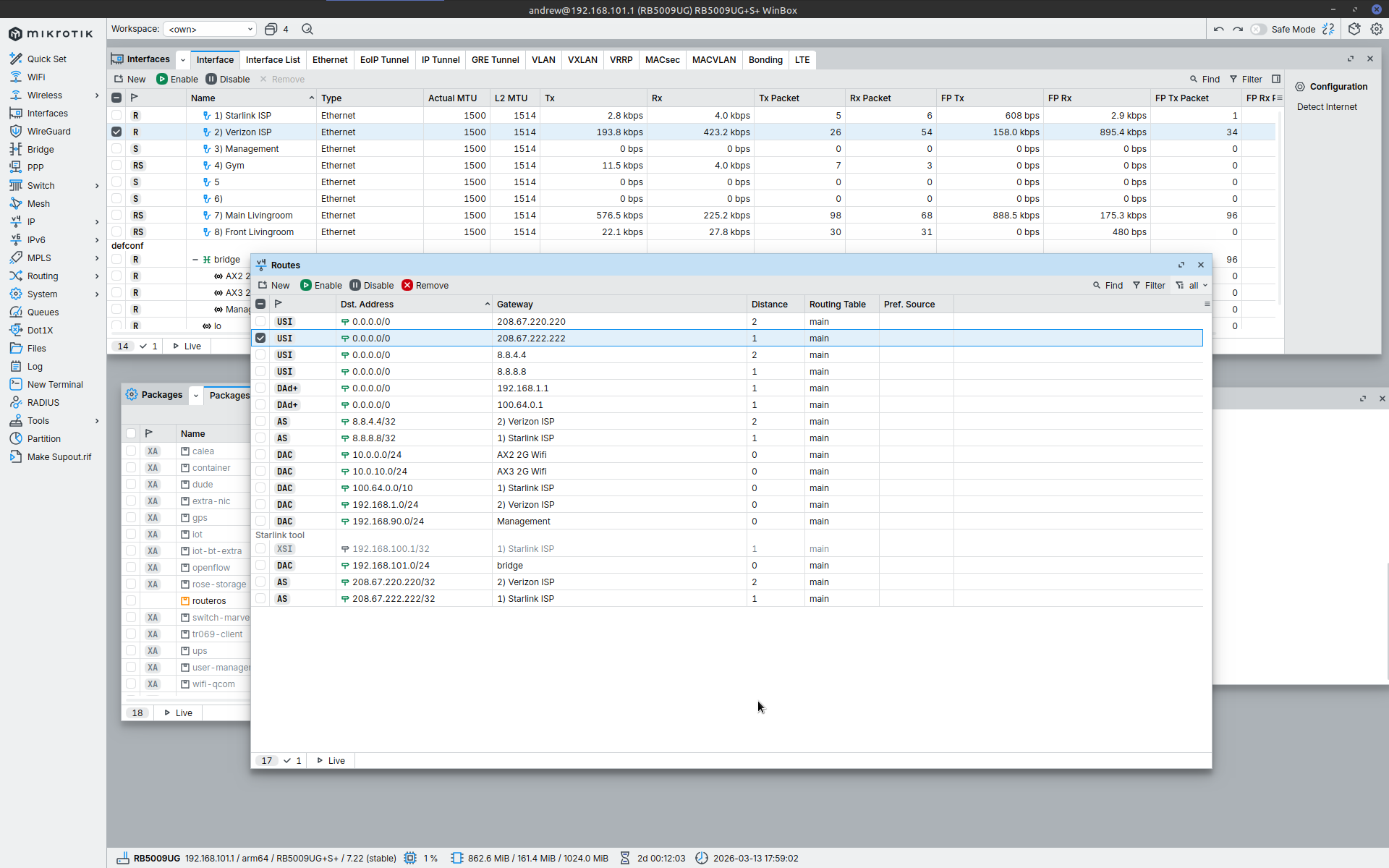
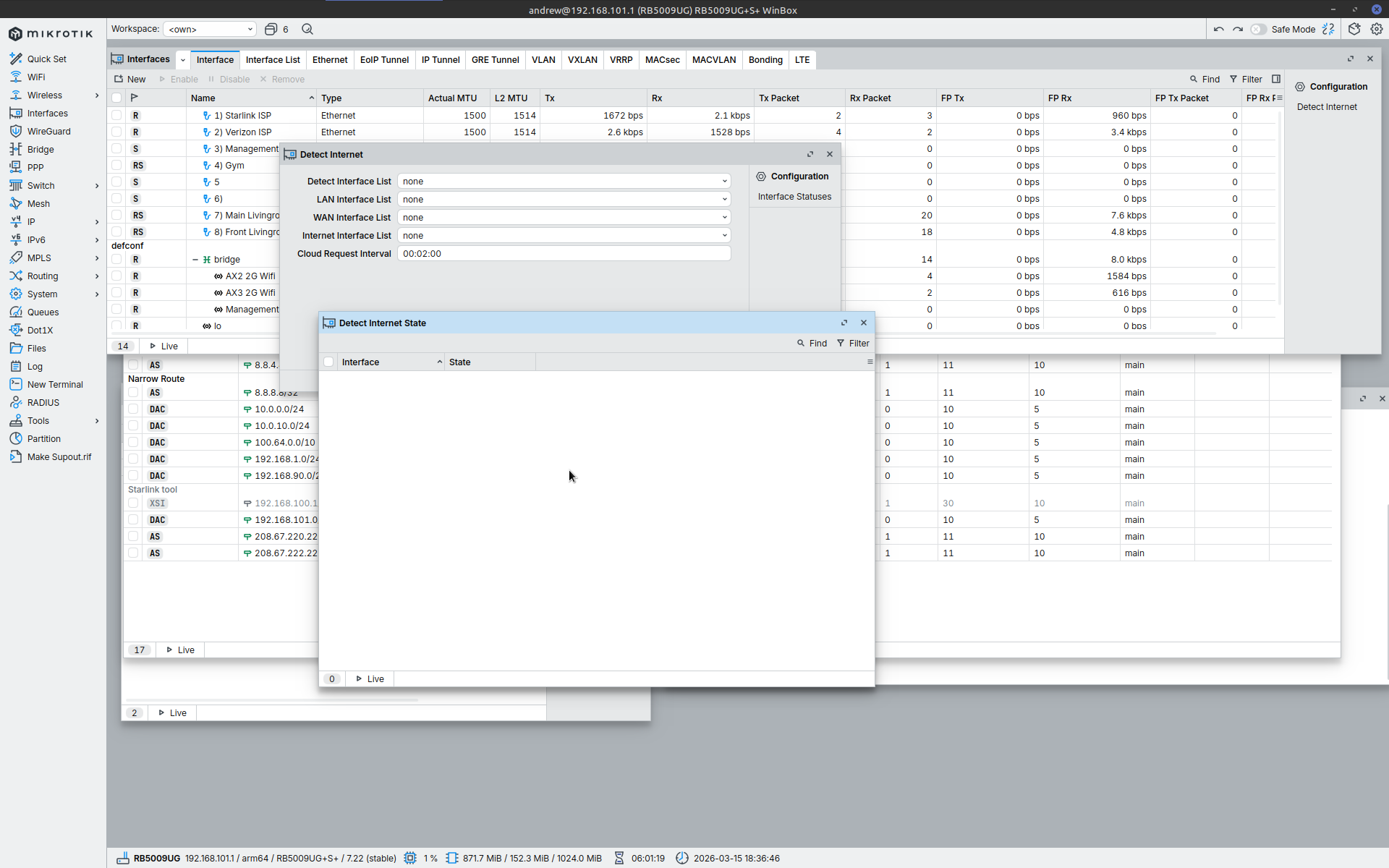
RB5009UG with latest software. Have followed setup in link below, but is not right. Instead of primary Starlink ISP with failover, it is allowing both Verizon and Starlink at same time. Links to 8.8.8.8 and 8.8.4.4 as well as secondary DNS pings are listed as unreachable. Both ISP are using dynamic IP assignment and are being automatically configured with distance of 0. I’ve tried manually creating this but the both get created again still with the distance set to 0. Any help would be appreciated thanks.
2026-03-13 16:50:35 by RouterOS 7.22
software id = LYM0-VBV6
model = RB5009UG+S+
serial number =
/interface bridge
add admin-mac=########### auto-mac=no comment=defconf name=bridge
port-cost-mode=short vlan-filtering=yes
/interface ethernet
set [ find default-name=ether1 ] l2mtu=1514 name="1) Starlink ISP"
set [ find default-name=ether2 ] l2mtu=1514 name="2) Verizon ISP"
set [ find default-name=ether3 ] l2mtu=1514 name="3) Management"
set [ find default-name=ether4 ] l2mtu=1514 name="4) Gym"
set [ find default-name=ether5 ] l2mtu=1514 name=5
set [ find default-name=ether6 ] l2mtu=1514 name="6)"
set [ find default-name=ether7 ] l2mtu=1514 name="7) Main Livingroom"
set [ find default-name=ether8 ] l2mtu=1514 name="8) Front Livingroom"
set [ find default-name=sfp-sfpplus1 ] l2mtu=1514 name=sfp-DS1821+
/interface vlan
add interface=bridge name="AX2 2G Wifi " vlan-id=100
add interface=bridge name="AX3 2G Wifi" vlan-id=101
add interface=bridge name=Management vlan-id=10
/interface list
add comment=defconf name=WAN
add comment=defconf name=LAN
/interface wireless security-profiles
set [ find default=yes ] supplicant-identity=MikroTik
/ip pool
add name=dhcp ranges=192.168.101.2-192.168.101.254
add name=dhcp_pool1 ranges=10.0.10.2-10.0.10.254
add name=dhcp_pool2 ranges=10.0.0.2-10.0.0.254
/ip dhcp-server
add add-arp=yes address-pool=dhcp interface=bridge lease-time=10m name=
defconf
add add-arp=yes address-pool=dhcp_pool1 interface="AX3 2G Wifi" name=dhcp1
add add-arp=yes address-pool=dhcp_pool2 interface="AX2 2G Wifi " name=dhcp2
/caps-man manager
set ca-certificate=auto certificate=auto require-peer-certificate=yes
/interface bridge port
add bridge=bridge comment=defconf interface="6)" internal-path-cost=10
path-cost=10
add bridge=bridge comment=defconf interface="7) Main Livingroom"
internal-path-cost=10 path-cost=10
add bridge=bridge comment=defconf interface="8) Front Livingroom"
internal-path-cost=10 path-cost=10
add bridge=bridge comment=defconf interface=sfp-DS1821+ internal-path-cost=10
path-cost=10
add bridge=bridge interface="3) Management" internal-path-cost=10 path-cost=
10
add bridge=bridge interface="4) Gym" internal-path-cost=10 path-cost=10
add bridge=bridge interface=5 internal-path-cost=10 path-cost=10
/ip firewall connection tracking
set udp-timeout=10s
/ip neighbor discovery-settings
set discover-interface-list=LAN
/interface bridge vlan
add bridge=bridge tagged="8) Front Livingroom,bridge" vlan-ids=100
add bridge=bridge tagged="7) Main Livingroom,bridge" vlan-ids=101
/interface list member
add comment=defconf interface=bridge list=LAN
add comment=defconf interface="1) Starlink ISP" list=WAN
add interface=Management list=LAN
add comment=defconf interface="2) Verizon ISP" list=WAN
/interface ovpn-server server
add auth=sha1,md5 mac-address=############## name=ovpn-server1
/interface wireless cap
set bridge=bridge certificate=request discovery-interfaces="2) Verizon ISP"
/ip address
add address=192.168.101.1/24 comment=defconf interface=bridge network=
192.168.101.0
add address=192.168.90.1/24 interface=Management network=192.168.90.0
add address=10.0.0.1/24 interface="AX2 2G Wifi " network=10.0.0.0
add address=10.0.10.1/24 interface="AX3 2G Wifi" network=10.0.10.0
/ip arp
add address=192.168.101.2 interface=bridge mac-address=################
add address=192.168.101.240 interface=bridge mac-address=###############
add address=192.168.101.250 interface=bridge mac-address=###############
add address=192.168.101.145 interface=bridge mac-address=###############
add address=192.168.101.4 interface=bridge mac-address=###############
/ip dhcp-client
add comment=defconf interface="1) Starlink ISP" name=ether1
add comment=defconf interface="2) Verizon ISP" name=ether2
/ip dhcp-server lease
add address=192.168.101.71 client-id=############### mac-address=
############### server=defconf
add address=192.168.101.240 client-id==############### comment=Backend
mac-address=############### server=defconf
add address=192.168.101.7 client-id==############### comment="FireCube 3rd"
mac-address=############### server=defconf
add address=10.0.10.5 mac-address=############### server=dhcp1
add address=10.0.10.6 client-id=############### mac-address=
############### server=dhcp1
add address=10.0.10.4 mac-address=############### server=dhcp1
add address=10.0.0.6 mac-address=############### server=dhcp2
add address=10.0.0.7 client-id=############### mac-address=
############### server=dhcp2
add address=10.0.0.9 mac-address=############### server=dhcp2
add address=192.168.101.46 client-id=############### mac-address=
############### server=defconf
add address=10.0.10.2 mac-address=############### server=dhcp1
add address=10.0.10.7 client-id=############## mac-address=
############### server=dhcp1
add address=192.168.101.23 client-id=############### mac-address=
############### server=defconf
add address=192.168.101.11 client-id=############### mac-address=
############### server=defconf
add address=192.168.101.18 client-id=############## mac-address=
############## server=defconf
add address=192.168.101.5 client-id=############## comment=
"FireCube 2nd" mac-address=############## server=defconf
add address=192.168.101.8 client-id=############## comment=
"FireStick 3rd" mac-address=############## server=defconf
/ip dhcp-server network
add address=10.0.0.0/24 gateway=10.0.0.1
add address=10.0.10.0/24 gateway=10.0.10.1
add address=192.168.101.0/24 comment=defconf domain=WORKGROUP gateway=
192.168.101.1 netmask=24
/ip dns
set allow-remote-requests=yes
/ip firewall address-list
add address=192.168.90.0/24 list=Local-Networks
add address=10.0.0.0/24 list=Local-Networks
add address=10.0.10.0/24 list=Local-Networks
add address=192.168.101.0/24 list=Local-Networks
/ip firewall filter
add action=accept chain=input comment=
"defconf: accept established,related,untracked" connection-state=
established,related,untracked
add action=drop chain=input comment="defconf: drop invalid" connection-state=
invalid
add action=accept chain=input comment="defconf: accept ICMP" protocol=icmp
add action=accept chain=input comment=
"defconf: accept to local loopback (for CAPsMAN)" dst-address=127.0.0.1
add action=drop chain=input comment="defconf: drop all not coming from LAN"
in-interface-list=!LAN
add action=accept chain=forward comment="defconf: accept in ipsec policy"
ipsec-policy=in,ipsec
add action=accept chain=forward comment="defconf: accept out ipsec policy"
ipsec-policy=out,ipsec
add action=fasttrack-connection chain=forward comment="defconf: fasttrack"
connection-state=established,related
add action=accept chain=forward connection-state=new dst-address=
192.168.101.0/24 src-address=192.168.90.0/24
add action=drop chain=forward comment="defconf: drop invalid"
connection-state=invalid
add action=accept chain=forward comment=
"defconf: accept established,related, untracked" connection-state=
established,related,untracked
add action=drop chain=forward comment=
"defconf: drop all from WAN not DSTNATed" connection-nat-state=!dstnat
connection-state=new in-interface-list=WAN
add action=drop chain=forward connection-state=new dst-address-list=
Local-Networks src-address-list=Local-Networks
/ip firewall nat
add action=masquerade chain=srcnat comment="defconf: masquerade" disabled=yes
ipsec-policy=out,none out-interface-list=WAN
add action=dst-nat chain=dstnat comment=openvpn disabled=yes dst-port=1194
in-interface-list=WAN protocol=udp to-addresses=192.168.101.250 to-ports=
1194
add action=masquerade chain=srcnat comment=Starlink out-interface=
"1) Starlink ISP"
add action=masquerade chain=srcnat comment=Verizon out-interface=
"2) Verizon ISP"
/ip ipsec profile
set [ find default=yes ] dpd-interval=2m dpd-maximum-failures=5
/ip route
add comment="Starlink tool" disabled=yes distance=1 dst-address=
192.168.100.1/32 gateway="1) Starlink ISP" pref-src="" routing-table=main
scope=30 target-scope=10
add disabled=no distance=1 dst-address=8.8.8.8/32 gateway="1) Starlink ISP"
routing-table=main scope=10
add disabled=no distance=2 dst-address=8.8.4.4/32 gateway="2) Verizon ISP"
routing-table=main scope=10 target-scope=10
add check-gateway=ping disabled=no distance=1 dst-address=0.0.0.0/0 gateway=
8.8.8.8 routing-table=main scope=11 target-scope=11
add check-gateway=ping disabled=no distance=2 dst-address=0.0.0.0/0 gateway=
8.8.4.4 routing-table=main scope=11 target-scope=11
add disabled=no dst-address=208.67.222.222/32 gateway="1) Starlink ISP"
routing-table=main scope=10
add disabled=no distance=2 dst-address=208.67.220.220/32 gateway=
"2) Verizon ISP" routing-table=main scope=10
add check-gateway=ping disabled=no distance=1 dst-address=0.0.0.0/0 gateway=
208.67.222.222 routing-table=main scope=11 target-scope=11
add check-gateway=ping disabled=no distance=2 dst-address=0.0.0.0/0 gateway=
208.67.220.220 routing-table=main scope=11 target-scope=11
/ip upnp
set enabled=yes
/ip upnp interfaces
add interface=bridge type=internal
add interface="1) Starlink ISP" type=external
/ipv6 firewall address-list
add address=::/128 comment="defconf: unspecified address" list=bad_ipv6
add address=::1/128 comment="defconf: lo" list=bad_ipv6
add address=fec0::/10 comment="defconf: site-local" list=bad_ipv6
add address=::ffff:0.0.0.0/96 comment="defconf: ipv4-mapped" list=bad_ipv6
add address=::/96 comment="defconf: ipv4 compat" list=bad_ipv6
add address=100::/64 comment="defconf: discard only " list=bad_ipv6
add address=2001:db8::/32 comment="defconf: documentation" list=bad_ipv6
add address=2001:10::/28 comment="defconf: ORCHID" list=bad_ipv6
add address=3ffe::/16 comment="defconf: 6bone" list=bad_ipv6
/ipv6 firewall filter
add action=accept chain=input comment=
"defconf: accept established,related,untracked" connection-state=
established,related,untracked
add action=drop chain=input comment="defconf: drop invalid" connection-state=
invalid
add action=accept chain=input comment="defconf: accept ICMPv6" protocol=
icmpv6
add action=accept chain=input comment="defconf: accept UDP traceroute" port=
33434-33534 protocol=udp
add action=accept chain=input comment=
"defconf: accept DHCPv6-Client prefix delegation." dst-port=546 protocol=
udp src-address=fe80::/10
add action=accept chain=input comment="defconf: accept IKE" dst-port=500,4500
protocol=udp
add action=accept chain=input comment="defconf: accept ipsec AH" protocol=
ipsec-ah
add action=accept chain=input comment="defconf: accept ipsec ESP" protocol=
ipsec-esp
add action=accept chain=input comment=
"defconf: accept all that matches ipsec policy" ipsec-policy=in,ipsec
add action=drop chain=input comment=
"defconf: drop everything else not coming from LAN" in-interface-list=
!LAN
add action=accept chain=forward comment=
"defconf: accept established,related,untracked" connection-state=
established,related,untracked
add action=drop chain=forward comment="defconf: drop invalid"
connection-state=invalid
add action=drop chain=forward comment=
"defconf: drop packets with bad src ipv6" src-address-list=bad_ipv6
add action=drop chain=forward comment=
"defconf: drop packets with bad dst ipv6" dst-address-list=bad_ipv6
add action=drop chain=forward comment="defconf: rfc4890 drop hop-limit=1"
hop-limit=equal:1 protocol=icmpv6
add action=accept chain=forward comment="defconf: accept ICMPv6" protocol=
icmpv6
add action=accept chain=forward comment="defconf: accept HIP" protocol=139
add action=accept chain=forward comment="defconf: accept IKE" dst-port=
500,4500 protocol=udp
add action=accept chain=forward comment="defconf: accept ipsec AH" protocol=
ipsec-ah
add action=accept chain=forward comment="defconf: accept ipsec ESP" protocol=
ipsec-esp
add action=accept chain=forward comment=
"defconf: accept all that matches ipsec policy" ipsec-policy=in,ipsec
add action=drop chain=forward comment=
"defconf: drop everything else not coming from LAN" in-interface-list=
!LAN
/ipv6 nd
set [ find default=yes ] advertise-dns=yes
/system clock
set time-zone-autodetect=no time-zone-name=America/Chicago
/system identity
set name=RB5009UG
/system ntp server
set multicast=yes use-local-clock=yes
/tool mac-server
set allowed-interface-list=LAN
/tool mac-server mac-winbox
set allowed-interface-list=LAN
jaclaz
March 13, 2026, 11:36pm
2
Scope 11 and target scope 11?
Check this:
Recursive routing and failover setup making use of it is one among the many commonly needed features of a router that is - BTW like most useful things possible in RouterOS - either mis-documented or documented in such a complex and convolute way that bears of little brain like myself simply cannot grasp in their entirety.
By applying a (rest assured moderate) amount of torture to knowledgeable member CGGXANNX (whom I want to thank for the patience and the will to discuss and explain the matter)…
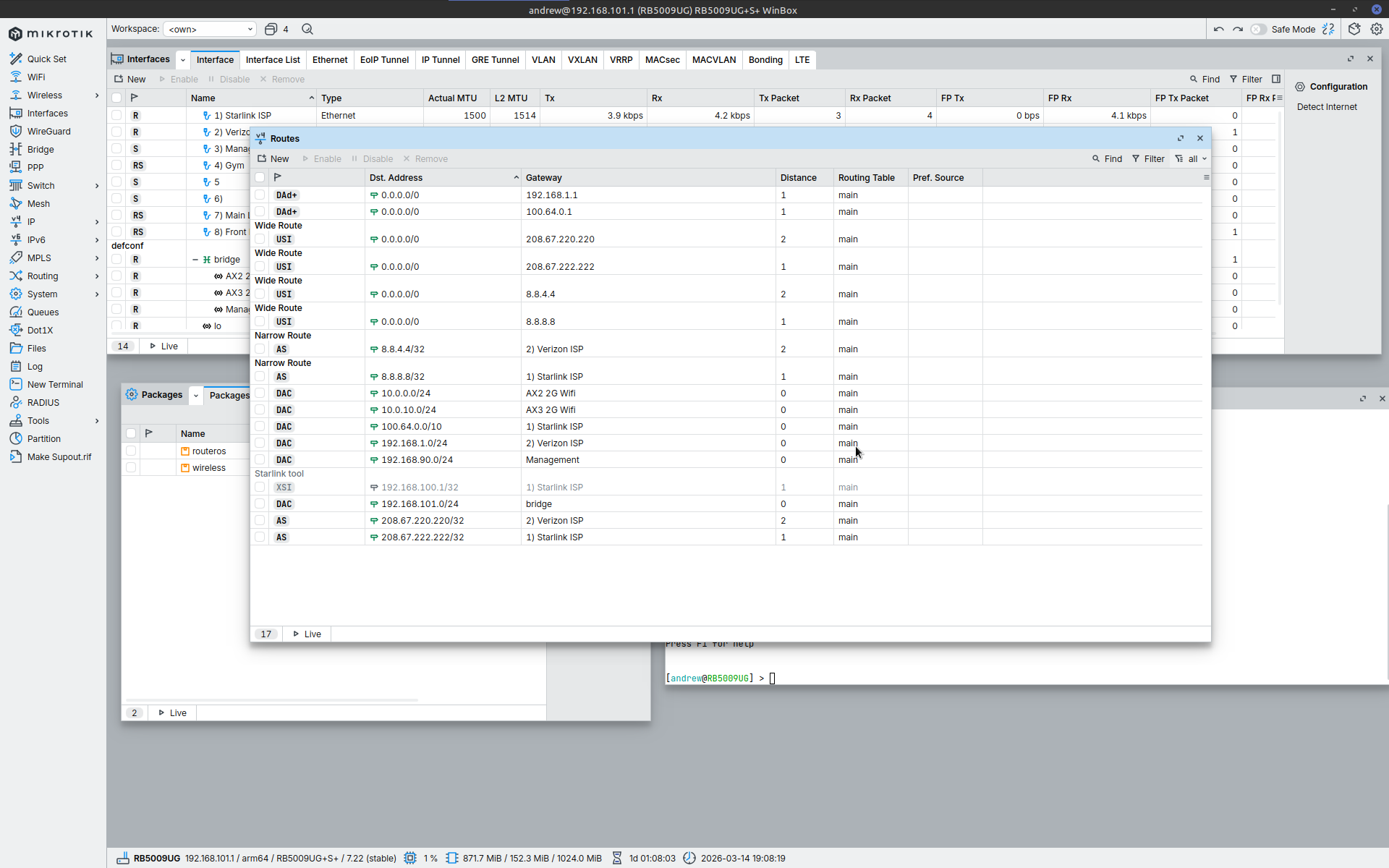
I went a head and made the changes you suggested but they made no difference. None of the recursive connections work. And is still using both ISPs not in failover mode.
2026-03-14 19:11:03 by RouterOS 7.22
software id = LYM0-VBV6
model = RB5009UG+S+
serial number =
/interface bridge
add admin-mac=########## auto-mac=no comment=defconf name=bridge
port-cost-mode=short vlan-filtering=yes
/interface ethernet
set [ find default-name=ether1 ] l2mtu=1514 name="1) Starlink ISP"
set [ find default-name=ether2 ] l2mtu=1514 name="2) Verizon ISP"
set [ find default-name=ether3 ] l2mtu=1514 name="3) Management"
set [ find default-name=ether4 ] l2mtu=1514 name="4) Gym"
set [ find default-name=ether5 ] l2mtu=1514 name=5
set [ find default-name=ether6 ] l2mtu=1514 name="6)"
set [ find default-name=ether7 ] l2mtu=1514 name="7) Main Livingroom"
set [ find default-name=ether8 ] l2mtu=1514 name="8) Front Livingroom"
set [ find default-name=sfp-sfpplus1 ] l2mtu=1514 name=sfp-DS1821+
/interface vlan
add interface=bridge name="AX2 2G Wifi " vlan-id=100
add interface=bridge name="AX3 2G Wifi" vlan-id=101
add interface=bridge name=Management vlan-id=10
/interface list
add comment=defconf name=WAN
add comment=defconf name=LAN
/interface wireless security-profiles
set [ find default=yes ] supplicant-identity=MikroTik
/ip pool
add name=dhcp ranges=192.168.101.2-192.168.101.254
add name=dhcp_pool1 ranges=10.0.10.2-10.0.10.254
add name=dhcp_pool2 ranges=10.0.0.2-10.0.0.254
/ip dhcp-server
add add-arp=yes address-pool=dhcp interface=bridge lease-time=10m name=
defconf
add add-arp=yes address-pool=dhcp_pool1 interface="AX3 2G Wifi" name=dhcp1
add add-arp=yes address-pool=dhcp_pool2 interface="AX2 2G Wifi " name=dhcp2
/caps-man manager
set ca-certificate=auto certificate=auto require-peer-certificate=yes
/interface bridge port
add bridge=bridge comment=defconf interface="6)" internal-path-cost=10
path-cost=10
add bridge=bridge comment=defconf interface="7) Main Livingroom"
internal-path-cost=10 path-cost=10
add bridge=bridge comment=defconf interface="8) Front Livingroom"
internal-path-cost=10 path-cost=10
add bridge=bridge comment=defconf interface=sfp-DS1821+ internal-path-cost=10
path-cost=10
add bridge=bridge interface="3) Management" internal-path-cost=10 path-cost=
10
add bridge=bridge interface="4) Gym" internal-path-cost=10 path-cost=10
add bridge=bridge interface=5 internal-path-cost=10 path-cost=10
/ip firewall connection tracking
set udp-timeout=10s
/ip neighbor discovery-settings
set discover-interface-list=LAN
/interface bridge vlan
add bridge=bridge tagged="8) Front Livingroom,bridge" vlan-ids=100
add bridge=bridge tagged="7) Main Livingroom,bridge" vlan-ids=101
/interface list member
add comment=defconf interface=bridge list=LAN
add comment=defconf interface="1) Starlink ISP" list=WAN
add interface=Management list=LAN
add comment=defconf interface="2) Verizon ISP" list=WAN
/interface ovpn-server server
add auth=sha1,md5 mac-address=FE:53:DE:71:83:02 name=ovpn-server1
/interface wireless cap
set bridge=bridge certificate=request discovery-interfaces="2) Verizon ISP"
/ip address
add address=192.168.101.1/24 comment=defconf interface=bridge network=
192.168.101.0
add address=192.168.90.1/24 interface=Management network=192.168.90.0
add address=10.0.0.1/24 interface="AX2 2G Wifi " network=10.0.0.0
add address=10.0.10.1/24 interface="AX3 2G Wifi" network=10.0.10.0
/ip arp
add address=192.168.101.2 interface=bridge mac-address=##########
add address=192.168.101.240 interface=bridge mac-address=##########
add address=192.168.101.250 interface=bridge mac-address=##########
add address=192.168.101.145 interface=bridge mac-address=##########
add address=192.168.101.4 interface=bridge mac-address=##########
/ip dhcp-client
add comment=defconf interface="1) Starlink ISP" name=ether1
add comment=defconf interface="2) Verizon ISP" name=ether2
/ip dhcp-server lease
add address=192.168.101.71 client-id=########## mac-address=
########## server=defconf
add address=192.168.101.240 client-id=########## comment=Backend
mac-address=D0:50:99:74:FE:B9 server=defconf
add address=192.168.101.7 client-id=########## comment="FireCube 3rd"
mac-address=########## server=defconf
add address=10.0.10.5 mac-address=########## server=dhcp1
add address=10.0.10.6 client-id=1:########## mac-address=
########## server=dhcp1
add address=10.0.10.4 mac-address=########## server=dhcp1
add address=10.0.0.6 mac-address=########## server=dhcp2
add address=10.0.0.7 client-id=1:########## mac-address=
########## server=dhcp2
add address=10.0.0.9 mac-address=########## server=dhcp2
add address=192.168.101.46 client-id=########## mac-address=
########## server=defconf
add address=10.0.10.2 mac-address=########## server=dhcp1
add address=10.0.10.7 client-id=########## mac-address=
########## server=dhcp1
add address=192.168.101.23 client-id=########## mac-address=
########## server=defconf
add address=192.168.101.11 client-id=########## mac-address=
########## server=defconf
add address=192.168.101.18 client-id=########## mac-address=
########## server=defconf
add address=192.168.101.5 client-id=########## comment=
"FireCube 2nd" mac-address=########## server=defconf
add address=192.168.101.8 client-id=########## comment=
"FireStick 3rd" mac-address=########## server=defconf
/ip dhcp-server network
add address=10.0.0.0/24 gateway=10.0.0.1
add address=10.0.10.0/24 gateway=10.0.10.1
add address=192.168.101.0/24 comment=defconf domain=WORKGROUP gateway=
192.168.101.1 netmask=24
/ip dns
set allow-remote-requests=yes
/ip firewall address-list
add address=192.168.90.0/24 list=Local-Networks
add address=10.0.0.0/24 list=Local-Networks
add address=10.0.10.0/24 list=Local-Networks
add address=192.168.101.0/24 list=Local-Networks
/ip firewall filter
add action=accept chain=input comment=
"defconf: accept established,related,untracked" connection-state=
established,related,untracked
add action=drop chain=input comment="defconf: drop invalid" connection-state=
invalid
add action=accept chain=input comment="defconf: accept ICMP" protocol=icmp
add action=accept chain=input comment=
"defconf: accept to local loopback (for CAPsMAN)" dst-address=127.0.0.1
add action=drop chain=input comment="defconf: drop all not coming from LAN"
in-interface-list=!LAN
add action=accept chain=forward comment="defconf: accept in ipsec policy"
ipsec-policy=in,ipsec
add action=accept chain=forward comment="defconf: accept out ipsec policy"
ipsec-policy=out,ipsec
add action=fasttrack-connection chain=forward comment="defconf: fasttrack"
connection-state=established,related
add action=accept chain=forward connection-state=new dst-address=
192.168.101.0/24 src-address=192.168.90.0/24
add action=drop chain=forward comment="defconf: drop invalid"
connection-state=invalid
add action=accept chain=forward comment=
"defconf: accept established,related, untracked" connection-state=
established,related,untracked
add action=drop chain=forward comment=
"defconf: drop all from WAN not DSTNATed" connection-nat-state=!dstnat
connection-state=new in-interface-list=WAN
add action=drop chain=forward connection-state=new dst-address-list=
Local-Networks src-address-list=Local-Networks
/ip firewall nat
add action=masquerade chain=srcnat comment="defconf: masquerade" disabled=yes
ipsec-policy=out,none out-interface-list=WAN
add action=dst-nat chain=dstnat comment=openvpn disabled=yes dst-port=1194
in-interface-list=WAN protocol=udp to-addresses=192.168.101.250 to-ports=
1194
add action=masquerade chain=srcnat comment=Starlink out-interface=
"1) Starlink ISP"
add action=masquerade chain=srcnat comment=Verizon out-interface=
"2) Verizon ISP"
/ip ipsec profile
set [ find default=yes ] dpd-interval=2m dpd-maximum-failures=5
/ip route
add comment="Starlink tool" disabled=yes distance=1 dst-address=
192.168.100.1/32 gateway="1) Starlink ISP" pref-src="" routing-table=main
scope=30 target-scope=10
add comment="Narrow Route" disabled=no distance=1 dst-address=8.8.8.8/32
gateway="1) Starlink ISP" routing-table=main scope=11 target-scope=10
add comment="Narrow Route" disabled=no distance=2 dst-address=8.8.4.4/32
gateway="2) Verizon ISP" routing-table=main scope=11 target-scope=10
add check-gateway=ping comment="Wide Route" disabled=no distance=1
dst-address=0.0.0.0/0 gateway=8.8.8.8 routing-table=main scope=30
target-scope=11
add check-gateway=ping comment="Wide Route" disabled=no distance=2
dst-address=0.0.0.0/0 gateway=8.8.4.4 routing-table=main scope=30
target-scope=11
add disabled=no dst-address=208.67.222.222/32 gateway="1) Starlink ISP"
routing-table=main scope=10
add disabled=no distance=2 dst-address=208.67.220.220/32 gateway=
"2) Verizon ISP" routing-table=main scope=10
add check-gateway=ping comment="Wide Route" disabled=no distance=1
dst-address=0.0.0.0/0 gateway=208.67.222.222 routing-table=main scope=30
target-scope=11
add check-gateway=ping comment="Wide Route" disabled=no distance=2
dst-address=0.0.0.0/0 gateway=208.67.220.220 routing-table=main scope=30
target-scope=11
/ip upnp
set enabled=yes
/ip upnp interfaces
add interface=bridge type=internal
add interface="1) Starlink ISP" type=external
/ipv6 firewall address-list
add address=::/128 comment="defconf: unspecified address" list=bad_ipv6
add address=::1/128 comment="defconf: lo" list=bad_ipv6
add address=fec0::/10 comment="defconf: site-local" list=bad_ipv6
add address=::ffff:0.0.0.0/96 comment="defconf: ipv4-mapped" list=bad_ipv6
add address=::/96 comment="defconf: ipv4 compat" list=bad_ipv6
add address=100::/64 comment="defconf: discard only " list=bad_ipv6
add address=2001:db8::/32 comment="defconf: documentation" list=bad_ipv6
add address=2001:10::/28 comment="defconf: ORCHID" list=bad_ipv6
add address=3ffe::/16 comment="defconf: 6bone" list=bad_ipv6
/ipv6 firewall filter
add action=accept chain=input comment=
"defconf: accept established,related,untracked" connection-state=
established,related,untracked
add action=drop chain=input comment="defconf: drop invalid" connection-state=
invalid
add action=accept chain=input comment="defconf: accept ICMPv6" protocol=
icmpv6
add action=accept chain=input comment="defconf: accept UDP traceroute" port=
33434-33534 protocol=udp
add action=accept chain=input comment=
"defconf: accept DHCPv6-Client prefix delegation." dst-port=546 protocol=
udp src-address=fe80::/10
add action=accept chain=input comment="defconf: accept IKE" dst-port=500,4500
protocol=udp
add action=accept chain=input comment="defconf: accept ipsec AH" protocol=
ipsec-ah
add action=accept chain=input comment="defconf: accept ipsec ESP" protocol=
ipsec-esp
add action=accept chain=input comment=
"defconf: accept all that matches ipsec policy" ipsec-policy=in,ipsec
add action=drop chain=input comment=
"defconf: drop everything else not coming from LAN" in-interface-list=
!LAN
add action=accept chain=forward comment=
"defconf: accept established,related,untracked" connection-state=
established,related,untracked
add action=drop chain=forward comment="defconf: drop invalid"
connection-state=invalid
add action=drop chain=forward comment=
"defconf: drop packets with bad src ipv6" src-address-list=bad_ipv6
add action=drop chain=forward comment=
"defconf: drop packets with bad dst ipv6" dst-address-list=bad_ipv6
add action=drop chain=forward comment="defconf: rfc4890 drop hop-limit=1"
hop-limit=equal:1 protocol=icmpv6
add action=accept chain=forward comment="defconf: accept ICMPv6" protocol=
icmpv6
add action=accept chain=forward comment="defconf: accept HIP" protocol=139
add action=accept chain=forward comment="defconf: accept IKE" dst-port=
500,4500 protocol=udp
add action=accept chain=forward comment="defconf: accept ipsec AH" protocol=
ipsec-ah
add action=accept chain=forward comment="defconf: accept ipsec ESP" protocol=
ipsec-esp
add action=accept chain=forward comment=
"defconf: accept all that matches ipsec policy" ipsec-policy=in,ipsec
add action=drop chain=forward comment=
"defconf: drop everything else not coming from LAN" in-interface-list=
!LAN
/ipv6 nd
set [ find default=yes ] advertise-dns=yes
/system clock
set time-zone-autodetect=no time-zone-name=America/Chicago
/system identity
set name=RB5009UG
/system ntp server
set multicast=yes use-local-clock=yes
/tool mac-server
set allowed-interface-list=LAN
/tool mac-server mac-winbox
set allowed-interface-list=LAN
Thank you for the help but it does raise some issues.
Firstly, I can’t change the DHCP clients default distance as these two are created by router and don’t allow me to edit them.
Secondly, the Starlink ISP is dynamic generated by Starlink equipment running in bypass mode so there is no guarantee the IP address for the gateway will stay the same.
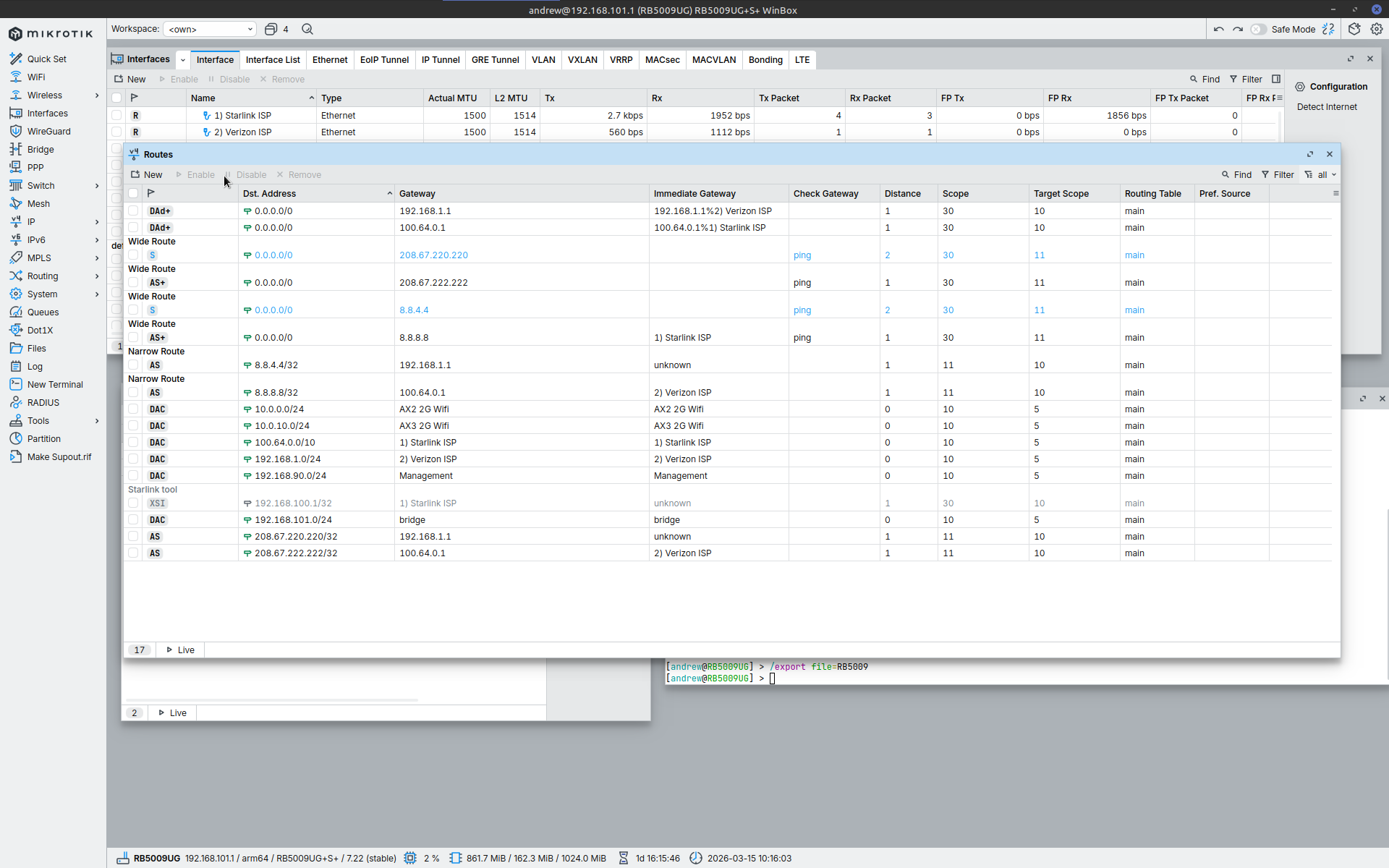
I went ahead and made the changes you suggested (at least the ones I could) and although the Wide routes are now active, the setup is still running in load balance not failover.
2026-03-15 10:15:48 by RouterOS 7.22
software id = LYM0-VBV6
model = RB5009UG+S+
serial number =
/interface bridge
add admin-mac=############ auto-mac=no comment=defconf name=bridge
port-cost-mode=short vlan-filtering=yes
/interface ethernet
set [ find default-name=ether1 ] l2mtu=1514 name="1) Starlink ISP"
set [ find default-name=ether2 ] l2mtu=1514 name="2) Verizon ISP"
set [ find default-name=ether3 ] l2mtu=1514 name="3) Management"
set [ find default-name=ether4 ] l2mtu=1514 name="4) Gym"
set [ find default-name=ether5 ] l2mtu=1514 name=5
set [ find default-name=ether6 ] l2mtu=1514 name="6)"
set [ find default-name=ether7 ] l2mtu=1514 name="7) Main Livingroom"
set [ find default-name=ether8 ] l2mtu=1514 name="8) Front Livingroom"
set [ find default-name=sfp-sfpplus1 ] l2mtu=1514 name=sfp-DS1821+
/interface vlan
add interface=bridge name="AX2 2G Wifi " vlan-id=100
add interface=bridge name="AX3 2G Wifi" vlan-id=101
add interface=bridge name=Management vlan-id=10
/interface list
add comment=defconf name=WAN
add comment=defconf name=LAN
/interface wireless security-profiles
set [ find default=yes ] supplicant-identity=MikroTik
/ip pool
add name=dhcp ranges=192.168.101.2-192.168.101.254
add name=dhcp_pool1 ranges=10.0.10.2-10.0.10.254
add name=dhcp_pool2 ranges=10.0.0.2-10.0.0.254
/ip dhcp-server
add add-arp=yes address-pool=dhcp interface=bridge lease-time=10m name=
defconf
add add-arp=yes address-pool=dhcp_pool1 interface="AX3 2G Wifi" name=dhcp1
add add-arp=yes address-pool=dhcp_pool2 interface="AX2 2G Wifi " name=dhcp2
/caps-man manager
set ca-certificate=auto certificate=auto require-peer-certificate=yes
/interface bridge port
add bridge=bridge comment=defconf interface="6)" internal-path-cost=10
path-cost=10
add bridge=bridge comment=defconf interface="7) Main Livingroom"
internal-path-cost=10 path-cost=10
add bridge=bridge comment=defconf interface="8) Front Livingroom"
internal-path-cost=10 path-cost=10
add bridge=bridge comment=defconf interface=sfp-DS1821+ internal-path-cost=10
path-cost=10
add bridge=bridge interface="3) Management" internal-path-cost=10 path-cost=
10
add bridge=bridge interface="4) Gym" internal-path-cost=10 path-cost=10
add bridge=bridge interface=5 internal-path-cost=10 path-cost=10
/ip firewall connection tracking
set udp-timeout=10s
/ip neighbor discovery-settings
set discover-interface-list=LAN
/interface bridge vlan
add bridge=bridge tagged="8) Front Livingroom,bridge" vlan-ids=100
add bridge=bridge tagged="7) Main Livingroom,bridge" vlan-ids=101
/interface list member
add comment=defconf interface=bridge list=LAN
add comment=defconf interface="1) Starlink ISP" list=WAN
add interface=Management list=LAN
add comment=defconf interface="2) Verizon ISP" list=WAN
/interface ovpn-server server
add auth=sha1,md5 mac-address=############ name=ovpn-server1
/interface wireless cap
set bridge=bridge certificate=request discovery-interfaces="2) Verizon ISP"
/ip address
add address=192.168.101.1/24 comment=defconf interface=bridge network=
192.168.101.0
add address=192.168.90.1/24 interface=Management network=192.168.90.0
add address=10.0.0.1/24 interface="AX2 2G Wifi " network=10.0.0.0
add address=10.0.10.1/24 interface="AX3 2G Wifi" network=10.0.10.00:09
/ip arp
add address=192.168.101.2 interface=bridge mac-address=############
add address=192.168.101.240 interface=bridge mac-address=############
add address=192.168.101.250 interface=bridge mac-address=############
add address=192.168.101.145 interface=bridge mac-address=############
add address=192.168.101.4 interface=bridge mac-address=############
/ip dhcp-client
add comment=defconf interface="1) Starlink ISP" name=ether1
add comment=defconf interface="2) Verizon ISP" name=ether2
/ip dhcp-server lease
add address=192.168.101.71 client-id=############ mac-address=
############ server=defconf
add address=192.168.101.240 client-id=############ comment=Backend
mac-address=############ server=defconf
add address=192.168.101.7 client-id=############ comment="FireCube 3rd"
mac-address=############ server=defconf
add address=10.0.10.5 mac-address=############ server=dhcp1
add address=10.0.10.6 client-id=############ mac-address=
############ server=dhcp1
add address=10.0.10.4 mac-address=############ server=dhcp1
add address=10.0.0.6 mac-address=############ server=dhcp2
add address=10.0.0.7 client-id=############ mac-address=
############ server=dhcp2
add address=10.0.0.9 mac-address=############ server=dhcp2
add address=192.168.101.46 client-id=############ mac-address=
############ server=defconf
add address=10.0.10.2 mac-address=############ server=dhcp1
add address=10.0.10.7 client-id=############ mac-address=
############ server=dhcp1
add address=192.168.101.23 client-id=############ mac-address=
############ server=defconf
add address=192.168.101.11 client-id=############ mac-address=
############ server=defconf
add address=192.168.101.18 client-id=############ mac-address=
############ server=defconf
add address=192.168.101.5 client-id=############ comment=
"FireCube 2nd" mac-address=############ server=defconf
add address=192.168.101.8 client-id=############ comment=
"FireStick 3rd" mac-address=############ server=defconf
/ip dhcp-server network
add address=10.0.0.0/24 gateway=10.0.0.1
add address=10.0.10.0/24 gateway=10.0.10.1
add address=192.168.101.0/24 comment=defconf domain=WORKGROUP gateway=
192.168.101.1 netmask=24
/ip dns
set allow-remote-requests=yes
/ip firewall address-list
add address=192.168.90.0/24 list=Local-Networks
add address=10.0.0.0/24 list=Local-Networks
add address=10.0.10.0/24 list=Local-Networks
add address=192.168.101.0/24 list=Local-Networks
/ip firewall filter
add action=accept chain=input comment=
"defconf: accept established,related,untracked" connection-state=
established,related,untracked
add action=drop chain=input comment="defconf: drop invalid" connection-state=
invalid
add action=accept chain=input comment="defconf: accept ICMP" protocol=icmp
add action=accept chain=input comment=
"defconf: accept to local loopback (for CAPsMAN)" dst-address=127.0.0.1
add action=drop chain=input comment="defconf: drop all not coming from LAN"
in-interface-list=!LAN
add action=accept chain=forward comment="defconf: accept in ipsec policy"
ipsec-policy=in,ipsec
add action=accept chain=forward comment="defconf: accept out ipsec policy"
ipsec-policy=out,ipsec
add action=fasttrack-connection chain=forward comment="defconf: fasttrack"
connection-state=established,related
add action=accept chain=forward connection-state=new dst-address=
192.168.101.0/24 src-address=192.168.90.0/24
add action=drop chain=forward comment="defconf: drop invalid"
connection-state=invalid
add action=accept chain=forward comment=
"defconf: accept established,related, untracked" connection-state=
established,related,untracked
add action=drop chain=forward comment=
"defconf: drop all from WAN not DSTNATed" connection-nat-state=!dstnat
connection-state=new in-interface-list=WAN
add action=drop chain=forward connection-state=new dst-address-list=
Local-Networks src-address-list=Local-Networks
/ip firewall nat
add action=masquerade chain=srcnat comment="defconf: masquerade" disabled=yes
ipsec-policy=out,none out-interface-list=WAN
add action=dst-nat chain=dstnat comment=openvpn disabled=yes dst-port=1194
in-interface-list=WAN protocol=udp to-addresses=192.168.101.250 to-ports=
1194
add action=masquerade chain=srcnat comment=Starlink out-interface=
"1) Starlink ISP"
add action=masquerade chain=srcnat comment=Verizon out-interface=
"2) Verizon ISP"
/ip ipsec profile
set [ find default=yes ] dpd-interval=2m dpd-maximum-failures=5
/ip route
add comment="Starlink tool" disabled=yes distance=1 dst-address=
192.168.100.1/32 gateway="1) Starlink ISP" pref-src="" routing-table=main
scope=30 target-scope=10
add comment="Narrow Route" disabled=no distance=1 dst-address=8.8.8.8/32
gateway=100.64.0.1 routing-table=main scope=11 target-scope=10
add comment="Narrow Route" disabled=no distance=1 dst-address=8.8.4.4/32
gateway=192.168.1.1 routing-table=main scope=11 target-scope=10
add check-gateway=ping comment="Wide Route" disabled=no distance=1
dst-address=0.0.0.0/0 gateway=8.8.8.8 routing-table=main scope=30
target-scope=11
add check-gateway=ping comment="Wide Route" disabled=no distance=2
dst-address=0.0.0.0/0 gateway=8.8.4.4 routing-table=main scope=30
target-scope=11
add disabled=no distance=1 dst-address=208.67.222.222/32 gateway=100.64.0.1
routing-table=main scope=11 target-scope=10
add disabled=no distance=1 dst-address=208.67.220.220/32 gateway=192.168.1.1
routing-table=main scope=11 target-scope=10
add check-gateway=ping comment="Wide Route" disabled=no distance=1
dst-address=0.0.0.0/0 gateway=208.67.222.222 routing-table=main scope=30
target-scope=11
add check-gateway=ping comment="Wide Route" disabled=no distance=2
dst-address=0.0.0.0/0 gateway=208.67.220.220 routing-table=main scope=30
target-scope=11
/ip upnp
set enabled=yes
/ip upnp interfaces
add interface=bridge type=internal
add interface="1) Starlink ISP" type=external
/ipv6 firewall address-list
add address=::/128 comment="defconf: unspecified address" list=bad_ipv6
add address=::1/128 comment="defconf: lo" list=bad_ipv6
add address=fec0::/10 comment="defconf: site-local" list=bad_ipv6
add address=::ffff:0.0.0.0/96 comment="defconf: ipv4-mapped" list=bad_ipv6
add address=::/96 comment="defconf: ipv4 compat" list=bad_ipv6
add address=100::/64 comment="defconf: discard only " list=bad_ipv6
add address=2001:db8::/32 comment="defconf: documentation" list=bad_ipv6
add address=2001:10::/28 comment="defconf: ORCHID" list=bad_ipv6
add address=3ffe::/16 comment="defconf: 6bone" list=bad_ipv6
/ipv6 firewall filter
add action=accept chain=input comment=
"defconf: accept established,related,untracked" connection-state=
established,related,untracked
add action=drop chain=input comment="defconf: drop invalid" connection-state=
invalid
add action=accept chain=input comment="defconf: accept ICMPv6" protocol=
icmpv6
add action=accept chain=input comment="defconf: accept UDP traceroute" port=
33434-33534 protocol=udp
add action=accept chain=input comment=
"defconf: accept DHCPv6-Client prefix delegation." dst-port=546 protocol=
udp src-address=fe80::/10
add action=accept chain=input comment="defconf: accept IKE" dst-port=500,4500
protocol=udp
add action=accept chain=input comment="defconf: accept ipsec AH" protocol=
ipsec-ah
add action=accept chain=input comment="defconf: accept ipsec ESP" protocol=
ipsec-esp
add action=accept chain=input comment=
"defconf: accept all that matches ipsec policy" ipsec-policy=in,ipsec
add action=drop chain=input comment=
"defconf: drop everything else not coming from LAN" in-interface-list=
!LAN
add action=accept chain=forward comment=
"defconf: accept established,related,untracked" connection-state=
established,related,untracked
add action=drop chain=forward comment="defconf: drop invalid"
connection-state=invalid
add action=drop chain=forward comment=
"defconf: drop packets with bad src ipv6" src-address-list=bad_ipv6
add action=drop chain=forward comment=
"defconf: drop packets with bad dst ipv6" dst-address-list=bad_ipv6
add action=drop chain=forward comment="defconf: rfc4890 drop hop-limit=1"
hop-limit=equal:1 protocol=icmpv6
add action=accept chain=forward comment="defconf: accept ICMPv6" protocol=
icmpv6
add action=accept chain=forward comment="defconf: accept HIP" protocol=139
add action=accept chain=forward comment="defconf: accept IKE" dst-port=
500,4500 protocol=udp
add action=accept chain=forward comment="defconf: accept ipsec AH" protocol=
ipsec-ah
add action=accept chain=forward comment="defconf: accept ipsec ESP" protocol=
ipsec-esp
add action=accept chain=forward comment=
"defconf: accept all that matches ipsec policy" ipsec-policy=in,ipsec
add action=drop chain=forward comment=
"defconf: drop everything else not coming from LAN" in-interface-list=
!LAN
/ipv6 nd
set [ find default=yes ] advertise-dns=yes
/system clock
set time-zone-autodetect=no time-zone-name=America/Chicago
/system identity
set name=RB5009UG
/system ntp server
set multicast=yes use-local-clock=yes
/tool mac-server
set allowed-interface-list=LAN
/tool mac-server mac-winbox
set allowed-interface-list=LAN
jaclaz
March 15, 2026, 5:51pm
6
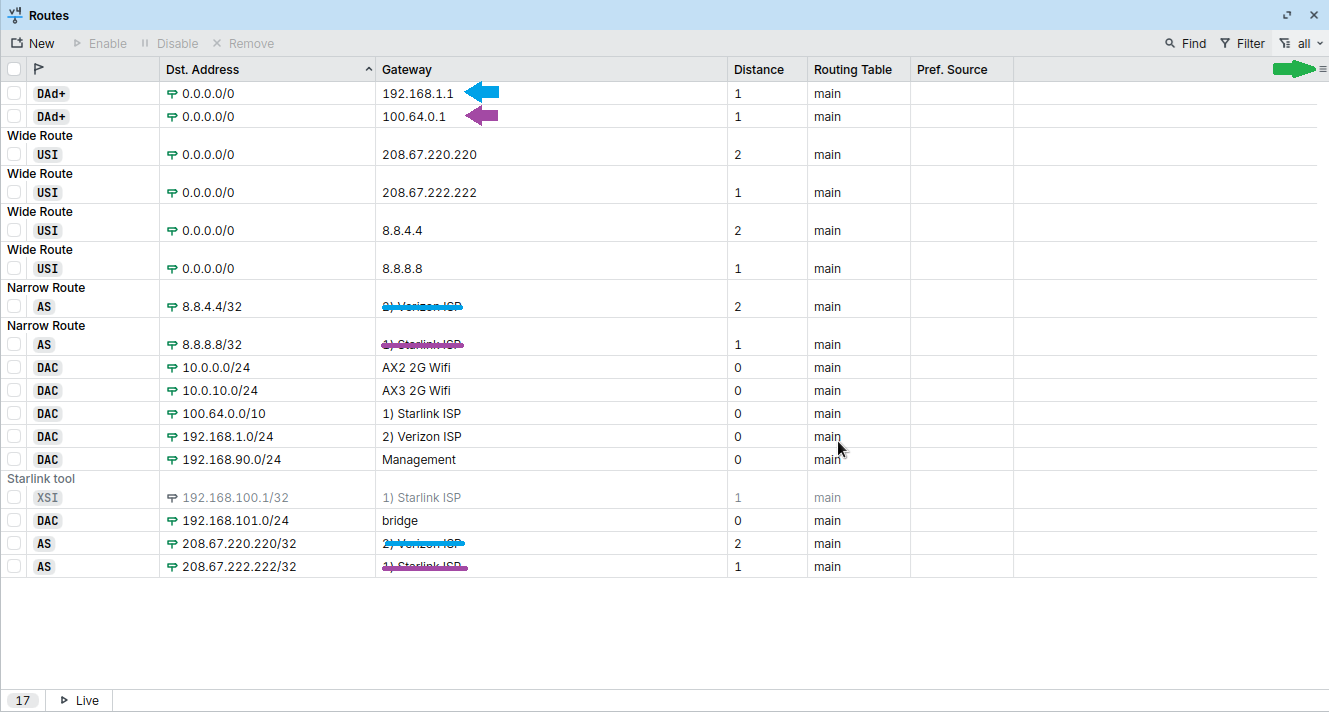
Yes, you have the two DAD routes (actually DAD+ as they become PCC ECMP ).
And as you can see, now that the "Wide" routes are AS, they are also AS+ as they become PCC ECMP )
Increase the distance of those routes on the DHCP client on Mikrotik:
/ip dhcp-client
add comment=defconf interface="1) Starlink ISP" name=ether1 default-route-distance=100
add comment=defconf interface="2) Verizon ISP" name=ether2 default-route-distance=101
This will make the two top rules "out of the way".
Then, you have only two ISP's, so you need recursive and gateway check on only one of them, there is no difference between
check if main is down, if it is use secondary, as soon as primary resumes go back to primary
check if secondary is down, if it is do nothing, as soon as it resumes, do nothing
And:
check if main is down, if it is use secondary, as soon as primary resumes go back to primary
do nothing
So, IF your "main" is Verizon and secondary is Starlink you can still use recursive.
Otherwise, you can use Netwatch, simplest approach here:
Only to keep things as together as possible I just “sold” this Filo’s approach to a new user, with a few changes.
I got rid of the separate routing table and of the mangle by adding a “narrow” /32 route to the “canary” ip address in “main” table.
And I didn’t use the “comment” as selector in the Netwatch script (this is a pet peeve of mine, comments may be changed accidentally six months or a year later, the setup would stop working and finding out what happened would be more difficult).
Be…
Hello Jaclaz,
As I already stated, I cannot edit the two DHCP-clients as there are automatically created by the RB5009UG and it will not allow me to change them in any way. I have tried deleting them and creating ones manually but the router just creates it’s own again and they become the default. Is there a way to stop the router from creating the automatically? Also is this even possible with dynamic ISP addresses?
Thanks
Andrew
Znevna
March 15, 2026, 10:21pm
8
Just a guess, but you did figure out how to add starlink and verizon to those two dhcp clients.
So did you try
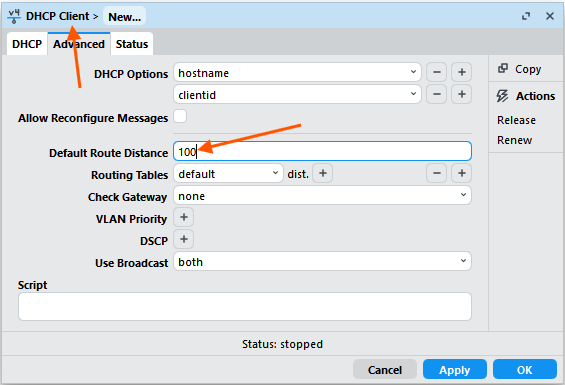
IP -> DHCP CLIENT -> WHATEVER -> ADVANCED -> ROUTE DISTANCE
?
jaclaz
March 15, 2026, 10:32pm
9
It's not possible AFAIK.
You have two DHCP clients in your configuration, they are configuration lines like any other.
Try disabling one of them.
Or try removing one of them.
Is It re-enabled or re-added automagically?
If yes, something is recreating them, but It Is not the normal behaviour.
Detect-internet may do that, but It doesn't seem to be enabled in your configuration.
Or maybe It doesn't show on your export?
Anyway explicitly settings detect-internet to interface list none costs nothing.
Try also disabling the two separate Nat rules and re-enable the single defconf out-interface-list=WAN one, but I doubt that those Nat rules have anything to do with the automatic recreating of DHCP clients.
I originally had the single NAT rule and they were created then too.
I only remove them, there is no disable option as it’s greyed out.
I’ve looked in the settings and detect-internet settings are set to none. I’ve seen a reference for older router software where you could add a line to manually disable this but don’t know if that is still a viable option?
You don't change the distance for those route in the IP -> Routes table, but change it by modifying the Default Route Distance property of the DHCP clients:
(this is what I wrote in the 1st bullet point of my previous post).
As for this issue, you'll need to do some scripting in the DHCP client (notice that in the screenshot above, there is a Script field where you can input the script content). Here is the documentation with the available variables:
script (script ; Default: ) Execute script when DHCP client obtains a new lease or loses an existing one, received gateway address or DNS server list is changed.
Variables that are accessible for the event script:
bound - 1 - lease is added/changed; 0 - lease is removed
server-address - server address
lease-address - lease address provided by a server
interface - name of the interface on which the client is configured
gateway-address - gateway address provided by a server
vendor-specific - stores value of option 43 received from DHCP server
lease-options - an array of received options
And below that you have the Lease script example that shows you exactly how to modify the gateway address of an existing IP -> Routes entry with the new gateway address provided by DHCP.
You can use that script or use this simplified version adapted to your configuration (this content is to be put inside the Script textbox of the Starlink DHCP client):
:if ($bound=1) do={
/ip route set [find dst-address=8.8.8.8/32] gateway=$"gateway-address";
/ip route set [find dst-address=208.67.222.222/32] gateway=$"gateway-address";
}
This simplified version assumes that you've already have the two routes in the table (no need for the script part that tries to create them new).
jaclaz
March 16, 2026, 9:37am
12
Ahh, now I see , we were referring to the DHCP clients, but OP attempted to change the routes generated by the DHCP clients (which being Dynamically created cannot be edited).
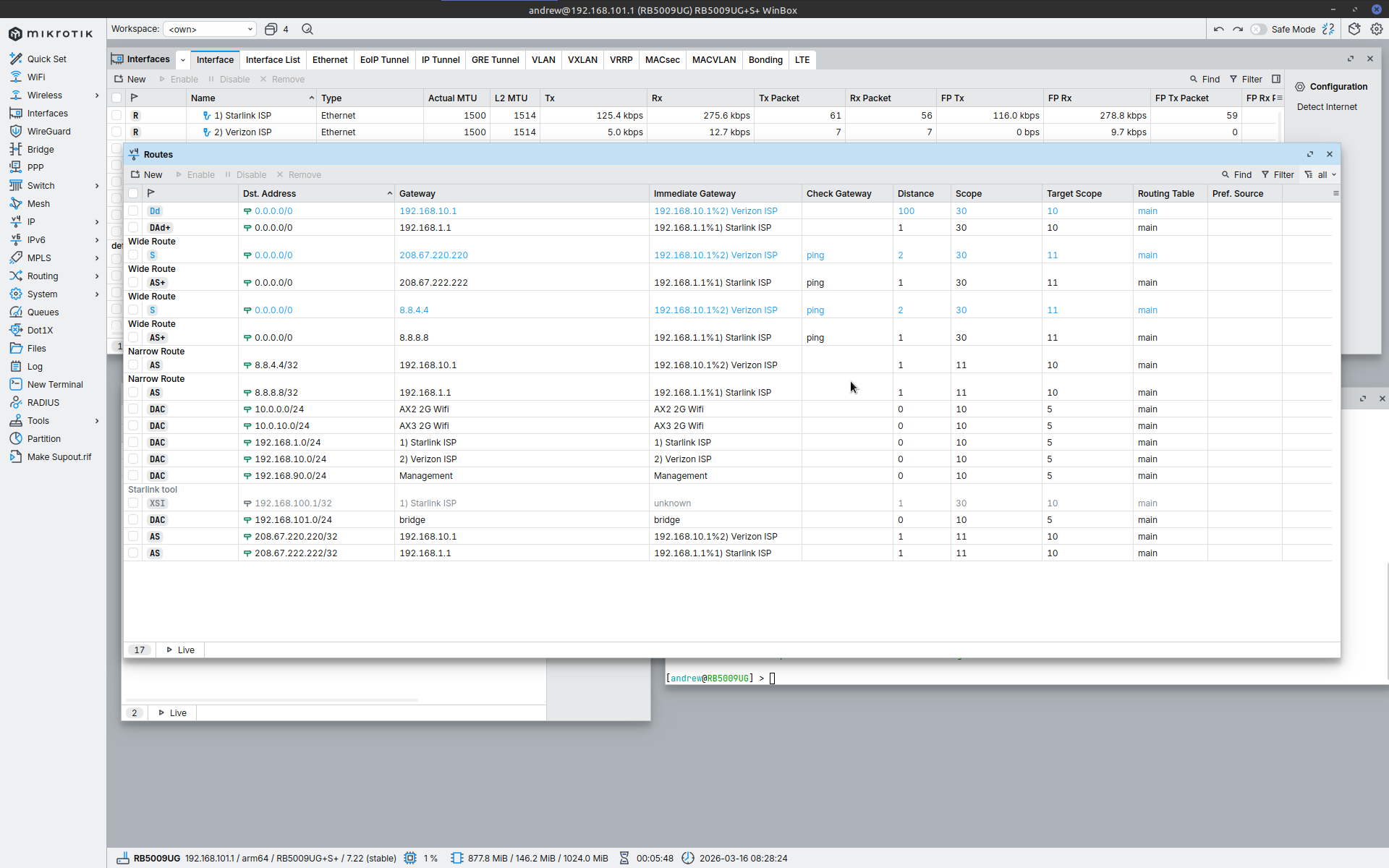
Hopefully:
“We are now cruising at a level of two to the power of twenty-five thousand to one against and falling, and we will be restoring normality just as soon as we are sure what is normal anyway.”
pe1chl
March 16, 2026, 9:46am
13
Actually, there is also a situation where RouterOS dynamically creates DHCP clients that you cannot change and for which only some parameters can be overridden at a difficult to find place.
But that is not for ethernet ports, that is for LTE interfaces. So not what he is facing here.
CGGXANNX
Okay I found the correct location and made the change to the default DHCP distance for Verizon ISP but unfortunately this failover does not work when Starlink ISP goes down. I can ping the 8.8.4.4 from the RB5009UG terminal but PCs connected the router are not getting routed through to the Verizon ISP link even if I reset the router.
As for the other issue I just went ahead and turned off bypass mode for the Starlink router (what a pain that was for the older 2nd gen Starlink). But this way it always gives the 192.168.1.1 address. Of course then had to change my Verizon ISP to 192.168.10.1 instead.
jaclaz
March 16, 2026, 2:10pm
15
The Starlink DHCP client is still with distance 1, and it creates the top DAD+ route, you need to put its distance to 101 (or 99, whatever) so that only the narrow and wide routes get into play (and without the +).
Setting the Starlink DHCP client to 99 did the trick. Failover works perfectly now and recovers correctly too.
Thank you everyone for all the help.
Regards
Andrew
jaclaz
March 16, 2026, 9:23pm
17
Good, now you might want to re-think about the futility of checking connectivity on the secondary (to be used as failover) route.
I will repeat how, given n connections, you only need to check the first n-1 ones as nothing changes whether the last one Is working or not with this "plain" recursive approach.
Makes sense, no need for the extra ping traffic bouncing around if it can’t actually cause any change. So I can get rid of both the 8.8.4.4 and 208.67.220.220 ping checking associated with the Verizon ISP failover Wide routes?
Thanks again,
Andrew
jaclaz
March 18, 2026, 10:45am
19
Yep, as a matter of fact, you can (should) re-join the narrow and wide routes for Verizon into a single one, i.e. from:
/ip route
add comment="Narrow Route" disabled=no distance=1 dst-address=8.8.4.4/32 gateway=192.168.10.1 routing-table=main scope=11 target-scope=10
add check-gateway=ping comment="Wide Route" disabled=no distance=2 dst-address=0.0.0.0/0 gateway=8.8.4.4 routing-table=main scope=30 target-scope=11
to:
/ip route
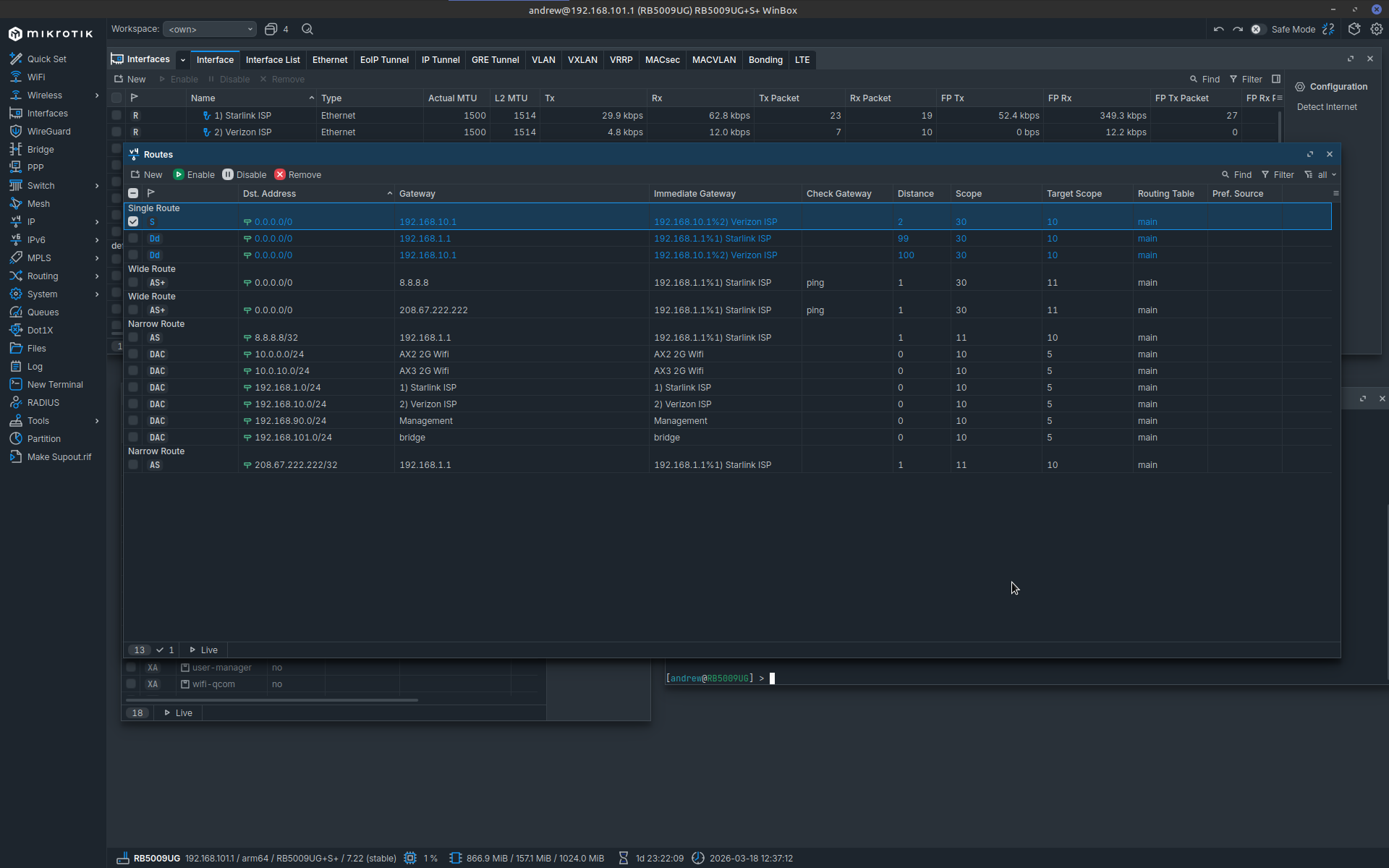
add comment="Single Route" disabled=no distance=2 dst-address=0.0.0.0/0 gateway=192.168.10.1 routing-table=main scope=30 target-scope=10
I tried this setup and the new route showed up as just S and not AS. In addition the failover was not as seamless as previous setup. It took several minutes before the Verizon ISP route became available for PCs connected to the router.