Just wondering if anyone could give me ideas on how they manage ECMP routing with 2 ADSL gateways?
I currently use a couple of sites that have multiple outbound gateways but all these are natted, and to get a persistant connection in from the outside I have to use a static route to allow connections to pass back to the main office.
I’ve also tried using mangling rules saying where traffic hits adsl1 - mark routing adsl1 to try and force the traffic to respond always over the same link but I can’t seem to get this to work either.
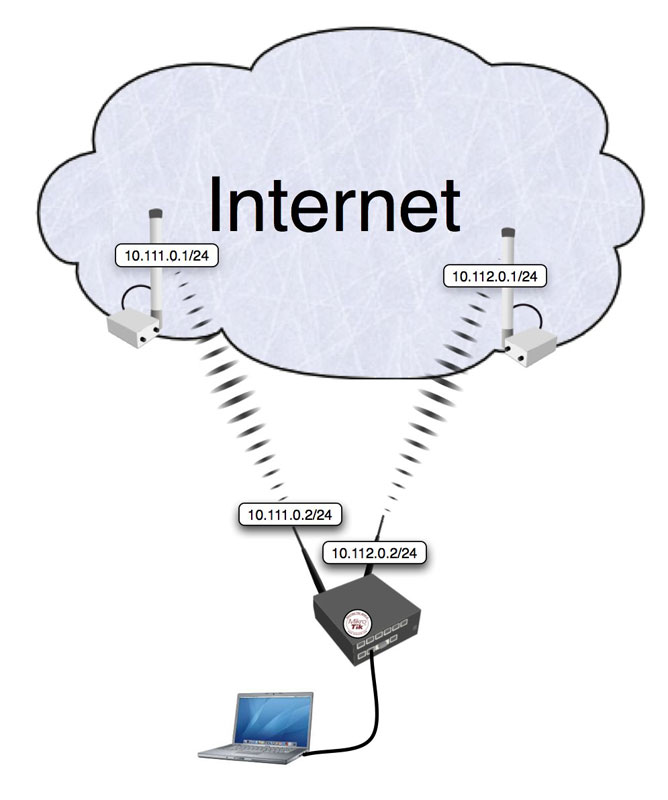
Setup is similar to this only I’m authenticating 2 x PPPoE sessions directly on the mikrotik with the modems in bridge mode.
Disabling Add Default Route and adding my own routes but with the PPPoE interface names, instead of the gateway IPs;
Policy routing everything coming in a certain interface, to the Router itself, to go out the same (connection-mark @ input, routing mark @ output)
Policy routing half the customers to one of the ADSLs (routing mark IPs)
Leaving a default gateway without policy routing for the other half of customers and all local requests
I will try to adjust this-and that to get rid of the packet leaks and maybe use some filters.
Another problem that I have is check-gateway does not work (as expected) probably because of using the interface name as gateway instead of an IP address. So for fail-over I would probably have to use scripts.
Hey, thanks for the quick response, I’ve posted on the second thread there including a pcap I did of the packet leaking issue.
What I currently do for customer outbound connections is just seperate similar to how you have only I do it port based.
Ports 1-10000 go via adsl1 (http,https,imap,pop3 etc) while 10001-65535 go via adsl2 (games, torrents alternative connections)
Thank you macgaiver (handshake). We are trying to use PPPoE and our routes do not have Gateway IPs but PPPoE interface names. Do you reckon’ the NAT proposed by you will solve our pains?
I had most of my problems with router traffic - like DNS caching. Never get any other problems.
So at this point it looks kind of mystical to me. Could you,please describe in details what is the problem. Packet sniffing would also give the necessary information where is the problem.
Sorry NetworkPro, but I don’t have any similar setup so I can’t give you any suggestions, in case you have to use interfaces as gateways. But I will try to get some time to make a test setup.
I implemented the NATs with out-interfaces, in the policy routing setup, and unNATed packets are still seen with packet sniffer, on both ADSL1 and ADSL2 pppoe interfaces. Here’s a screenshot:
As you can see, unNATed packets are with src-addr of local clients, so some of their packets get NATed, and some don’t. And the first packet is 10.0.0.2? This is mystical and unsolved.
99% of those packets will be TCP packets with FIN flag. It looks like some programs send more that one FIN packet (one of those programs is Firefox for example), they send up to 8 copies of the same packet, but MT closes connection with the first FIN packet (as it should) so the rest FIN packets don’t have connection tracking entry and that is why they are invalid.
I don’t think there is a point of logging IPs in the address list.
NetworkPro, did you use this in tandem with mangle rules saying ‘traffic in on adsl1 mark routing out adsl1’ as well?
or just have the default ECMP route with both gateways?
/ip firewall mangle
add action=mark-connection chain=input comment=
“Policy Routing All connections from ADSL1 to Router back to ADSL1”
connection-state=new in-interface=ADSL1 new-connection-mark=
ADSL1Con2R passthrough=yes
add action=mark-routing chain=output connection-mark=ADSL1Con2R
new-routing-mark=ToADSL1 passthrough=yes
add action=mark-connection chain=input comment=
“Policy Routing All connections from ADSL2 to Router back to ADSL2”
connection-state=new in-interface=ADSL2 new-connection-mark=
ADSL2Con2R passthrough=yes
add action=mark-routing chain=output connection-mark=ADSL2Con2R
new-routing-mark=ToADSL2 passthrough=yes
The next challenge will be FAIL-OVER capability. Last time when I tested this, I had check-gateway=ping and =arp as well. When I disabled the PPPoE interface to simulate disappearance of the Gateway, the static route that has the PPPoE interface name, instead of a Gateway IP, did not go blue in 30 seconds. So check-gateway was not working

 (Thanks to macgaiver - Cheers mate)
