We are moving away from the bloated documentation engine we used, to a more simple, easier to edit and manage system. The content is mostly the same, of course, but there are various readability improvements and it will be easier to manage in the future.
Other benefits to come in the future include automatic updating of command reference based on what's actually in RouterOS source, this is partially started in the CLI reference section.
Thank you, the new documentation site is much more snappy than the old one, that's a big plus. And it looks like we'll be able to select the (RouterOS?) version in the future.
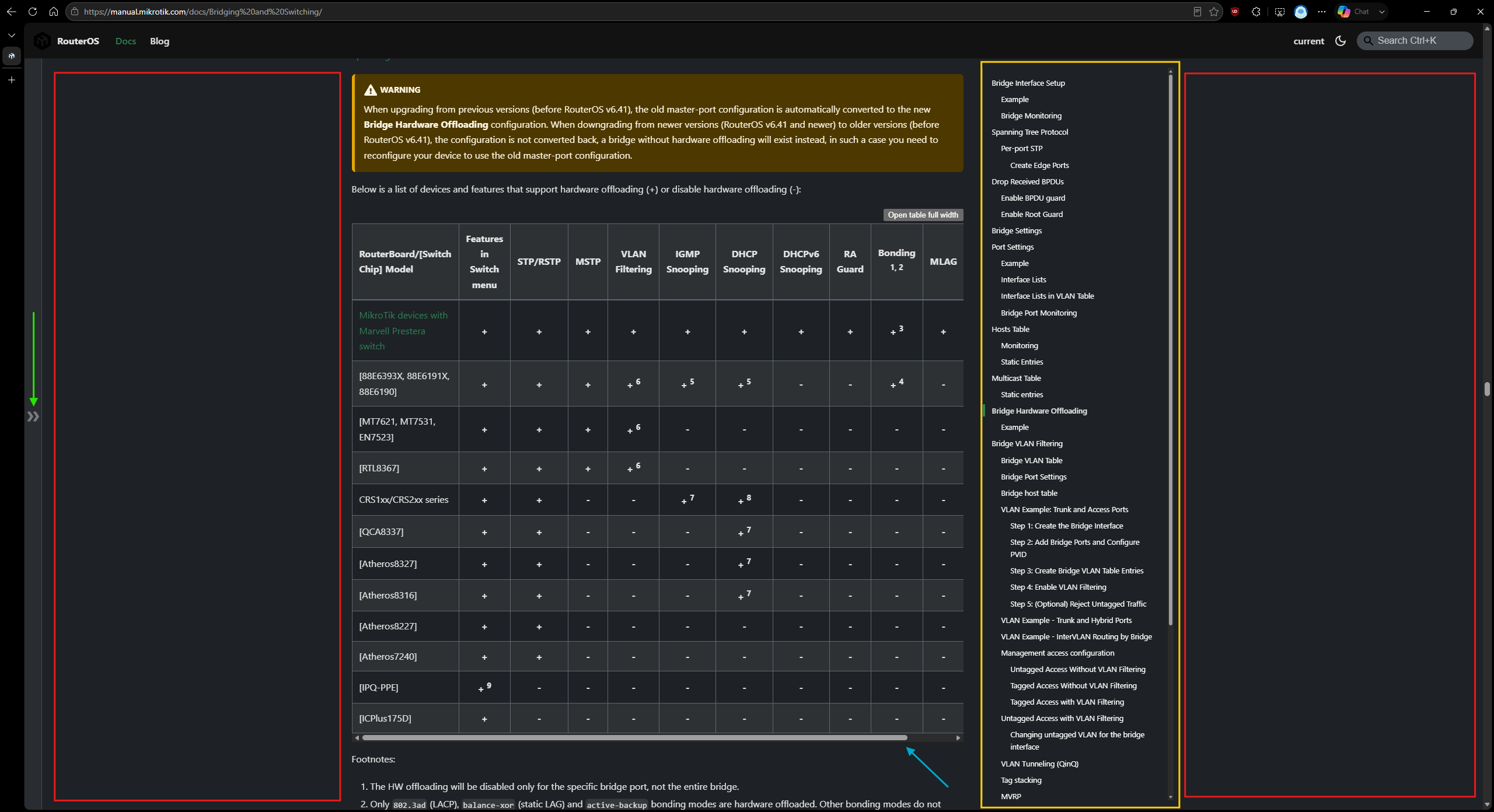
However, currently the design restricts the usable width of the pages. Here is an example where on an 2560px-wide screen I still have to scroll (blue arrow) to see the full bridge hardware offload table (oh and the table lost its background highlight colors).
The left navigation bar (green arrow) can already be collapsed, but the right jump list (yellow) cannot. Also there is no way to expand the content to the sides (red boxes).
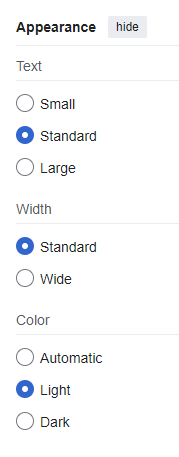
Could you please add options similar to what's available on Wikipedia (MediaWiki):
For the tables I see now that we can click on "open table full width". Still, it would be great to have an option to toggle the blank space on the two sides of the page. It's only a CSS change I think.
That's why it should be an option (like the "wide" option on Wikipedia), and with the option enabled, I can decide how wide I want the content to be, by resizing the browser window :).
For now, I've found where this limit is set in the CSS:
and added an override (setting --ifm-container-width to 1600px).
EDIT: This is the CSS overrides I am currently using for my 2560px wide 96dpi screens:
Well that would be really great, but I fear that just like in Atlassian the "versioning" feature just refers to versions of the document and not versions of the system. Of course it would mean extra work to add that information into the documents.
Still we can hope that there will be a separate "version" that describes testing features while the "current" version documents the existing stable/long-term versions...
You can use the versioning CLI to create a new documentation version based on the latest content in the docs directory. That specific set of documentation will then be preserved and accessible even as the documentation in the docs directory continues to evolve.
Which means we'll be able to see a tree for 7.23 and one for 7.24 for example.
The problem is that currently the doc is updated when MikroTik works on beta and alpha versions, so they cannot freeze the "current" state to make the doc for a stable version. The freeze must be done earlier.
Yes, it will copy the whole docs to a new directory, it will not be just "changes betweeen 7.23 and 7.24", we are still weighing if this is really needed.
Well, ideally there would be an internal version where a developer updates the docs at the time they change something in the code that warrants a doc change (new subcommand, new parameter, change in documented behavior) and when that change makes it to rc/beta this version of the doc will be available for the users. When it becomes stable/long-term the "current" doc is updated.
But of course that is only warranted when it can be a simple admin task to migrate an entire document to another version.
Still, it would be very useful when a new feature that significantly extends functionality is always marked with some "available from version x.xx" tag, either in a fixed style in the sidebar or so, or some special icon that shows this when hovered.
Please consider adding a simple feedback form, or at least a feedback link, at the bottom of each manual page so users can easily report anything that is incorrect, unclear, or incomplete.