First attempt to set VLANs up

Hi everyone,

I finally came up with my first VLAN setup even though in a virtual environment like GNS3.
I followed the pcunite guide to set the bridge VLAN method on my virtual Mk device.
My goal would be to come up with such a setup:
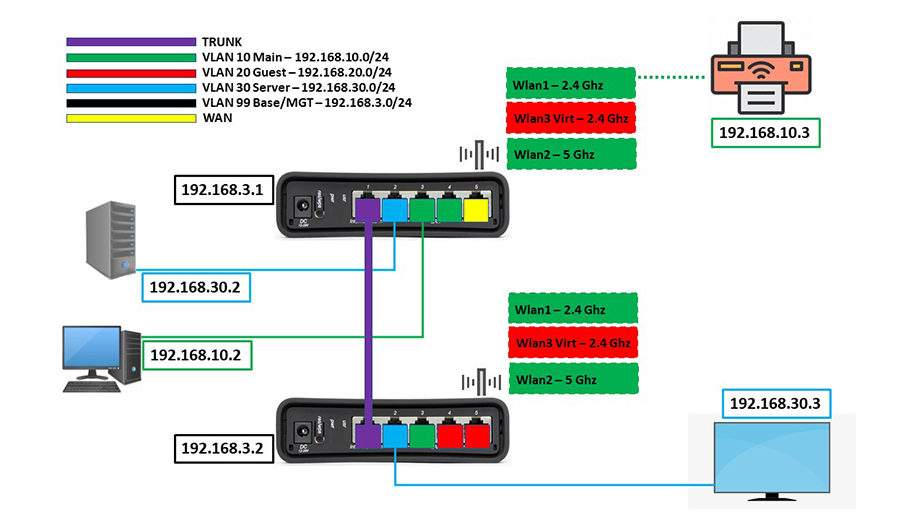
Meanwhile I set this one in GNS3 just to give it a go:
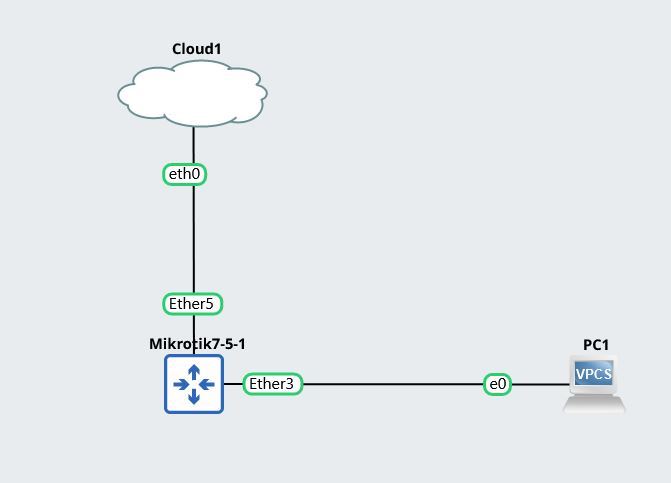
Unfortunately, PC1 doesn’t get an IP from the router’s DHCP service as if there was no connection between them.
I didn’t expect that everything would work perfectly at the first attempt of course, but I didn’t understand what I got wrong.
Could you help me please? Thanks

This is my setup:

[admin@RouterSwitchAP] > export
# oct/13/2022 15:47:07 by RouterOS 7.5
# software id = 
#
/interface bridge
add name=BR1 protocol-mode=none vlan-filtering=yes
/interface vlan
add interface=BR1 name=BASE_VLAN vlan-id=99
add interface=BR1 name=Blue_VLAN vlan-id=30
add interface=BR1 name=Green_VLAN vlan-id=10
add interface=BR1 name=Red_VLAN vlan-id=20
/disk
set sata1 disabled=no
/interface list
add name=WAN
add name=VLAN
add name=BASE
/interface wireless security-profiles
set [ find default=yes ] authentication-types=wpa2-psk mode=dynamic-keys supplicant-identity=MikroTik
/ip pool
add name=Green_POOL ranges=10.0.10.2-10.0.10.254
add name=Red_POOL ranges=10.0.20.2-10.0.20.254
add name=Blue_POOL ranges=10.0.30.2-10.0.30.254
/ip dhcp-server
add address-pool=Green_POOL interface=Green_VLAN name=Green_DHCP
add address-pool=Red_POOL interface=Red_VLAN name=Red_DHCP
add address-pool=Blue_POOL interface=Blue_VLAN name=Blue_DHCP
/port
set 0 name=serial0
/interface bridge port
add bridge=BR1 frame-types=admit-only-untagged-and-priority-tagged interface=ether3 pvid=10
add bridge=BR1 frame-types=admit-only-untagged-and-priority-tagged interface=ether4 pvid=10
add bridge=BR1 frame-types=admit-only-untagged-and-priority-tagged interface=ether2 pvid=30
add bridge=BR1 interface=ether1
/interface bridge vlan
add bridge=BR1 tagged=BR1,ether1 vlan-ids=99
add bridge=BR1 tagged=ether1 untagged=ether2 vlan-ids=30
add bridge=BR1 tagged=ether1 untagged=ether3,ether4 vlan-ids=10
add bridge=BR1 tagged=ether1 vlan-ids=20
add interface=ether5 list=WAN
add interface=BASE_VLAN list=VLAN
add interface=Blue_VLAN list=VLAN
add interface=Green_VLAN list=VLAN
add interface=Red_VLAN list=VLAN
add interface=BASE_VLAN list=BASE
/ip address
add address=10.0.10.1/24 interface=Green_VLAN network=10.0.10.0
add address=10.0.20.1/24 interface=Red_VLAN network=10.0.20.0
add address=10.0.30.1/24 interface=Blue_VLAN network=10.0.30.0
/ip dhcp-client
add interface=ether5 use-peer-dns=no
/ip dhcp-server network
add address=10.0.10.0/24 dns-server=192.168.99.1 gateway=10.0.10.1
add address=10.0.20.0/24 dns-server=192.168.99.1 gateway=10.0.20.1
add address=10.0.30.0/24 dns-server=192.168.99.1 gateway=10.0.30.1
/ip dns
set allow-remote-requests=yes servers=1.1.1.1
/ip firewall filter
add action=accept chain=input comment="Allow Estab & Related" connection-state=established,related
add action=accept chain=input comment="Allow VLAN" in-interface-list=VLAN
add action=accept chain=input comment="Allow Base_Vlan Full Access" in-interface=BASE_VLAN
add action=accept chain=forward comment="Allow Estab & Related" connection-state=established,related
add action=accept chain=forward comment="VLAN Internet Access only" connection-state=new in-interface-list=VLAN out-interface-list=WAN
add action=drop chain=forward comment=Drop
/ip firewall nat
add action=masquerade chain=srcnat log=yes out-interface-list=WAN
/ip firewall service-port
set ftp disabled=yes
set tftp disabled=yes
set irc disabled=yes
/system identity
set name=RouterSwitchAP
/tool mac-server
set allowed-interface-list=BASE
/tool mac-server mac-winbox
set allowed-interface-list=BASE
/tool romon
set enabled=yes

You are missing the bridge itself (i.e. the intrinsic bridge-to-CPU port) as a tagged member for all the VLANs except your base VLAN. Without these there is no connection between the other /interface bridge vlan IDs on trunk/access ports and the /interface vlan connected to the bridge.

/interface bridge vlan
add bridge=BR1 tagged=BR1,ether1 vlan-ids=99
add bridge=BR1 tagged=BR1,ether1 untagged=ether2 vlan-ids=30
add bridge=BR1 tagged=BR1,ether1 untagged=ether3,ether4 vlan-ids=10
add bridge=BR1 tagged=BR1,ether1 vlan-ids=20

Awesome! It works perfectly now.
My new setup:

/interface bridge vlan
add bridge=BR1 tagged=BR1,ether1 vlan-ids=99
add bridge=BR1 tagged=BR1,ether1 untagged=ether2 vlan-ids=30
add bridge=BR1 tagged=BR1,ether1 untagged=ether3,ether4 vlan-ids=10
add bridge=BR1 tagged=BR1,ether1 vlan-ids=20

Why is a VLAN ID 1 added dinamically on BR1?

Anyway, Before going ahead and setting the switch/AP connected to the trunk port, I’d like to dive a bit deeper into this, since I don’t think I’ve understood why I had to add the bridge as a tagged member, and I don’t want it to be just a paste-copy thing. Sorry, I’m totally new to VLANs on Mikrotik. To be honest, I am even surprised that it was the only mistake I made.
Thanks.

Check this thread which pretty well describes different “personalities” of bridge in ROS.

Vlan ID 1 is a default PVID setting on all bridge ports. If bridge port is allowed to work with untagged frames (i.e. frame-types is set to anything but admit-only-vlan-tagged), then it will be automatically added as untagged port under /interface bridge vlan. In your case, those are ports BR1 and ether1 (the rest have pvid set to different values).

I read it a couple of times, still processing it. A bit complicated to me honestly.

Vlan ID 1 is a default PVID setting on all bridge ports. If bridge port is allowed to work with untagged frames (i.e. > frame-types > is set to anything but > admit-only-vlan-tagged> ), then it will be automatically added as untagged port under > /interface bridge vlan> . In your case, those are ports BR1 and ether1 (the rest have pvid set to different values).

ok. So, is it ok to leave them as they are or should I change the frame type for, say, security purpose? And why?

/interface bridge
add name=BR1 protocol-mode=none vlan-filtering=yes
/interface bridge port
add bridge=BR1 frame-types=admit-only-untagged-and-priority-tagged interface=ether3 pvid=10
add bridge=BR1 frame-types=admit-only-untagged-and-priority-tagged interface=ether4 pvid=10
add bridge=BR1 frame-types=admit-only-untagged-and-priority-tagged interface=ether2 pvid=30
add bridge=BR1 interface=ether1

to this:

/interface bridge
add frame-types=admit-only-vlan-tagged name=BR1 protocol-mode=none vlan-filtering=yes
/interface bridge port
add bridge=BR1 frame-types=admit-only-untagged-and-priority-tagged interface=ether3 pvid=10
add bridge=BR1 frame-types=admit-only-untagged-and-priority-tagged interface=ether4 pvid=10
add bridge=BR1 frame-types=admit-only-untagged-and-priority-tagged interface=ether2 pvid=30
add bridge=BR1 frame-types=admit-only-vlan-tagged interface=ether1
/interface bridge vlan
add bridge=BR1 tagged=BR1,ether1 vlan-ids=99
add bridge=BR1 tagged=BR1,ether1 untagged=ether2 vlan-ids=30
add bridge=BR1 tagged=BR1,ether1 untagged=ether3,ether4 vlan-ids=10
add bridge=BR1 tagged=BR1,ether1 vlan-ids=20

I set admit-only-vlan-tagged for BR1 and ether1


Thanks

If you intend to use certain port (e.g. ether1 or BR1 strictly for tagged traffic, then you should configure it as such. If you don’t fully control device on the other end of connection, then you really should configure your end as strict as possible to reduce chance of any foul play. BR1 bejng internal port is obviously under your full control, but I’d say it’s a good habit to always make things as strict as it gets.

An example of foul play: imagine that ether1 port is supposed to be tagged only for VID 10 and ether2 is supposed to be tagged only for VID 20. So any pair of devices connected to those two ports should not be able to talk to each other (unless L3 route exists between the two subnets). But if you don’t set frame-types=admit-only-vlan-tagged, those two devices can talk to each other via untagged traffic (which is internally to switch passed between the two ports as part of VLAN 1). With frame-types set properly, switch drops untagged frames on ingress and those two devices remain separated.

If you want to really understand why BR1 has to be set as tagged member of relevant VLANs, then you have to understand the whole picture about bridge in ROS. I agree that it’s hard to understand if one is missing some knowledge of general networking, even for experienced network admin comingbfrom other vendor’s bubble this can be a hard nut to crack.

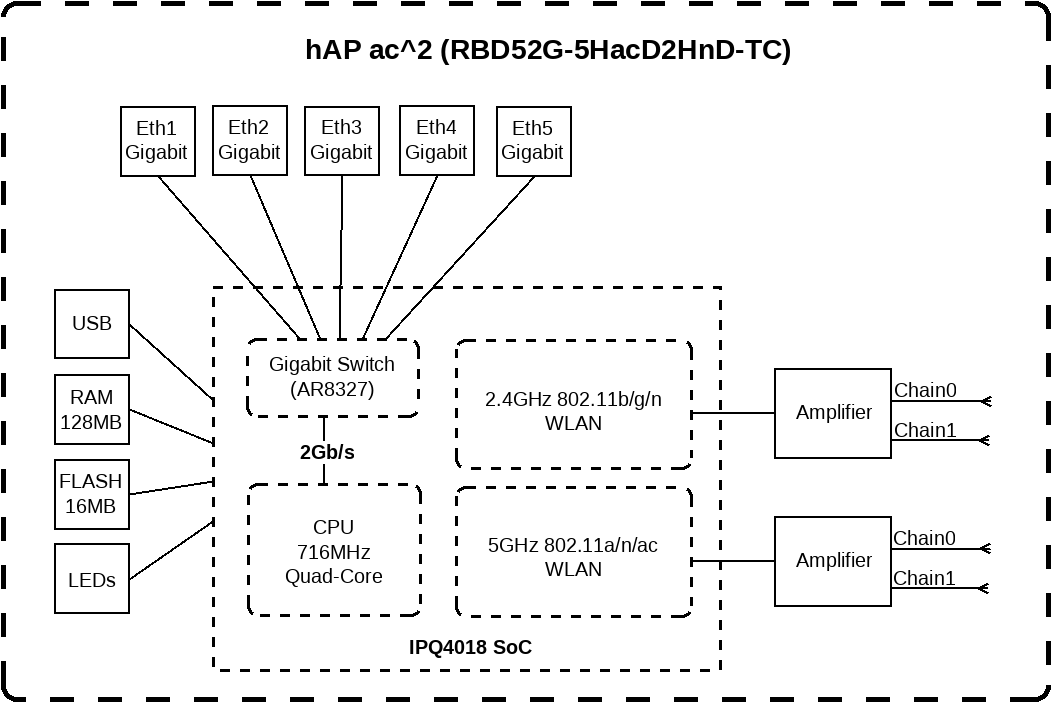
I really like Ed Harmoush’s vlan explanations at his Practical Networking site. In Virtual Local Area Networks (VLANs) he covers vlans with good animations. Included is an example of the way a router on a stick works, essentially it is a router with a single physical port configured as a trunk port and connected to a vlan-aware switch. If you look at the block diagram of the hAP ac², you will see internally that’s what it is. There is a 2Gbps “trunk” between the CPU “routing engine” and the switch ASIC.

Ed has another video where inter-vlan routing is explained in greater detail and it has example cisco switch configurations. Every vendor has their own way to configure vlans, so being exposed to the different ways it is done is useful if you are going to interfacing with other vendors’ kit.

After digesting those explanations, then the RouterOS bridge mysteries explained article may make more sense.

Head over to Ed Harmoush’s Practical Networking site https://www.practicalnetworking.net Ed has recently started a Networking Fundamentals course and he is putting the first module (with multiple videos) on Youtube. It’s a good intro with very little assumptions about previous knowledge, and even if you think you already know this stuff, if you watch it, and give it your utmost attention, you will probably get a deeper understanding than you currently have. Ed has some of the best explained info about vlans Virtual Local Area Networks (VLANs) See the challenge quiz if you think you understand vlans. Ed also has a video covering the same info VLANs – the simplest explanation Here’s an index to the vlan pages on PracticalNetworking And here’s a good starting point for Networking topics in general (don’t be put off by the CCNA, this is pretty generic info that you need to know, and explained in an easy to understand way. CCNA Index You can ignore the ACL stuff which is Cisco specific.

Yes, I know about Ed Harmoush’s videos. He is very good at explaining computer networking, and the animations help a lot with that. I understand them most times. However, when you switch to MK devices things get to be so complicated!

I have started practicing with Mk VLANS in my virtual environment. If I plug a virtual pc in any untagged port (VLAN 10, VLAN30), I can ping the router both on its WAN port and LAN port (192.168.99.1), but if I drop connection coming from all the VLAN in the firewall rules, no one can’t ping it anymore of course. So, I might as well set the firewall rules so that I can get access to the router itself only from VLAN10 (my Main vlan) and drop others. To be honest, I don’t think I have understood what BASE_VLAN is exactly for if every and ech port on my router is already part of a VLAN.

Would the BASE_VLAN IP be the LAN IP address of the router if there were no VLAN at all?

In @pcunite setup file for router I see these lines:

# Optional: Create a DHCP instance for BASE_VLAN. Convenience feature for an admin.
# /ip pool add name=BASE_POOL ranges=192.168.0.10-192.168.0.254
# /ip dhcp-server add address-pool=BASE_POOL interface=BASE_VLAN name=BASE_DHCP disabled=no
# /ip dhcp-server network add address=192.168.0.0/24 dns-server=192.168.0.1 gateway=192.168.0.1

I haven’t set it in my configuration above, but I was wondering in which port should I plug a device to get an IP in that range?


Thanks

Depends. When I first had an attempt with openwrt, I couldn’t get my head around setting up a simple wireless interface. Still don’t like it.
It’s the power and the pitfall of ROS. You can do so many things with it but you can also do things, without any warning, pretty wrong too :laughing:

I agree. Mk devices enable you to do a lot of things, but sometimes you can have a very hard time to set even easy things up as well. I mean many other brands may as well be less powerful than MK devices but their level of abstraction often make things easier for you to set up.

Getting back to my problem, I don’t know how to get myself understood about what exactly I’m struggling with. I’ll try one more time if you don’t mind.
I set such a BASE_VLAN up by following the @pcunite tutorial, but I don’t know to access this VLAN if I need it since I can’t see any port linked to it like the other VLAN.
Do I need to set one port at least on my router for me to use if I want to get access to the router without using other VLAN interface? In my diagram above could I set ether4 on VLAN99, and plug a PC on it if I need to enter the router to fix something for example? I hope that I get my point across this time.
Thanks

A trusted SUBNET or VLAN, is one that the admin will reside on, for the purposes of managing the router and all smart device attached to the router down the line.

I say trusted because sometimes the admin will be on the same subnet has trusted home users…

All managed devices attached to the router should get their IP address on the TRUSTED subnet.

Typically, I also take one etherport OFF The bridge, give it an IP address only separate from others, and add this interface to the TRUSTED interface list so that the admin can gain access to the router or even config the router without having to worry about the bridge burping during configuration or troubleshooting.


Thus in your case, if you have no need for a separate subnet, then just use an existing subnet with trusted users.
Which port goes to your computer? or do you get your connection from a managed switch??

Yes, I agree with you of course

Typically, I also take one etherport OFF The bridge, give it an IP address only separate from others, and add this interface to the TRUSTED interface list so that the admin can gain access to the router or even config the router without having to worry about the bridge burping during configuration or troubleshooting.

That would be the easiest way to go for, and it is exactly what I wanted to do at the beginning. But, as I already said in one of my posts , I need neither VLANs nor trusted interfaces on my network (I already set an interface with its own subnet and services for guests to use. No particular and importat security issues here. I wanted to set them up just for the sake of it in order to learn something new about Mikrotik and computer networking. I don’t want just to set VLANs up, I also want to understand what I’m doing…possibly. That’s it, basically.


Which port goes to your computer? or do you get your connection from a managed switch??

For the time being, It is still running on a virtual environment. I think I’ll set everything up physically when I buy a new Mk device or, at least, a Vlan-capable switch/AP.
ANYWAY.
I think I figured it out eventually…hopefully :slight_smile:

I missed this line in the @pcunite’s RouterSwitchAP.rsc file :blush: :cry: :mrgreen:

add bridge=BR1 interface=wlan3 pvid=99

Wlan3 is the wifi interface I need to connect to if I want to get access to my router via, i.g, winbox in case I drop any input connection coming from other VLANs.
In fact, I found this lines in the firewall rules:

 Allow BASE_VLAN full access to the device for Winbox, etc.
add chain=input action=accept in-interface=BASE_VLAN comment="Allow Base_Vlan Full Access"

I should of course modify this one, and set it differently in order to drop anything but services that VLANs need to work properly:

# Allow VLANs to access router services like DNS, Winbox. Naturally, you SHOULD make it more granular.
add chain=input action=accept in-interface-list=VLAN comment="Allow VLAN"

What do you think about it? Thanks

Understanding what and why is a good goal and you should be able to use the virtual environment for learning about how vlans work on MikroTik.

Here is a thread I found useful when coming from vlans on a Ubiquiti ER-X vlan-aware switch0, and trying to wrap my head around the MikroTik way to configure vlans on the vlan-filtering bridge. How to create most basic VLAN and solution post #11 and post #12 by Sob (which has link to v6 doc examples (3 examples starting here). The v7 docs for the same start here.

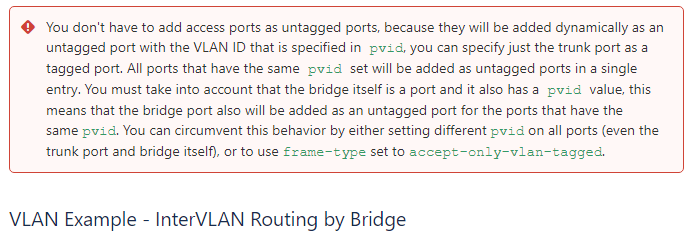
In the v7 docs they left out the explicit untagged ports in the /interface bridge vlan stanza for the access ports. The ports will be added as untagged “automatically” if they are specified with pvid in the /interface/bridge/port stanza, but won’t show up in the config, and I think the v6 way, although more “wordy”, makes the config export much easier to understand the intent. But to really understand, you need to know that either will create a config that behaves the same. The output of /interface/bridge/vlan/print detail is useful to see what ports are tagged and untagged for each vlan.

This is in the v7 docs:
access ports don't need explicit untagging.png

Yes! Much clearer now. As I said earlier, what made me struggle with VLANs on MK for days was because a couple of lines I totally missed to read in the @pcunite configuration file. I missed an important step, in the same way as when you lost a piece of a gear and you don’t know why it doesn’t work since you don’t have a complete - or at least proper - knowledge of it and how it works.
Futhermore, I also found this sentence by @mkx rather was enlightening:

BTW, in this context forget about native VLANs on mikrotik, IMO native VLANs concept can make more confusion than it does good. Just go with “all VLANs are equal” thinking.

here in this post:
http://forum.mikrotik.com/t/trunking-native-vlan/151306/1

The concept of native VLANs used basically on other brands had led me astray even more, making me think that I fad failed to understand something else important about VLANs. :imp:

Now, I have a better understanding about VLANs on Mikrotik devices. Of course it doesn’t mean that I have become a VLAN bad-ass overnight, since there are still plenty of things that aren’t complete clear to me. I’m still have some doubt about the bridge in setting up VLANs. it is basically about why I need to add BRIDGE1 as a tagged port in the bridge itself. I need to dive a bit deeper into this.

Last thing. I also read this in this post here: http://forum.mikrotik.com/t/how-to-create-most-basic-vlan/153816/11

→ if you plug in your PC in port ether5 you won’t obtain any IP, except if you manually set a VLAN-Tag (111 or 222)

What exactly mean, " …except if you manually set a VLAN-TAG." Can I set a vlan tag on my pc?

Anyway, I think that I can go ahead now, and set the switch device connected to the router (alway in my virtual environment) on the trunk port.

Thanks all for your advice

Unless you do something special, all ethernet from your windows pc will be untagged (i.e. standard ethernet frames). What vlan they get classified into is determined by the switch-port they are connected to, and the port vlan id (pvid) that the port is configured to use.

I have never tried this, and I think it depends a bit on what type of NIC (network interface controller) your PC has. See this Configuring Multiple VLAN Interfaces on Windows for what is involved with creating additional “vlan interfaces” on Window 10.

Whether you use untagged vlans on a trunk port or not, a pvid will always be defined. If you don’t specify one, then it will use vlan 1. And the untagged frames will be associated with the base bridge interface. If you are not using it, it may not have an ip address associated with the base bridge interface. MikroTik also allows you to block (filter out) untagged frames when they are recieved by the switch asic or bridge by using the /interface bridge add bridge=BR1 frame-types=admit-only-vlan-tagged interface=ether1 as your config has. Then all vlans on the trunk that are received by the MikroTik will be tagged, all untagged frames will just be dropped.

Yes, I know it. Anyway. I came up with this new configuration eventually. I changed a bit my diagram to make it match with the router’s setup on GNS3:

My new diagram:

a screenshot from gns3:


My final setup:

# oct/17/2022 17:13:54 by RouterOS 7.5
# software id = 
#
/interface bridge
add frame-types=admit-only-vlan-tagged name=BR1 protocol-mode=none \
    vlan-filtering=yes
/interface vlan
add interface=BR1 name=BASE_VLAN vlan-id=99
add interface=BR1 name=Blue_VLAN vlan-id=30
add interface=BR1 name=Green_VLAN vlan-id=10
add interface=BR1 name=Red_VLAN vlan-id=20
/disk
set sata1 disabled=no
/interface list
add name=WAN
add name=VLAN
add name=BASE
/interface wireless security-profiles
set [ find default=yes ] authentication-types=wpa2-psk mode=dynamic-keys \
    supplicant-identity=MikroTik
/ip pool
add name=Green_POOL ranges=10.0.10.2-10.0.10.254
add name=Red_POOL ranges=10.0.20.2-10.0.20.254
add name=Blue_POOL ranges=10.0.30.2-10.0.30.254
/ip dhcp-server
add address-pool=Green_POOL interface=Green_VLAN name=Green_DHCP
add address-pool=Red_POOL interface=Red_VLAN name=Red_DHCP
add address-pool=Blue_POOL interface=Blue_VLAN name=Blue_DHCP
/port
set 0 name=serial0
/interface bridge port
add bridge=BR1 frame-types=admit-only-untagged-and-priority-tagged interface=\
    ether3 pvid=10
add bridge=BR1 frame-types=admit-only-untagged-and-priority-tagged interface=\
    ether4 pvid=99
add bridge=BR1 frame-types=admit-only-untagged-and-priority-tagged interface=\
    ether2 pvid=30
add bridge=BR1 frame-types=admit-only-vlan-tagged interface=ether1
/interface bridge vlan
add bridge=BR1 tagged=BR1,ether1 vlan-ids=99
add bridge=BR1 tagged=BR1,ether1 untagged=ether2 vlan-ids=30
add bridge=BR1 tagged=BR1,ether1 untagged=ether3 vlan-ids=10
add bridge=BR1 tagged=BR1,ether1 vlan-ids=20
/interface list member
add interface=ether5 list=WAN
add interface=BASE_VLAN list=VLAN
add interface=Blue_VLAN list=VLAN
add interface=Green_VLAN list=VLAN
add interface=Red_VLAN list=VLAN
add interface=BASE_VLAN list=BASE
/ip address
add address=10.0.10.1/24 interface=Green_VLAN network=10.0.10.0
add address=10.0.20.1/24 interface=Red_VLAN network=10.0.20.0
add address=10.0.30.1/24 interface=Blue_VLAN network=10.0.30.0
add address=192.168.99.1/24 interface=BASE_VLAN network=192.168.99.0
/ip dhcp-client
add interface=ether5 use-peer-dns=no
/ip dhcp-server network
add address=10.0.10.0/24 dns-server=192.168.99.1 gateway=10.0.10.1
add address=10.0.20.0/24 dns-server=192.168.99.1 gateway=10.0.20.1
add address=10.0.30.0/24 dns-server=192.168.99.1 gateway=10.0.30.1
/ip dns
set allow-remote-requests=yes servers=1.1.1.1
/ip firewall filter
add action=accept chain=input comment="Allow Estab & Related" \
    connection-state=established,related
add action=accept chain=input comment="Allow VLAN" in-interface-list=VLAN
add action=accept chain=input comment="Allow Base_Vlan Full Access" \
    in-interface=BASE_VLAN
add action=accept chain=forward comment="Allow Estab & Related" \
    connection-state=established,related
add action=accept chain=forward comment="VLAN Internet Access only" \
    connection-state=new in-interface-list=VLAN out-interface-list=WAN
add action=drop chain=forward comment=Drop
/ip firewall nat
add action=masquerade chain=srcnat log=yes out-interface-list=WAN
/ip firewall service-port
set ftp disabled=yes
set tftp disabled=yes
set irc disabled=yes
/system identity
set name=RouterSwitchAP
/tool mac-server
set allowed-interface-list=BASE
/tool mac-server mac-winbox
set allowed-interface-list=BASE
/tool romon
set enabled=yes

Everything seems to work properly now, and I am going to plug a virtual switch to the trunk port as well, then go on with my virtual project.
In your opinion, is it ok? Can you see something that could be set better?
As you can see, I set the Management VLAN on ether4.

Thanks

(1) One bridge… and the only thing that needs to be modified is potentially the name so I would remove the part in orange and apply any specific settings on the bridge ports themselves.

/interface bridge
add frame-types=admit-only-vlan-tagged name=BR1 protocol-mode=none
vlan-filtering=yes

(2) You are missing the management pool, the management DHCP and the managment DHCP-server and the managmane dhcp-server network

(3) Adjustments to bridge ports
/interface bridge port
add bridge=BR1 frame-types=admit-only-untagged-and-priority-tagged ingress-filtering=yes interface=
ether3 pvid=10
add bridge=BR1 frame-types=admit-only-untagged-and-priority-tagged ingress-filtering=yes interface=
ether4 pvid=99
add bridge=BR1 frame-types=admit-only-untagged-and-priority-tagged ingress-filtering=yes interface=
ether2 pvid=30
add bridge=BR1 frame-types=admit-only-vlan-tagged ingress filtering=yes interface=ether1

(4) Some changes to bridge vlans
/interface bridge vlan
add bridge=BR1 tagged=BR1,ether1 untagged=ether4 vlan-ids=99
add bridge=BR1 tagged=BR1,ether1 untagged=ether2 vlan-ids=30
add bridge=BR1 tagged=BR1,ether1 untagged=ether3 vlan-ids=10
add bridge=BR1 tagged=BR1,ether1 vlan-ids=20

(5) Firewall rules, duplication and redundancy
There is no gain by these two ruless… and you FAIL to block wan to router traffic etc…
/ip firewall filter
add action=accept chain=input comment=“Allow VLAN” in-interface-list=VLAN
add action=accept chain=input comment=“Allow Base_Vlan Full Access”
in-interface=BASE_VLAN

The second rule will never be used/seen by the router, can you figure out why???
++++++++++++++++++++++++++++++++++++++++++++++++++++++++++++++++++++++++++++++

Instead take the first rule and put it after the second rule and modify them accordingly only for services on the router that all users will need so it looks like this.
add action=accept chain=input comment=“Allow MGMT access” in-interface-list=BASE
add action=accept chain=input comment=“Allow DNS services” dst-port=53 protocol=udp in-interface-list=VLAN
add action=drop chain=input comment=“drop all else”

Note the use of interface list for BASE as this gives you the flexibility down the line to take ether4 OFF the bridge for emergency access or for configuration off the bridge by the Admin and then use a port on the upcoming switch to plug in your desk computer as a replacement connection. Then you would add ether4 as a BASE list entry.


(6) Missing a few default rules in the input chain…
add action=accept chain=input comment=“defconf: accept established,related,untracked” connection-state=established,related,untracked
add action=drop chain=input comment=“defconf: drop invalid” connection-state=invalid
add action=accept chain=input comment=“defconf: accept ICMP” protocol=icmp


(7) Missing the fastrack rule as the first rule in the forward chain and the invalid rule…
add action=fasttrack-connection chain=forward comment=“defconf: fasttrack” connection-state=established,related
add action=accept chain=forward comment=“defconf: accept established,related, untracked” connection-state=established,related,untracked
add action=drop chain=forward comment=“defconf: drop invalid” connection-state=invalid

(8) No requirement to state connection-state=new in the forward chain (internet access rule) as its redundant.

(9) Set this to NONE as mac-server only is not encrypted/secure.
/tool mac-server
set allowed-interface-list=BASE
/tool mac-server mac-winbox
set allowed-interface-list=BASE

(10) MIssing rule.
/ip neighbor discovery-settings
set discover-interface-list=BASE

Removing add frame-types=admit-only-vlan-tagged? Why?


(2) You are missing the management pool, the management DHCP and the managment DHCP-server and the managmane dhcp-server network

I did it on purpose. If I need to connect to the Management VLAN for any reason I would set the IP of my device manually.
I would be the only one who knows the right subnet :sunglasses:


(3) Adjustments to bridge ports
/interface bridge port
add bridge=BR1 frame-types=admit-only-untagged-and-priority-tagged > ingress-filtering=yes > interface=
ether3 pvid=10
add bridge=BR1 frame-types=admit-only-untagged-and-priority-tagged > ingress-filtering> =yes interface=
ether4 pvid=99
add bridge=BR1 frame-types=admit-only-untagged-and-priority-tagged > ingress-filtering> =yes interface=
ether2 pvid=30
add bridge=BR1 frame-types=admit-only-vlan-tagged i> ngress filtering=yes > interface=ether1

This is strange. The Ingress filtering box is checked already:


(4) Some changes to bridge vlans
/interface bridge vlan
add bridge=BR1 tagged=BR1,ether1 > untagged=ether4 > vlan-ids=99
add bridge=BR1 tagged=BR1,ether1 untagged=ether2 vlan-ids=30
add bridge=BR1 tagged=BR1,ether1 untagged=ether3 vlan-ids=10
add bridge=BR1 tagged=BR1,ether1 vlan-ids=20

Again, strange. Ether4 is already showd as Untagged:

Maybe something wrong with GNS3 :confused:


(5) Firewall rules, duplication and redundancy
There is no gain by these two ruless… and you FAIL to block wan to router traffic etc…
/ip firewall filter
add action=accept chain=input comment=“Allow VLAN” in-interface-list=VLAN
add action=accept chain=input comment=“Allow Base_Vlan Full Access”
in-interface=BASE_VLAN

The second rule will never be used/seen by the router, can you figure out why???
++++++++++++++++++++++++++++++++++++++++++++++++++++++++++++++++++++++++++++++

Instead take the first rule and put it after the second rule and modify them accordingly only for services on the router that all users will need so it looks like this.
add action=accept chain=input comment=“Allow MGMT access” in-interface-list=BASE
add action=accept chain=input comment=“Allow DNS services” dst-port=53 protocol=udp in-interface-list=VLAN
add action=drop chain=input comment=“drop all else”

I know. It is the @pcunite’s default setup. I still haven’t started tinkering with them. Thanks for your suggestions anyway


Note the use of interface list for BASE as this gives you the flexibility down the line to take ether4 OFF the bridge for emergency access or for configuration off the bridge by the Admin and then use a port on the upcoming switch to plug in your desk computer as a replacement connection. Then you would add ether4 as a BASE list entry.

I dont’ think I’ve understood what you mean here.


(6) Missing a few default rules in the input chain…
add action=accept chain=input comment=“defconf: accept established,related,untracked” connection-state=established,related,untracked
add action=drop chain=input comment=“defconf: drop invalid” connection-state=invalid
add action=accept chain=input comment=“defconf: accept ICMP” protocol=icmp


(7) Missing the fastrack rule as the first rule in the forward chain and the invalid rule…
add action=fasttrack-connection chain=forward comment=“defconf: fasttrack” connection-state=established,related
add action=accept chain=forward comment=“defconf: accept established,related, untracked” connection-state=established,related,untracked
add action=drop chain=forward comment=“defconf: drop invalid” connection-state=invalid

I know.


(8) No requirement to state connection-state=new in the forward chain (internet access rule) as its redundant.

I didn’t know it :astonished:


(9) Set this to > NONE > as mac-server only is not encrypted/secure.
/tool mac-server
set allowed-interface-list=> BASE
/tool mac-server mac-winbox
set allowed-interface-list=BASE

oh, ok. Thanks :wink:


(10) MIssing rule.
/ip neighbor discovery-settings
set discover-interface-list=BASE

I had set it up, but I had a problem with getting its IP showed in my Winbox. So I set it back to default


Thank you very much Anav.