Flash Memory Full

Hello everyone,

I’ve just bought a second-hand Chateau LTE6 router (D53G-5HacD2HnD&FG621-EA) from the previous owner in August 2025.

It has been used very little and is in excellent condition.

I have configured the router with the VLANs I need and everything seems to be working correctly. I always rely on the excellent guide link

Once the configuration is complete, I move on to setting up NextDNS as an encrypted DNS following the instructions in my account.

/tool fetch url=https://curl.se/ca/cacert.pem
/certificate import file-name=cacert.pem
/ip dns set servers=""
/ip dns static add name=dns.nextdns.io address=xxxx type=A
/ip dns static add name=dns.nextdns.io address=xxxx type=AAAA
/ip dns static add name=dns.nextdns.io address=xxxxx type=AAAA
/ip dns set use-doh-server=“https://dns.nextdns.io/xxxxxxx” verify-doh-cert=yes

However, from the terminal I notice the error:

echo: system,error,critical could not save configuration changes, not enough storage space available.

And I realise I have 136 KiB free out of 16 MiB.

The firmware version is as follows: 7.22.2

I have also attached my configuration

Config_export.txt (6.9 KB)

Thank you for the help!

check what you have in files and remove what is not required.

I checked and the file section is empty.

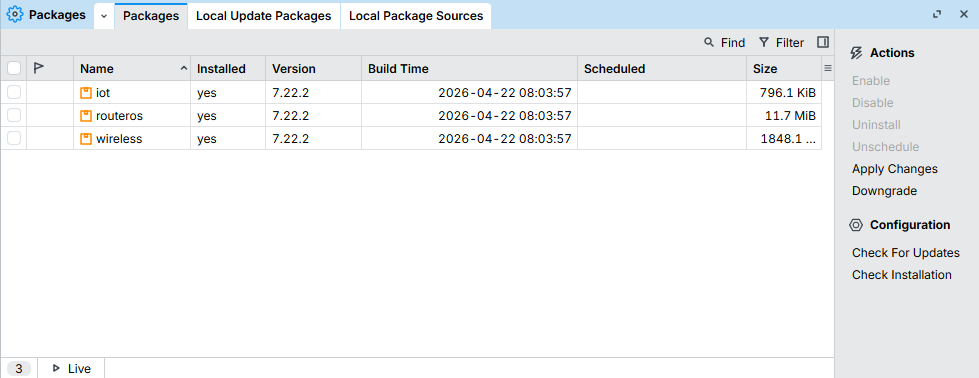
And in the packages I have only the firmware:

I don’t know what happened.

iot for what?

uninstall iot

Only as a side note, when you get an used device it would be a good thing to netinstall it fresh.
You never know what happened to the device and sometimes (particularly subsequent upgrades but not only) might leave some "cruft" on the device, including something (mysterious) that may even prevent normal operation of the device, recent example:
hAP ax S - Strange networking behavior

1 Like

@fedex03 do you actually need to import all CA certificates for NextDNS DoH? It is not small for 16MB flash with latest ROS version, afaik ROS should have latest CA certificates builtin, see Certificates - RouterOS - MikroTik Documentation and trust settings for them Certificates - RouterOS - MikroTik Documentation .

1 Like

+1 ...

I don’t know, it was already installed.

I think I’ll follow your advice!

Interesting! In fact I get the memory error after importing the CA certificates. But when I removed them no more space was free.

uninstall iot and remove certificates.

This is the solution.