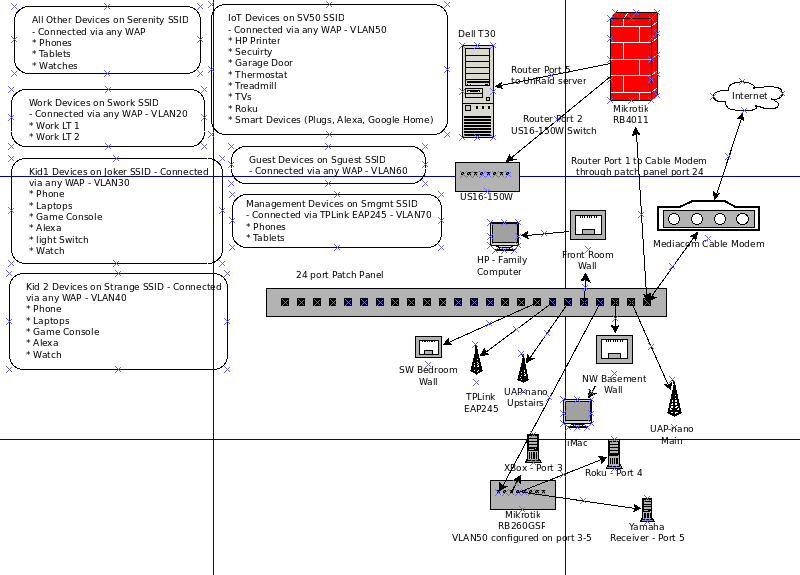
Well, i think i have this working for now. I am sure there is more to do but this seems to work at the moment. I still need to understand the bridge concept and LAN list concept but for now I think i have a rudimentary understanding. I also want to put my regular network on a VLAN as i think that is recommended. I was able to get WINE working on my laptop so i can run winbox under linux now. Thank you all for your help and guidance.
(1) what is the relationship between the interface ovpn-cybuzz and VLAN10?
(2) Still waiting for network diagram otherwise your bridge port settings or lack of any detail on them is confusing.
(3) Interface list members seems incomplete and why are some disabled?
For example, all your VLANs should be entered as LAN entities
If you need to identify a sub group of vlans for example create a new interface list item and use that where required in firewall rules.
(3) Your forward chain firewall rules are a mess due to (2), no diagram and no detail in bridge port settings.
(4) What devices/users use bridge Subnet ???
Glad to help on config once we have a clearer picture.
ovpn-cybuzz is the dynamic interface that gets created when i VPN into the network and VLAN10 is the VLAN for the VPN
send me an example of what would be helpful. i could work forever on a diagram. What detail is needed? in post #39 there is something i put together. what else needs to be added? i guess it has changed a little. i will update it.
I dont know. I dont quite get what the relationship between all that is and just got what i needed to work. in trying things i made changes and then disabled the changes i didnt need or that didnt seem to be needed at the time
I dont quite know how the chain rules are a mess because i dont have a diagram. They seem to work but maybe they would be easier to understand with a diagram? I also dont get the bridge concept(mentioned above) other than all my ports on the router are a listed as ‘in’ or part of bridge.
i am not sure i understand this question.
i am going to read up on the bridge, the interface lists and see what i can do for a diagram and get back with everyone. Thanks for taking a look.
Okay a diagram to detail what is connected to each port on the RB4011 and
a. what vlans are running through the ports.
b. where do you expect bridge traffic that has its own dhcp and pool etc to go and why? who and what is the bridge serving…??
it is not shown on this diagram…all the patch panel connections patch back to the US16-150W switch on various ports.
The only VLANs that are running through ports are the ones on my RB260GSP so the devices connected are VLAN50 and separate from my other networks. I left on port open (not vlan50) so i could connect hardwired to it with my laptop and not be forced into VLAN50
If i understand the bridge, it is just being used to allow all the ports on the router to talk to each other. Also if i understand it correctly, i should be creating a VLAN for my “All other devices” that arent on a VLAN now and apply the DHCP that is on my bridge now to that and not have DHCP on the bridge. I think that would cover DHCP for everything that connects since everything that connects would be on a VLAN. I think i would also need to figure out the VLAN through ports thing too so i would ensure that things hardwired were on the right VLAN.
Any suggested configuration changes would be greatly appreciated since as i have said before…still trying to figure this out.
Diagram observations.
The RB4011 has not connection back to the same 24 port switch??
I would have expected eth2 from the RB4011 to go to one of the ports on the 24 port switch as a trunk port carrying the necessary vlans for
untagged dumb devices and tagged smarrt devices like the TPLINK eap 245 and RB260GS etc…
I would annotate each device by the vlan it belongs too, not obvious.
which devices does the us16-150W serve (is it a smart switch?) which vlans?
What vlan is dell T30 on,
YOu have SSIDs noted but really care about vlans devices are supposed to use (not necessary) but to identify wlans yes.
Probably tried to do too much with one diagram and best to break it out.
if you have a clear idea of what you want to do then start a configuration and then check it against your diagrams to make sure its what you want.
When you have a coherent config export it here.
All smart devices should get an IP from the management LAN and thus every smart device will have the managment vlan running to it on a trunk port and doesnt necessarily need to go to any device.
*** I apologize now for dumping all this information. Sorry, it is a long read with no TL/DR. ***
I am not sure i am communicating well here. I will try and do a little better. Also note, when i say ‘arbitrarily’…it is arbitrary because i dont know any better
TPLink-EAP245 in the basement VLAN 20, 30, 40, 50, 60, 70
RB4011:
eth1 → Cable Modem
eth2 → Unifi Switch
eth5 → UnRaid Server
Other eth ports unused
Cable modem is connected to RB4011 eth1
16 port switch (US-16-150W) Port 1 is connected to RB4011 eth2 ← not sure if this is considered a trunk…dont quite know anything about trunk yet
UnRaid Server is connected to RB4011 eth5. There is no VLAN for that port and it was arbitrarily attached to eth5 on the RB4011
None of the ports on the Unifi Switch are VLAN tagged.
Devices are arbitrarily plugged into the ports on the Unifi Switch.
Everything on the network other than the server go through the switch (hard wired or via WAP, mostly wireless)
RB260GSP ports 3-5 are configured VLAN 50 because untrusted devices are on those ports.
VLAN Information:
VLAN10 - VPN inbound
VLAN20 - Work devices
VLAN30 - Kid 1 devices
VLAN40 - Kid 2 devices
VLAN50 - IoT/Untrusted Devices
VLAN60 - Guests (not used yet)
VLAN70 - Management, only connect via SSID that is configured for VLAN70 and only i have the password for that VLAN. Not sure if this is the same management VLAN you are referring to. My diagram was incorrect (copy/paste error) saying phones and tablets. My phone and my laptop are the only devices used to manage the hardware devices.
What do i want to do:
Separate networks for Kids, Work, IoT/Untrusted, Guest, Management(per your recommendation) and ‘All Other’ which i will just call trusted devices for now. I think i have done that with the VLAN configuration that is set up.
Learn to write firewall rules to manage traffic between the networks (VLANS) and between the networks and the internet. I think i have done this to the best of my abilites so far.
Print to printer on VLAN50 from all networks except WAN. ← In Progress
Figure out Bonjour to allow iDevices to print to printer on VLAN50 ← Not Started
Set up a ‘Trusted Devices’ VLAN where my devices that connect through Serenity SSID and hard wired (like my server) reside. ← Not Started
I think i caused a bit of confusion here. I have a 24 port patch panel and 16 port Unifi Switch. The RB4011 does connect to the 16 port switch. It is done through the patch panel on port 24.
I am not sure what a trunk port is yet. need to read up on that.
Which devices should be annotated? Network Devices or end user devices (phones, laptops, tvs)? As i see it, the network devices dont belong to a VLAN, a VLAN is configured on a device. Am i missing this? Should all my network devices (RB4011, RB260GSP, etc) be on VLAN70 (as you indicated below)?
the switch is a smart switch. i manage it through Unifi Controller hosted on the UnRaid server. No VLANS have been configured on it. As noted above, all devices other than the server go through the switch.
the server is not on a VLAN
Do you have an example of a configuration i should be looking to strive for? If i could see a sample configuration that i could model mine after that may help me.
so each of my smart devices should have a 10.10.70.x IP address versus the 192.168.73.x addresses they have now? If this is the case, would i set the port they(APs) are plugged into on the Unifi Switch to VLAN70 or will that cause problems because of VLANs (for each SSID) are on each AP?
 otherwise your bridge port settings or lack of any detail on them is confusing.