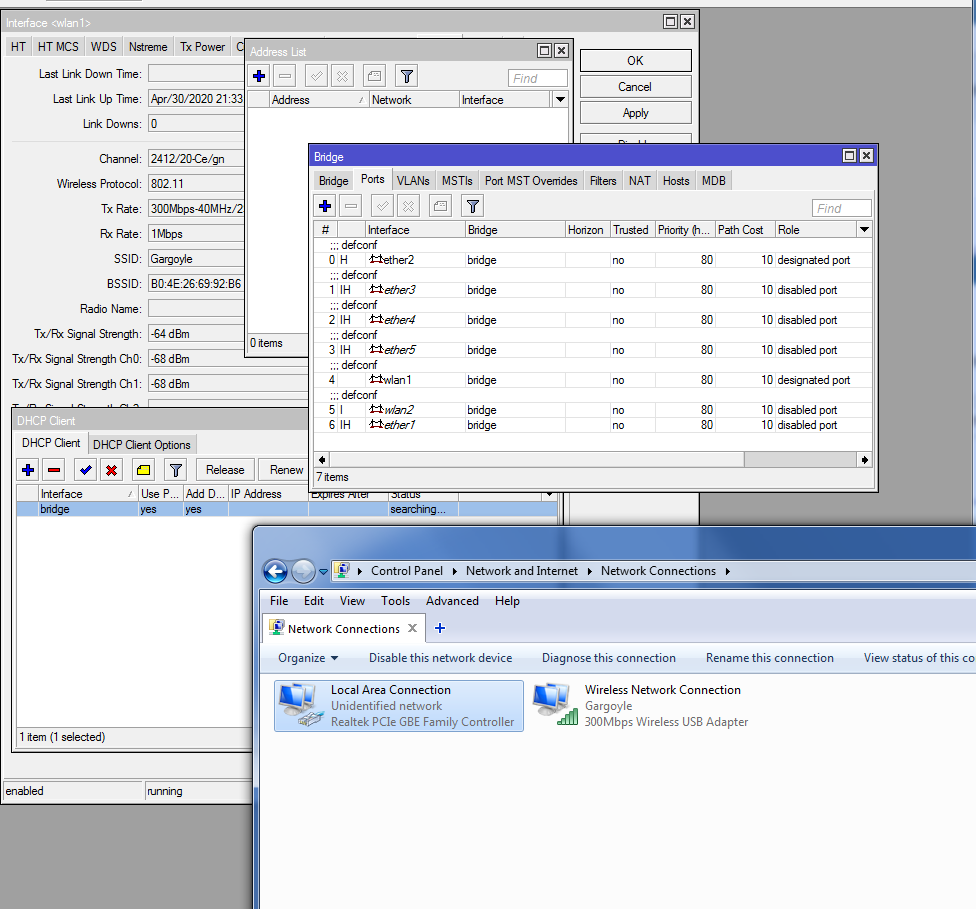
please advise - i have (borrowed) a hap ac lite that is meant to be used as wifi client on 2.4ghz and AP on 5ghz , directly connected by cable to my pc and tv box.
but whatever i do, it’s not connecting to existing tp-link AP i use at home. i noticed the same behaviour in the office where i have the same one - it doesn’t want to connect to any AP unless it’s a mikrotik one.
it works perfectly between 2 mikrotiks, but it refuses to work with other vendors, i tried a few of them, zte, tp-link, iskratel and no way to get the hap ac lite to work with them.
if i take another mikrotik (non ac) device, like a rb931 or an sxt2, they connect instantly.
i updated the ac lite to the last longterm version, but this problem has been here the last 2 years and is still here.
if there is no fix, maybe running openwrt on it would help?
it’s station mode. station-bridge is only for mikrotik-mikrotik links, and station for mikrotik-other vendors links.
i wasn’t 100% clear in the 1 st post - the hap itself connects to the wifi , but there is no communication whatsoever.
i resetted it to factory default twice , i was having some rather useless signal strenght (around -86dbm) and after reset it went to normal (-60dbm) but there is still no communication.
all interfaces are in bridge.
Are you sure you are connected to a network with an active and working DHCP server ?
You should be able to get an IP address and as i can see you do not…
After that, next question is, do you want to be on the same Layer 2 (same LAN) network as the AP you connect to ?
You cannot bridge wireless interface in station mode. You can configure that, obviously, but it won’t work. Try using station-pseudobridge (or station-pseudobridge-clone), but beware of the limitations.
You can configure that, obviously, but it won’t work.
This does not change the fact that the DHCP Client should get an IP address without problems…
As for the station-pseudobridge, should always be avoided !!!
We should either create a Station mode and configure our Station to act as a router…
Or If we need Layer 2 connectivity, again Station Mode and we then create an EoIP tunnel between the AP and the Station so that we have Layer 2 connectivity with the rest of the Network…
Have a look at the screenshots posted- DHCP client is on the bridge interface, so (provided DHCP server is only accessible over wireless) there’s no way it will work.
The world is far from being perfect…
EoIP is a Mikrotik proprietary protocol. And OP is connecting to an AP of some other brand.
is this some new limitation with new ac devices?
on EVERY mikrotik wireless device it was possible to bridge interfaces and connect their wireless interface to a (non mikrotik) wireless network. it’s the core operation mode for wifi equipment.
of course we can bridge interfaces, and use wifi in station mode. been doing that the last 5 years , sxt, lhg, rb433, rb931, rb941, cap , wap …
i have right now a sxt ac lite in station mode connected to an ubiquiti hotspot, and in my summer house a mikrotik metal connected to a cambium hotspot.
the problem is only on hap ac lite. if i take out my rb931, put all interfaces in bridge mode, put wifi in station mode and connect to a tp-link AP - it will connect and work as expected. but doing the same with hap ac - no go.
regarding dhcp client on bridge - if i try to put dhcp client on wlan1, i get an error saying dhcp client can’t run on slave interface.
i don’t know what pseudobridge and pseudobridge-clone do, never used those. been using only station (for connecting to non-mikrotik wifi) and station-bridge (for mikrotik-mikrotik link).
so if i understood the posts right - if i buy a sxtsq ac (which is arm based), i won’t be able to connect it to a non-mikrotik wifi? hap ac lite is also an arm device?
Have a look at the screenshots posted- DHCP client is on the bridge interface, so (provided DHCP server is only accessible over wireless) there’s no way it will work.
Sorry but you are wrong on that…
Yes the DHCP Client is on the Bridge Interface and that Bridge Interface has a slave Interface, in Station Mode in this example, where as soon as the Station Connects to the AP the Bridge will get an Address through the DHCP Server…
If there is a point on adding the Station inside the Bridge is something different and has nothing to do with the DHCP…
I suggested two ways that can be used, generally speaking, as an answer to your suggestion of Station Pseudobridge mode. Ofcorse i do know EoIP is a Mikrotik Protocol…
In case Layer 2 connectivity is not a must, e.g. use of VLANs, there is no problem setting the Mikrotik to Station Mode and with Simple Routing the Network will work perfectly…
To my experience and understanding the “Ap-bridge - station bridge” mode only works between Mikrotik devices . You can see it in the log, while associating the log says “requesting bridge mode”.
It has all to do with the 802.11 standard wifi packet with space for (only) 3 MAC addresses. The bridge mode , as the WDS mode, is differently implemented by different brands, to handle that 4th MAC address.
“station mode” will work for 1 dependent device. It that mode the Mikrotik is the external wifi connection for that device. The bridge will bring your signal to the ether1 interface, or other bridged interface. All sent data packets from your dependent device will have the source MAC address replaced by the WLAN1 MAC address for the wifi connection. (Wiki says this is the “station pseudobridge clone” mode. Confusing experience, and also others brands call this ‘station mode’)
If you want multiple devices connected then you either end the wifi connection in the Mikrotik WLAN1 (by taking WLAN1 off the bridge and moving the DHCP client to WLAN1) and route to the standalone AP you make with the rest of the Mikrotik (virtual WLAN, WLAN2, ether ports, bridge etc etc). The standalone AP has its own IP-subnet and DHCP server as needed.
Other way to have multiple devices is using “station pseudobridge (clone)” . Then the Mikrotik has a mapping table between IP addresses and the MAC addresses of the connected devices. This only works for the IP protocol., therefore should be avoided if possible. . Please read the full text about “station pseudobridge” again: https://wiki.mikrotik.com/wiki/Manual:Wireless_Station_Modes
There is a possible problem with DHCP client on a bridge. Sometimes it helps to set the STP mode of the bridge to “none” (default is RSTP). Some brands of DHCP servers may struggle with the fact that the ARP entry and DHCP entry has different MAC addresses for the same IP address, what is not a conflict for DHCP packets. (And even some have over-optimised their memory usage and merged the ARP table and DHCP table.) Be sure to get an IP address and default route from DHCP. Your screenshots show you don’t get one.
Nothing specific to the hAP AC Lite, to my knowledge or experience. Its a MIPSBE, not an ARM. But all works the same for me with a SXTsq ac, wAP ac, hAP ac2, Omnitik ac, mAP Lite or hAP ac Lite
In station-pseudobridge-clone mode it’s the other way around: external DHCP server will see all DHCP requests come with WiFi client’s MAC address and might reject issuing additinal IP address(es) … meaning that wired devices, using the WiFi station-pseudobridge-clone node as gateway to the rest of LAN, won’t get their IP addresses and are thus left without L3 connectivity.
For OP to test if this is the problem indeed, he could set IP statically on the wifi client (or simply disable DHCP client … management can be still done using winbox over MAC) and see if one of wired clients, connected to the wifi client, can get IP address via DHCP. Or, alternatively, set wired device with static IP address (and default gateway and DNS server and …) and see if that device can communicate with the rest of LAN, including main router (and consequentally internet).
regarding the dhcp client issue - i tried assigning a fix ip to bridge like i do in all my other mikrotiks - and i coudn’t ping it anyway nor access the mikrotik via ip.
i tried to put only wlan1 and wlan2 in bridge (wlan2 is AP-bridge), and my phone (connected to hap ac lite) wasn’t getting the ip from the main router.
i don’t know what’s wrong with this router but it’s not working as it should. i can’t comment on all things you said as it’s too technical for me, i know how to setup a basic or even a semi-advanced configuration , this should be a “piece of cake” configuration.
if a 5 eur no-name wifi router can act as wifi client and bridge all of it’s lan ports with wlan, the minimum technical requirment is that a 50eur hap ac lite can do at least the same. i don’t need fancy functions, just a bare dumb ap with all its interfaces in bridge.
there is most likely nothing wrong with the device itself, but must be some anormality in ros.
btw this is the exact same setup i had on an old rb433 with 3 wifi cards, 1 wifi card in station mode, the other 2 in ap-bridge and all lan ports in bridge. worked flawlesly for years.
if anyone has the hap ac (lite or non lite), would be nice if you tried the same configuration and posted the result , if it works for you, or you get the same problem? thanks.
I never tested “station pseudobridge clone” , but after reading the wiki I also wondered what would happen if both the Mikrotik and the client were proposing/requesting a DHCP lease. Would they get the same answer or have the proposal rejected? [ Also, not in this case however, a Mikrotik DHCP server does checks the DHCP lease and that one fails for quite some ‘Universal repeaters’ like the TP-Link RE450, were other DHCP servers succeed to assign the lease]. Anyway checking if one gets a DHCP lease assigned as client is the first check to do, before claiming no connectivity or no communication. By giving a static IP address (and not forgetting the default route to the gateway and DNS), one eliminates the DHCP lease problem, but also misses the implicit connectivity check that goes with it. With a static IP you don’t even know if you have a good connection. You can be associated but have no communication! (Happens with missing forwarding rules in AP, incorrect security profiles or encryption settings in the client or AP (e.g. some devices do not connect properly if TKIP is not enabled, even if you prefer AES for speed).). I even had a problem recently due to the ARP learn setting in a bridge port.
That 5 euro AP/repeater thing (Edimax, TP-link, etc etc) knows 2 relevant modes mostly: AP and repeater. They call that repeater mode also “station” mode. That station mode is the Mikrotiks “station pseudo bridge” mode however. And they have also their problems … sometimes they work, and then with others AP’s they don’t work. And apart from selecting one of the 4 to 6 predefined modes you have no tools to check or correct.
Just did the experiment with hAP ac Lite ROS version 6.45.8
Setup is: main router: Draytek 2132ac : 192.168.2.1
Connected via ethernet wAP ac 192.168.2.25 - 5 GHz wifi - hAPac2 192.168.2.23
connected via 2.4GHz wifi hAPacLite 192.168.2.27 - ethernet - laptop 192.168.2.21
hAP ac Lite was previously connected to wAP ac over 5 GHz (and maintained its IP address while changing)
experiment 1: WLAN1 in “station” mode (WLAN2 off ) → association but no communication. PC cannot ping any device except the hAP ac Lite. hAPacLite cannot ping any router device
experiment 1b , same WLAN1 station mode, but disconnected from the bridge. PC cannot ping any device except hAPacLite. hAPacLite can ping all except the 192.168.2.1 gateway (Draytek)
experiment 2 WLAN1 in “station pseudobridge” mode, connected to bridge. PC and hAP ac Lite can ping all Mikrotik routers. (Cannot ping 192.168.2.1 gateway (Draytek)
DHCP renew for laptop works also over this connection.
Hope this helps. So station mode is not working, I must have mixed up this mode with the defininntions of Edimax, TP-link, Engenius, Draytek … they all use the same mode words with a different meaning
Bizarre that 192.168.2.1 cannot be pinged. It can be pinged if PC is connected to wAP or hAP ac2 in this setup. And yes it is pingable if connected via 2.4 GHz on the Draytek as well.
“station pseudobridge” is working as expected. However here only tested with one client device.
No, it is a fundamental limitation of the whole set of 802.11 protocol suite.
No, it is not.
Bridging is essentially a way to forward traffic originated from one interface via another interface towards its intended destination. In a typical bridging scenario there are always 4 parties involved- source (where the packet was originated from), sender (the bridge currently forwarding the packet), receiver (either final destination device of the next bridge in chain) and destination. In wired Ethernet case source and destination are identified by their respective MAC addresses, whereas sender and receiver are identified by their respective physical ports (the packet is forwarded over the wire). In the wireless situation there’s no physical ports between sender and receiver and no wire connecting them. MAC addresses are used as the sender and receiver identities, and so total of 4 MAC addresses are needed for briding. In a standard (station to AP) wireless connection, however, either the source and the sender (for packets flowing from station to AP), or the receiver and destination (for packets flowing in the opposite direction) are always the same, and so only 3 MACs are really necessary. Thus the standard WiFi frame only contains 3 MAC addresses. This allows for a more efficient use of spectrum, but makes bridging impossible. Hope this explains.
Well, as the question was … “is the hAP ac Lite different” from the other Mikrotik routers, I continued the experiments. Just to be certain in the real hardware world there is no difference with a device with another CPU brand.
So I disconnected the hAP ac2 (ARM based) from the previous setup and did the same experiment again. (A bid faster, not trying to rely on “Safe Mode” to maintain my old config, what it didn’t do, and not trying to be on-line with the PC all the time.)
The answer is as expected: hAP ac2 with ROS 6.46.6 showed no difference in the connectivity. Except for that gateway ping that did work this time.
So wierd. So I went back to the hAP ac Lite and tried again, This time the ping worked as expected.
edit post: while writting there was another reply… here is the post i wrote before the last topic reply:
your explanation is likely correct, but it still didn’t help me to fix my problem. i’m not that expert on this “low level” networking stuff as i’m not doing it for a living. it’s quite complicated.
in the meantime i tried:
-station-pseudobridge. result: hap can’t connect to wifi. not sure why, it’s stuck on “searching for network”.
-station-pseudobridge-clone. result: constant connect-disconnect from wifi (and a lot of stuff in log saying clone address something, disconnected). i should have made a screenshot.
-install openwrt . rb doesn’t want to boot it although it’s supported. with hex router i did it in 10 min. weird.
maybe wds mode would help?
ps thanks to bpwl for testing on his own network. i don’t have any mikrotik ac indoor devices so cannot test. hap ac lite was meant to be my “entry” to mikrotik ac world but looks like it’s not successful. pity as i’m quite happy with mikrotik outdoor devices. thankfully there are alternatives and i’m quite familiar with openwrt.
i wanted to take my rb931 to test the same scenario, but it’s in use and i can’t disconnect it right now.
"-station-pseudobridge. result: hap can’t connect to wifi. not sure why, it’s stuck on “searching for network”.
Why should this be different from the “station” case? Did you use “SCAN” to connect to the wireless network?
" i don’t have any mikrotik ac indoor devices" … if the WLAN interfcae “Installation” is set to “indoor”, it will not see the other (outdoor) frequencies.
Well, you insisted on something that’s impossible in reality being “the core operation mode for wifi”. I tried to explain why that assertion is not true.
If you have your wireless station successfully associated to your AP, simply changing the mode to station-pseudobridge should just work (switching to the station-pseudobridge-clone mode should also just work, though I would not recommend using it unless strictly necessary). “Searching for network” means looking for an AP to connect to, there may be numerous reasons why it is stuck there.