FW downgraded again
Testing now, so far so good.
Ehhh - how did you do that???
And to what? 04?
I didn’t.
Support did via Back To Home access 
Yes, 04 again.
Pfffff
Can we please have an official way of doing this or a corrected 06 instead?
What to do now?
Wait.
Not my key skill but hey 
Looking good so far.
Relocated the device to location with better reception.
Scheduled a script with bandwidth test over zerotier to home RB5009.
Running stable for 20 minutes already.
I will let it run overnight.
Made an error in the script. Started it again this morning, so far so good.
But the device was active all night and there were no issues seen, interface kept stable.
Therefor the issue was solved for me with the downgrade.
@TeWe: I suggest you also contact support, refer to the same SUP-ticket I made and then they should be able to solve it.
It’s odd it seems we are the only 2 having this problem right now ??
Because he did not get any other problem report related to that FW upgrade.
I don’t dare to try the upgrade after this 
I did exactly that yesterday but not expecting miracles over the weekend.
SUP-143430
In the meantime I got hold of another device which is still running on its original firmware 03.
7.13.4 and running very smoothly.
‘A newer version of modem firmware is available!’ is being nicely promoted.
If nothing happens soonish many devices might be t***s up as soon as people start blindly upgrading…
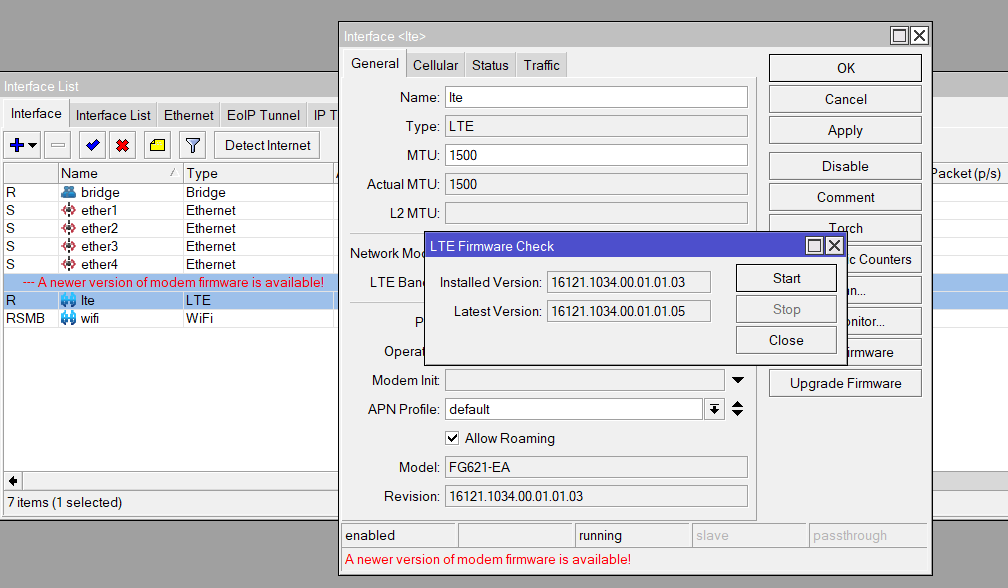
After upgrading to version 16121.1034.00.01.01.05, I believe there’s a critical bug related to the LTE interface. When I remove the SIM card, the LTE interface shows up, but once I insert the SIM card again, the LTE interface disappears.
(7.13.4, modem firmware 05, SIM without PIN and default config)
hAP ax lite LTE @ 7.14beta10 with 16121.1034.00.01.01.05 firmware, no SIM PIN as it’s a known problem with this model. I used it for last 5 hours and 0 linkdowns or problems have occured.
Tried all possible procedures again with a fresh 7.14 rc1 but still no luck.
My hope was
*) modem - fixed modem firmware-upgrade (introduced in v7.14beta9);
*) lte - fixed APN authentication for FG621-EA modem;
but negative.
Modem still dead-ish.
Waiting for Support to reply on my ticket.
05 has been taken offline.
https://upgrade.mikrotik.com/firmware/FG621-EA/16121.1034.00.01.01.05/latest
Showing 04 as latest version now.
Downloaded the ‘new latest’ 04 image now (exactly the same KB size as ‘old’ 04 before!) and flashed same way as I did 1mio times before
and it’s reporting to be back on 04!!!
But errors in log are still the same and no connection (no IP, no DNS, no default route)
Sending/receiving various AT commands but no connection at all.
Testing different APN’s also doesn’t help.
I think I am suffering this as well… Will see if I manage to downgrade.
Support informed me yesterday they may have found the possible cause.
(it has to do with multiple APNs being defined and then FW crashing because of it)
About solution and resolving the issue for current incidents, I don’t know.
I’m staying put on 04 now for a while.
For those still having this problem: try to only have 1 APN and see if that helps ?
I have the same problem with 7.13.4 and the latest firmware but I think have found the solution - 2 days of uptime without the problem.
First I create a new APN profile with the settings from the provider and in this profile uncheck Use network APN. Then select to only use IPv4 (default is Auto) and apply the newly created APN to the LTE interface.
This is not a ‘solution’ for me but rather a workaround.
It always has and should work nicely with “Use Network APN” - which means the default APN is being used with info or “config” from SIM card.
As of now it looks like there’s some SIM’s out there (mine included) which deliver a “” (empty content) as APN info and this might cause the provider to answer with nonsense = no connection possible.
I am providing remote access to my box for Support Team and we’re investigating.
I agree and I’m certain they will mitigate this problem.
But for now, it might be a workaround.