hAP ax S Quick Set internet interface issue

Hi all!

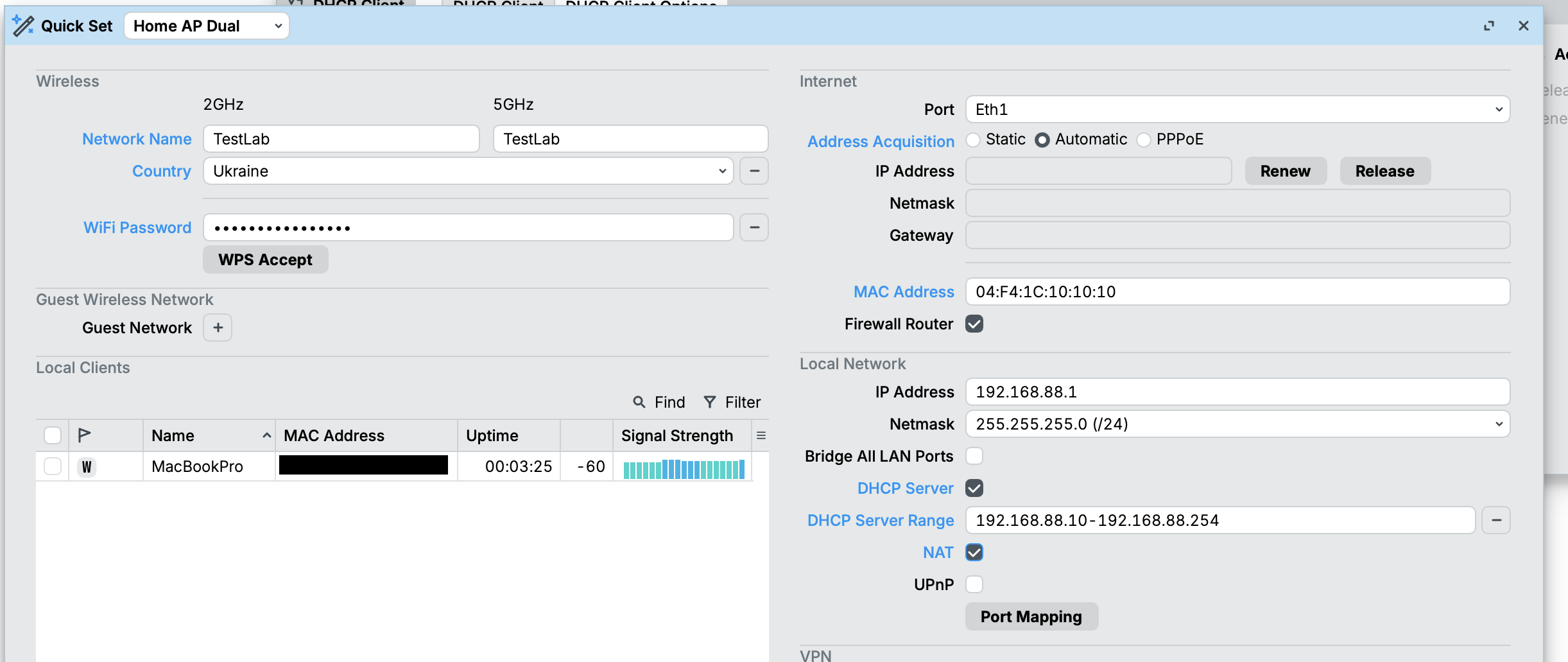
I am fully aware that it is not the best idea to use Quick Set (especially after any changes have been applied outside of it), but I usually use it to set initial configuration on a new router (or after reset), like changing MAC address on internet interface. There was no problem doing so with hAP ax^3 and a couple of ax lite, but with a brand new hAP ax S it seems to be different. I connected ISP cable to ether1, switched it on, accepted default configuration, opened Quick Set and it weirdly showed that Internet mode was set to Static (I needed Automatic, which I think is always the default) with IP 192.168.88.1 (which is LAN one) and gateway 0.0.0.0 (highlighted in red) using Eth1 interface, although I checked DHCP client and there was an active one for ether1 and internet connection was available on wireless client. I decided it was just a Quick Set glitch, so I switched mode to Automatic and it messed a lot of things:

  • router lost LAN IP

  • all the internet interface configuration was applied to ether2 for some reason (in Quick Set you have a choice of Eth1 and SFP1 only for internet interface, which is understandable), it even removed ether1 from WAN interfaces list and replaced it with ether2

  • DHCP server, NAT, firewall settings in Quick Set were messed up

I understand Quick Set tends to mess up the configuration, but the initial / default one?

Has anyone encountered such an issue? I wonder if this is a software or hardware problem? I have a gut feeling that it might be a bug in Quick Set, hAP ax S is a very fresh and immature piece of hardware, but still concerned if it can have something to do with ports wiring.

As a workaround I switched to using ether2 as a WAN interface, this way it at least correctly shows leased IP in Quick Set and I can apply other changes there without messing everything up.

All of it was tested and reproduced both on the original ROS (7.19) and after upgrading to 7.20.6 (both packages and firmware). Btw, is it ok that Factory Software version (7.19.4) from System -> Resources is not equal to Factory Firmware (7.19.5) from System -> RouterBOARD?
1 Like

It's a rather new device so probably not too many who encountered this issue.

Start from default
Apply Quickset
Then open terminal and use this command:
/system default-configuration export file=anynameyouwish

Move that file to your PC, remove sensitive parts (serial, public IP, ...) and post back here between < / > quotes.
Then we can have a look at what Quickset did... or didn't do.

Last question: it's not a problem per se but it is recommended to keep SW and FW the same version.
Factory version is something you can not change. That's the lower limit you will be able to downgrade to.

I did factory reset, reconnected ISP cable back to ether1, added changes in Quick Set (adding screenshot to indicate what exactly has been changed) and applied, surprisingly ros upgraded to latest version automatically after this, but maybe there’s an explanation for that.

Posting config after applying, created it using /export file=config.txt command, if the default configuration is needed instead - I will add it (tried adding it, got an error that it was too large and as a new user I cannot upload that for some reason, maybe use some pastebin service?)


# 2025-12-14 15:20:43 by RouterOS 7.20.6
# software id = BZAH-1K3Z
#
# model = E62iUGS-2axD5axT
# serial number = XXXXXXXXXXX
/interface bridge
add admin-mac=04:F4:1C:11:11:11 auto-mac=no comment=defconf name=bridge
/interface ethernet
set [ find default-name=ether2 ] mac-address=04:F4:1C:10:10:10
/interface wifi
set [ find default-name=wifi1 ] channel.skip-dfs-channels=10min-cac \
    configuration.country=Ukraine .mode=ap .ssid=TestLab disabled=no \
    security.authentication-types=wpa2-psk,wpa3-psk .ft=yes .ft-over-ds=yes
set [ find default-name=wifi2 ] channel.skip-dfs-channels=10min-cac \
    configuration.country=Ukraine .mode=ap .ssid=TestLab disabled=no \
    security.authentication-types=wpa2-psk,wpa3-psk .ft=yes .ft-over-ds=yes
/interface list
add comment=defconf name=WAN
add comment=defconf name=LAN
/ip pool
add name=default-dhcp ranges=192.168.88.10-192.168.88.254
add name=dhcp ranges=192.168.88.10-192.168.88.254
/ip dhcp-server
# No IP address on interface
add address-pool=default-dhcp interface=bridge name=defconf
/disk settings
set auto-media-interface=bridge auto-media-sharing=yes auto-smb-sharing=yes
/interface bridge port
add bridge=bridge comment=defconf disabled=yes interface=ether2
add bridge=bridge comment=defconf interface=ether3
add bridge=bridge comment=defconf interface=ether4
add bridge=bridge comment=defconf interface=ether5
add bridge=bridge comment=defconf interface=sfp1
add bridge=bridge comment=defconf interface=wifi1
add bridge=bridge comment=defconf interface=wifi2
/ip neighbor discovery-settings
set discover-interface-list=LAN
/interface list member
add comment=defconf interface=bridge list=LAN
add interface=ether2 list=WAN
/ip dhcp-client
add comment=defconf interface=ether1
# Interface not active
add interface=ether2
/ip dhcp-server network
add address=192.168.88.0/24 comment=defconf dns-server=192.168.88.1 gateway=\
    192.168.88.1 netmask=24
/ip dns
set allow-remote-requests=yes
/ip dns static
add address=192.168.88.1 comment=defconf name=router.lan type=A
/ip firewall filter
add action=accept chain=input comment=\
    "defconf: accept established,related,untracked" connection-state=\
    established,related,untracked
add action=drop chain=input comment="defconf: drop invalid" connection-state=\
    invalid
add action=accept chain=input comment="defconf: accept ICMP" protocol=icmp
add action=accept chain=input comment=\
    "defconf: accept to local loopback (for CAPsMAN)" dst-address=127.0.0.1
add action=drop chain=input comment="defconf: drop all not coming from LAN" \
    in-interface-list=!LAN
add action=accept chain=forward comment="defconf: accept in ipsec policy" \
    ipsec-policy=in,ipsec
add action=accept chain=forward comment="defconf: accept out ipsec policy" \
    ipsec-policy=out,ipsec
add action=fasttrack-connection chain=forward comment="defconf: fasttrack" \
    connection-state=established,related hw-offload=yes
add action=accept chain=forward comment=\
    "defconf: accept established,related, untracked" connection-state=\
    established,related,untracked
add action=drop chain=forward comment="defconf: drop invalid" \
    connection-state=invalid
add action=drop chain=forward comment=\
    "defconf: drop all from WAN not DSTNATed" connection-nat-state=!dstnat \
    connection-state=new in-interface-list=WAN
/ip firewall nat
add action=masquerade chain=srcnat comment="defconf: masquerade" \
    ipsec-policy=out,none out-interface-list=WAN
add action=masquerade chain=srcnat out-interface-list=WAN
/ipv6 firewall address-list
add address=::/128 comment="defconf: unspecified address" list=bad_ipv6
add address=::1/128 comment="defconf: lo" list=bad_ipv6
add address=fec0::/10 comment="defconf: site-local" list=bad_ipv6
add address=::ffff:0.0.0.0/96 comment="defconf: ipv4-mapped" list=bad_ipv6
add address=::/96 comment="defconf: ipv4 compat" list=bad_ipv6
add address=100::/64 comment="defconf: discard only " list=bad_ipv6
add address=2001:db8::/32 comment="defconf: documentation" list=bad_ipv6
add address=2001:10::/28 comment="defconf: ORCHID" list=bad_ipv6
add address=3ffe::/16 comment="defconf: 6bone" list=bad_ipv6
/ipv6 firewall filter
add action=accept chain=input comment=\
    "defconf: accept established,related,untracked" connection-state=\
    established,related,untracked
add action=drop chain=input comment="defconf: drop invalid" connection-state=\
    invalid
add action=accept chain=input comment="defconf: accept ICMPv6" protocol=\
    icmpv6
add action=accept chain=input comment="defconf: accept UDP traceroute" \
    dst-port=33434-33534 protocol=udp
add action=accept chain=input comment=\
    "defconf: accept DHCPv6-Client prefix delegation." dst-port=546 protocol=\
    udp src-address=fe80::/10
add action=accept chain=input comment="defconf: accept IKE" dst-port=500,4500 \
    protocol=udp
add action=accept chain=input comment="defconf: accept ipsec AH" protocol=\
    ipsec-ah
add action=accept chain=input comment="defconf: accept ipsec ESP" protocol=\
    ipsec-esp
add action=accept chain=input comment=\
    "defconf: accept all that matches ipsec policy" ipsec-policy=in,ipsec
add action=drop chain=input comment=\
    "defconf: drop everything else not coming from LAN" in-interface-list=\
    !LAN
add action=fasttrack-connection chain=forward comment="defconf: fasttrack6" \
    connection-state=established,related
add action=accept chain=forward comment=\
    "defconf: accept established,related,untracked" connection-state=\
    established,related,untracked
add action=drop chain=forward comment="defconf: drop invalid" \
    connection-state=invalid
add action=drop chain=forward comment=\
    "defconf: drop packets with bad src ipv6" src-address-list=bad_ipv6
add action=drop chain=forward comment=\
    "defconf: drop packets with bad dst ipv6" dst-address-list=bad_ipv6
add action=drop chain=forward comment="defconf: rfc4890 drop hop-limit=1" \
    hop-limit=equal:1 protocol=icmpv6
add action=accept chain=forward comment="defconf: accept ICMPv6" protocol=\
    icmpv6
add action=accept chain=forward comment="defconf: accept HIP" protocol=139
add action=accept chain=forward comment="defconf: accept IKE" dst-port=\
    500,4500 protocol=udp
add action=accept chain=forward comment="defconf: accept ipsec AH" protocol=\
    ipsec-ah
add action=accept chain=forward comment="defconf: accept ipsec ESP" protocol=\
    ipsec-esp
add action=accept chain=forward comment=\
    "defconf: accept all that matches ipsec policy" ipsec-policy=in,ipsec
add action=drop chain=forward comment=\
    "defconf: drop everything else not coming from LAN" in-interface-list=\
    !LAN
/system clock
set time-zone-name=Europe/Kiev
/tool mac-server
set allowed-interface-list=LAN
/tool mac-server mac-winbox
set allowed-interface-list=LAN

It surely messes things up between ether1 and ether2.
MAC address you specified gets applied to ether2 whereas you clearly indicated it should be ether1.
No fixed IP address assigned to neither ether1 nor ether2
DHCP client also gets applied to ether2 instead of ether1.
ether2 is taken out of bridge in port settings.
...

Looks like a bug to me. Worthwhile to make a ticket out of it so support can have a look at it.

Q: why didn't you tick "Bridge all LAN ports" ?

Do you have the same issues on 7.21rc1 ?

Tried with 7.21rc1, same. I will try to file a bug report, thank you!

Q: why didn't you tick "Bridge all LAN ports" ?

I haven’t checked it on any of my routers. I see it only adds ether1 to bridge as well, not sure this is what I need or am I missing something?

Btw, this issue indeed has something to do with ether2 binding in Quick Set, I have just noticed whenever I enable/disable ether2 in bridge ports - it messes things up in Quick Set UI in real time.

The same problem, also all connected PCs and smartphones connected to this router does not have internet connection.

In IP–>DHCP Client I can see that settings from ISP are received

Completely stuck, all MikroTik products just working out of the box before

1 Like

There is a reason why seasoned users around here don't use QuickSet...

I would suggest to also create a support tocket.
The more they get reports about it, the sooner they may solve it.

MikroTik team have been able to reproduce the issue, there will be a fix, no ETA though.

1 Like

Similar problem in my case. I’m new to Mikrotik. How shall we learn about the upgrade?

One important note... if you upgrade RouterOS then use QuickSet, you can run into problems since the /system/default-configuration can change between version. And "new" QuickSet may not find something it expects in the config because it's expecting a default configuration from its own version, not the factory-version default configuration. This is because upgrading does not re-apply the newer default configuration, so the original defconf remains same after upgrade to newer version like 7.21rc1 – but QuickSet in 7.21rc1 may need something specific in latest defconf...

Generally, it is best to run QuickSet once from the box, then upgrade to current version. BUT if you want to run QuickSet after upgrading RouterOS from factory-version, then you can re-apply the current version defconf via /system/reset-configuration no-default=no keep-users=yes, which will get you back to something the current version's QuickSet code expects.

But...it's good @bytes filed a ticket... since MikroTik does mess things up in QuickSet more often then they should given it should be "simple" and "just work".

Just installed RouterOS 7.21 update - still no changes, problem still exist.

Any news/updates from MikroTik Team? Possible ETA to fix?

Did you try 7.22beta1 ?

And did you create a support ticket ?
This is a USER forum. MT staff comes by from time to time but not everywhere.

As I can see @bytes have created a ticket earlier.

I didn’t try 7.22beta1 , can’t see any changes in What is new section regarding this issue.

Actually, this one is the worst device I have ever bought from MikroTik.

Just noticed the issue that WiFi 2GHz speed drops down from 70 Mbps down to 0.2 Mbps without any reason.

Have used hAP ac2 before the replacement to hAP AX S at the same apartment and conditions, no such surprises noticed before.

The advice to using QuickSet once stems from how it internally works. The way I think about it is generally looking for find [comment=defconf], and in few cases the interface default name. And there is also a few heuristics, for example, if ether1 is a member of the bridge, QuickSet will infer you're running in "Bridge Mode" in some of the QuickSet profiles.

If I look at the config posted, the export tells the story:

/ip dhcp-server
# No IP address on interface
add address-pool=default-dhcp interface=bridge name=defconf

The default configuration has an IP address on the ether2 (or perhaps bridge), but I suspect if you add an IP address, with comment defconf, QuickSet will allow editing things since it have find the router IP.

/ip/address add address=192.168.88.1/24 interface=ether2 comment=defconf

Now a /system/reset-configuration keep-users=yes would also restore the entire configuration, including an /ip/address.... and if it's not doing that well that is a bug.

But...without a router IP being found... yes, I'd imagine QuickSet do bad things. But the default configuration should have one. And also why re-run QuickSet can be problematic: since if you do remove comments or change interface names or bridge ports (sometimes)... it will be confused. Now, QuickSet does not care if you add a bunch of OTHER config, even set vlan-filtering=yes will not break QuickSet for working multiple times...

Conversely, sometimes MikroTik itself change defconf between versions, that breaks QuickSet on some devices... why it could still be a bug. Or, it could also be a related issue to that... if you router was based on an older defconf, sometimes a newer RouterOS version's QuickSet may not look for the older names, since new defconf use different names... But here if there is not an /ip/address, however it happened, will break QuickSet for sure.

@anykey_lv, if you post your configuration, I can see what might be fowling up QuickSet. QuickSet will not, generally‡, add missing item. It looks for config to set.

In general, some name change or adding something will get QuickSet working in new versions. MikroTik has broken this in past (maybe half-dozen version ago, there was a bug where DHCP server where the network was written as 0.0.0.0 not 0.0.0.0/0 upon an update).

‡ only bridge port are potentially added, AFAIK... if you change LAN settings those look for the defconf stuff to set dhcp network/server, ip address, etc.
‡ update, and I guess port forwarding dialog in some modes... but I know QuickSet does not add an /ip/address

# 2026-01-13 22:32:11 by RouterOS 7.21
# software id = YGUW-FJFG
#
# model = E62iUGS-2axD5axT
# serial number = removed
/interface bridge
add admin-mac=xx:xx:xx:xx:xx:xx auto-mac=no comment=defconf name=bridge
/interface wifi
set [ find default-name=wifi1 ] channel.band=2ghz-ax .skip-dfs-channels=all \
    .width=20/40mhz configuration.country="United States" .mode=ap .ssid=\
    HomeNet disabled=no security.authentication-types=wpa2-psk,wpa3-psk .ft=\
    yes .ft-over-ds=yes
set [ find default-name=wifi2 ] channel.band=5ghz-ax .skip-dfs-channels=all \
    .width=20/40/80mhz configuration.country="United States" .mode=ap .ssid=\
    HomeNet disabled=no security.authentication-types=wpa2-psk,wpa3-psk .ft=\
    yes .ft-over-ds=yes
/interface list
add comment=defconf name=WAN
add comment=defconf name=LAN
/ip pool
add name=default-dhcp ranges=192.168.88.10-192.168.88.254
/ip dhcp-server
add address-pool=default-dhcp interface=bridge name=defconf
/disk settings
set auto-media-interface=bridge auto-media-sharing=yes auto-smb-sharing=yes
/interface bridge port
add bridge=bridge comment=defconf interface=ether2
add bridge=bridge comment=defconf interface=ether3
add bridge=bridge comment=defconf interface=ether4
add bridge=bridge comment=defconf interface=ether5
add bridge=bridge comment=defconf interface=sfp1
add bridge=bridge comment=defconf interface=wifi1
add bridge=bridge comment=defconf interface=wifi2
/ip neighbor discovery-settings
set discover-interface-list=LAN
/ipv6 settings
set disable-ipv6=yes
/interface list member
add comment=defconf interface=bridge list=LAN
add comment=defconf interface=ether1 list=WAN
/ip address
add address=192.168.88.1/24 comment=defconf interface=bridge network=\
    192.168.88.0
/ip dhcp-client
add comment=defconf interface=ether1
/ip dhcp-server network
add address=192.168.88.0/24 comment=defconf dns-server=192.168.88.1 gateway=\
    192.168.88.1
/ip dns
set allow-remote-requests=yes
/ip dns static
add address=192.168.88.1 comment=defconf name=router.lan type=A
/ip firewall filter
add action=accept chain=input comment=\
    "defconf: accept established,related,untracked" connection-state=\
    established,related,untracked
add action=drop chain=input comment="defconf: drop invalid" connection-state=\
    invalid
add action=accept chain=input comment="defconf: accept ICMP" protocol=icmp
add action=accept chain=input comment=\
    "defconf: accept to local loopback (for CAPsMAN)" dst-address=127.0.0.1
add action=drop chain=input comment="defconf: drop all not coming from LAN" \
    in-interface-list=!LAN
add action=accept chain=forward comment="defconf: accept in ipsec policy" \
    ipsec-policy=in,ipsec
add action=accept chain=forward comment="defconf: accept out ipsec policy" \
    ipsec-policy=out,ipsec
add action=fasttrack-connection chain=forward comment="defconf: fasttrack" \
    connection-state=established,related
add action=accept chain=forward comment=\
    "defconf: accept established,related, untracked" connection-state=\
    established,related,untracked
add action=drop chain=forward comment="defconf: drop invalid" \
    connection-state=invalid
add action=drop chain=forward comment=\
    "defconf: drop all from WAN not DSTNATed" connection-nat-state=!dstnat \
    in-interface-list=WAN
/ip firewall nat
add action=masquerade chain=srcnat comment="defconf: masquerade" \
    ipsec-policy=out,none out-interface-list=WAN
/ip upnp
set enabled=yes
/ip upnp interfaces
add interface=bridge type=internal
add interface=ether1 type=external
/ipv6 firewall address-list
add address=::/128 comment="defconf: unspecified address" list=bad_ipv6
add address=::1/128 comment="defconf: lo" list=bad_ipv6
add address=fec0::/10 comment="defconf: site-local" list=bad_ipv6
add address=::ffff:0.0.0.0/96 comment="defconf: ipv4-mapped" list=bad_ipv6
add address=::/96 comment="defconf: ipv4 compat" list=bad_ipv6
add address=100::/64 comment="defconf: discard only " list=bad_ipv6
add address=2001:db8::/32 comment="defconf: documentation" list=bad_ipv6
add address=2001:10::/28 comment="defconf: ORCHID" list=bad_ipv6
add address=3ffe::/16 comment="defconf: 6bone" list=bad_ipv6
/ipv6 firewall filter
add action=accept chain=input comment=\
    "defconf: accept established,related,untracked" connection-state=\
    established,related,untracked
add action=drop chain=input comment="defconf: drop invalid" connection-state=\
    invalid
add action=accept chain=input comment="defconf: accept ICMPv6" protocol=\
    icmpv6
add action=accept chain=input comment="defconf: accept UDP traceroute" \
    dst-port=33434-33534 protocol=udp
add action=accept chain=input comment=\
    "defconf: accept DHCPv6-Client prefix delegation." dst-port=546 protocol=\
    udp src-address=fe80::/10
add action=accept chain=input comment="defconf: accept IKE" dst-port=500,4500 \
    protocol=udp
add action=accept chain=input comment="defconf: accept ipsec AH" protocol=\
    ipsec-ah
add action=accept chain=input comment="defconf: accept ipsec ESP" protocol=\
    ipsec-esp
add action=accept chain=input comment=\
    "defconf: accept all that matches ipsec policy" ipsec-policy=in,ipsec
add action=drop chain=input comment=\
    "defconf: drop everything else not coming from LAN" in-interface-list=\
    !LAN
add action=fasttrack-connection chain=forward comment="defconf: fasttrack6" \
    connection-state=established,related
add action=accept chain=forward comment=\
    "defconf: accept established,related,untracked" connection-state=\
    established,related,untracked
add action=drop chain=forward comment="defconf: drop invalid" \
    connection-state=invalid
add action=drop chain=forward comment=\
    "defconf: drop packets with bad src ipv6" src-address-list=bad_ipv6
add action=drop chain=forward comment=\
    "defconf: drop packets with bad dst ipv6" dst-address-list=bad_ipv6
add action=drop chain=forward comment="defconf: rfc4890 drop hop-limit=1" \
    hop-limit=equal:1 protocol=icmpv6
add action=accept chain=forward comment="defconf: accept ICMPv6" protocol=\
    icmpv6
add action=accept chain=forward comment="defconf: accept HIP" protocol=139
add action=accept chain=forward comment="defconf: accept IKE" dst-port=\
    500,4500 protocol=udp
add action=accept chain=forward comment="defconf: accept ipsec AH" protocol=\
    ipsec-ah
add action=accept chain=forward comment="defconf: accept ipsec ESP" protocol=\
    ipsec-esp
add action=accept chain=forward comment=\
    "defconf: accept all that matches ipsec policy" ipsec-policy=in,ipsec
add action=drop chain=forward comment=\
    "defconf: drop everything else not coming from LAN" in-interface-list=\
    !LAN
/system clock
set time-zone-name=Europe/Riga
/system leds
set 5 type=interface-activity
set 6 type=interface-activity
/system leds settings
set all-leds-off=immediate
/tool mac-server
set allowed-interface-list=LAN
/tool mac-server mac-winbox
set allowed-interface-list=LAN

I don't a new hEX S to test this one. But it all looks normal to me. It very well be a bug.

But what's not working in QuickSet on this one?

Now the main bug is that clients WiFi download speed drops down from 70-250 Mbps to 1000 kbps or even less for Tx rate, but Rx rate remain at good level (about 70-250 Mbps depending on the distance). Distance between laptop with Intel(R) Dual Band Wireless-AC 3165 adapter and router is about 1-2m (not possible to use wired connection unfortunately).

The lowest used bands iz 2 GHz N and 5GHz AC

This happens for both 2.4GHz and 5GHz channels.

It's set the Wi-Fi country to "United States", that effects the bands used. You might want to select your current country if that's not right.

Have changed country to “Latvia“

Problem still exist on my 2 laptops randomly