Here is the config: Serial # and MAC addresses removed. Not sure whatelse should be removed. wifi iOT2G is disabled on purpose. (I had problems with it and decided not to use it, I don’t remember what the problem was but if you see something obvious it would be helpful in case I need it in the future, but the current, important issue is neither wifi1 or wifi2 are working.
# 2025-10-08 16:21:39 by RouterOS 7.20
# software id = BVAE-I2UZ
#
# model = C53UiG+5HPaxD2HPaxD
# serial number = \*\*\*\*\*\*\*\*\*\*

/container mounts
add dst=/app/data name=kuma src=/usb1/kuma_data
/interface bridge
add name=Dockers
add admin-mac=\*\*\*\*\*\*\*\*\*\* auto-mac=no comment=defconf name=bridge
vlan-filtering=yes
/interface ethernet
set \[ find default-name=ether2 \] name="ether2 \[Management\]"
set \[ find default-name=ether3 \] name="ether3 {Trusted\]"
set \[ find default-name=ether5 \] name="ether5 \[Untrusted\]"
/interface wifi
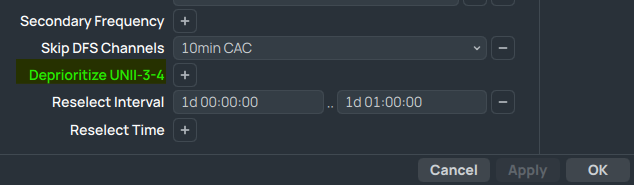
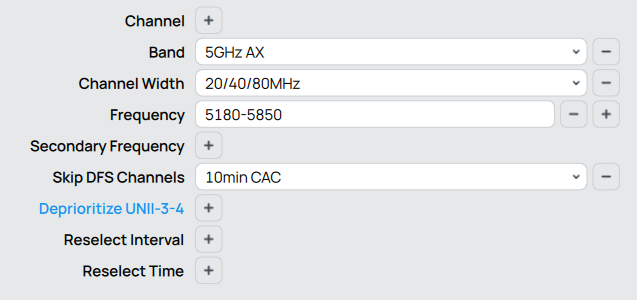
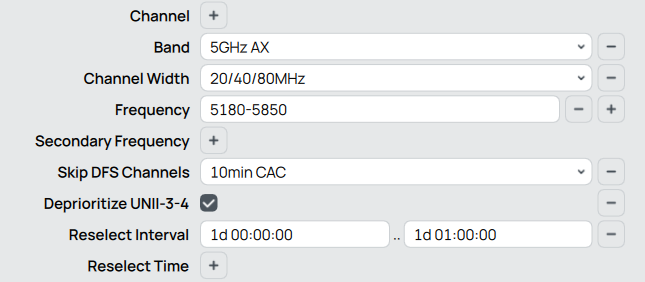
set \[ find default-name=wifi1 \] channel.band=5ghz-ax .frequency=5180-5850
.skip-dfs-channels=10min-cac .width=20/40/80mhz configuration.country=
"United States" .mode=ap .ssid=worthleypond_5GHz disabled=no
security.authentication-types=wpa2-psk,wpa3-psk .ft=yes .ft-over-ds=yes
set \[ find default-name=wifi2 \] channel.skip-dfs-channels=10min-cac
configuration.country="United States" .mode=ap .ssid=worthleypond
disabled=no security.authentication-types=wpa2-psk,wpa3-psk .ft=yes
.ft-over-ds=yes
/interface veth
add address=172.16.0.2/24 dhcp=no gateway=172.16.0.1 gateway6="" mac-address=
\*\*\*\*\*\*\*\*\*\* name=veth1-kuma
add address=172.16.1.2/24 dhcp=no gateway=172.16.1.1 gateway6="" name=
veth2-adguard
/interface vlan
add interface=bridge name=ARDC20 vlan-id=20
add interface=bridge name=ARDC30 vlan-id=30
add interface=bridge name=ARDC40 vlan-id=40
add interface=bridge name=AREDN60 vlan-id=60
add interface=bridge name=HamGate50 vlan-id=50
add interface=bridge name=Management vlan-id=10
/disk
set usb1 media-interface=bridge media-sharing=yes smb-sharing=yes
/interface wifi
add configuration.mode=ap .ssid=worthleypond-5G-Guest
datapath.client-isolation=yes disabled=no mac-address=\*\*\*\*\*\*\*\*
master-interface=wifi1 name=5ghz-Guest security.authentication-types=
wpa2-psk,wpa3-psk .ft=yes .ft-over-ds=yes
add configuration.mode=ap .ssid=iOT2G datapath.client-isolation=yes
mac-address=\*\*\*\*\*\*\*\*\* master-interface=wifi2 name=iOT2G
security.authentication-types=wpa2-psk,wpa3-psk .ft=yes .ft-over-ds=yes
/interface ethernet switch
set 0 cpu-flow-control=yes
/interface list
add comment=defconf name=WAN
add comment=defconf name=LAN
/ip pool
add name=default-dhcp ranges=192.168.88.10-192.168.88.254
add name=dhcp_pool1 ranges=192.168.10.2-192.168.10.254
add name=dhcp_pool2 ranges=192.168.20.2-192.168.20.6
add name=dhcp_pool3 ranges=192.168.30.2-192.168.30.6
add name=dhcp_pool4 ranges=192.168.40.2-192.168.40.6
add name=dhcp_pool5 ranges=192.168.50.2-192.168.50.6
add name=dhcp_pool6 ranges=192.168.60.2-192.168.60.6
add name=dhcp_pool7 ranges=192.168.99.2-192.168.99.254
add name=dhcp_pool8 ranges=192.168.50.2-192.168.50.6
add name=dhcp_pool9 ranges=192.168.2.2-192.168.2.254
add name=dhcp_pool10 ranges=192.168.3.2-192.168.3.254
/ip dhcp-server
add address-pool=default-dhcp interface=bridge name=defconf
add address-pool=dhcp_pool2 interface=ARDC20 name=dhcp2
add address-pool=dhcp_pool3 interface=ARDC30 name=dhcp3
add address-pool=dhcp_pool4 interface=ARDC40 name=dhcp4
add address-pool=dhcp_pool6 interface=AREDN60 name=dhcp6
add address-pool=dhcp_pool7 interface=Management name=dhcp1
add address-pool=dhcp_pool8 interface=HamGate50 name=dhcp5

# Interface not running

add address-pool=dhcp_pool9 interface=5ghz-Guest name=dhcp7

# Interface not running

add address-pool=dhcp_pool10 interface=iOT2G name=dhcp8
/container
add interface=veth1-kuma logging=yes mounts=kuma name=
4a28cf45-1cba-4f59-9211-0e773d51e064 root-dir=usb1/kuma start-on-boot=yes
workdir=/app
/container config
set registry-url=https://registry-1.docker.io tmpdir=usb1/pull
/disk settings
set auto-media-interface=bridge auto-media-sharing=yes auto-smb-sharing=yes
/interface bridge port
add bridge=bridge comment=defconf interface="ether2 \[Management\]" pvid=10
add bridge=bridge comment=defconf interface="ether3 {Trusted\]"
add bridge=bridge comment=defconf interface=ether4
add bridge=bridge comment=defconf interface="ether5 \[Untrusted\]"
add bridge=bridge comment=defconf interface=wifi1
add bridge=bridge comment=defconf interface=wifi2
add bridge=Dockers interface=veth1-kuma
add bridge=Dockers interface=veth2-adguard
/ip neighbor discovery-settings
set discover-interface-list=LAN
/interface bridge vlan
add bridge=bridge tagged="ether5 \[Untrusted\],bridge" untagged=
"ether2 \[Management\]" vlan-ids=10
add bridge=bridge tagged="ether5 \[Untrusted\],bridge" vlan-ids=20
add bridge=bridge tagged="ether5 \[Untrusted\],bridge" vlan-ids=30
add bridge=bridge tagged="ether5 \[Untrusted\],bridge" vlan-ids=40
add bridge=bridge tagged="ether5 \[Untrusted\],bridge" vlan-ids=50
add bridge=bridge tagged="ether5 \[Untrusted\],bridge" vlan-ids=60
/interface list member
add comment=defconf interface=bridge list=LAN
add comment=defconf interface=ether1 list=WAN
add interface=Management list=LAN
/ip address
add address=192.168.88.1/24 comment=defconf interface=bridge network=
192.168.88.0
add address=192.168.99.1/24 interface=Management network=192.168.99.0
add address=192.168.20.1/29 interface=ARDC20 network=192.168.20.0
add address=192.168.30.1/29 interface=ARDC30 network=192.168.30.0
add address=192.168.40.1/29 interface=ARDC40 network=192.168.40.0
add address=192.168.50.1/29 interface=HamGate50 network=192.168.50.0
add address=192.168.60.1/29 interface=AREDN60 network=192.168.60.0
add address=172.16.0.1/24 interface=Dockers network=172.16.0.0
add address=172.16.1.1/24 interface=Dockers network=172.16.1.0
add address=192.168.2.1/24 interface=5ghz-Guest network=192.168.2.0
add address=192.168.3.1/24 interface=iOT2G network=192.168.3.0
/ip dhcp-client
add comment=defconf interface=ether1
/ip dhcp-server network
add address=192.168.2.0/24 gateway=192.168.2.1
add address=192.168.3.0/24 gateway=192.168.3.1
add address=192.168.20.0/29 dns-server=1.1.1.1 gateway=192.168.20.1
add address=192.168.30.0/29 dns-server=1.1.1.1 gateway=192.168.30.1
add address=192.168.40.0/29 dns-server=1.1.1.1 gateway=192.168.40.1
add address=192.168.50.0/29 dns-server=1.1.1.1 gateway=192.168.50.1
add address=192.168.60.0/29 dns-server=1.1.1.1 gateway=192.168.60.1
add address=192.168.88.0/24 comment=defconf dns-server=1.1.1.1 gateway=
192.168.88.1
add address=192.168.99.0/24 dns-server=1.1.1.1 gateway=192.168.99.1 netmask=
24
/ip dns
set allow-remote-requests=yes
/ip dns static
add address=192.168.88.1 comment=defconf name=router.lan type=A
/ip firewall address-list
add address=192.168.20.0/29 list=Local-VLAN
add address=192.168.30.0/29 list=Local-VLAN
add address=192.168.40.0/29 list=Local-VLAN
add address=192.168.50.0/29 list=Local-VLAN
add address=192.168.60.0/29 list=Local-VLAN
add address=192.168.99.0/24 list=Management
add address=192.168.88.0/24 list=Trusted
/ip firewall filter
add action=accept chain=input comment=
"defconf: accept established,related,untracked" connection-state=
established,related,untracked
add action=drop chain=input comment="defconf: drop invalid" connection-state=
invalid
add action=accept chain=input comment="defconf: accept ICMP" protocol=icmp
add action=accept chain=input comment=
"defconf: accept to local loopback (for CAPsMAN)" dst-address=127.0.0.1
add action=drop chain=input comment="defconf: drop all not coming from LAN"
in-interface-list=!LAN
add action=accept chain=forward comment="defconf: accept in ipsec policy"
ipsec-policy=in,ipsec
add action=accept chain=forward comment="defconf: accept out ipsec policy"
ipsec-policy=out,ipsec
add action=fasttrack-connection chain=forward comment="defconf: fasttrack"
connection-state=established,related hw-offload=yes
add action=accept chain=forward connection-state=new dst-address-list=
Local-VLAN src-address-list=Management
add action=accept chain=forward comment=
"defconf: accept established,related, untracked" connection-state=
established,related,untracked
add action=drop chain=forward comment="defconf: drop invalid"
connection-state=invalid
add action=drop chain=forward comment=
"defconf: drop all from WAN not DSTNATed" connection-nat-state=!dstnat
connection-state=new in-interface-list=WAN
add action=drop chain=forward connection-state=
established,related,new,untracked dst-address-list=Trusted
src-address-list=Local-VLAN
add action=drop chain=forward connection-state=
established,related,new,untracked dst-address-list=Management
src-address-list=Local-VLAN
add action=drop chain=forward connection-state=new dst-address-list=
Local-VLAN src-address-list=Local-VLAN
add action=drop chain=forward in-interface=5ghz-Guest out-interface=bridge

# iOT2G not ready

# iOT2G not ready

add action=drop chain=forward in-interface=iOT2G out-interface=bridge
/ip firewall nat
add action=masquerade chain=srcnat comment="defconf: masquerade"
ipsec-policy=out,none out-interface-list=WAN
add action=masquerade chain=srcnat src-address=172.16.0.0/24
add action=masquerade chain=srcnat src-address=172.16.1.0/24
/ipv6 firewall address-list
add address=::/128 comment="defconf: unspecified address" list=bad_ipv6
add address=::1/128 comment="defconf: lo" list=bad_ipv6
add address=fec0::/10 comment="defconf: site-local" list=bad_ipv6
add address=::ffff:0.0.0.0/96 comment="defconf: ipv4-mapped" list=bad_ipv6
add address=::/96 comment="defconf: ipv4 compat" list=bad_ipv6
add address=100::/64 comment="defconf: discard only " list=bad_ipv6
add address=2001:db8::/32 comment="defconf: documentation" list=bad_ipv6
add address=2001:10::/28 comment="defconf: ORCHID" list=bad_ipv6
add address=3ffe::/16 comment="defconf: 6bone" list=bad_ipv6
/ipv6 firewall filter
add action=accept chain=input comment=
"defconf: accept established,related,untracked" connection-state=
established,related,untracked
add action=drop chain=input comment="defconf: drop invalid" connection-state=
invalid
add action=accept chain=input comment="defconf: accept ICMPv6" protocol=
icmpv6
add action=accept chain=input comment="defconf: accept UDP traceroute"
dst-port=33434-33534 protocol=udp
add action=accept chain=input comment=
"defconf: accept DHCPv6-Client prefix delegation." dst-port=546 protocol=
udp src-address=fe80::/10
add action=accept chain=input comment="defconf: accept IKE" dst-port=500,4500
protocol=udp
add action=accept chain=input comment="defconf: accept ipsec AH" protocol=
ipsec-ah
add action=accept chain=input comment="defconf: accept ipsec ESP" protocol=
ipsec-esp
add action=accept chain=input comment=
"defconf: accept all that matches ipsec policy" ipsec-policy=in,ipsec
add action=drop chain=input comment=
"defconf: drop everything else not coming from LAN" in-interface-list=
!LAN
add action=fasttrack-connection chain=forward comment="defconf: fasttrack6"
connection-state=established,related
add action=accept chain=forward comment=
"defconf: accept established,related,untracked" connection-state=
established,related,untracked
add action=drop chain=forward comment="defconf: drop invalid"
connection-state=invalid
add action=drop chain=forward comment=
"defconf: drop packets with bad src ipv6" src-address-list=bad_ipv6
add action=drop chain=forward comment=
"defconf: drop packets with bad dst ipv6" dst-address-list=bad_ipv6
add action=drop chain=forward comment="defconf: rfc4890 drop hop-limit=1"
hop-limit=equal:1 protocol=icmpv6
add action=accept chain=forward comment="defconf: accept ICMPv6" protocol=
icmpv6
add action=accept chain=forward comment="defconf: accept HIP" protocol=139
add action=accept chain=forward comment="defconf: accept IKE" dst-port=
500,4500 protocol=udp
add action=accept chain=forward comment="defconf: accept ipsec AH" protocol=
ipsec-ah
add action=accept chain=forward comment="defconf: accept ipsec ESP" protocol=
ipsec-esp
add action=accept chain=forward comment=
"defconf: accept all that matches ipsec policy" ipsec-policy=in,ipsec
add action=drop chain=forward comment=
"defconf: drop everything else not coming from LAN" in-interface-list=
!LAN
/system clock
set time-zone-name=America/New_York
/system routerboard mode-button
set enabled=yes on-event=dark-mode
/system routerboard wps-button
set enabled=yes on-event=wps-accept
/system script
add comment=defconf dont-require-permissions=no name=dark-mode owner=\*sys
policy=ftp,reboot,read,write,policy,test,password,sniff,sensitive,romon
source="\\r
\\n   :if (\[system leds settings get all-leds-off\] = "never") do={\\r
\\n     /system leds settings set all-leds-off=immediate \\r
\\n   } else={\\r
\\n     /system leds settings set all-leds-off=never \\r
\\n   }\\r
\\n "
add comment=defconf dont-require-permissions=no name=wps-accept owner=\*sys
policy=ftp,reboot,read,write,policy,test,password,sniff,sensitive,romon
source="\\r
\\n   :foreach iface in=\[/interface/wifi find where (configuration.mode="a
p" && disabled=no)\] do={\\r
\\n     /interface/wifi wps-push-button $iface;}\\r
\\n "
/tool mac-server
set allowed-interface-list=LAN
/tool mac-server mac-winbox
set allowed-interface-list=LAN
 I will keep an eye on whether it gets hotter than usual.