Hap ax3 VLAN Assistance

Good evening I am New to the Forum. I have had a Mikrotik Router for about a year (Hap ac2) but have only used it as router for wireless and guest network. It was connected behind a pfsense box which I had managing my vlans and vpn. The pfense box was trunked to 2 consumer cisco switches (SG2500-8) that where LAG’ed together and I never had an issue until I decided to drop the pfsense box and upgrade my router to the Hap ax3 to managed vlans, guest network and wireless. I’m still new to Vlans on Mikrotik and I’ve spent the past 3 days pouring through the forms here and the cisco boards looking for a solution. I know its gonna be asked yes I have read these guides http://forum.mikrotik.com/t/using-routeros-to-vlan-your-network/126489/1 https://forum.mikrotik.com/viewtopic.php?t=182373#p906567, http://forum.mikrotik.com/t/routeros-bridge-mysteries-explained/147832/1 and yes I has switched the Native Vlan on both the cisco switches to something other than Vlan 1. I cant access any of the devices on the vlan’s even when directly connected to the switch. I’m at a loss and any help would be greatly appreciated. My network is pretty simple Vlans trunked on port 5 to switches. Here is a copy of my config.

# 2023-08-22 05:44:47 by RouterOS 7.11
# software id =
#
# model = C53UiG+5HPaxD2HPaxD
# serial number = 
/interface bridge
add admin-mac= auto-mac=no comment=defconf name=\
    "Main Bridge" vlan-filtering=yes
/interface wifiwave2
set [ find default-name=wifi1 ] channel.band=5ghz-ax .skip-dfs-channels=\
    10min-cac .width=20/40/80mhz configuration.mode=ap .ssid="PsyMaster 5G" \
    disabled=no name="wifi1 5G" security.authentication-types=\
    wpa2-psk,wpa3-psk
set [ find default-name=wifi2 ] channel.band=2ghz-ax .skip-dfs-channels=\
    10min-cac .width=20/40mhz configuration.mode=ap .ssid="PsyMaster 2G" \
    disabled=no name="wifi2 2G" security.authentication-types=\
    wpa2-psk,wpa3-psk
/interface vlan
add interface="Main Bridge" name="Guest 10" vlan-id=10
add interface="Main Bridge" name="Master 2" vlan-id=2
add interface="Main Bridge" name="Proxmox 69" vlan-id=69
add interface="Main Bridge" name="VPN 3" vlan-id=3
add interface="Main Bridge" name="Work 4" vlan-id=4
/interface wifiwave2
add configuration.mode=ap .ssid="PsyHome 2G" disabled=no mac-address=\
      master-interface="wifi2 2G" name=Home \
    security.authentication-types=wpa2-psk,wpa3-psk
/interface list
add comment=defconf name=WAN
add comment=defconf name=LAN
add name=VLAN
/iot lora servers
add address=eu.mikrotik.thethings.industries down-port=1700 name=TTN-EU \
    up-port=1700
add address=us.mikrotik.thethings.industries down-port=1700 name=TTN-US \
    up-port=1700
add address=eu1.cloud.thethings.industries down-port=1700 name=\
    "TTS Cloud (eu1)" up-port=1700
add address=nam1.cloud.thethings.industries down-port=1700 name=\
    "TTS Cloud (nam1)" up-port=1700
add address=au1.cloud.thethings.industries down-port=1700 name=\
    "TTS Cloud (au1)" up-port=1700
add address=eu1.cloud.thethings.network down-port=1700 name="TTN V3 (eu1)" \
    up-port=1700
add address=nam1.cloud.thethings.network down-port=1700 name="TTN V3 (nam1)" \
    up-port=1700
add address=au1.cloud.thethings.network down-port=1700 name="TTN V3 (au1)" \
    up-port=1700
/ip pool
add name=default-dhcp ranges=192.168.88.10-192.168.88.254
add name="Master 2" ranges=192.168.20.2-192.168.20.254
add name="VPN 3" ranges=192.168.30.2-192.168.30.254
add name="Work 4" ranges=192.168.40.2-192.168.40.254
add name="Proxmox 69" ranges=192.168.69.2-192.168.69.254
add name="Guest 10" ranges=10.0.10.2-10.0.10.254
/ip dhcp-server
add address-pool=default-dhcp interface="Main Bridge" lease-time=10m name=\
    defconf
add address-pool="Master 2" interface="Master 2" lease-time=10m name=Master
add address-pool="VPN 3" interface="VPN 3" lease-time=10m name="VPN 3"
add address-pool="Work 4" interface="Work 4" lease-time=10m name="Work 4"
add address-pool="Proxmox 69" interface="Proxmox 69" lease-time=10m name=\
    "Proxmox 69"
add address-pool="Guest 10" interface="Guest 10" lease-time=10m name=\
    "Guest 10"
/zerotier
set zt1 comment="ZeroTier Central controller - https://my.zerotier.com/" \
    disabled=yes disabled=yes name=zt1 port=9993
/interface bridge port
add bridge="Main Bridge" comment=defconf frame-types=\
    admit-only-untagged-and-priority-tagged interface=ether2 pvid=2
add bridge="Main Bridge" comment=defconf frame-types=\
    admit-only-untagged-and-priority-tagged interface=ether3 pvid=2
add bridge="Main Bridge" comment=defconf frame-types=\
    admit-only-untagged-and-priority-tagged interface=ether4 pvid=2
add bridge="Main Bridge" comment=defconf interface=ether5 pvid=2
add bridge="Main Bridge" comment=defconf interface="wifi1 5G" pvid=2
add bridge="Main Bridge" comment=defconf interface="wifi2 2G" pvid=2
add bridge="Main Bridge" frame-types=admit-only-untagged-and-priority-tagged \
    interface=Home pvid=10
/ip neighbor discovery-settings
set discover-interface-list=LAN
/interface bridge vlan
add bridge="Main Bridge" tagged="Main Bridge,ether5" untagged=\
    "ether2,ether3,ether4,wifi1 5G,wifi2 2G" vlan-ids=2
add bridge="Main Bridge" tagged="Main Bridge,ether5" untagged=\
    "ether2,ether3,ether4,wifi1 5G,wifi2 2G" vlan-ids=3
add bridge="Main Bridge" tagged="ether5,Main Bridge" untagged=\
    "ether2,ether3,ether4,wifi1 5G,wifi2 2G" vlan-ids=4
add bridge="Main Bridge" tagged="ether5,Main Bridge" untagged=\
    "ether2,ether3,ether4,wifi1 5G,wifi2 2G" vlan-ids=69
add bridge="Main Bridge" tagged="Main Bridge" vlan-ids=10
add bridge="Main Bridge" tagged="Main Bridge,ether5" untagged=\
    "ether2,ether3,ether4,wifi1 5G,wifi2 2G" vlan-ids=1
/interface list member
add comment=defconf interface="Main Bridge" list=LAN
add comment=defconf interface=ether1 list=WAN
add interface="Master 2" list=VLAN
add interface="Guest 10" list=VLAN
add interface="VPN 3" list=VLAN
add interface="Work 4" list=VLAN
add interface="Proxmox 69" list=VLAN
/ip address
add address=192.168.88.1/24 comment=defconf interface="Main Bridge" network=\
    192.168.88.0
add address=192.168.20.1/24 interface="Master 2" network=192.168.20.0
add address=192.168.30.1/24 interface="VPN 3" network=192.168.30.0
add address=192.168.40.1/24 interface="Work 4" network=192.168.40.0
add address=192.168.69.1/24 interface="Proxmox 69" network=192.168.69.0
add address=10.0.10.1/24 interface="Guest 10" network=10.0.10.0
/ip dhcp-client
add comment=defconf interface=ether1
/ip dhcp-server network
add address=10.0.10.0/24 dns-server=1.1.1.1,1.0.0.1 gateway=10.0.10.1
add address=192.168.20.0/24 dns-server=1.1.1.1,1.0.0.1 gateway=192.168.20.1
add address=192.168.30.0/24 dns-server=1.1.1.1,1.0.0.1 gateway=192.168.30.1
add address=192.168.40.0/24 dns-server=1.1.1.1,1.0.0.1 gateway=192.168.40.1
add address=192.168.69.0/24 dns-server=1.1.1.1,1.0.0.1 gateway=192.168.69.1
add address=192.168.88.0/24 comment=defconf dns-server=192.168.88.1 gateway=\
    192.168.88.1
/ip dns
set allow-remote-requests=yes servers=1.1.1.1,1.0.0.1
/ip dns static
add address=192.168.88.1 comment=defconf name=router.lan
/ip firewall filter
add action=accept chain=input comment=\
    "defconf: accept established,related,untracked" connection-state=\
    established,related,untracked
add action=accept chain=input comment="Allow VLAN" in-interface-list=VLAN
add action=accept chain=forward comment="VLAN Internet Access only" \
    connection-state=new in-interface-list=VLAN out-interface-list=WAN
add action=drop chain=input comment="defconf: drop invalid" connection-state=\
    invalid
add action=accept chain=input comment="defconf: accept ICMP" protocol=icmp
add action=accept chain=input comment=\
    "defconf: accept to local loopback (for CAPsMAN)" dst-address=127.0.0.1
add action=drop chain=input comment="defconf: drop all not coming from LAN" \
    in-interface-list=!LAN
add action=accept chain=forward comment="defconf: accept in ipsec policy" \
    ipsec-policy=in,ipsec
add action=accept chain=forward comment="defconf: accept out ipsec policy" \
    ipsec-policy=out,ipsec
add action=fasttrack-connection chain=forward comment="defconf: fasttrack" \
    connection-state=established,related hw-offload=yes
add action=accept chain=forward comment=\
    "defconf: accept established,related, untracked" connection-state=\
    established,related,untracked
add action=drop chain=forward comment="defconf: drop invalid" \
    connection-state=invalid
add action=drop chain=forward comment=\
    "defconf: drop all from WAN not DSTNATed" connection-nat-state=!dstnat \
    connection-state=new in-interface-list=WAN
/ip firewall nat
add action=masquerade chain=srcnat comment="defconf: masquerade" \
    ipsec-policy=out,none out-interface-list=WAN
/ip service
set telnet disabled=yes
set ftp disabled=yes
set www address=192.168.88.0/24,192.168.20.0/24
set ssh address=192.168.88.0/24,192.168.20.0/24 port=2244
set api disabled=yes
set winbox address=192.168.88.0/24,192.168.20.0/24
set api-ssl disabled=yes
/ipv6 firewall address-list
add address=::/128 comment="defconf: unspecified address" list=bad_ipv6
add address=::1/128 comment="defconf: lo" list=bad_ipv6
add address=fec0::/10 comment="defconf: site-local" list=bad_ipv6
add address=::ffff:0.0.0.0/96 comment="defconf: ipv4-mapped" list=bad_ipv6
add address=::/96 comment="defconf: ipv4 compat" list=bad_ipv6
add address=100::/64 comment="defconf: discard only " list=bad_ipv6
add address=2001:db8::/32 comment="defconf: documentation" list=bad_ipv6
add address=2001:10::/28 comment="defconf: ORCHID" list=bad_ipv6
add address=3ffe::/16 comment="defconf: 6bone" list=bad_ipv6
/ipv6 firewall filter
add action=accept chain=input comment=\
    "defconf: accept established,related,untracked" connection-state=\
    established,related,untracked
add action=drop chain=input comment="defconf: drop invalid" connection-state=\
    invalid
add action=accept chain=input comment="defconf: accept ICMPv6" protocol=\
    icmpv6
add action=accept chain=input comment="defconf: accept UDP traceroute" port=\
    33434-33534 protocol=udp
add action=accept chain=input comment=\
    "defconf: accept DHCPv6-Client prefix delegation." dst-port=546 protocol=\
    udp src-address=fe80::/10
add action=accept chain=input comment="defconf: accept IKE" dst-port=500,4500 \
    protocol=udp
add action=accept chain=input comment="defconf: accept ipsec AH" protocol=\
    ipsec-ah
add action=accept chain=input comment="defconf: accept ipsec ESP" protocol=\
    ipsec-esp
add action=accept chain=input comment=\
    "defconf: accept all that matches ipsec policy" ipsec-policy=in,ipsec
add action=drop chain=input comment=\
    "defconf: drop everything else not coming from LAN" in-interface-list=\
    !LAN
add action=accept chain=forward comment=\
    "defconf: accept established,related,untracked" connection-state=\
    established,related,untracked
add action=drop chain=forward comment="defconf: drop invalid" \
    connection-state=invalid
add action=drop chain=forward comment=\
    "defconf: drop packets with bad src ipv6" src-address-list=bad_ipv6
add action=drop chain=forward comment=\
    "defconf: drop packets with bad dst ipv6" dst-address-list=bad_ipv6
add action=drop chain=forward comment="defconf: rfc4890 drop hop-limit=1" \
    hop-limit=equal:1 protocol=icmpv6
add action=accept chain=forward comment="defconf: accept ICMPv6" protocol=\
    icmpv6
add action=accept chain=forward comment="defconf: accept HIP" protocol=139
add action=accept chain=forward comment="defconf: accept IKE" dst-port=\
    500,4500 protocol=udp
add action=accept chain=forward comment="defconf: accept ipsec AH" protocol=\
    ipsec-ah
add action=accept chain=forward comment="defconf: accept ipsec ESP" protocol=\
    ipsec-esp
add action=accept chain=forward comment=\
    "defconf: accept all that matches ipsec policy" ipsec-policy=in,ipsec
add action=drop chain=forward comment=\
    "defconf: drop everything else not coming from LAN" in-interface-list=\
    !LAN
/system clock
set time-zone-name=America/New_York
/system note
set show-at-login=no
/tool mac-server
set allowed-interface-list=LAN
/tool mac-server mac-winbox
set allowed-interface-list=LAN

P.S. Please save me
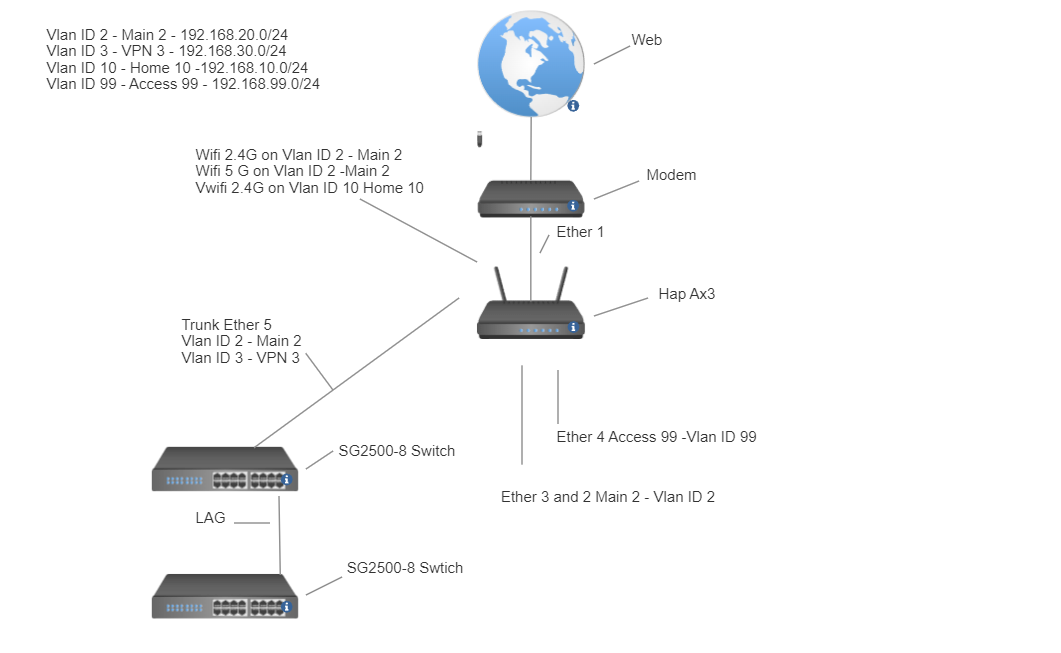
(1) Provide a network diagram it helps you visually plan your network and is a great communication tool. It is very unclear what your traffic flows are…

(2) Take one port and put if OFF bridge for now, to configure the router for bridge and emergency access. Since you have other switches you should be able to free up port5 for example.

(3) Dont mix apples and oranges something doesnt fit 192.168.88.0… either get rid of it as a default crap still hanging around or make it a vlan. The bridge should only do bridging and not dhcp etc… However I dont see where you use that subnet anywhere? Clearly that points to a problem.

(4) Bridge is not a lan list member, only the vlans.

(5) For all your vlans, you only use two of them vlan2 and vlan10, what is the purpose of 3,4 and 69???
Okay so you have ether5 acting as a trunk port but your bridge port assignment is incorrect in that regard.

(6) Interface bridge vlans is screwed up… big time… needs work.

(7) Firewall rules are less than optimal…and somewhat disorganized/incomplete.

(8) WWW is not a secure protocol and should be removed… other than winbox and SSH (and SSH not required if wireguard is up and running) all should be disabled.

(9) IPV6 should be DISABLED if not using.

(10) Mac-server is not secure should be set to NONE.

++++++++++++++++++++++++++++++++++++++++++++++

Overall not a bad effort, some cleaning up will get you on the way. First and foremost the diagram will solidify what you put down on the config.
a. identify all the user(s)/device(s) / groups of users/devices ( including remote users and admin )
b. identify all the traffic they should be able to accomplish.


I took off Vlan 4 and 69 and added and access vlan 99. Vlan 3 I want only on the switches for the 2nd port of my server. I tried the suggestion you made but im having a difficult time with interface bridge vlans. I searched the forms to see if I could find someone that posted a working config thats similar to mine so I general idea of how to set it up correctly. Firewall rules is another one of my weak points i’ll try getting a better handle on it once I can get everything connecting together. I appreciate your help.

Ok I think I have made some progress I can now access my devices on the switch and managed to ping them from the Ax3 I had to set native vlan to none on the Trunk port of the switch. Native vlan 2 didn’t work. I did set native vlan to 2 on every port on both switch besides the trunk port. Here is my config so far let me know what you think.


# 2023-08-24 07:52:50 by RouterOS 7.11
# software id =
#
# model = C53UiG+5HPaxD2HPaxD
# serial number = 
/interface bridge
add admin-mac= auto-mac=no comment=defconf frame-types=\
    admit-only-vlan-tagged name="Main Bridge" pvid=2 vlan-filtering=yes
/interface wifiwave2
set [ find default-name=wifi1 ] channel.band=5ghz-ax .skip-dfs-channels=\
    10min-cac .width=20/40/80mhz configuration.mode=ap .ssid="PsyMaster 5G" \
    disabled=no name="wifi1 5G" security.authentication-types=\
    wpa2-psk,wpa3-psk
set [ find default-name=wifi2 ] channel.band=2ghz-ax .skip-dfs-channels=\
    10min-cac .width=20/40mhz configuration.mode=ap .ssid="PsyMaster 2G" \
    disabled=no name="wifi2 2G" security.authentication-types=\
    wpa2-psk,wpa3-psk
/interface vlan
add interface="Main Bridge" name="Guest 10" vlan-id=10
add interface="Main Bridge" name="Master 2" vlan-id=2
add interface="Main Bridge" name="VPN 3" vlan-id=3
/interface wifiwave2
add configuration.mode=ap .ssid="PsyHome 2G" disabled=no mac-address=\
     master-interface="wifi2 2G" name=Home \
    security.authentication-types=wpa2-psk,wpa3-psk
/interface list
add comment=defconf name=WAN
add comment=defconf name=LAN
add name=VLAN
/iot lora servers
add address=eu.mikrotik.thethings.industries down-port=1700 name=TTN-EU \
    up-port=1700
add address=us.mikrotik.thethings.industries down-port=1700 name=TTN-US \
    up-port=1700
add address=eu1.cloud.thethings.industries down-port=1700 name=\
    "TTS Cloud (eu1)" up-port=1700
add address=nam1.cloud.thethings.industries down-port=1700 name=\
    "TTS Cloud (nam1)" up-port=1700
add address=au1.cloud.thethings.industries down-port=1700 name=\
    "TTS Cloud (au1)" up-port=1700
add address=eu1.cloud.thethings.network down-port=1700 name="TTN V3 (eu1)" \
    up-port=1700
add address=nam1.cloud.thethings.network down-port=1700 name="TTN V3 (nam1)" \
    up-port=1700
add address=au1.cloud.thethings.network down-port=1700 name="TTN V3 (au1)" \
    up-port=1700
/ip pool
add name=default-dhcp ranges=192.168.88.10-192.168.88.254
add name="Master 2" ranges=192.168.20.2-192.168.20.254
add name="VPN 3" ranges=192.168.30.2-192.168.30.254
add name="Guest 10" ranges=10.0.10.2-10.0.10.254
/ip dhcp-server
add address-pool="Master 2" interface="Master 2" lease-time=10m name=Master
add address-pool="VPN 3" interface="VPN 3" lease-time=10m name="VPN 3"
add address-pool="Guest 10" interface="Guest 10" lease-time=10m name=\
    "Guest 10"
/zerotier
set zt1 comment="ZeroTier Central controller - https://my.zerotier.com/" \
    disabled=yes disabled=yes name=zt1 port=9993
/interface bridge port
add bridge="Main Bridge" comment=defconf frame-types=\
    admit-only-untagged-and-priority-tagged interface=ether2 pvid=2
add bridge="Main Bridge" comment=defconf frame-types=\
    admit-only-untagged-and-priority-tagged interface=ether3 pvid=2
add bridge="Main Bridge" comment=defconf frame-types=\
    admit-only-untagged-and-priority-tagged interface=ether4 pvid=2
add bridge="Main Bridge" comment=defconf frame-types=admit-only-vlan-tagged \
    interface=ether5 pvid=2
add bridge="Main Bridge" comment=defconf frame-types=\
    admit-only-untagged-and-priority-tagged interface="wifi1 5G" pvid=2
add bridge="Main Bridge" comment=defconf frame-types=\
    admit-only-untagged-and-priority-tagged interface="wifi2 2G" pvid=2
add bridge="Main Bridge" frame-types=admit-only-untagged-and-priority-tagged \
    interface=Home pvid=10
/ip neighbor discovery-settings
set discover-interface-list=LAN
/interface bridge vlan
add bridge="Main Bridge" tagged="Main Bridge,ether5" vlan-ids=2
add bridge="Main Bridge" tagged="Main Bridge,ether5" vlan-ids=3
add bridge="Main Bridge" tagged="Main Bridge" vlan-ids=10
/interface list member
add comment=defconf interface="Main Bridge" list=LAN
add comment=defconf interface=ether1 list=WAN
add interface="Master 2" list=VLAN
add interface="Guest 10" list=VLAN
add interface="VPN 3" list=VLAN
add interface=*E list=VLAN
add interface=*F list=VLAN
/ip address
add address=192.168.20.1/24 interface="Master 2" network=192.168.20.0
add address=192.168.30.1/24 interface="VPN 3" network=192.168.30.0
add address=10.0.10.1/24 interface="Guest 10" network=10.0.10.0
/ip dhcp-client
add comment=defconf interface=ether1
/ip dhcp-server network
add address=10.0.10.0/24 dns-server=1.1.1.1,1.0.0.1 gateway=10.0.10.1
add address=192.168.20.0/24 dns-server=1.1.1.1,1.0.0.1 gateway=192.168.20.1
add address=192.168.30.0/24 dns-server=1.1.1.1,1.0.0.1 gateway=192.168.30.1
add address=192.168.40.0/24 dns-server=1.1.1.1,1.0.0.1 gateway=192.168.40.1
add address=192.168.69.0/24 dns-server=1.1.1.1,1.0.0.1 gateway=192.168.69.1
add address=192.168.88.0/24 comment=defconf dns-server=192.168.88.1 gateway=\
    192.168.88.1
/ip dns
set allow-remote-requests=yes servers=1.1.1.1,1.0.0.1
/ip dns static
add address=192.168.88.1 comment=defconf name=router.lan
/ip firewall filter
add action=accept chain=input comment=\
    "defconf: accept established,related,untracked" connection-state=\
    established,related,untracked
add action=accept chain=input comment="Allow VLAN" in-interface-list=VLAN
add action=accept chain=forward comment="VLAN Internet Access only" \
    connection-state=new in-interface-list=VLAN out-interface-list=WAN
add action=drop chain=input comment="defconf: drop invalid" connection-state=\
    invalid
add action=accept chain=input comment="defconf: accept ICMP" protocol=icmp
add action=accept chain=input comment=\
    "defconf: accept to local loopback (for CAPsMAN)" dst-address=127.0.0.1
add action=drop chain=input comment="defconf: drop all not coming from LAN" \
    in-interface-list=!LAN
add action=accept chain=forward comment="defconf: accept in ipsec policy" \
    ipsec-policy=in,ipsec
add action=accept chain=forward comment="defconf: accept out ipsec policy" \
    ipsec-policy=out,ipsec
add action=fasttrack-connection chain=forward comment="defconf: fasttrack" \
    connection-state=established,related hw-offload=yes
add action=accept chain=forward comment=\
    "defconf: accept established,related, untracked" connection-state=\
    established,related,untracked
add action=drop chain=forward comment="defconf: drop invalid" \
    connection-state=invalid
add action=drop chain=forward comment=\
    "defconf: drop all from WAN not DSTNATed" connection-nat-state=!dstnat \
    connection-state=new in-interface-list=WAN
/ip firewall nat
add action=masquerade chain=srcnat comment="defconf: masquerade" \
    ipsec-policy=out,none out-interface-list=WAN
/ip service
set telnet disabled=yes
set ftp disabled=yes
set www address=192.168.88.0/24,192.168.20.0/24
set ssh address=192.168.88.0/24,192.168.20.0/24 port=2244
set api disabled=yes
set winbox address=192.168.88.0/24,192.168.20.0/24
set api-ssl disabled=yes
/ipv6 firewall address-list
add address=::/128 comment="defconf: unspecified address" list=bad_ipv6
add address=::1/128 comment="defconf: lo" list=bad_ipv6
add address=fec0::/10 comment="defconf: site-local" list=bad_ipv6
add address=::ffff:0.0.0.0/96 comment="defconf: ipv4-mapped" list=bad_ipv6
add address=::/96 comment="defconf: ipv4 compat" list=bad_ipv6
add address=100::/64 comment="defconf: discard only " list=bad_ipv6
add address=2001:db8::/32 comment="defconf: documentation" list=bad_ipv6
add address=2001:10::/28 comment="defconf: ORCHID" list=bad_ipv6
add address=3ffe::/16 comment="defconf: 6bone" list=bad_ipv6
/ipv6 firewall filter
add action=accept chain=input comment=\
    "defconf: accept established,related,untracked" connection-state=\
    established,related,untracked
add action=drop chain=input comment="defconf: drop invalid" connection-state=\
    invalid
add action=accept chain=input comment="defconf: accept ICMPv6" protocol=\
    icmpv6
add action=accept chain=input comment="defconf: accept UDP traceroute" port=\
    33434-33534 protocol=udp
add action=accept chain=input comment=\
    "defconf: accept DHCPv6-Client prefix delegation." dst-port=546 protocol=\
    udp src-address=fe80::/10
add action=accept chain=input comment="defconf: accept IKE" dst-port=500,4500 \
    protocol=udp
add action=accept chain=input comment="defconf: accept ipsec AH" protocol=\
    ipsec-ah
add action=accept chain=input comment="defconf: accept ipsec ESP" protocol=\
    ipsec-esp
add action=accept chain=input comment=\
    "defconf: accept all that matches ipsec policy" ipsec-policy=in,ipsec
add action=drop chain=input comment=\
    "defconf: drop everything else not coming from LAN" in-interface-list=\
    !LAN
add action=accept chain=forward comment=\
    "defconf: accept established,related,untracked" connection-state=\
    established,related,untracked
add action=drop chain=forward comment="defconf: drop invalid" \
    connection-state=invalid
add action=drop chain=forward comment=\
    "defconf: drop packets with bad src ipv6" src-address-list=bad_ipv6
add action=drop chain=forward comment=\
    "defconf: drop packets with bad dst ipv6" dst-address-list=bad_ipv6
add action=drop chain=forward comment="defconf: rfc4890 drop hop-limit=1" \
    hop-limit=equal:1 protocol=icmpv6
add action=accept chain=forward comment="defconf: accept ICMPv6" protocol=\
    icmpv6
add action=accept chain=forward comment="defconf: accept HIP" protocol=139
add action=accept chain=forward comment="defconf: accept IKE" dst-port=\
    500,4500 protocol=udp
add action=accept chain=forward comment="defconf: accept ipsec AH" protocol=\
    ipsec-ah
add action=accept chain=forward comment="defconf: accept ipsec ESP" protocol=\
    ipsec-esp
add action=accept chain=forward comment=\
    "defconf: accept all that matches ipsec policy" ipsec-policy=in,ipsec
add action=drop chain=forward comment=\
    "defconf: drop everything else not coming from LAN" in-interface-list=\
    !LAN
/system clock
set time-zone-name=America/New_York
/system note
set show-at-login=no
/tool mac-server
set allowed-interface-list=LAN
/tool mac-server mac-winbox
set allowed-interface-list=LAN

Yeah I think I was making vlan tagging more complicated than it should be. Once I simplified it it started working.

Could you please use proper tags for code to not post “4 screens long” configuration
code.PNG

Mainly to show changes…
What is confusing to me is the extra additions that are not complete…

For example, you have three subnets identified in IP address and IP dhcp-server, this makes sense to me as you have 3 identified vlans.
SO…
WTF is this:
/ip pool
add name=default-dhcp ranges=192.168.88.10-192.168.88.254
add name=“Master 2” ranges=192.168.20.2-192.168.20.254
add name=“VPN 3” ranges=192.168.30.2-192.168.30.254
add name=“Guest 10” ranges=10.0.10.2-10.0.10.

OR this
/ip dhcp-server network
add address=10.0.10.0/24 dns-server=1.1.1.1,1.0.0.1 gateway=10.0.10.1
add address=192.168.20.0/24 dns-server=1.1.1.1,1.0.0.1 gateway=192.168.20.1
add address=192.168.30.0/24 dns-server=1.1.1.1,1.0.0.1 gateway=192.168.30.1

**add address=192.168.40.0/24 dns-server=1.1.1.1,1.0.0.1 gateway=192.168.40.1
add address=192.168.69.0/24 dns-server=1.1.1.1,1.0.0.1 gateway=192.168.69.1
add address=192.168.88.0/24 comment=defconf dns-server=192.168.88.1 gateway=**

BASICALLY you have a very confused network and not surprizing things are not working properly.
Ditch the extra crap … Including setting ipv6 to disabled if not using it.

Why do you have pVID=2 on /interface bridge port settings for bridge port ether5. If this is a trunk port, NO PVIDs!
If its a HYBRID port yes you are allowed one PVID addition to the config line BUT then why put only tagged frames on the same line… Illogical. Furthermore, your /interface bridge vlan states otherwise… Inconsistent where you have ether5, tagged for VLAN2.

IN other words, not only is the basic structure flawed so is your vlan structure.
Another example in your /interface bridge vlan settings you extend the close parenthesis for “Main Bridge” to include etherports?? Why??
add bridge=“Main Bridge” tagged=“Main Bridge,ether5**** vlan-ids=2
add bridge=“Main Bridge” tagged=“Main Bridge,ether5**** vlan-ids=3
add bridge=“Main Bridge” tagged=“Main Bridge” vlan-ids=10

When I saw your bridge definition, I knew it was going to be a dogs breakfast. :slight_smile:
See below to simplify config including bridge definition.

+++++++++++++++++++++++++++++++++++++++++++++++++++++++++++++++++++++

/interface bridge
add admin-mac= auto-mac=no name="Main Bridge" vlan-filtering=yes
/interface vlan
add interface="Main Bridge" name="Guest 10" vlan-id=10
add interface="Main Bridge" name="Master 2" vlan-id=2
add interface="Main Bridge" name="VPN 3" vlan-id=3
/interface list
add comment=defconf name=WAN
add comment=defconf name=LAN
/ip pool
add name="Master 2" ranges=192.168.20.2-192.168.20.254
add name="VPN 3" ranges=192.168.30.2-192.168.30.254
add name="Guest 10" ranges=10.0.10.2-10.0.10.254
/ip dhcp-server
add address-pool="Master 2" interface="Master 2" lease-time=10m name=Master
add address-pool="VPN 3" interface="VPN 3" lease-time=10m name="VPN 3"
add address-pool="Guest 10" interface="Guest 10" lease-time=10m name=\
    "Guest 10"
/interface bridge port
add bridge="Main Bridge"  ingress-filtering=yes admit-only-untagged-and-priority-tagged \ 
     interface=ether2 pvid=2
add bridge="Main Bridge"  ingress-filtering=yes admit-only-untagged-and-priority-tagged \ 
     interface=ether3 pvid=2
add bridge="Main Bridge"  ingress-filtering=yes admit-only-untagged-and-priority-tagged \ 
     interface=ether4 pvid=2
add bridge="Main Bridge" ingress-filtering=yes  frame-types= admit-only- vlan-tagged \
     interface=ether5
add bridge="Main Bridge"  ingress-filtering=yes admit-only-untagged-and-priority-tagged \ 
     interface="wifi1 5G" pvid=2
add bridge="Main Bridge"  ingress-filtering=yes admit-only-untagged-and-priority-tagged \ 
     interface="wifi2 2G" pvid=2
add bridge="Main Bridge"  ingress-filtering=yes admit-only-untagged-and-priority-tagged \ 
     interface=Home pvid=10
/ip neighbor discovery-settings
set discover-interface-list=LAN
/interface bridge vlan
add bridge="Main Bridge" tagged="Main Bridge",ether5  untagged=ether2,ether3,ether4,"wifi1 5G","wifi2 2G" vlan-ids=2
add bridge="Main Bridge" tagged="Main Bridge",ether5 vlan-ids=3
add bridge="Main Bridge" tagged="Main Bridge"  untagged=Home  vlan-ids=10
/interface list member
add comment=defconf interface=ether1 list=WAN
add interface="Master 2" list=LAN
add interface="Guest 10" list=LAN
add interface="VPN 3" list=LAN
/ip address
add address=192.168.20.1/24 interface="Master 2" network=192.168.20.0
add address=192.168.30.1/24 interface="VPN 3" network=192.168.30.0
add address=10.0.10.1/24 interface="Guest 10" network=10.0.10.0
/ip dhcp-client
add comment=defconf interface=ether1
/ip dhcp-server network
add address=10.0.10.0/24 dns-server=1.1.1.1,1.0.0.1 gateway=10.0.10.1
add address=192.168.20.0/24 dns-server=1.1.1.1,1.0.0.1 gateway=192.168.20.1
add address=192.168.30.0/24 dns-server=1.1.1.1,1.0.0.1 gateway=192.168.30.1
/ip dns
set allow-remote-requests=yes servers=1.1.1.1,1.0.0.1
/ip firewall address-list
add ip-address="Admin IP#1"  list=Authorized comment="admin desktop local"
add ip-address="Admin IP#2"  list=Authorized comment="admin laptop local"
add ip-address="Admin IP#3"  list=Authorized comment="admin smartphone local"
add ip-address="Admin IP#4"  list=Authorized comment="admin remote wireguard - just an example"
/ip firewall filter
{ Input Chain }
( default rules needed )
add action=accept chain=input comment=\
    "defconf: accept established,related,untracked" connection-state=\
    established,related,untracked
add action=drop chain=input comment="defconf: drop invalid" connection-state=\
    invalid
add action=accept chain=input comment="defconf: accept ICMP" protocol=icmp
add action=accept chain=input comment=\
    "defconf: accept to local loopback (for CAPsMAN)" dst-address=127.0.0.1
( admin rules )
add action=accept chain=input comment="Allow admin to config"  in-interface-list=LAN src-address-lis=Authorized
add acction=acdept chain=input comment="Services for all users"  dst-port=53 protocol=udp 
   in-interface-list=LAN
add acction=acdept chain=input comment="Services for all users"  dst-port=53 protocol=tcp 
   in-interface-list=LAN
add action=drop chain=input comment="drop all else"
{ forward chain }
( default rules needed )
add action=accept chain=forward comment="defconf: accept in ipsec policy" \
    ipsec-policy=in,ipsec
add action=accept chain=forward comment="defconf: accept out ipsec policy" \
    ipsec-policy=out,ipsec
add action=fasttrack-connection chain=forward comment="defconf: fasttrack" \
    connection-state=established,related hw-offload=yes
add action=accept chain=forward comment=\
    "defconf: accept established,related, untracked" connection-state=\
    established,related,untracked
add action=drop chain=forward comment="defconf: drop invalid" \
    connection-state=invalid
( admin rules )
add action=accept chain=forward comment="internet traffic"  in-interface-list=LAN out-interface-list=WAN
add action=accept chain=forward comment="admin access" src-address-list=Authorized out-interface-list=LAN
add action=accept chain=forward comment="port forwarding" connection-nat-state=dstnat  { disable/remove if not required }
add action=drop chain=forward comment="drop all else"
add action=masquerade chain=srcnat comment="defconf: masquerade" \
    ipsec-policy=out,none out-interface-list=WAN
/ip service
set telnet disabled=yes
set ftp disabled=yes
set www disabled=yes  { not secure do not use }
set ssh address=192.168.88.0/24,192.168.20.0/24 port=2244
set api disabled=yes
set winbox address=192.168.88.0/24,192.168.20.0/24
set api-ssl disabled=yes
/ipv6 settings
set disable-ipv6=yes forward=no
/system clock
set time-zone-name=America/New_York
/system note
set show-at-login=no
/tool mac-server
set allowed-interface-list=NONE  { set to NONE, is  not secure }
/tool mac-server mac-winbox
set allowed-interface-list=LAN

Sorry about that BartoszP I’ll use proper tags. Anav I had removed ipv6, the default DHCp and ip address and turned off unnecessary service, but I had to reload my old config and forgot to remove again that’s my bad. I rebuilt my config using the one you linked as a reference. I do appreciate all the help you are giving I am learning a lot.

# model = C53UiG+5HPaxD2HPaxD
# serial number = 
/interface bridge
add name="Da Bridge" vlan-filtering=yes
/interface ethernet
set [ find default-name=ether4 ] name="ether4 Access"
/interface wifiwave2
set [ find default-name=wifi2 ] channel.band=2ghz-ax .width=20/40mhz \
    configuration.mode=ap .ssid="PsyMaster 2G" disabled=no name="Wifi 2G" \
    security.authentication-types=wpa2-psk,wpa3-psk
set [ find default-name=wifi1 ] channel.band=5ghz-ax .width=20/40/80mhz \
    configuration.mode=ap .ssid="PsyMaster 5G" disabled=no name="Wifi 5G" \
    security.authentication-types=wpa2-psk,wpa3-psk
/interface vlan
add interface="Da Bridge" name="Home 10" vlan-id=10
add interface="Da Bridge" name="Master 2" vlan-id=2
add interface="Da Bridge" name="VPN 3" vlan-id=3
/interface wifiwave2
add configuration.mode=ap .ssid="PsyHome 2G" disabled=no mac-address=\
     master-interface="Wifi 2G" name=Home \
    security.authentication-types=wpa2-psk,wpa3-psk
/interface list
add name=WAN
add name=LAN
/iot lora servers
add address=eu.mikrotik.thethings.industries down-port=1700 name=TTN-EU \
    up-port=1700
add address=us.mikrotik.thethings.industries down-port=1700 name=TTN-US \
    up-port=1700
add address=eu1.cloud.thethings.industries down-port=1700 name=\
    "TTS Cloud (eu1)" up-port=1700
add address=nam1.cloud.thethings.industries down-port=1700 name=\
    "TTS Cloud (nam1)" up-port=1700
add address=au1.cloud.thethings.industries down-port=1700 name=\
    "TTS Cloud (au1)" up-port=1700
add address=eu1.cloud.thethings.network down-port=1700 name="TTN V3 (eu1)" \
    up-port=1700
add address=nam1.cloud.thethings.network down-port=1700 name="TTN V3 (nam1)" \
    up-port=1700
add address=au1.cloud.thethings.network down-port=1700 name="TTN V3 (au1)" \
    up-port=1700
/ip pool
add name="Master 2" ranges=192.168.20.2-192.168.20.254
add name="VPN 3" ranges=192.168.30.2-192.168.30.254
add name="Home 10" ranges=10.0.10.2-10.0.10.254
/ip dhcp-server
add address-pool="Master 2" interface="Master 2" lease-time=10m name=\
    "Master 2"
add address-pool="VPN 3" interface="VPN 3" lease-time=10m name="VPN 3"
add address-pool="Home 10" interface="Home 10" lease-time=10m name="Home 10"
/zerotier
set zt1 comment="ZeroTier Central controller - https://my.zerotier.com/" \
    disabled=yes disabled=yes name=zt1 port=9993
/interface bridge port
add bridge="Da Bridge" frame-types=admit-only-untagged-and-priority-tagged \
    interface=ether2 pvid=2
add bridge="Da Bridge" frame-types=admit-only-untagged-and-priority-tagged \
    interface=ether3 pvid=2
add bridge="Da Bridge" frame-types=admit-only-vlan-tagged interface=ether5
add bridge="Da Bridge" frame-types=admit-only-untagged-and-priority-tagged \
    interface="Wifi 5G" pvid=2
add bridge="Da Bridge" frame-types=admit-only-untagged-and-priority-tagged \
    interface="Wifi 2G" pvid=2
add bridge="Da Bridge" frame-types=admit-only-untagged-and-priority-tagged \
    interface=Home pvid=10
/ip neighbor discovery-settings
set discover-interface-list=!LAN
/ipv6 settings
set disable-ipv6=yes forward=no
/interface bridge vlan
add bridge="Da Bridge" tagged="Da Bridge,ether5" untagged=\
    "ether2,ether3,Wifi 5G,Wifi 2G" vlan-ids=2
add bridge="Da Bridge" tagged="Da Bridge,ether5" vlan-ids=3
add bridge="Da Bridge" tagged="Da Bridge" untagged=Home vlan-ids=10
/interface list member
add interface=ether1 list=WAN
add interface="Home 10" list=LAN
add interface="Master 2" list=LAN
add interface="VPN 3" list=LAN
/ip address
add address=192.168.99.1/24 interface="ether4 Access" network=192.168.99.0
add address=192.168.20.1/24 interface="Master 2" network=192.168.20.0
add address=192.168.30.1/24 interface="VPN 3" network=192.168.30.0
add address=10.0.10.1/24 interface="Home 10" network=10.0.10.0
/ip dhcp-client
add interface=ether1
/ip dhcp-server network
add address=10.0.10.0/24 dns-server=1.1.1.1,1.0.0.1 gateway=10.0.10.1
add address=192.168.20.0/24 dns-server=1.1.1.1,1.0.0.1 gateway=192.168.20.1
add address=192.168.30.0/24 dns-server=1.1.1.1,1.0.0.1 gateway=192.168.30.1
/ip dns
set allow-remote-requests=yes servers=1.1.1.1,1.0.0.1
/ip firewall address-list
add address=192.168.20.65 comment="admin laptop local" list=Authorized
add address=192.168.20.64 comment="admin tablet local" list=Authorized
add address=192.168.20.63 comment="admin cell local" list=Authorized
add address=192.168.99.65 comment="admin offbridge laptop" list=Authorized
/ip firewall filter
add action=accept chain=input comment=\
    "defconf: accept established,related,untracked" connection-state=\
    established,related,untracked
add action=drop chain=input comment="defconf: drop invalid" connection-state=\
    invalid
add action=accept chain=input comment="defconf: accept ICMP" protocol=icmp
add action=accept chain=input comment=\
    "defconf: accept to local loopback (for CAPsMAN)" dst-address=127.0.0.1
add action=accept chain=input comment="Allow admin to config" \
    in-interface-list=LAN src-address-list=Authorized
add action=accept chain=input comment="Services for all users" dst-port=53 \
    in-interface-list=LAN protocol=udp
add action=accept chain=input comment="Services for all users" dst-port=53 \
    in-interface-list=LAN protocol=tcp
add action=drop chain=input comment="drop all else"
add action=accept chain=forward comment="defconf: accept in ipsec policy" \
    ipsec-policy=in,ipsec
add action=accept chain=forward comment="defconf: accept out ipsec policy" \
    ipsec-policy=out,ipsec
add action=fasttrack-connection chain=forward comment="defconf: fasttrack" \
    connection-state=established,related hw-offload=yes
add action=accept chain=forward comment=\
    "defconf: accept established,related, untracked" connection-state=\
    established,related,untracked
add action=drop chain=forward comment="defconf: drop invalid" \
    connection-state=invalid
add action=accept chain=forward comment="internet traffic" in-interface-list=\
    LAN out-interface-list=WAN
add action=accept chain=forward comment="admin access" out-interface-list=LAN \
    src-address-list=Authorized
add action=accept chain=forward comment="port forwarding" \
    connection-nat-state=dstnat
add action=drop chain=forward comment="drop all else"
/ip firewall nat
add action=masquerade chain=srcnat comment="defconf: masquerade" \
    ipsec-policy=out,none out-interface-list=WAN
/ip service
set telnet disabled=yes
set ftp disabled=yes
set www disabled=yes
set ssh port=2244
set api disabled=yes
set api-ssl disabled=yes
/system clock
set time-zone-name=America/New_York
/system note
set show-at-login=no
/tool mac-server
set allowed-interface-list=none
/tool mac-server mac-winbox
set allowed-interface-list=LAN

I’m not sure why its still putting ether 5 in the parenthesis
add bridge=“Da Bridge” tagged=“Da Bridge,ether5” untagged=
“ether2,ether3,Wifi 5G,Wifi 2G” vlan-ids=2

(1) Remove the exclamation mark, you want the LAN interface list to be the discovery list.
/ip neighbor discovery-settings
set discover-interface-list=**!**LAN

(2) As far as quotation marks are concerned, either you have finger troubles or your router is acting very weird, which one do I presume…
So to alleviate both,
change all your names to NOT uses quote marks… should only be used for comments anyway.

Da-Bridge
Home-10
Master-2
VPN-3
wifi-5G
wifi-2G
ether4-access

(3) Don’t forget to add ether4-access to the LAN interface list!!!

Ohh I did not know that if there’s a space in the name it quotes it. I updated the names, removed the exclamation mark and added ether4- Access to LAN list.

Is everything now working as required? If not post the latest config and let us know what is not working.

Everything seems to be working fine. I left the sids the way they are so I don’t need to re-login from everyone’s devices.

 model = C53UiG+5HPaxD2HPaxD
# serial number =
/interface bridge
add name=Da-Bridge vlan-filtering=yes
/interface ethernet
set [ find default-name=ether4 ] name=ether4-Access
/interface wifiwave2
set [ find default-name=wifi2 ] channel.band=2ghz-ax .width=20/40mhz \
    configuration.mode=ap .ssid="PsyMaster 2G" disabled=no name=Wifi-2G \
    security.authentication-types=wpa2-psk,wpa3-psk
set [ find default-name=wifi1 ] channel.band=5ghz-ax .width=20/40/80mhz \
    configuration.mode=ap .ssid="PsyMaster 5G" disabled=no name=Wifi-5G \
    security.authentication-types=wpa2-psk,wpa3-psk
/interface vlan
add interface=Da-Bridge name=Home-10 vlan-id=10
add interface=Da-Bridge name=Master-2 vlan-id=2
add interface=Da-Bridge name=VPN-3 vlan-id=3
/interface wifiwave2
add configuration.mode=ap .ssid="PsyHome 2G" disabled=no mac-address=\
    4A:A9:8A:EE:1D:C9 master-interface=Wifi-2G name=Home \
    security.authentication-types=wpa2-psk,wpa3-psk
/interface list
add name=WAN
add name=LAN
/iot lora servers
add address=eu.mikrotik.thethings.industries down-port=1700 name=TTN-EU \
    up-port=1700
add address=us.mikrotik.thethings.industries down-port=1700 name=TTN-US \
    up-port=1700
add address=eu1.cloud.thethings.industries down-port=1700 name=\
    "TTS Cloud (eu1)" up-port=1700
add address=nam1.cloud.thethings.industries down-port=1700 name=\
    "TTS Cloud (nam1)" up-port=1700
add address=au1.cloud.thethings.industries down-port=1700 name=\
    "TTS Cloud (au1)" up-port=1700
add address=eu1.cloud.thethings.network down-port=1700 name="TTN V3 (eu1)" \
    up-port=1700
add address=nam1.cloud.thethings.network down-port=1700 name="TTN V3 (nam1)" \
    up-port=1700
add address=au1.cloud.thethings.network down-port=1700 name="TTN V3 (au1)" \
    up-port=1700
/ip pool
add name=Master-2 ranges=192.168.20.2-192.168.20.254
add name=VPN-3 ranges=192.168.30.2-192.168.30.254
add name=Home-10 ranges=10.0.10.2-10.0.10.254
/ip dhcp-server
add address-pool=Master-2 interface=Master-2 lease-time=10m name=Master-2
add address-pool=VPN-3 interface=VPN-3 lease-time=10m name=VPN-3
add address-pool=Home-10 interface=Home-10 lease-time=10m name=Home-10
/zerotier
set zt1 comment="ZeroTier Central controller - https://my.zerotier.com/" \
    disabled=yes disabled=yes name=zt1 port=9993
/interface bridge port
add bridge=Da-Bridge frame-types=admit-only-untagged-and-priority-tagged \
    interface=ether2 pvid=2
add bridge=Da-Bridge frame-types=admit-only-untagged-and-priority-tagged \
    interface=ether3 pvid=2
add bridge=Da-Bridge frame-types=admit-only-vlan-tagged interface=ether5
add bridge=Da-Bridge frame-types=admit-only-untagged-and-priority-tagged \
    interface=Wifi-5G pvid=2
add bridge=Da-Bridge frame-types=admit-only-untagged-and-priority-tagged \
    interface=Wifi-2G pvid=2
add bridge=Da-Bridge frame-types=admit-only-untagged-and-priority-tagged \
    interface=Home pvid=10
/ip neighbor discovery-settings
set discover-interface-list=LAN
/ipv6 settings
set disable-ipv6=yes forward=no
/interface bridge vlan
add bridge=Da-Bridge tagged=Da-Bridge,ether5 untagged=\
    ether2,ether3,Wifi-5G,Wifi-2G vlan-ids=2
add bridge=Da-Bridge tagged=Da-Bridge,ether5 vlan-ids=3
add bridge=Da-Bridge tagged=Da-Bridge untagged=Home vlan-ids=10
/interface list member
add interface=ether1 list=WAN
add interface=Home-10 list=LAN
add interface=Master-2 list=LAN
add interface=VPN-3 list=LAN
add interface=ether4-Access list=LAN
/ip address
add address=192.168.99.1/24 interface=ether4-Access network=192.168.99.0
add address=192.168.20.1/24 interface=Master-2 network=192.168.20.0
add address=192.168.30.1/24 interface=VPN-3 network=192.168.30.0
add address=10.0.10.1/24 interface=Home-10 network=10.0.10.0
/ip dhcp-client
add interface=ether1
/ip dhcp-server network
add address=10.0.10.0/24 dns-server=1.1.1.1,1.0.0.1 gateway=10.0.10.1
add address=192.168.20.0/24 dns-server=1.1.1.1,1.0.0.1 gateway=192.168.20.1
add address=192.168.30.0/24 dns-server=1.1.1.1,1.0.0.1 gateway=192.168.30.1
/ip dns
set allow-remote-requests=yes servers=1.1.1.1,1.0.0.1
/ip firewall address-list
add address=192.168.20.65 comment="admin laptop local" list=Authorized
add address=192.168.20.64 comment="admin tablet local" list=Authorized
add address=192.168.20.63 comment="admin cell local" list=Authorized
add address=192.168.99.65 comment="admin offbridge laptop" list=Authorized
/ip firewall filter
add action=accept chain=input comment=\
    "defconf: accept established,related,untracked" connection-state=\
    established,related,untracked
add action=drop chain=input comment="defconf: drop invalid" connection-state=\
    invalid
add action=accept chain=input comment="defconf: accept ICMP" protocol=icmp
add action=accept chain=input comment=\
    "defconf: accept to local loopback (for CAPsMAN)" dst-address=127.0.0.1
add action=accept chain=input comment="Allow admin to config" \
    in-interface-list=LAN src-address-list=Authorized
add action=accept chain=input comment="Services for all users" dst-port=53 \
    in-interface-list=LAN protocol=udp
add action=accept chain=input comment="Services for all users" dst-port=53 \
    in-interface-list=LAN protocol=tcp
add action=drop chain=input comment="drop all else"
add action=accept chain=forward comment="defconf: accept in ipsec policy" \
    ipsec-policy=in,ipsec
add action=accept chain=forward comment="defconf: accept out ipsec policy" \
    ipsec-policy=out,ipsec
add action=fasttrack-connection chain=forward comment="defconf: fasttrack" \
    connection-state=established,related hw-offload=yes
add action=accept chain=forward comment=\
    "defconf: accept established,related, untracked" connection-state=\
    established,related,untracked
add action=drop chain=forward comment="defconf: drop invalid" \
    connection-state=invalid
add action=accept chain=forward comment="internet traffic" in-interface-list=\
    LAN out-interface-list=WAN
add action=accept chain=forward comment="admin access" out-interface-list=LAN \
    src-address-list=Authorized
add action=accept chain=forward comment="port forwarding" \
    connection-nat-state=dstnat
add action=drop chain=forward comment="drop all else"
/ip firewall nat
add action=masquerade chain=srcnat comment="defconf: masquerade" \
    ipsec-policy=out,none out-interface-list=WAN
/ip service
set telnet disabled=yes
set ftp disabled=yes
set www disabled=yes
set ssh port=2244
set api disabled=yes
set api-ssl disabled=yes
/system clock
set time-zone-name=America/New_York
/system note
set show-at-login=no
/tool mac-server
set allowed-interface-list=none
/tool mac-server mac-winbox
set allowed-interface-list=LAN

Next i’ll be setting up Mullvad through wireguard on VPN-3. We will see how that goes. I did see in another post you said that if a vpn connection on wireguard drops there is no leak. Is that correct?

That is my understanding…
