That is completely erroneous AI garbage, and should be treated as such.
Can you tell me if the problem is physical or can it be solved with Mikrotik software updates? Can you tell me if the problem is physical or can be fixed with Mikrotik software updates? Thanks!
It’s like there’s a glitch in the Matrix.
Im pretty sure no one here has access to enough information to say what exactly the issue is.
Wait some more, six/seven days is too short a time.
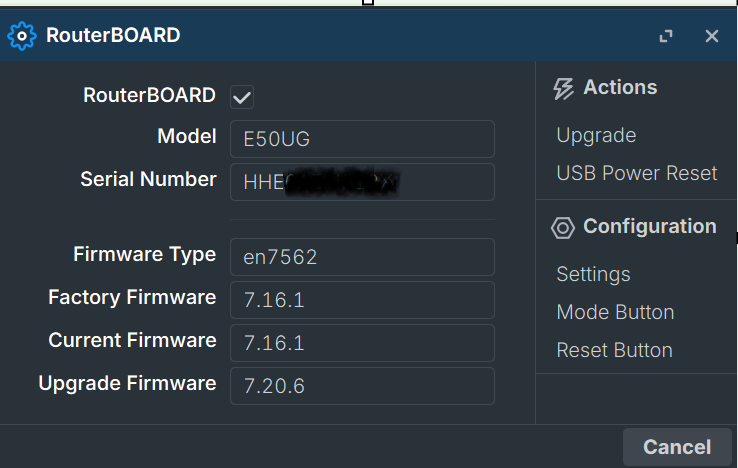
So, six months or so have passed since this post was created. Today I decide to try again the E50UG against my GPON provider handoff.
I am shocked to see that on 7.20.4 I am now getting full upload speed through my E50UG to my provider (!!). My sup-case was not updated in months, and I do not see specific release notes about it either.
Can anyone else in thread check to see if your problems are gone using 7.20.4? I know my issue was not PPPoE related like others here, but something has definitely changed….
I have swapped in the E50UG running 7.20.4 as my edge router and am going to let it run to check stability/performance/etc. I hope MikroTik can confirm they did somethig specifically to fix this, as I’ve wanted to use this model series (EN7562CT) for a bunch of things, and I also see new hEX S AP (!) coming out which I also definitely have a use case for.
There were changes made in 7.20beta5, and also available for 7.19.6:
- ethernet - improved performance for hEX Refresh and hEX S (2025);
I do not consider that to be “specific”. As my case was not updated since months either my assumption is that is unrelated. Waiting on MikroTik to confirm.
Nevermind, my previous post is a false positive. The problem is still 100% present.
I forgot I had enabled a queue-tree on ether1/wan when I was messing around. If I leave thate cake queue enabled, I get near total throughput on upload (my ISP gives me 300Mb symmetrical):
    Latency:     9.64 ms   (0.17 ms jitter)
   Download:   286.50 Mbps (data used: 129.2 MB )
     Upload:   264.93 Mbps (data used: 283.2 MB )
Packet Loss:     0.0%
If I disable the queue-tree enabled on ether1/wan:
    Latency:     4.69 ms   (0.26 ms jitter)
   Download:   284.93 Mbps (data used: 128.8 MB )
     Upload:    10.07 Mbps (data used: 11.1 MB )
Packet Loss:     0.0%
Apologies for the false hopes. Although it is interesting that assigning a queue to the ether1 interface makes that huge of a difference.
Ether1 is still totally broken, then.
Hey, I am still experiencing the issue and performed some additional tests that I provided to MikroTik.
The first was an iperf3 test with Eth1 was the WAN port, and got crawling upload speeds compared to when Eth2 was the WAN port.
Eth1 as WAN:
$ iperf3 -c speedtest.wdc2.us.leaseweb.net -p 5201-5210
Connecting to host speedtest.wdc2.us.leaseweb.net, port 5201
[  5] local 172.17.150.40 port 41656 connected to 23.105.9.80 port 5201
[ ID] Interval           Transfer     Bitrate         Retr  Cwnd
[  5]   0.00-1.01   sec   128 KBytes  1.04 Mbits/sec   22   2.83 KBytes
[  5]   1.01-2.02   sec  0.00 Bytes  0.00 bits/sec   13   2.83 KBytes
[  5]   2.02-3.02   sec   128 KBytes  1.05 Mbits/sec   15   1.41 KBytes
[  5]   3.02-4.02   sec  0.00 Bytes  0.00 bits/sec   12   2.83 KBytes
[  5]   4.02-5.00   sec  0.00 Bytes  0.00 bits/sec   14   2.83 KBytes
[  5]   5.00-6.00   sec   128 KBytes  1.05 Mbits/sec   14   1.41 KBytes
[  5]   6.00-7.02   sec  0.00 Bytes  0.00 bits/sec   14   1.41 KBytes
[  5]   7.02-8.02   sec  0.00 Bytes  0.00 bits/sec   13   2.83 KBytes
[  5]   8.02-9.02   sec  0.00 Bytes  0.00 bits/sec   13   4.24 KBytes
[  5]   9.02-10.02  sec   128 KBytes  1.05 Mbits/sec   14   2.83 KBytes
- - - - - - - - - - - - - - - - - - - - - - - - -
[ ID] Interval           Transfer     Bitrate         Retr
[  5]   0.00-10.02  sec   512 KBytes   418 Kbits/sec  144             sender
[  5]   0.00-9.84   sec   471 KBytes   392 Kbits/sec                  receiver

iperf Done.
Eth2 as WAN:
$ iperf3 -c speedtest.wdc2.us.leaseweb.net -p 5201-5210
Connecting to host speedtest.wdc2.us.leaseweb.net, port 5201
[  5] local 172.17.150.40 port 41192 connected to 23.105.9.80 port 5201
[ ID] Interval           Transfer     Bitrate         Retr  Cwnd
[  5]   0.00-1.00   sec  13.1 MBytes   110 Mbits/sec   24    206 KBytes
[  5]   1.00-2.00   sec  17.1 MBytes   144 Mbits/sec    0    262 KBytes
[  5]   2.00-3.00   sec  21.2 MBytes   178 Mbits/sec    0    318 KBytes
[  5]   3.00-4.00   sec  24.6 MBytes   206 Mbits/sec    0    372 KBytes
[  5]   4.00-5.00   sec  29.1 MBytes   244 Mbits/sec    0    428 KBytes
[  5]   5.00-6.00   sec  34.6 MBytes   290 Mbits/sec    0    485 KBytes
[  5]   6.00-7.00   sec  39.5 MBytes   330 Mbits/sec    0    544 KBytes
[  5]   7.00-8.00   sec  39.0 MBytes   328 Mbits/sec    0    598 KBytes
[  5]   8.00-9.00   sec  38.2 MBytes   321 Mbits/sec    1    468 KBytes
[  5]   9.00-10.00  sec  38.6 MBytes   324 Mbits/sec    0    532 KBytes
- - - - - - - - - - - - - - - - - - - - - - - - -
[ ID] Interval           Transfer     Bitrate         Retr
[  5]   0.00-10.00  sec   295 MBytes   248 Mbits/sec   25             sender
[  5]   0.00-9.88   sec   293 MBytes   249 Mbits/sec                  receiver

iperf Done.
Additionally, when Eth2 was the WAN to my ONT, I bridged Eth1 to see if I could replicate any issues with traffic between Eth1 and Eth3 and achieved near wire speeds, accounting for protocol framing overhead.
The problem occurs only when Eth1 is the WAN port. Also, my test with Eth1 indicates it’s not hardware-related but rather a firmware issue when Eth1 is the WAN port.
MikroTik said they have been unable to replicate and are working to acquire the Nokia G-211M-C ONT that I have with Verizon FiOS to try to replicate with matching hardware.
I wonder if we will hit the one year mark for this thread’s existence with this still being broken.
It is definitely a problem with only the E50UG since my L009, my RB5009, my hAP ax3, my RB760iGS and my RB750Gr3 all work fine when plugged in, without this ludicrous layer 2 silicon bug or whatever it is happening.
Oh well, now I know to just avoid all products they make with Econet EN7562CT inside. Too bad.
E50UG with “factory” defaults from power-on reset.
E50UG - 192.168.88.1
WAN port - ether1 with DHCP (192.168.1.56).
Client - 192.168.88.2
external iperf3 server - 192.168.1.66
Results:
Direct 1 thread 944Mbps - sender(192.168.88.2) 944Mbps - receiver(192.168.1.66)
Revers 1 thread 919Mbps - sender(192.168.1.66) 916Mbps- receiver(192.168.88.2)
Direct 4 threads 955Mbps - sender(192.168.88.2) 945Mbps - receiver(192.168.1.66)
Revers 4 threads 948Mbps - sender(192.168.1.66) 946Mbps- receiver(192.168.88.2)
Internet speed on GPON 500Mbps (by ISP contract) - 535/548Mbps.
So, as is …

Yes for some it works, for plenty of others it does not. That chip/phy is not handling some ethernet variable correctly and apparently it’s beyond Econet/Mediatek and/or MikroTik’s ability to figure out or care about.
So try PPPOE.
Given everything reported I am still of the opinion that the built-in PHY on EN7562CT is simply not handling Ethernet pause frames it receives correctly. I know for a fact that my particular provider (FiOS) does send pause frames (for some stupid reason) to control the upload bandwidth. Multiple people report sticking a dumb switch in front of this router somehow magically fixes the problem….
If I use my other MikroTik routers, they perform as expected without this 10Mbps crippling effect, even though RX pause frame processing should be disabled on all of them, including the E50UG….
Please, someone from MikroTik (@normis?), it’s been almost a year now, can you please double check the Ethernet pause frame configuration and behavior on these models having EN7562CT WAN port???
Also, can you please ask MediaTek/Econet if there is some BUG on these SOCs dealing with pause frames?
Please…
Hi,
I’m also using an EN7562CT-based device, which is the hAP ax S, with the same setup as yours that is the device connected to the bridge-mode fibre modem.
I’m guessing you have your ethernet queues in only-hardware-queueconfiguration. Could you indulge me and try the following?
> /queue type add fq-codel-ecn=no kind=fq-codel name=fq-codel-ethernet-default
> /queue interface set [find where queue=only-hardware-queue] queue=fq-codel-ethernet-default
> /system reboot
You could try to reboot the system after making the changes for good measure. If you can’t reboot, then proceed with testing nonetheless.
Let me know if this improves on the issue you’re experiencing.
Unfortunately, no, I cannot indulge you. I already know that playing around with various queues will change the behavior (see my post #170 in this same thread).
This does not change the fact that I do NOT have to mess with queues (or change any other setting) on any other MikroTik router I own (including RB750Gr3, which this model is supposed to replace) that all work fine when connected at factory default values, to the very same GPON handoff and cable.
Something is wrong with the E50UG/EN7562CT chip in it’s current state. I refuse to “work around” a defective product. It should be fixed, period.
Then you should already know by now that these hardware-queues are like black boxes themselves, and they exist in the hardware network interface card, aka NIC, that Mikrotik puts in their networking equipment. Mikrotik did not manufacture them, so if you wish to fix such queues, which creates the behavior that you are experiencing and which the bufferbloat movement that understood the science behind it very well have already successfully fixed such issues for years now, then you should be sending mails to the manufacturer themselves.
Being the black boxes that they are, you cannot expect hardware-queues to behave the same or at least similar across the board for all manufacturers that produces NICs, even for every NIC that such a manufacturer produce. You have experienced this firsthand yourself, why it wasn’t a problem before with another device but not this one. I won’t rehash all the concepts that have been said before regarding software vs hardware queues that the bufferbloat movement have already done so in the past (because I admit I am not as well-versed about such subject).
The OpenWrt Project have already been using “smart” queues (fq_codel, cake, etc.) instead of “dumb” hardware queues in the networking firmwares they produce, because such “smart” queues fix the issues one of which you are experiencing.
Of course I wouldn’t try to change your mind nor stop you from the path you have already undertaken regarding this. 
I’m only showing you that the issue you’re experiencing is already well understood and that the problem has been identified and solutions are already available. You just need to take your poison, so to speak. On the part of Mikrotik, I’m not knowledgeable enough on the reason why they chose to set fq-codel-ethernet-defaultfor ethernet queues on LTE (and 5G?) devices only, and leave only-hardware-queuefor all other else.
Yes I am well aware of bufferbloat. This, however has nothing to do with the problem of this router.
If putting a dumb 1Gb switch in front of this router and between my providers handoff makes it go full speed, while changing nothing else, then the problem is not bufferbloat. Plain and simple.
I appreciate the time you took to type all of that, but it’s not the problem here with this unit.
Fascinating reading through all this, what a complex problem it seems. Would it be wise to avoid devices with the EN7562CT SOC?
Bufferbloat is one of the effects, queuing is the cause. I hope I have clearly pointed that out.
You’re still dealing with black boxes. By putting a switch infront of the router, you’re effectively letting the hardware-queues of the switch take the brunt of the flow of data, still in a straightforward first-in, first-out manner, thus labelled “dumb”, where the hardware-queue of the router in question gets easily filled up, for reasons only the manufacturer would know as they have designed the NIC.
This is the same scenario when you put “smart”software-queues on top of the hardware-queue of the router in question, only that the switch here is now replaced by the “smart”software-queue that manages the arriving packets of data into “flows” for better traffic management, not the simplistic FIFO only a hardware-queue knows.
Now does this all mean that the router has some hardware fault? Why you observe the issue you’re observing and why placing a switch in front of it enables full throughput, or when software-queues come into play and the issue somehow “magically” disappears? Not at all. That is just hardware queuing playing against you in a game of chicken.
Now if you’re of the belief that factory defaults must be preserved at all cost so as not to require a workaround on an issue that you’re experiencing, then perhaps you could only wait until Mikrotik decides to change the default, factory configuration that works for you. The solution is already available. Perhaps bug Mikrotik support about this, to change the default configuration for you?
Thank you.
You don’t have to avoid anything if you’re armed with the knowledge about the problem and the solutions are already available to you to make it work to your needs.