I’m about to replace my ER-X with a Mikrotik router: hEX Refresh or hAP AX2 (with wifi disabled).
I’ve already learned alot about those devices from topics like Hap ax2 vs hex s 2025 for 1gig service, but there a a few differences between the two devices for which I do not know if one or the other is better for my situation.
My situation:
WAN connection currently less than 1Gbps, but will be upgraded to 1Gbps eventually
The router is placed after the ISP modem and connected to WAN on eth1 (so no need for SFP)
eth2 - eth5 are connected to dedicated switches (mix of managed and unmanaged)
Wifi is handled by separate AP’s, so no need for wifi on the router.
I have a few VLANs (currently less than 5). These are not port based VLAN’s on the router, but via tagging on an AP’s or managed switch
VLAN traffic (inter-VLAN, VLAN to WAN, …) is controlled by firewall rules on the router
I’m not planning on running containers on the router
Device should last 5+ years
My question:
On the hEX Refresh, eth1 is not connected to the switch chip, but the switch chip offers more hardware offloading options than the switch chip on the AX2 (my knowledge about HW offloading is limited).
Will this difference affect my situation and make the hEX Refresh or the AX2 a better choice for my situation?
Any other differences that I might have missed that could impact my situation (other than the fact that the AX2 is more powerful than the hEX Refresh)?
My reading is that HW offloading skips firewall rule processing on the CPU. If you are routing from the WAN via eth1 then it would never be on the switch chip for HW offloading so that factor can be ignored. The chip’s benefit is for LAN/VLAN ports 2-5; pretty much why it was designed that way.
I am not making a recommendation between Hex Refresh and ax2, just trying to clarify that aspect. I use the former for a special task within the network, not on WAN, and the latter as a super-travel-router for travel with other people. There are many ways to use Mikrotiks.
If your router is going to do inter-VLAN and VLAN-WAN routing then of course the hAP ax² will be much more preferable, with twice the CPU performance.
The switch chip on the hEX refresh it not an advantage in this context, and as you already have other switches and APs that do most of the switching already, the integrated 4-port switch in the hEX refresh won't even be needed, because it can only do L2 hardware offload and a $25 5-port managed switch is already better at that task.
I agree with @CGGXANNX. The hapax2 with wifi turned off will be a higher performance router.
The hapax2 will probably be sufficient. However, if you are planning to keep for 5+ years, the ~ $120 more that a RB5009 cost isn't much per month ($2/month without figuring in inflation) and it is a much nicer router than the hapax2 if you don't need wifi), a superior CPU and switch compared to either of the other two choices. That's less than a cup of coffee at a coffee shop per month.
If you have a lot of intra-vlan traffic between the external switches, that will be processed by the CPU on the hapax2. But if you find that is a problem, you can always use your ER-X as a 5 port managed switch, there is even a configuration setup wizard to configure the ER-X as a 5 port switch, e.g. see this.
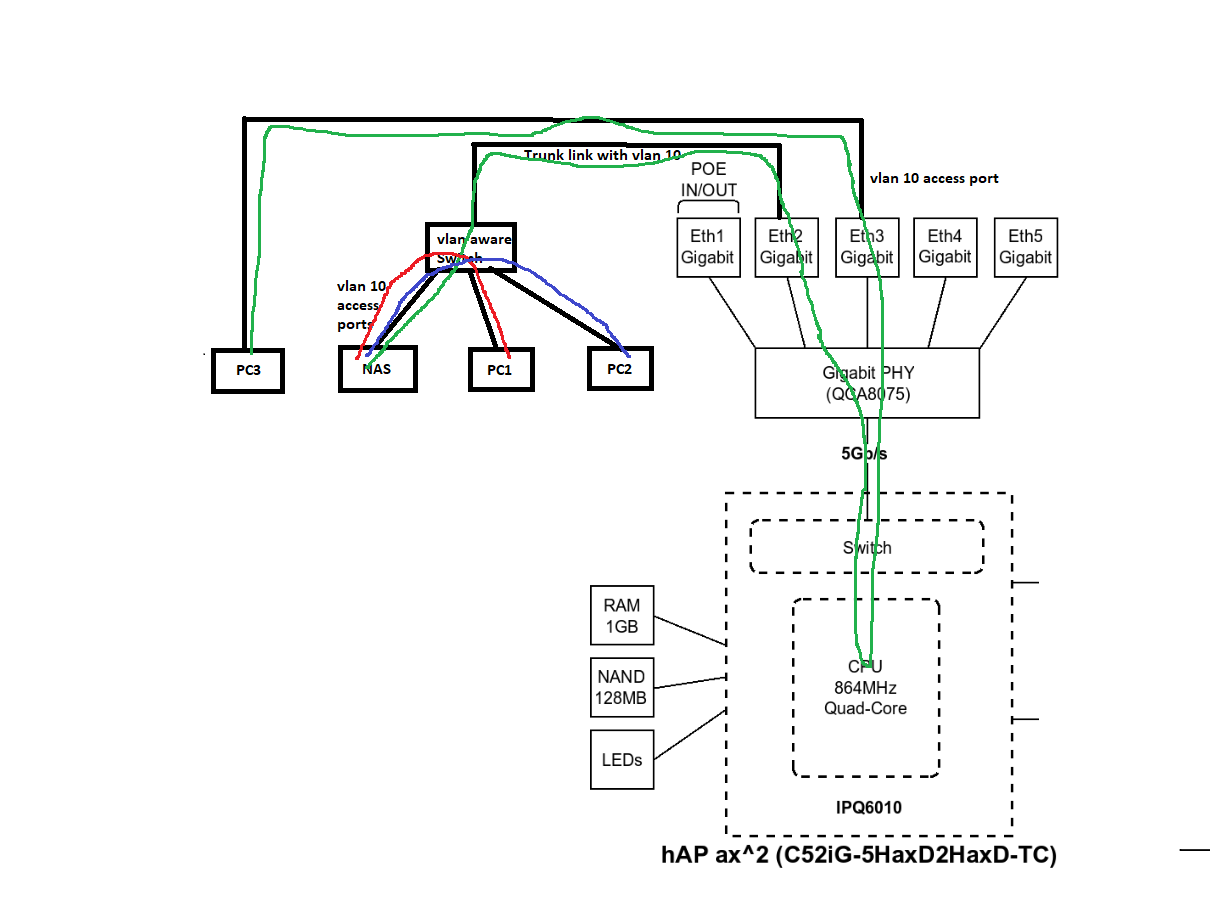
If you don't have much intra-vlan traffic between external switches, then you won't notice much difference with the addition of a 5 port managed switch or the ER-X. But if you are trunking vlans between the switches, and for example accessing a NAS connected to one of the external switches from a PC on the same vlan connected through another switch, then having the extra managed vlan aware switch between the hapax2 and the other 4 switches will offload the L2 traffic from the software bridge on the hapax2.
@Buckeye I know the RB5009 is better, but I stick to either the AX2 or Hex Refresh.
But the NAS case is very relevant. Sot let’s see if I understand this correctly.
The NAS is accessed from different computers in the same VLAN as the NAS. But not all computers are physically connected to the same switch, and thus port on the router, as the NAS.
Am I correct that, because this traffic is in the same VLAN, the switch chip in the hEX Refresh/AX2 wil take care of this traffic and not the CPU (even if the IN and OUT port on the router are different). So I can expect 1Gbps speeds between the computers and the NAS?
The ax² has no working hardware offload for bridge, but it has no problem with switching (same VLAN between its ports) at wire-speed. 2.4 Gbps throughput should be possible if you look at the Bridging (fast path) numbers that MikroTik published (even the 512-byte column). If you can use Fasttrack, then the inter-VLAN routing performance will also approach that value, because most of the packets will travel in fast path (the Routing none row).
So, while it might not have single digit CPU load when switching at wire-speed (1Gbps), switching including VLAN handling will probably not use more than half a core at 1 Gbps. The hAP ax² has a slightly better CPU than the older hAP ac², and here you can see real benchmark showing that non HW offloaded switching with VLAN at 1 Gbps only use 1/8th of the available CPU power of the hAP ac² at half of the possible CPU clock.
A small note: the problem doesn't occur while the CPU is < 80%. If you overload the CPU in some scenarios, you'll experience bridge connection degradation. That's why AX2 isn't suitable for your purposes.
The Hex Refresh has an EN7523 switch (see this). So that supports HW offloaded bridge and should handle intra-vlan traffic in the EN7523 chip included in the SoC. The hapax2 switch chip is not supported by ROS, and I don't even know if the switches "PPE" packet processing engine has the ability to process vlan tags; I have seen conflicting information. But ROS does not currently support vlans in hardware on the IPQ6010.
This shows the data path of intra-vlan traffic when going between vlan interfaces on the hapax2 vs going through an external vlan-aware switch.
If you are not doing massive transfers between pcs and the NAS (backups, graphics editing, etc) then you probably won't notice the difference. I don't know what will happen if the CPU gets saturated with IRQ processing, probably packets will be dropped. But if you find it is a problem, you can put a 5 port vlan-aware switch connected to the hapax2 and then connect your other switches to it. That should then prevent the (vast majority of) intra-vlan traffic from hitting the hapax2 interface. And unless you have other plans for the ER-X, it could fulfill that role without having to purchase another switch.
@CGGXANNX and @Buckeye thank you very much for your very detailed explanations. This is very helpful.
Now I fully understand what to expect from these devices.
And as I read somewhere else on this forum, it seems that within the price range I’m shopping for a Mikrotik router, there is always a compromise to be made (a router with a better CPU and more RAM can still offer less features and performance in some cases than a cheaper router).
It's very simple. If you run a test, port-to-port, at 1 Gbps, with small packets, and simultaneously load the CPU with something, like a VPN or even regular routing (mangle), you'll see your speed test become unstable. On the other hand, it's still a good device. But as was correctly noted above, it's still worse than a regular switch.
As for the Hex Refresh, I honestly don't understand. We already have two devices, and two more are on the way (hAP ax S, hAP ax gpon), and all are on a broken EN7562CT, which has port issues.
It's also worth noting that enabling IPSec on the EN7562CT significantly reduces the remaining resources; it takes up approximately 60% or more of the CPU, making the device insufficient for routing even 300 Mbps. In fact, this device is even worse than the AX Lite.
How much are you paying a month for internet? If you look at the 5 year cost of your internet, the extra $120 for a better router and switch may not look so bad. Of course, if you don't have a way to get the $120 for the router up front, then that is a problem.
Sometimes buy once, cry once makes sense (at least for things you use daily).
The ER-X has been rock solid for the past 7 years and still can handle my current internet speeds. But it is not getting any noticeable updates anymore.
And yes, as my network grows, I also want a new challenge